mirror of
https://github.com/benbusby/whoogle-search.git
synced 2026-04-26 12:45:48 +03:00
[GH-ISSUE #407] Show client's public ip address when "my ip" is used as search keyword #272
Labels
No labels
Fixed (Pending PR Merge)
Stale
bug
enhancement
enhancement
good first issue
help wanted
keep-open
needs more info
pull-request
question
theme
unfortunate
No milestone
No project
No assignees
1 participant

Notifications
Due date
No due date set.
Dependencies
No dependencies set.
Reference
starred/whoogle-search#272
Loading…
Add table
Add a link
Reference in a new issue
No description provided.
Delete branch "%!s()"
Deleting a branch is permanent. Although the deleted branch may continue to exist for a short time before it actually gets removed, it CANNOT be undone in most cases. Continue?
Originally created by @mahenkpatel on GitHub (Aug 28, 2021).
Original GitHub issue: https://github.com/benbusby/whoogle-search/issues/407
Originally assigned to: @vacom13 on GitHub.
The top search result should show client's public ip address when "My ip" keyword is used for search. Google does it.
This prevents the need to visit any 3rd party website just to check client's public ip address. Useful for troubleshooting vpn and throughput issues.
@Albonycal commented on GitHub (Aug 29, 2021):
Well this will have to be custom coded and with a list of some common search terms like "what is my ip" etc..
Yea this one might be a good feature
@benbusby commented on GitHub (Oct 14, 2021):
For anyone interested in contributing, this would be straightforward.
The main thing to do would be to pass
request.remote_addrto the template used in the/searchendpoint inroutes.py, if the user's request contains some variation of "my ip".For anyone interested, please assign the issue to yourself before getting started.
@vacom13 commented on GitHub (Oct 16, 2021):
Hey @benbusby. I am interested. I will work on this. I am curious though. How do I assign the issue to myself? Could you help me with that?
@benbusby commented on GitHub (Oct 16, 2021):
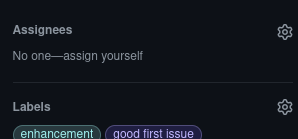
@vacom13 In the right column of the issue UI there should be an "Assignees" tab where you can select "assign yourself".
@vacom13 commented on GitHub (Oct 16, 2021):
@benbusby The "assign yourself" isn't showing up.
@vacom13 commented on GitHub (Oct 16, 2021):
I cannot click on that row either. Is it a feature I am supposed to turn on maybe in the Github account settings?
@benbusby commented on GitHub (Oct 16, 2021):
Oh right, I forgot that GitHub works like that. I don't recall what the solution is anymore -- I'll just assign it to you manually in the meantime.
@vacom13 commented on GitHub (Oct 16, 2021):
Okay. No problem. I will try to finish asap.
@vacom13 commented on GitHub (Oct 17, 2021):
Hey @benbusby. I have a doubt. Passing the ip address is all good. About displaying it, I assume, I have to use beautiful soup to add it to response?
@necaran commented on GitHub (Oct 22, 2021):
Well, it's shows my IP address as 172.17.0.2. I am running Whoogle behind
nginx-proxy.