mirror of
https://github.com/benbusby/whoogle-search.git
synced 2026-04-25 12:15:50 +03:00
[GH-ISSUE #244] Whoogle in Firefox omnibox as a search engine #164
Labels
No labels
Fixed (Pending PR Merge)
Stale
bug
enhancement
enhancement
good first issue
help wanted
keep-open
needs more info
pull-request
question
theme
unfortunate
No milestone
No project
No assignees
1 participant

Notifications
Due date
No due date set.
Dependencies
No dependencies set.
Reference
starred/whoogle-search#164
Loading…
Add table
Add a link
Reference in a new issue
No description provided.
Delete branch "%!s()"
Deleting a branch is permanent. Although the deleted branch may continue to exist for a short time before it actually gets removed, it CANNOT be undone in most cases. Continue?
Originally created by @EmTeeAge on GitHub (Mar 30, 2021).
Original GitHub issue: https://github.com/benbusby/whoogle-search/issues/244
Describe the bug
Not sure whether my question doesn't make sense or is irrelevant, in that case, feel free to close it.
How is Whoogle supposed to work like as an engine in Firefox Desktop?
I would imagine that it would work like other search engines - You start typing query into the address bar at the top and once you press enter, it takes you to the result page of the search engine. However, what happens in my case is that it only takes me to the main Whoogle page and I have to type in the search query again into the Whoogle site - is this how that's supposed to be? If not, is there anything I could try to fix it? Thank you very much.
To Reproduce
Steps to reproduce the behavior:
Deployment Method
proxy_params are following:
Version of Whoogle Search
Desktop:
Additional context
I suppose it may have somthing to do with my Nginx configuration to the upstream Whoogle server. Can someone who doesn't use Nginx perhaps try this out on their end or suggest what should I try?
Thank you very much.
@benbusby commented on GitHub (Apr 5, 2021):
I vaguely recall this issue coming up in the past with someone else's reverse proxy. Could you let me know if
Root URLin your config is set to your domain name or localhost? If it's set to localhost, could you try updating that to your full domain name and see if that changes anything with your issue?Edit: If you do change the
Root URLsetting, you'll need to remove Whoogle from your Firefox search settings, clear the site cache, and then re-add it as a search engine.@EmTeeAge commented on GitHub (Apr 5, 2021):
Thanks for the tip, however I'm not sure exactly what to change where (for some reason I can't even remember setting my domain anywhere in Whoogle). When I open up the site in a different browser or a private windows and check "Configuration" on the main page, my domain is there, however with http instead of https. Perhaps that could be the issue, since I have a permanent redirect from http to https set in Nginx? The Whoogle service is started using systemd unit file like this:
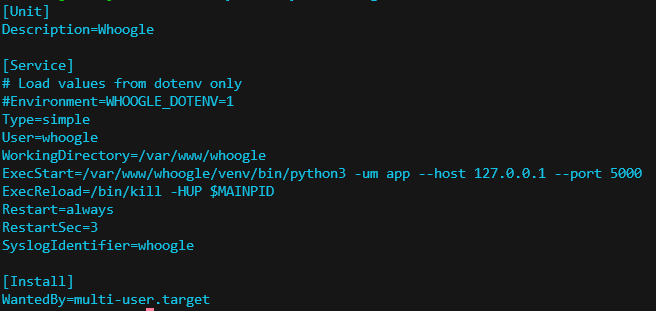
Should I just uncomment Environment=WHOOGLE_DOTENV=1 and edit the whoogle.env file like this?
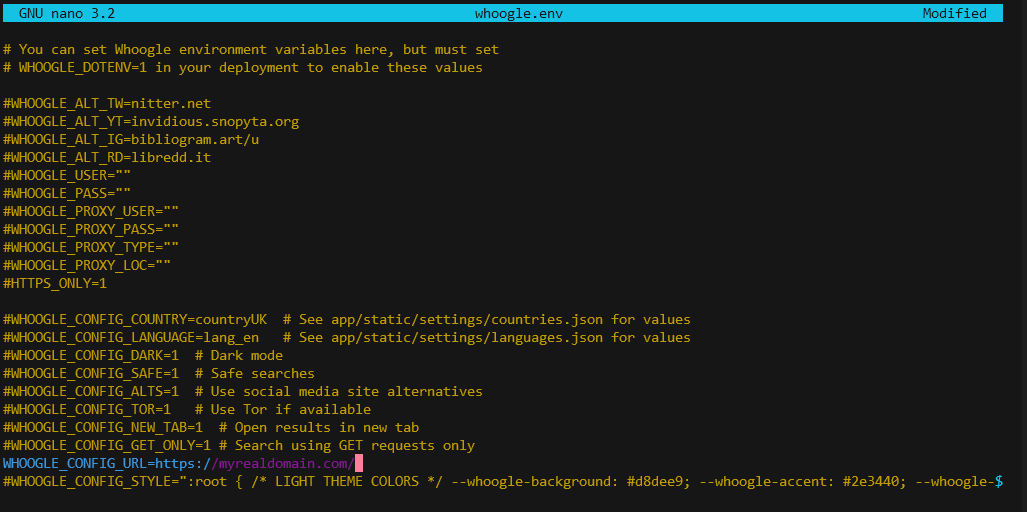
Edit: Sorry about that, maybe I was it was just me or Firefox being dumb. I haven't even tried the thing with the unit file and whoogle.env, I only removed Whoogle as a search engine from Firefox and deleted site data like you suggested and after adding it back again, it started working fine... I haven't changed anything since the installation, only added Searx on the same server, but haven't messed with the Whoogle's part of Nginx config. What I assume could have happened is that I added Whoogle to Firefox before putting Nginx in front of it and after I installed Nginx, I only re-added Whoogle to Firefox, but haven't cleaned the site data and cookies - I guess that could have messed up something.
Anyways, thanks for help, I appreciate it. Also, thanks for this project as a whole, incredible piece of software :)
@benbusby commented on GitHub (Apr 5, 2021):
Yes, the situation you're describing could definitely cause the buggy state that you were initially seeing. The whole opensearch template dance with Whoogle is a little clunky, but thankfully once it's working, it doesn't need reconfiguring again.
Thank you for the kind words! I really appreciate it.