[GH-ISSUE #3] Whagodri: previous backups not visible #2

Closed
opened 2026-02-25 20:34:26 +03:00 by kerem · 12 comments
Owner

Originally created by @kaefert on GitHub (Jun 1, 2018).
Original GitHub issue: https://github.com/B16f00t/whapa/issues/3

Hi there!

Sadly my girlfriend managed to overwrite her 1GB big WhatsApp backup of a few years in her Google Drive Account with a new backup of the last few days. It seems that Android Oreo causes the WhatsApp Backup Restore function too malfunction badly, only allowing users (that don't read the screen too much before clicking buttons...) to setup a new backup into Google Drive without restoring the old one.

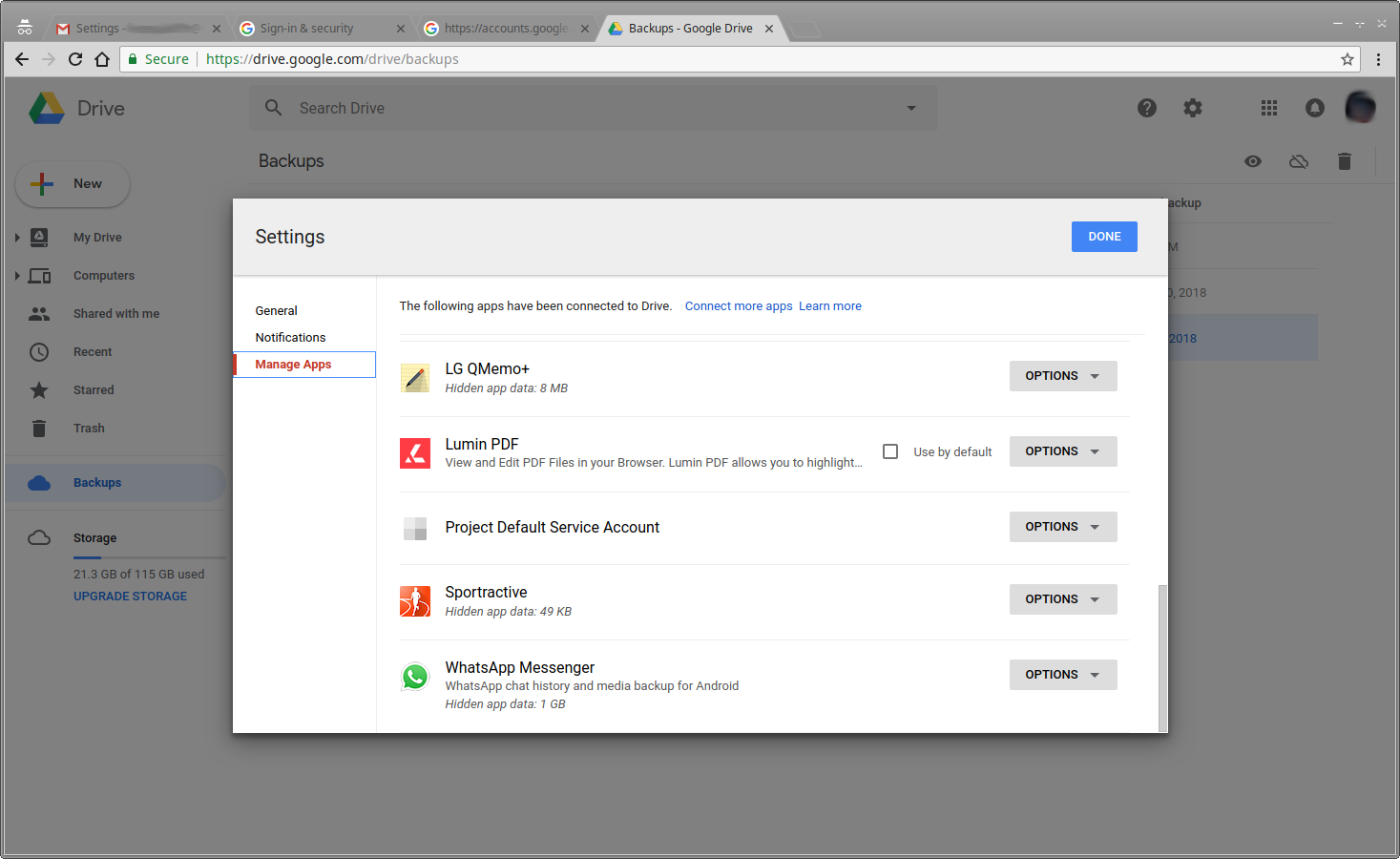
Now her Google Drive Account still shows "Hidden app data: 1 GB" under https://drive.google.com -> Settings -> Manage Apps -> WhatsApp Messenger
So I had hoped that the data still is stored somewhere, which is why I tried to get your whagodri.py script running, but sadly, I can only see the tiny new backup:

kaefert@mint ~/Downloads/android/whapa $ python2 whagodri.py -l

     __      __.__             ________      ________        .__ 
    /  \    /  \  |__ _____   /  _____/  ____\______ \_______|__|
    \   \/\/   /  |  \\__  \ /   \  ___ /  _ \|    |  \_  __ \  |
     \        /|   Y  \/ __ \\    \_\  (  <_> )    `   \  | \/  |
      \__/\  / |___|  (____  /\______  /\____/_______  /__|  |__|
           \/       \/     \/        \/              \/          

    ------------ Whatsapp Google Drive Extractor v0.1 ------------
    
[i] Searching...

[+] Backup ID: 0
    [+] Number: 1 / 0
        [-] File    : Databases/msgstore.db.crypt12
        [-] Hash MD5: 0eef660a7cb43cc32e41343b81da63e2
        [-] Request : 1Bi4CGXZfTq1xSmA6IEjuCYpdKghy3_4Rm1oTpbfATg4LSMREGQ
        [-] Size    : 52793 Bytes (51.56 KB)

    [+] Number: 2 / 0
        [-] File    : Media/WhatsApp Images/IMG-20180531-WA0000.jpg
        [-] Hash MD5: 5bc0c4d2ca9b8357deb4d3a1703fc550
        [-] Request : 1HBvc9oBJAhSoYnMhVzxGv-Kqpwe3A3hrlw4
        [-] Size    : 105391 Bytes (102.92 KB)

Can you help me? Do you know of any way that might enable me to find the overwritten backup in there?

Originally created by @kaefert on GitHub (Jun 1, 2018). Original GitHub issue: https://github.com/B16f00t/whapa/issues/3 Hi there! Sadly my girlfriend managed to overwrite her 1GB big WhatsApp backup of a few years in her Google Drive Account with a new backup of the last few days. It seems that Android Oreo causes the WhatsApp Backup Restore function too malfunction badly, only allowing users (that don't read the screen too much before clicking buttons...) to setup a new backup into Google Drive without restoring the old one. Now her Google Drive Account still shows "Hidden app data: 1 GB" under https://drive.google.com -> Settings -> Manage Apps -> WhatsApp Messenger So I had hoped that the data still is stored somewhere, which is why I tried to get your whagodri.py script running, but sadly, I can only see the tiny new backup: ``` kaefert@mint ~/Downloads/android/whapa $ python2 whagodri.py -l __ __.__ ________ ________ .__ / \ / \ |__ _____ / _____/ ____\______ \_______|__| \ \/\/ / | \\__ \ / \ ___ / _ \| | \_ __ \ | \ /| Y \/ __ \\ \_\ ( <_> ) ` \ | \/ | \__/\ / |___| (____ /\______ /\____/_______ /__| |__| \/ \/ \/ \/ \/ ------------ Whatsapp Google Drive Extractor v0.1 ------------ [i] Searching... [+] Backup ID: 0 [+] Number: 1 / 0 [-] File : Databases/msgstore.db.crypt12 [-] Hash MD5: 0eef660a7cb43cc32e41343b81da63e2 [-] Request : 1Bi4CGXZfTq1xSmA6IEjuCYpdKghy3_4Rm1oTpbfATg4LSMREGQ [-] Size : 52793 Bytes (51.56 KB) [+] Number: 2 / 0 [-] File : Media/WhatsApp Images/IMG-20180531-WA0000.jpg [-] Hash MD5: 5bc0c4d2ca9b8357deb4d3a1703fc550 [-] Request : 1HBvc9oBJAhSoYnMhVzxGv-Kqpwe3A3hrlw4 [-] Size : 105391 Bytes (102.92 KB) ``` Can you help me? Do you know of any way that might enable me to find the overwritten backup in there?
kerem closed this issue 2026-02-25 20:34:26 +03:00
Author
Owner

@B16f00t commented on GitHub (Jun 1, 2018):

Can you show the result with -i flag?

<!-- gh-comment-id:394034875 --> @B16f00t commented on GitHub (Jun 1, 2018): Can you show the result with -i flag?
Author
Owner

@kaefert commented on GitHub (Jun 1, 2018):

$ python2 whagodri.py -i

     __      __.__             ________      ________        .__ 
    /  \    /  \  |__ _____   /  _____/  ____\______ \_______|__|
    \   \/\/   /  |  \\__  \ /   \  ___ /  _ \|    |  \_  __ \  |
     \        /|   Y  \/ __ \\    \_\  (  <_> )    `   \  | \/  |
      \__/\  / |___|  (____  /\______  /\____/_______  /__|  |__|
           \/       \/     \/        \/              \/          

    ------------ Whatsapp Google Drive Extractor v0.1 ------------
    
[i] Searching...

[+] Backup ID: 0
    [-] Backup Frequency        : 1
    [-] Backup Network Settings : 0
    [-] Backup Version          : 1
    [-] Include Videos In Backup: True
    [-] Backup Size             : 158184 Bytes (154.48 KB)
    [-] Media Size              : 105391 Bytes (102.92 KB)
    [-] Chat DB Size            : 52793 Bytes (51.56 KB)
    [-] Num Of Messages         : 80
    [-] Num Of Media Files      : 1
    [-] Num Of Photos           : 1
    [-] Video Size              : 0 Bytes (0.00 KB)
    [+] Local Settings          : 
Traceback (most recent call last):
  File "whagodri.py", line 314, in <module>
    print "        [-] Conversation Sound    : " + str(data_json['localSettings']['conversation_sound'])
KeyError: 'conversation_sound'
<!-- gh-comment-id:394035037 --> @kaefert commented on GitHub (Jun 1, 2018): ``` $ python2 whagodri.py -i __ __.__ ________ ________ .__ / \ / \ |__ _____ / _____/ ____\______ \_______|__| \ \/\/ / | \\__ \ / \ ___ / _ \| | \_ __ \ | \ /| Y \/ __ \\ \_\ ( <_> ) ` \ | \/ | \__/\ / |___| (____ /\______ /\____/_______ /__| |__| \/ \/ \/ \/ \/ ------------ Whatsapp Google Drive Extractor v0.1 ------------ [i] Searching... [+] Backup ID: 0 [-] Backup Frequency : 1 [-] Backup Network Settings : 0 [-] Backup Version : 1 [-] Include Videos In Backup: True [-] Backup Size : 158184 Bytes (154.48 KB) [-] Media Size : 105391 Bytes (102.92 KB) [-] Chat DB Size : 52793 Bytes (51.56 KB) [-] Num Of Messages : 80 [-] Num Of Media Files : 1 [-] Num Of Photos : 1 [-] Video Size : 0 Bytes (0.00 KB) [+] Local Settings : Traceback (most recent call last): File "whagodri.py", line 314, in <module> print " [-] Conversation Sound : " + str(data_json['localSettings']['conversation_sound']) KeyError: 'conversation_sound' ```
Author
Owner

@B16f00t commented on GitHub (Jun 1, 2018):

I'm seeing a flaw to parse the google drive account, I would have to do some change and try again, when It's ready, I'll get in touch

<!-- gh-comment-id:394035765 --> @B16f00t commented on GitHub (Jun 1, 2018): I'm seeing a flaw to parse the google drive account, I would have to do some change and try again, when It's ready, I'll get in touch
Author
Owner

@kaefert commented on GitHub (Jun 1, 2018):

okey, thanks! :)

<!-- gh-comment-id:394035868 --> @kaefert commented on GitHub (Jun 1, 2018): okey, thanks! :)
Author
Owner

@kaefert commented on GitHub (Jun 1, 2018):

I commented out the two lines for printing 'conversation_sound' and 'security_notifications' in the whagodri.py file.
Now this is my full output with no errors given:

$ python2 whagodri.py -i

     __      __.__             ________      ________        .__ 
    /  \    /  \  |__ _____   /  _____/  ____\______ \_______|__|
    \   \/\/   /  |  \\__  \ /   \  ___ /  _ \|    |  \_  __ \  |
     \        /|   Y  \/ __ \\    \_\  (  <_> )    `   \  | \/  |
      \__/\  / |___|  (____  /\______  /\____/_______  /__|  |__|
           \/       \/     \/        \/              \/          

    ------------ Whatsapp Google Drive Extractor v0.1 ------------
    
[i] Searching...

[+] Backup ID: 0
    [-] Backup Frequency        : 1
    [-] Backup Network Settings : 0
    [-] Backup Version          : 1
    [-] Include Videos In Backup: True
    [-] Backup Size             : 158184 Bytes (154.48 KB)
    [-] Media Size              : 105391 Bytes (102.92 KB)
    [-] Chat DB Size            : 52793 Bytes (51.56 KB)
    [-] Num Of Messages         : 80
    [-] Num Of Media Files      : 1
    [-] Num Of Photos           : 1
    [-] Video Size              : 0 Bytes (0.00 KB)
    [+] Local Settings          : 
        [-] Input Enter Send      : False
        [-] Interface Font Size   : 0
        [-] Settings Language     : 0
        [-] VoIP Low Data Usage   : False

I've uncomented the line print data_json
which gives this:
{u'backupVersion': 1, u'includeVideosInBackup': True, u'numOfMessages': 80, u'numOfPhotos': 1, u'backupFrequency': 1, u'chatdbSize': 52793, u'backupNetworkSettings': 0, u'videoSize': 0, u'mediaSize': 105391, u'backupSize': 158184, u'numOfMediaFiles': 1, u'localSettings': {u'input_enter_send': False, u'interface_font_size': u'0', u'settings_language': u'0', u'voip_low_data_usage': False}}

<!-- gh-comment-id:394037536 --> @kaefert commented on GitHub (Jun 1, 2018): I commented out the two lines for printing 'conversation_sound' and 'security_notifications' in the whagodri.py file. Now this is my full output with no errors given: ``` $ python2 whagodri.py -i __ __.__ ________ ________ .__ / \ / \ |__ _____ / _____/ ____\______ \_______|__| \ \/\/ / | \\__ \ / \ ___ / _ \| | \_ __ \ | \ /| Y \/ __ \\ \_\ ( <_> ) ` \ | \/ | \__/\ / |___| (____ /\______ /\____/_______ /__| |__| \/ \/ \/ \/ \/ ------------ Whatsapp Google Drive Extractor v0.1 ------------ [i] Searching... [+] Backup ID: 0 [-] Backup Frequency : 1 [-] Backup Network Settings : 0 [-] Backup Version : 1 [-] Include Videos In Backup: True [-] Backup Size : 158184 Bytes (154.48 KB) [-] Media Size : 105391 Bytes (102.92 KB) [-] Chat DB Size : 52793 Bytes (51.56 KB) [-] Num Of Messages : 80 [-] Num Of Media Files : 1 [-] Num Of Photos : 1 [-] Video Size : 0 Bytes (0.00 KB) [+] Local Settings : [-] Input Enter Send : False [-] Interface Font Size : 0 [-] Settings Language : 0 [-] VoIP Low Data Usage : False ``` I've uncomented the line `print data_json` which gives this: `{u'backupVersion': 1, u'includeVideosInBackup': True, u'numOfMessages': 80, u'numOfPhotos': 1, u'backupFrequency': 1, u'chatdbSize': 52793, u'backupNetworkSettings': 0, u'videoSize': 0, u'mediaSize': 105391, u'backupSize': 158184, u'numOfMediaFiles': 1, u'localSettings': {u'input_enter_send': False, u'interface_font_size': u'0', u'settings_language': u'0', u'voip_low_data_usage': False}}`
Author
Owner

@B16f00t commented on GitHub (Jun 2, 2018):

As it shows there you only have one accessible copy with that phone number, username and password

<!-- gh-comment-id:394062881 --> @B16f00t commented on GitHub (Jun 2, 2018): As it shows there you only have one accessible copy with that phone number, username and password
Author
Owner

@kaefert commented on GitHub (Jun 2, 2018):

:(
yes that's what I was afraid of.
I wonder why Google Drive is still showing me that it has 1GB of hidden app data stored for WhatsApp then...
screenshot from 2018-06-02 01-13-02_

<!-- gh-comment-id:394063143 --> @kaefert commented on GitHub (Jun 2, 2018): :( yes that's what I was afraid of. I wonder why Google Drive is still showing me that it has 1GB of hidden app data stored for WhatsApp then... ![screenshot from 2018-06-02 01-13-02_](https://user-images.githubusercontent.com/1448723/40871658-f6d48a38-663f-11e8-9bb9-339a55146eb3.png)
Author
Owner

@B16f00t commented on GitHub (Jun 2, 2018):

I'm sorry but I don't know the answer, try to contact google, and request such a backup, I will continue to research it.
Are you sure it's the same account? the new backup should appear and put its size

<!-- gh-comment-id:394063515 --> @B16f00t commented on GitHub (Jun 2, 2018): I'm sorry but I don't know the answer, try to contact google, and request such a backup, I will continue to research it. Are you sure it's the same account? the new backup should appear and put its size
Author
Owner

@kaefert commented on GitHub (Jun 2, 2018):

yes, it's the same account. maybe the display of the size is delayed by a few days..

I did contact google through the drive app feedback feature as suggested at a few places in the google drive forums when people asked the same question.

If and when I get a response by them I will post about it here.

Thank you very much for your help!

<!-- gh-comment-id:394064024 --> @kaefert commented on GitHub (Jun 2, 2018): yes, it's the same account. maybe the display of the size is delayed by a few days.. I did contact google through the drive app feedback feature as suggested at a few places in the google drive forums when people asked the same question. If and when I get a response by them I will post about it here. Thank you very much for your help!
Author
Owner

@B16f00t commented on GitHub (Jun 2, 2018):

Ok thanks.
It could also be that there is an index containing the backup files and that index has been corrupted, but the files are still in the cloud.

<!-- gh-comment-id:394069648 --> @B16f00t commented on GitHub (Jun 2, 2018): Ok thanks. It could also be that there is an index containing the backup files and that index has been corrupted, but the files are still in the cloud.
Author
Owner

@kaefert commented on GitHub (Jun 2, 2018):

Yes. Maybe the index has been overwritten by setting up a new backup for the same number without restoring the old backup first.

The big question is how to access those files missing their intact index now.

UPDATE:
Okey. So I had a long chat session with Google Drive Support. They say there is no way for Google Support to access that data, and their tool for restoring deleted data didn't help. I also asked if I can pay for more in depth support but they declined.

They say only WhatsApp can access and manipulate that data and it might be possible that the 1GB display might simply be delayed, although it's also possible that the data is still there somewhere and just inaccessible at the moment because WhatsApp is not supporting the recovery of previous backups. (as they've published here: https://faq.whatsapp.com/en/android/20887921 )

<!-- gh-comment-id:394069809 --> @kaefert commented on GitHub (Jun 2, 2018): Yes. Maybe the index has been overwritten by setting up a new backup for the same number without restoring the old backup first. The big question is how to access those files missing their intact index now. UPDATE: Okey. So I had a long chat session with Google Drive Support. They say there is no way for Google Support to access that data, and their tool for restoring deleted data didn't help. I also asked if I can pay for more in depth support but they declined. They say only WhatsApp can access and manipulate that data and it might be possible that the 1GB display might simply be delayed, although it's also possible that the data is still there somewhere and just inaccessible at the moment because WhatsApp is not supporting the recovery of previous backups. (as they've published here: https://faq.whatsapp.com/en/android/20887921 )
Author
Owner

@kaefert commented on GitHub (Jun 10, 2018):

Okey, so:

  • Google Drive support says they can't access the data.
  • WhatsApp support says "There isn't a way to restore a previous Google Drive Backup.".

I think it was just one single "bad" backup that has been written to Google Drive @ 2018-06-01 02:26 (probably WhatsApp displays this time in my local time zone, that would be CEST).

I've disabled the automatic Google Drive backup check in WhatsApp on that phone in the evening of 2018-06-01, so no new backups have been written to Google Drive since then. (I instead setup an auto-upload to my Nextcloud to backup the new data, which includes a feature to get back previous versions should problems like these ever arise again in the future..)

The last "good" backup should have been written to Google Drive @ 2018-05-30 ~02:30 CEST, or maybe one day before. On 2018-05-31 ~02:00 the phone was already reinstalled with a new OS but WhatsApp hadn't been installed yet.

The Google Drive Account still shows "Hidden app data: 1 GB" under https://drive.google.com -> Settings -> Manage Apps -> WhatsApp Messenger. Since this data has been "overwritten" more than 9 days ago, I do not believe that it has truly been deleted, but still at least partly exists in that Google Drive storage account somewhere. (Since the one new "bad" backup made has a size of just 150kb.)

The big question now is how to get access to that data. Can you help?

<!-- gh-comment-id:396047878 --> @kaefert commented on GitHub (Jun 10, 2018): Okey, so: * Google Drive support says they can't access the data. * WhatsApp support says "There isn't a way to restore a previous Google Drive Backup.". I think it was just one single "bad" backup that has been written to Google Drive @ 2018-06-01 02:26 (probably WhatsApp displays this time in my local time zone, that would be CEST). I've disabled the automatic Google Drive backup check in WhatsApp on that phone in the evening of 2018-06-01, so no new backups have been written to Google Drive since then. (I instead setup an auto-upload to my Nextcloud to backup the new data, which includes a feature to get back previous versions should problems like these ever arise again in the future..) The last "good" backup should have been written to Google Drive @ 2018-05-30 ~02:30 CEST, or maybe one day before. On 2018-05-31 ~02:00 the phone was already reinstalled with a new OS but WhatsApp hadn't been installed yet. The Google Drive Account still shows "Hidden app data: 1 GB" under https://drive.google.com -> Settings -> Manage Apps -> WhatsApp Messenger. Since this data has been "overwritten" more than 9 days ago, I do not believe that it has truly been deleted, but still at least partly exists in that Google Drive storage account somewhere. (Since the one new "bad" backup made has a size of just 150kb.) The big question now is how to get access to that data. Can you help?
Sign in to join this conversation.
No milestone
No project
No assignees
1 participant
Notifications
Due date
The due date is invalid or out of range. Please use the format "yyyy-mm-dd".

No due date set.

Dependencies

No dependencies set.

Reference
starred/whapa#2
No description provided.