[GH-ISSUE #230] Error: unknown procedure: 342 #155

Open
opened 2026-02-27 15:57:33 +03:00 by kerem · 21 comments
Owner

Originally created by @zaghost on GitHub (Mar 27, 2019).
Original GitHub issue: https://github.com/retspen/webvirtcloud/issues/230

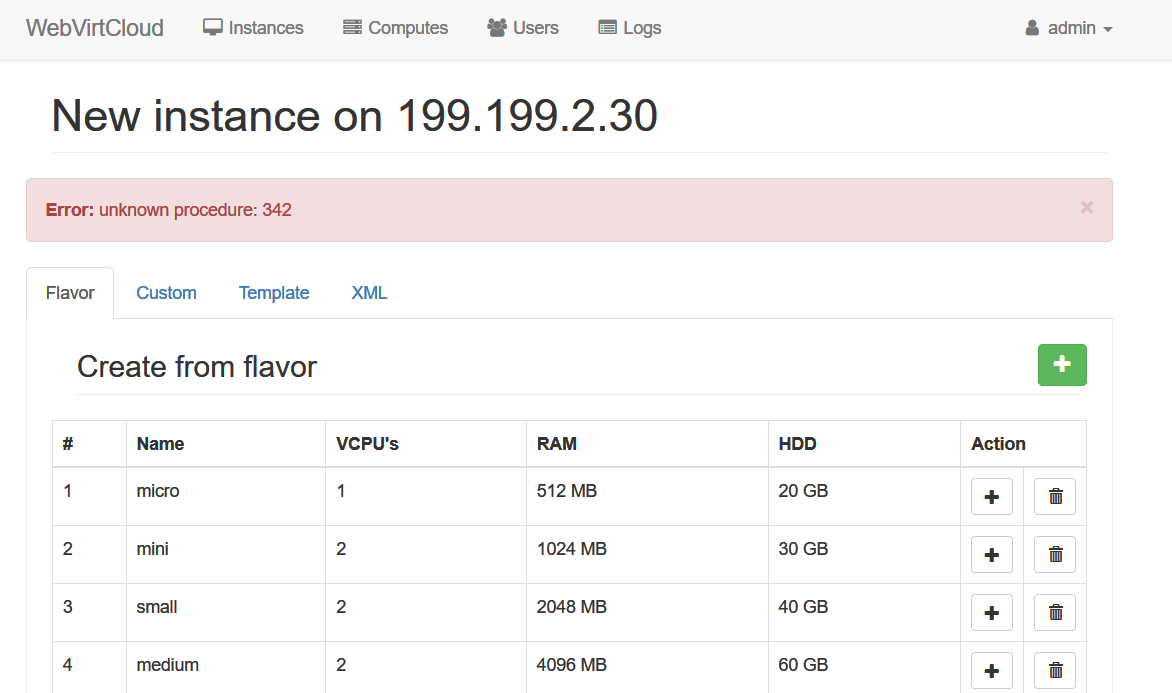
I got en error when visit http:///computes/2/create/ or some other pages
There is the following line in the console log:
libvirt: XML-RPC error : unknown procedure: 342

Originally created by @zaghost on GitHub (Mar 27, 2019). Original GitHub issue: https://github.com/retspen/webvirtcloud/issues/230 I got en error when visit http://<host>/computes/2/create/ or some other pages There is the following line in the console log: libvirt: XML-RPC error : unknown procedure: 342
Author
Owner

@catborise commented on GitHub (Mar 27, 2019):

"http:///computes/2/create/" is this the adress? there should be hostname or ip

it is related libvirt and/or network/port problem. you should check libvirt config.

how you check...

  1. login to a host
  2. run virt-manager
  3. add a connection(ssh or tcp or ssl) to other host which is problematic.
    you connect and manage other host hypervisor. if you could not that. you must solve that problem before webvirtcloud use
<!-- gh-comment-id:476998179 --> @catborise commented on GitHub (Mar 27, 2019): "http:///computes/2/create/" is this the adress? there should be hostname or ip it is related libvirt and/or network/port problem. you should check libvirt config. how you check... 1. login to a host 2. run virt-manager 3. add a connection(ssh or tcp or ssl) to other host which is problematic. you connect and manage other host hypervisor. if you could not that. you must solve that problem before webvirtcloud use
Author
Owner

@zaghost commented on GitHub (Mar 28, 2019):

@catborise Thank you for your reply
I'm sorry, I wanted to say "http://<host>/computes/2/create/", but github don't display the "<host>" part.
In http://<hostname>/instances/, the VMs are listed under libvirt host, so I think the connection to libvirt host is OK.
But I click "Add Instance" button, it turns to http://<host>/computes/2/create/ where display an error message
图片

<!-- gh-comment-id:477484504 --> @zaghost commented on GitHub (Mar 28, 2019): @catborise Thank you for your reply I'm sorry, I wanted to say `"http://<host>/computes/2/create/"`, but github don't display the `"<host>"` part. In `http://<hostname>/instances/`, the VMs are listed under libvirt host, so I think the connection to libvirt host is OK. But I click "Add Instance" button, it turns to `http://<host>/computes/2/create/` where display an error message ![图片](https://user-images.githubusercontent.com/8455736/55138681-05151c00-516f-11e9-890f-e745f3026f3a.png)
Author
Owner

@catborise commented on GitHub (Mar 28, 2019):

what is host operating system?
what is libvirt version?
what is qemu version?

login to virt host:
run;
qemu-img --version
virsh --version

<!-- gh-comment-id:477552937 --> @catborise commented on GitHub (Mar 28, 2019): what is host operating system? what is libvirt version? what is qemu version? login to virt host: run; qemu-img --version virsh --version
Author
Owner

@zaghost commented on GitHub (Mar 28, 2019):

the versions are a bit old

kvm03:~ # uname -a
Linux kvm03 3.0.13-0.27-default #1 SMP Wed Feb 15 13:33:49 UTC 2012 (d73692b) x86_64 x86_64 x86_64 GNU/Linux
kvm03:~ # cat /etc/SuSE-release
SUSE Linux Enterprise Server 11 (x86_64)
VERSION = 11
PATCHLEVEL = 2
kvm03:~ # virsh -v
0.9.6
kvm03:~ # qemu-img --version
qemu-img version 0.15.0, Copyright (c) 2004-2008 Fabrice Bellard
usage: qemu-img command [command options]
QEMU disk image utility

<!-- gh-comment-id:477579545 --> @zaghost commented on GitHub (Mar 28, 2019): the versions are a bit old kvm03:~ # uname -a Linux kvm03 3.0.13-0.27-default #1 SMP Wed Feb 15 13:33:49 UTC 2012 (d73692b) x86_64 x86_64 x86_64 GNU/Linux kvm03:~ # cat /etc/SuSE-release SUSE Linux Enterprise Server 11 (x86_64) VERSION = 11 PATCHLEVEL = 2 kvm03:~ # virsh -v 0.9.6 kvm03:~ # qemu-img --version qemu-img version 0.15.0, Copyright (c) 2004-2008 Fabrice Bellard usage: qemu-img command [command options] QEMU disk image utility
Author
Owner

@catborise commented on GitHub (Mar 28, 2019):

It is too old for qemu and libvirt. You should update these packages.
Latest stable releases for libvirt is 5.0 and qemu is 2.12

You should update them to use webvirtcloud without problem

<!-- gh-comment-id:477689201 --> @catborise commented on GitHub (Mar 28, 2019): It is too old for qemu and libvirt. You should update these packages. Latest stable releases for libvirt is 5.0 and qemu is 2.12 You should update them to use webvirtcloud without problem
Author
Owner

@sckghost commented on GitHub (Apr 9, 2019):

image

I also encountered the same problem. In the latest version of webvirtcloud, Error: unknown procedure: 342 appeared when clicking on an instance of the web interface. Here is the information of the server system.

[root@webvirt2-200-74 script]# cat /etc/redhat-release
CentOS Linux release 7.6.1810 (Core)
[root@webvirt2-200-74 script]# virsh -v
4.5.0

<!-- gh-comment-id:481089192 --> @sckghost commented on GitHub (Apr 9, 2019): ![image](https://user-images.githubusercontent.com/7287929/55771760-ef331f80-5abb-11e9-9dbe-28c88c107fbe.png) I also encountered the same problem. In the latest version of webvirtcloud, Error: unknown procedure: 342 appeared when clicking on an instance of the web interface. Here is the information of the server system. [root@webvirt2-200-74 script]# cat /etc/redhat-release CentOS Linux release 7.6.1810 (Core) [root@webvirt2-200-74 script]# virsh -v 4.5.0
Author
Owner

@catborise commented on GitHub (Apr 9, 2019):

hi @sckghost could you please send me the output out this command "virsh version"

<!-- gh-comment-id:481112244 --> @catborise commented on GitHub (Apr 9, 2019): hi @sckghost could you please send me the output out this command "virsh version"
Author
Owner

@sckghost commented on GitHub (Apr 9, 2019):

你好@sckghost请你输出这个命令“virsh version”

(venv) [root@webvirt2-200-74 ~]# virsh version
Compiled against library: libvirt 4.5.0
Using library: libvirt 4.5.0
Using API: QEMU 4.5.0
Running hypervisor: QEMU 1.5.3

<!-- gh-comment-id:481124748 --> @sckghost commented on GitHub (Apr 9, 2019): > 你好@sckghost请你输出这个命令“virsh version” (venv) [root@webvirt2-200-74 ~]# virsh version Compiled against library: libvirt 4.5.0 Using library: libvirt 4.5.0 Using API: QEMU 4.5.0 Running hypervisor: QEMU 1.5.3
Author
Owner

@sckghost commented on GitHub (Apr 9, 2019):

你好@sckghost请你输出这个命令“virsh version”

centos7.x Must I use libvirt version 5.0 or above?

<!-- gh-comment-id:481125566 --> @sckghost commented on GitHub (Apr 9, 2019): > 你好@sckghost请你输出这个命令“virsh version” centos7.x Must I use libvirt version 5.0 or above?
Author
Owner

@catborise commented on GitHub (Apr 9, 2019):

@sckghost no, you should upgrade the qemu.
i am using also centos 7 and i upgrade the qemu package to "2.12"

you could add "qemu-kvm-ev" repo to upgrade the qemu-kvm package.

i think this solve your problem.
qemu 2.12 stable version. it contains many features.

<!-- gh-comment-id:481126010 --> @catborise commented on GitHub (Apr 9, 2019): @sckghost no, you should upgrade the qemu. i am using also centos 7 and i upgrade the qemu package to "2.12" you could add "qemu-kvm-ev" repo to upgrade the qemu-kvm package. i think this solve your problem. qemu 2.12 stable version. it contains many features.
Author
Owner

@sckghost commented on GitHub (Apr 9, 2019):

@sckghost不,你应该升级qemu。
我也使用centos 7,我将qemu包升级到“2.12”

你可以添加“qemu-kvm-ev”repo来升级qemu-kvm包。

我认为这可以解决你的问题。
qemu 2.12稳定版。它包含许多功能。

Okay, it's still 342 error after installation. What's next?

Yum install centos-release-qemu-ev

Yum update qemu-kvm

(venv) [root@webvirt2-200-74 ~]# virsh version

Compiled against library: libvirt 4.5.0

Use library: libvirt 4.5.0

Using API: QEMU 4.5.0

Running hypervisor: QEMU 2.12.0

<!-- gh-comment-id:481129744 --> @sckghost commented on GitHub (Apr 9, 2019): > @sckghost不,你应该升级qemu。 > 我也使用centos 7,我将qemu包升级到“2.12” > > 你可以添加“qemu-kvm-ev”repo来升级qemu-kvm包。 > > 我认为这可以解决你的问题。 > qemu 2.12稳定版。它包含许多功能。 Okay, it's still 342 error after installation. What's next? Yum install centos-release-qemu-ev Yum update qemu-kvm (venv) [root@webvirt2-200-74 ~]# virsh version Compiled against library: libvirt 4.5.0 Use library: libvirt 4.5.0 Using API: QEMU 4.5.0 Running hypervisor: QEMU 2.12.0
Author
Owner

@catborise commented on GitHub (Apr 9, 2019):

@sckghost could you create a new instance to see the error still exist
(ps: to activate new version of qemu you should stop and start the instance.)

<!-- gh-comment-id:481133795 --> @catborise commented on GitHub (Apr 9, 2019): @sckghost could you create a new instance to see the error still exist (ps: to activate new version of qemu you should stop and start the instance.)
Author
Owner

@sckghost commented on GitHub (Apr 9, 2019):

@sckghost no, you should upgrade the qemu.
i am using also centos 7 and i upgrade the qemu package to "2.12"

you could add "qemu-kvm-ev" repo to upgrade the qemu-kvm package.

i think this solve your problem.
qemu 2.12 stable version. it contains many features.

(venv) [root@webvirt2 webvirtcloud]# cat conf/requirements.txt
Django==1.11.17
websockify==0.8.0
gunicorn==19.9.0
lxml==4.2.5
libvirt-python==4.10.0
pytz

Does the libvirt-python version need to be changed to 5.0, or the libvirt version of the system needs to be upgraded to 5.0?

<!-- gh-comment-id:481134271 --> @sckghost commented on GitHub (Apr 9, 2019): > @sckghost no, you should upgrade the qemu. > i am using also centos 7 and i upgrade the qemu package to "2.12" > > you could add "qemu-kvm-ev" repo to upgrade the qemu-kvm package. > > i think this solve your problem. > qemu 2.12 stable version. it contains many features. (venv) [root@webvirt2 webvirtcloud]# cat conf/requirements.txt Django==1.11.17 websockify==0.8.0 gunicorn==19.9.0 lxml==4.2.5 libvirt-python==4.10.0 pytz Does the libvirt-python version need to be changed to 5.0, or the libvirt version of the system needs to be upgraded to 5.0?
Author
Owner

@sckghost commented on GitHub (Apr 9, 2019):

@sckghost可以创建一个新实例来查看错误仍然存​​在
(ps:要激活新版本的qemu,你应该停止并启动实例。)

I tried, but I still couldn't. Restart webvirtcloud and nginx. Errors still exist.

<!-- gh-comment-id:481135192 --> @sckghost commented on GitHub (Apr 9, 2019): > @sckghost可以创建一个新实例来查看错误仍然存​​在 > (ps:要激活新版本的qemu,你应该停止并启动实例。) I tried, but I still couldn't. Restart webvirtcloud and nginx. Errors still exist.
Author
Owner

@catborise commented on GitHub (Apr 9, 2019):

no, i also did not upgrade libvirt-python. i am using 4.10.

i suspect jquery.js, i did upgrade it lately. it could cause something like that. but i need more information.
could you check with chrome(right click and inspect) if there is an anomaly

<!-- gh-comment-id:481136365 --> @catborise commented on GitHub (Apr 9, 2019): no, i also did not upgrade libvirt-python. i am using 4.10. i suspect jquery.js, i did upgrade it lately. it could cause something like that. but i need more information. could you check with chrome(right click and inspect) if there is an anomaly
Author
Owner

@sckghost commented on GitHub (Apr 9, 2019):

image

<!-- gh-comment-id:481139305 --> @sckghost commented on GitHub (Apr 9, 2019): ![image](https://user-images.githubusercontent.com/7287929/55781685-58775a80-5add-11e9-8037-3444f8757256.png)
Author
Owner

@catborise commented on GitHub (Apr 9, 2019):

there is an error as you see right
image
could you click to see.

<!-- gh-comment-id:481139748 --> @catborise commented on GitHub (Apr 9, 2019): there is an error as you see right ![image](https://user-images.githubusercontent.com/1725643/55781998-0ff77700-5ab4-11e9-937f-6d2b7bccf192.png) could you click to see.
Author
Owner

@sckghost commented on GitHub (Apr 9, 2019):

image

<!-- gh-comment-id:481141597 --> @sckghost commented on GitHub (Apr 9, 2019): ![image](https://user-images.githubusercontent.com/7287929/55782418-d38d4080-5ade-11e9-868d-bdb016feb587.png)
Author
Owner

@catborise commented on GitHub (Apr 9, 2019):

@sckghost i check it again it is not related with qemu or libvirt.
i will install centos 7.6 to try it again. i could not simulate it. i am also using but there is not error like that.
please give me some time to install new env

<!-- gh-comment-id:481146771 --> @catborise commented on GitHub (Apr 9, 2019): @sckghost i check it again it is not related with qemu or libvirt. i will install centos 7.6 to try it again. i could not simulate it. i am also using but there is not error like that. please give me some time to install new env
Author
Owner

@sckghost commented on GitHub (Apr 9, 2019):

@sckghost我再次检查它与qemu或libvirt无关。
我将安装centos 7.6再试一次。我无法模拟它。我也在使用,但没有这样的错误。
请给我一些时间来安装新的环境

ok

<!-- gh-comment-id:481147037 --> @sckghost commented on GitHub (Apr 9, 2019): > @sckghost我再次检查它与qemu或libvirt无关。 > 我将安装centos 7.6再试一次。我无法模拟它。我也在使用,但没有这样的错误。 > 请给我一些时间来安装新的环境 ok
Author
Owner

@catborise commented on GitHub (Apr 9, 2019):

@sckghost i install a minimal host.
cat /etc/redhat-release
CentOS Linux release 7.6.1810 (Core)

run the script to prepare host:
yum install epel-release wget
wget -O - https://clck.ru/9V9fH | sudo sh

disable firewall:
systemctl stop firewalld

add an sasl2 user:
saslpasswd2 -a libvirt admin

build an os image:
virt-builder centos-7.6 --output /var/lib/libvirt/images/test.qcow2 --format qcow2

add host to webvirtcloud with tcp connection.

create an instance from custom
start it.

and there is not any error

virsh version
Compiled against library: libvirt 4.5.0
Using library: libvirt 4.5.0
Using API: QEMU 4.5.0
Running hypervisor: QEMU 1.5.3

what could it be? i do not understand

<!-- gh-comment-id:481172760 --> @catborise commented on GitHub (Apr 9, 2019): @sckghost i install a minimal host. cat /etc/redhat-release CentOS Linux release 7.6.1810 (Core) run the script to prepare host: yum install epel-release wget wget -O - https://clck.ru/9V9fH | sudo sh disable firewall: systemctl stop firewalld add an sasl2 user: saslpasswd2 -a libvirt admin build an os image: virt-builder centos-7.6 --output /var/lib/libvirt/images/test.qcow2 --format qcow2 add host to webvirtcloud with tcp connection. create an instance from custom start it. and there is not any error virsh version Compiled against library: libvirt 4.5.0 Using library: libvirt 4.5.0 Using API: QEMU 4.5.0 Running hypervisor: QEMU 1.5.3 what could it be? i do not understand
Sign in to join this conversation.
No milestone
No project
No assignees
1 participant
Notifications
Due date
The due date is invalid or out of range. Please use the format "yyyy-mm-dd".

No due date set.

Dependencies

No dependencies set.

Reference
starred/webvirtcloud#155
No description provided.