mirror of
https://github.com/dani-garcia/vaultwarden.git
synced 2026-04-26 01:35:54 +03:00
[GH-ISSUE #1203] SMTP not connecting: SMTP IO error: Resource temporarily unavailable (os error 11) #848
Labels
No labels
SSO
Third party
better for forum
bug
bug
documentation
duplicate
enhancement
future Vault
future Vault
future Vault
good first issue
help wanted
low priority
notes
pull-request
question
troubleshooting
wontfix
No milestone
No project
No assignees
1 participant

Notifications
Due date
No due date set.
Dependencies
No dependencies set.
Reference
starred/vaultwarden#848
Loading…
Add table
Add a link
Reference in a new issue
No description provided.
Delete branch "%!s()"
Deleting a branch is permanent. Although the deleted branch may continue to exist for a short time before it actually gets removed, it CANNOT be undone in most cases. Continue?
Originally created by @jean-io on GitHub (Oct 28, 2020).
Original GitHub issue: https://github.com/dani-garcia/vaultwarden/issues/1203
Hello,
For some reason sending email with SMTP is not working with bitwarden_rs latest image. I get the following error in my log file:
SMTP IO error: Resource temporarily unavailable (os error 11). My understanding is this error is caused by the host and not from the remote SMTP server.No luck on troubleshooting this issue so far...
Environment
Extract of my docker compose file:
Relevant logs
@BlackDex commented on GitHub (Oct 30, 2020):
This error occurres when the mail server is not reachable or the dns could not be resolved. It can also mean that the port is incorrect for example.
Bitwardenrs can't connect to the mail server for some reason.
@jean-io commented on GitHub (Nov 6, 2020):
Well, I did more test... DNS resolution works inside this container. I tried with curl:
I have enabled DEBUG and here is the output (note that sending mail with the same credential work in other container):
My issue is very similar to https://bitwardenrs.discourse.group/t/smtp-unable-to-send-email/145.
The error message is not really clear. For some reason there is no DEBUG message related to SMTP, I find it really strange... Any one that got this error has give up so far since SMTP work with gmail but not with custom SMTP servers...
Any help is welcome 😢
@jean-io commented on GitHub (Nov 6, 2020):
I have made progress, I know get this error:
I give up on SSL connexion on port 465 and I switched to STARTTLS on port 587. I tested both configuration in other environment: credential are OK. I have no idea why:
SMTP IO error: Resource temporarily unavailable (os error 11)for SSLError sending delete account email: SMTP 5xx error: ["5.7.1 Authentication failed"]for STARTTLS@thelittlefireman commented on GitHub (Nov 6, 2020):
Same issue.
I try all the possibilities 465/587/25 with ssl, force tls. nothing worked.
Sometimes it's authentication failed, sometimes it's the empty response.
My server and credentials are all double check and ok because i used them on the same server on other services.
Thanks
version docker 1.17.0
@BlackDex commented on GitHub (Nov 7, 2020):
Please try to change or add multiple authentication mechanisms.
github.com/dani-garcia/bitwarden_rs@ec920b5756/.env.template (L255)@misilot commented on GitHub (Nov 7, 2020):
I am seeing this as well on our setup. I don't recall seeing it when we were on 1.16.3.
We have an SMTP relay setup that we use. No user authentication, the system is authenticated via IP and just straight send it emails. The host for docker utilizes the same relayhost and we have not seen any DNS resolution errors in the logs for the mail it sends out.
@jean-io commented on GitHub (Nov 7, 2020):
My SMTP server sould work only with login method. But I have udated my config with what you requested:
"smtp_auth_mechanism": "Login,Plain,Xoauth2",. Still nothing... I get always getError sending delete account email: SMTP 5xx error: ["5.7.1 Authentication failed"].@thelittlefireman commented on GitHub (Nov 7, 2020):
hi, thanks for you reply @BlackDex . I try too "Login" and "Plain" mix. It doesn't work.
@jean-io commented on GitHub (Nov 12, 2020):
👋 @dani-garcia @BlackDex any update ? No luck on my side 😔
@BlackDex commented on GitHub (Nov 12, 2020):
@jean-io, well, it's hard for us to test user specific configurations of course. And we are limited to the errors we get returned from the email library. I don't know if you are using a mail server under your own control, and if so, please check the logs there.
I don't know if you have tried the option to enable implicit ssl?
Be aware, that the variable name is misleading here.
github.com/dani-garcia/bitwarden_rs@e25fc7083d/.env.template (L247)@misilot commented on GitHub (Nov 12, 2020):
Could it be an underlying DNS/network issue in the container to external resources? As I am having similar issues with this and connecting to a remote mysql database in #1204
@BlackDex commented on GitHub (Nov 12, 2020):
@misilot only if you get a message regarding resource unavailable. That could indicate DNS issue or wrong port, or firewall issues etc.. there are also some strange issues sometimes with docker(-compose) and if users fully stop, pull, start it sometimes starts working as it should.
The error regarding credentials is mostly wrong configuration like username, password, auth mechanism or even wrong port.
Strange copy paste issues with passwords or usernames with some special characters can happen and cause issues.
@jean-io commented on GitHub (Nov 14, 2020):
Not yet! I will try when I get back to home in few days. I hope this will work! 🤩
Regarding copy/paste errors, I will check once again, human error does happen but I already triple checked. 🤪
@BlackDex commented on GitHub (Nov 18, 2020):
As a note:
If you are using port 465 kinda dictates that you need Implicit TLS enabled (Thus enable SMTP_EXPLICIT_TLS=true).
When using ports 25 or 587, that means using STARTTLS, which upgrades an existing unencrypted connection to use TLS during the connection.
I have created a PR #1229 which has some changes to enable smtp debugging to troubleshoot issues.
@BlackDex commented on GitHub (Nov 18, 2020):
The version with the debug option is available on docker hub when using the
testingtag.github.com/dani-garcia/bitwarden_rs@5379329ef7/.env.template (L265)@jean-io commented on GitHub (Nov 23, 2020):
Hello,
I just came back from vacation, so it's time to do some SMTP debug.
Good news: with new SMTP debug information from
testingimage tag, I had more information to resolve this issue, I have found that:SMTP_EXPLICIT_TLS=truemy container is able to open a connection my OVH SMTP server.Now I have to find why mails are coming as spam for Bitwarden and not for Nextcloud...
Thank you all for your help !
@keshamin commented on GitHub (Aug 31, 2021):
I faced the same error while trying to set up Yandex (russian tech company) SMTP server. The solution was to tick both SSL and TLS checkboxes.
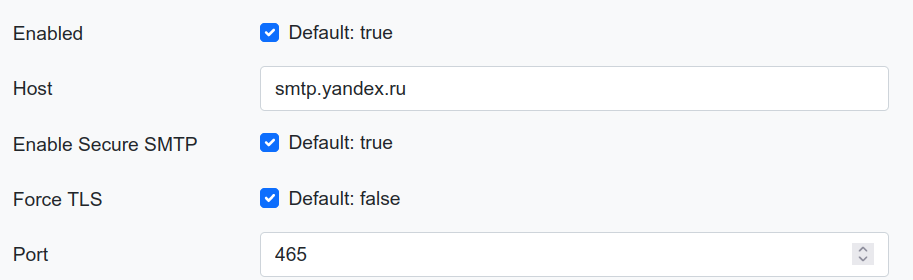
"Resource temporary unavailable" error message a bit misleads.
@BlackDex commented on GitHub (Sep 1, 2021):
That isn't needed anymore for a while now.
You can tick just force tls for this to work. Previously you needed to tick both indeed.
@chunjinfeng commented on GitHub (Dec 18, 2021):
I force tls and solved the
SMTP IO error: Resource temporarily unavailable (os error 11)
error
@sanger89 commented on GitHub (Nov 22, 2022):
I used docker-compose deployed vaultwarden.
When I use 163.com or personal email sever, it didn't work.
I fix it in this way: replace the smtp server to outlook, and it works.