[GH-ISSUE #1127] email cannot get sent: unrecognized challenge #795

Closed
opened 2026-03-03 02:03:17 +03:00 by kerem · 13 comments
Owner

Originally created by @joergmschulz on GitHub (Sep 2, 2020).
Original GitHub issue: https://github.com/dani-garcia/vaultwarden/issues/1127

Subject of the issue

I try to setup / send email.
The server seems to be reached, but the log returns:

[2020-09-02 14:43:45.461][request][INFO] POST /admin/test/smtp/
bitwarden           | [2020-09-02 14:43:45.560][error][ERROR] SmtpError.
bitwarden           | [CAUSE] Client(
bitwarden           |     "Unrecognized challenge",
bitwarden           | )
bitwarden           | [2020-09-02 14:43:45.562][response][INFO] POST /admin/test/smtp (test_smtp) => 400 Bad Request

Your environment

image: bitwardenrs/server-postgresql:latest

  • Install method: docker-compose

Steps to reproduce

Expected behaviour

email should be sent

Actual behaviour

error 400

Originally created by @joergmschulz on GitHub (Sep 2, 2020). Original GitHub issue: https://github.com/dani-garcia/vaultwarden/issues/1127 <!-- Please fill out the following template to make solving your problem easier and faster for us. This is only a guideline. If you think that parts are unneccessary for your issue, feel free to remove them. Remember to hide/obfuscate personal and confidential information, such as names, global IP/DNS adresses and especially passwords, if neccessary. --> ### Subject of the issue I try to setup / send email. The server seems to be reached, but the log returns: ``` [2020-09-02 14:43:45.461][request][INFO] POST /admin/test/smtp/ bitwarden | [2020-09-02 14:43:45.560][error][ERROR] SmtpError. bitwarden | [CAUSE] Client( bitwarden | "Unrecognized challenge", bitwarden | ) bitwarden | [2020-09-02 14:43:45.562][response][INFO] POST /admin/test/smtp (test_smtp) => 400 Bad Request ``` ### Your environment <!-- The version number, obtained from the logs or the admin page --> `image: bitwardenrs/server-postgresql:latest` * Install method: docker-compose ### Steps to reproduce <!-- Tell us how to reproduce this issue. What parameters did you set (differently from the defaults) and how did you start bitwarden_rs? --> ### Expected behaviour email should be sent ### Actual behaviour error 400
kerem closed this issue 2026-03-03 02:03:17 +03:00
Author
Owner

@BlackDex commented on GitHub (Sep 3, 2020):

Could you give some more details on your config without password and username?

So what are the settings you have for email?

<!-- gh-comment-id:686655754 --> @BlackDex commented on GitHub (Sep 3, 2020): Could you give some more details on your config without password and username? So what are the settings you have for email?
Author
Owner

@joergmschulz commented on GitHub (Sep 3, 2020):

  "_enable_smtp": true,
  "smtp_host": "m.mmmmmmm.de",
  "smtp_ssl": true,
  "smtp_explicit_tls": false,
  "smtp_port": 587,
  "smtp_from": "help@mmmmmmmmm.de",
  "smtp_from_name": "Bitwarden_RS",
  "smtp_username": "help@mmmmmmmmmm.de",
  "smtp_password": "pppppppppp",
  "smtp_auth_mechanism": "login",
  "smtp_timeout": 15,
  "helo_name": "bitwarden.mmmmmmmm.de",

Things that didn't change the situation:

  • use other ports like 25, 465
  • dis/enable tls
  • use another tls1.3 enabled email server (I don't have a 1.2 one)
  • disable authentication
  • use a completely different provider
  • enter different values in the smtp_auth_mechanism field
<!-- gh-comment-id:686713540 --> @joergmschulz commented on GitHub (Sep 3, 2020): ``` "_enable_smtp": true, "smtp_host": "m.mmmmmmm.de", "smtp_ssl": true, "smtp_explicit_tls": false, "smtp_port": 587, "smtp_from": "help@mmmmmmmmm.de", "smtp_from_name": "Bitwarden_RS", "smtp_username": "help@mmmmmmmmmm.de", "smtp_password": "pppppppppp", "smtp_auth_mechanism": "login", "smtp_timeout": 15, "helo_name": "bitwarden.mmmmmmmm.de", ``` Things that didn't change the situation: - use other ports like 25, 465 - dis/enable tls - use another tls1.3 enabled email server (I don't have a 1.2 one) - disable authentication - use a completely different provider - enter different values in the smtp_auth_mechanism field
Author
Owner

@BlackDex commented on GitHub (Sep 7, 2020):

@joergmschulz I think you need to change the "smtp_auth_mechanism" to be "Plain" instead of "login", if you really need the "login" mechanism, then i think i also need to have an uppercase L, so "Login".

Please try if that solves your issue.

<!-- gh-comment-id:688155506 --> @BlackDex commented on GitHub (Sep 7, 2020): @joergmschulz I think you need to change the "smtp_auth_mechanism" to be "Plain" instead of "login", if you really need the "login" mechanism, then i think i also need to have an uppercase L, so "Login". Please try if that solves your issue.
Author
Owner

@joergmschulz commented on GitHub (Sep 7, 2020):

yes, this has been among the things I have tested. Plain, login, Login, plain. But neither worked.

<!-- gh-comment-id:688233152 --> @joergmschulz commented on GitHub (Sep 7, 2020): yes, this has been among the things I have tested. Plain, login, Login, plain. But neither worked.
Author
Owner

@BlackDex commented on GitHub (Sep 16, 2020):

I made some changes so it now supports multiple authentication mechanisms. You could try to add both plain and login comma separated. It now also have a bit update mail library which could help a bit.

<!-- gh-comment-id:693643657 --> @BlackDex commented on GitHub (Sep 16, 2020): I made some changes so it now supports multiple authentication mechanisms. You could try to add both plain and login comma separated. It now also have a bit update mail library which could help a bit.
Author
Owner

@joergmschulz commented on GitHub (Sep 17, 2020):

Has this change found its way into the docker image or should I build from master?

<!-- gh-comment-id:694070671 --> @joergmschulz commented on GitHub (Sep 17, 2020): Has this change found its way into the docker image or should I build from master?
Author
Owner

@BlackDex commented on GitHub (Sep 17, 2020):

@joergmschulz this is in the latest version when using the testing tag

<!-- gh-comment-id:694087441 --> @BlackDex commented on GitHub (Sep 17, 2020): @joergmschulz this is in the latest version when using the testing tag
Author
Owner

@joergmschulz commented on GitHub (Sep 17, 2020):

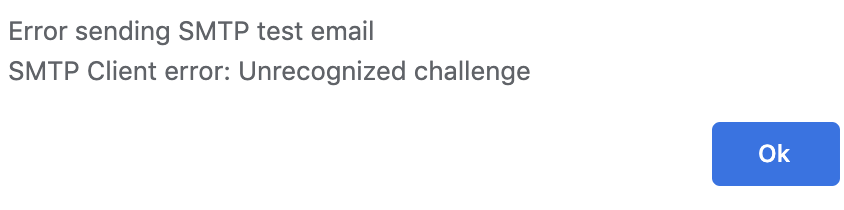
have now built from master; the format of the error message improved, but the content is left unchanged.
grafik

<!-- gh-comment-id:694112604 --> @joergmschulz commented on GitHub (Sep 17, 2020): have now built from master; the format of the error message improved, but the content is left unchanged. <img width="422" alt="grafik" src="https://user-images.githubusercontent.com/6523646/93452322-9256ae00-f8d8-11ea-8a0f-e2f9d118f214.png">
Author
Owner

@BlackDex commented on GitHub (Sep 19, 2020):

@joergmschulz i have checked the code and this error only happens during the following.

  1. Using the Login auth mechanism
  2. The server responds with some kind of challenge it doesn't recognize.

So what happens during the LOGIN auth method is the following.

  1. Client connects to mail-server
  2. Client sends ehlo command
  3. Server responds with its features (250-XX)
  4. Client checks which 250-AUTH features and if a match, it will continue.
  5. Client sends which auth it's going to use AUTH LOGIN
  6. Server sends a response 334 VXNlcm5hbWU6

And there is where it goes wrong.
The value right after 334 here is a base64 encoded string which contains Username: in this case.
For some reason the server you connect to responds with something the mail-library doesn't understand.

You could try to do this manually and see what the server returns.
The 334 responses are where the library is tripping on and returning the the error you see.

To try it your self do the following.

# Run for starttls either port 25 or 587
openssl s_client -starttls smtp -crlf -connect m.mmmmmmm.de:587
# Run for SSL connection normally port 465
openssl s_client -crlf -connect m.mmmmmmm.de:465

This will start a console where you can type and press enter to send that command.
Enter the following commands right after each other.

EHLO my.domain.tld
AUTH LOGIN

And now wait what will return.
It could also be that the Password part is giving the issue, that normally follows after you have entered your username.

Also, checkout one of these two sites for example to help you test it manually:
https://www.ndchost.com/wiki/mail/test-smtp-auth-telnet
http://www.xglobe.com/knowledgebase/mail/test-smtp-authentication-with-telnet/

<!-- gh-comment-id:695220098 --> @BlackDex commented on GitHub (Sep 19, 2020): @joergmschulz i have checked the code and this error only happens during the following. 1. Using the Login auth mechanism 2. The server responds with some kind of challenge it doesn't recognize. So what happens during the LOGIN auth method is the following. 1. Client connects to mail-server 2. Client sends `ehlo` command 3. Server responds with its features (`250-XX`) 4. Client checks which `250-AUTH` features and if a match, it will continue. 5. Client sends which auth it's going to use `AUTH LOGIN` 6. Server sends a response `334 VXNlcm5hbWU6` And there is where it goes wrong. The value right after 334 here is a base64 encoded string which contains `Username:` in this case. For some reason the server you connect to responds with something the mail-library doesn't understand. You could try to do this manually and see what the server returns. The `334` responses are where the library is tripping on and returning the the error you see. To try it your self do the following. ```bash # Run for starttls either port 25 or 587 openssl s_client -starttls smtp -crlf -connect m.mmmmmmm.de:587 # Run for SSL connection normally port 465 openssl s_client -crlf -connect m.mmmmmmm.de:465 ``` This will start a console where you can type and press enter to send that command. Enter the following commands right after each other. ```bash EHLO my.domain.tld AUTH LOGIN ``` And now wait what will return. It could also be that the Password part is giving the issue, that normally follows after you have entered your username. Also, checkout one of these two sites for example to help you test it manually: https://www.ndchost.com/wiki/mail/test-smtp-auth-telnet http://www.xglobe.com/knowledgebase/mail/test-smtp-authentication-with-telnet/
Author
Owner

@joergmschulz commented on GitHub (Sep 19, 2020):

hmmm
doing it manually, it works correctly:

the smtp server can't be the reason as other smtp servers don't work as well.
Do I need to escape special characters in username or password (like @ or ! )?


New, TLSv1/SSLv3, Cipher is ECDHE-RSA-AES256-GCM-SHA384
Server public key is 2048 bit
Secure Renegotiation IS supported
Compression: NONE
Expansion: NONE
No ALPN negotiated
SSL-Session:
    Protocol  : TLSv1.2
    Cipher    : ECDHE-RSA-AES256-GCM-SHA384
    Session-ID: 2903E03595DD35E2B3C04582C8AB8168C14CEE471384DFF7BFF19A3453356472
    Session-ID-ctx: 
    Master-Key: A05C146F265F45259196D97B4FA594C43AC9426C12E5D1290E620ABF6C65777C7A6BB7B3991E520D5F70B21DA770448C
    Key-Arg   : None
    PSK identity: None
    PSK identity hint: None
    SRP username: None
    Start Time: 1600529739
    Timeout   : 300 (sec)
    Verify return code: 20 (unable to get local issuer certificate)
---
250 HELP
ehlo bitwarden.faudin.de
250-m.mysmtphost or 1&1smtphost.de Hello somebody
250-SIZE 52428800
250-8BITMIME
250-PIPELINING
250-AUTH LOGIN
250-CHUNKING
250-PRDR
250 HELP
auth login
334 4oCcVXNlcm5hbWU6
anMuZGU=
334 UGFzc3dvcmQ64oCd
Z0F1dDFuZzE0IQ==
535 Incorrect authentication data
auth login
334 4oCcVXNlcm5hbWU6
base64encodedusername=
334 UGFzc3dvcmQ64oCd
base64encodedpassword==
235 Authentication succeeded
<!-- gh-comment-id:695282844 --> @joergmschulz commented on GitHub (Sep 19, 2020): hmmm doing it manually, it works correctly: the smtp server can't be the reason as other smtp servers don't work as well. Do I need to escape special characters in username or password (like @ or ! )? ``` New, TLSv1/SSLv3, Cipher is ECDHE-RSA-AES256-GCM-SHA384 Server public key is 2048 bit Secure Renegotiation IS supported Compression: NONE Expansion: NONE No ALPN negotiated SSL-Session: Protocol : TLSv1.2 Cipher : ECDHE-RSA-AES256-GCM-SHA384 Session-ID: 2903E03595DD35E2B3C04582C8AB8168C14CEE471384DFF7BFF19A3453356472 Session-ID-ctx: Master-Key: A05C146F265F45259196D97B4FA594C43AC9426C12E5D1290E620ABF6C65777C7A6BB7B3991E520D5F70B21DA770448C Key-Arg : None PSK identity: None PSK identity hint: None SRP username: None Start Time: 1600529739 Timeout : 300 (sec) Verify return code: 20 (unable to get local issuer certificate) --- 250 HELP ehlo bitwarden.faudin.de 250-m.mysmtphost or 1&1smtphost.de Hello somebody 250-SIZE 52428800 250-8BITMIME 250-PIPELINING 250-AUTH LOGIN 250-CHUNKING 250-PRDR 250 HELP auth login 334 4oCcVXNlcm5hbWU6 anMuZGU= 334 UGFzc3dvcmQ64oCd Z0F1dDFuZzE0IQ== 535 Incorrect authentication data auth login 334 4oCcVXNlcm5hbWU6 base64encodedusername= 334 UGFzc3dvcmQ64oCd base64encodedpassword== 235 Authentication succeeded ```
Author
Owner

@BlackDex commented on GitHub (Sep 19, 2020):

Well, the issue is that the first 334 parameter starts with an ” and the last one ends with an “.
“Username:
Password:”
Those signs looking like a " are the issue here. They apparently are causing the match to fail.

Maybe it is something you can configure on the mail server?

<!-- gh-comment-id:695336414 --> @BlackDex commented on GitHub (Sep 19, 2020): Well, the issue is that the first `334` parameter starts with an ” and the last one ends with an “. `“Username:` `Password:”` Those signs looking like a " are the issue here. They apparently are causing the match to fail. Maybe it is something you can configure on the mail server?
Author
Owner

@joergmschulz commented on GitHub (Sep 19, 2020):

definitely yes, this is configurable on the mail server. In case of exim, it is the stanza server_prompts = Username:: : Password:: that has contained the quote signes for some years now. Always working with all clients. But leaving away the qutes works as well.
Thank you very much for the pain to debug this one!

<!-- gh-comment-id:695359576 --> @joergmschulz commented on GitHub (Sep 19, 2020): definitely yes, this is configurable on the mail server. In case of exim, it is the stanza `server_prompts = Username:: : Password::` that has contained the quote signes for some years now. Always working with all clients. But leaving away the qutes works as well. Thank you very much for the pain to debug this one!
Author
Owner

@BlackDex commented on GitHub (Sep 19, 2020):

@joergmschulz your welcome glad it works now :)

<!-- gh-comment-id:695361568 --> @BlackDex commented on GitHub (Sep 19, 2020): @joergmschulz your welcome glad it works now :)
Sign in to join this conversation.
No milestone
No project
No assignees
1 participant
Notifications
Due date
The due date is invalid or out of range. Please use the format "yyyy-mm-dd".

No due date set.

Dependencies

No dependencies set.

Reference
starred/vaultwarden#795
No description provided.