mirror of
https://github.com/dani-garcia/vaultwarden.git
synced 2026-04-26 09:46:00 +03:00
[GH-ISSUE #748] Yubikey and Browser extension #510
Labels
No labels
SSO
Third party
better for forum
bug
bug
documentation
duplicate
enhancement
future Vault
future Vault
future Vault
good first issue
help wanted
low priority
notes
pull-request
question
troubleshooting
wontfix
No milestone
No project
No assignees
1 participant

Notifications
Due date
No due date set.
Dependencies
No dependencies set.
Reference
starred/vaultwarden#510
Loading…
Add table
Add a link
Reference in a new issue
No description provided.
Delete branch "%!s()"
Deleting a branch is permanent. Although the deleted branch may continue to exist for a short time before it actually gets removed, it CANNOT be undone in most cases. Continue?
Originally created by @eflemingtra on GitHub (Nov 28, 2019).
Original GitHub issue: https://github.com/dani-garcia/vaultwarden/issues/748
Hi,
Sorry for the dumb question. I have setup bitwarden_rs to work with my Yubikey so that when accessing my selfhosted instance of it, my Yubikey is required.
Is it possible to use the Yubikey to access the Bitwarden extension on my web browser or on my Android device? The browser extension just sends me to the Bitwarden's website when attempting to set up U2F functionality.
@dani-garcia commented on GitHub (Nov 30, 2019):
You should set up the yubikey on your web vault, and once that's done you can use it to login in the browser extension, is that what you mean?
@eflemingtra commented on GitHub (Dec 7, 2019):
Yeah - I've done that. So I'm using the Bitwarden Firefox extension on desktop, and the Bitwarden App on Android. Despite setting up my Yubikey on the web vault (and when I log onto the web vault it requires me to use my Yubikey), both the browser extension and the Android app just take me to the Bitwarden official webpage, not my hosted webvault. It seems that they're not communicating to my self hosted instance for 2FA, but otherwise work fine.
@dani-garcia commented on GitHub (Dec 7, 2019):
Well I've just tried and it works fine for me on Firefox, though it does ask to open as a new window instead of a popup.
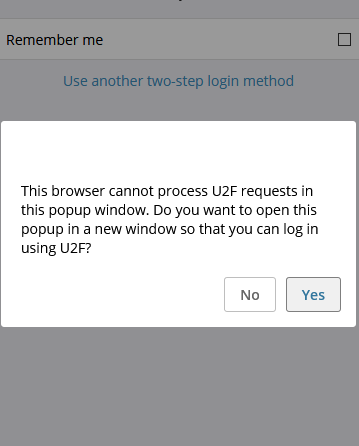
Once I click ok a new window opens and I can log in and use the Yubikey as U2F just fine.
@eflemingtra commented on GitHub (Dec 8, 2019):
Mine does this:
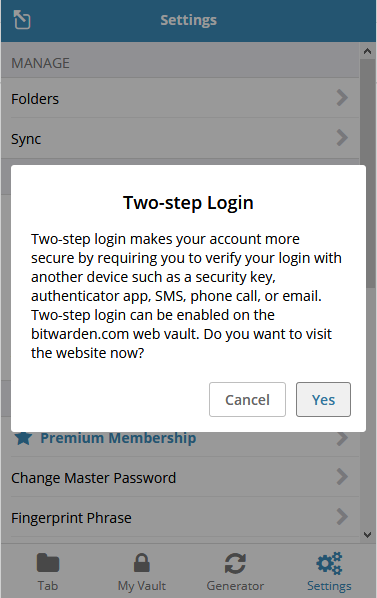
And then just takes me to Bitwarden's website. Is it because I'm not serving bitwarden_rs from an HTTPS domain? I don't use a direct proxy to interact with my server but a Zero Tier tunnel.
@mqus commented on GitHub (Dec 8, 2019):
just to rule the simple thing out: you did point the firefox addon/android app to your instance by clicking on the cog and entering your url in the first field, right?
(that may sound stupid, i know but just to understand it right ;)
@eflemingtra commented on GitHub (Dec 8, 2019):
Yes, it interacts fine with my self hosted instance otherwise. So if I click on My Vault, it will take me to my self hosted bitwarden_rs instance at http://192.168.1.49:1024
@mqus commented on GitHub (Dec 8, 2019):
(if I think about it, it wouldnt ask for 2fa if that wasnt the case, so sry for the dumb question >.>)
@dani-garcia commented on GitHub (Dec 9, 2019):
@eflemingtra Yeah from that menu it opens the help page, that's expected.
What you need to do is configure the 2FA methods from the web vault, and they will work in the extensions, though you'll need to log out and log back in to see the changes.
@dani-garcia commented on GitHub (May 13, 2020):
Closed due to inactivity.