[GH-ISSUE #3410] [BUG] where the command line versioning is different or missing from the web extension versioning #1559

Closed
opened 2026-03-03 02:10:14 +03:00 by kerem · 2 comments
Owner

Originally created by @calvin-li-developer on GitHub (Apr 3, 2023).
Original GitHub issue: https://github.com/dani-garcia/vaultwarden/issues/3410

Subject of the issue

Deployment environment

  • vaultwarden version: 1.28.1
  • Install method: docker via docker compose up -d

  • Clients used: web browser extension firefox / edge /chrome

  • Reverse proxy and version: yes via cloudflare tunnels

  • MySQL/MariaDB or PostgreSQL version: n/a

  • Other relevant details:

Steps to reproduce

So I have updated to the latest version of vaultwarden using docker compose pull and docker compose up -d then I checked the version via cli with command docker exec vaultwarden /vaultwarden --version and got version 1.28.1

Expected behaviour

Should show version 1.28.1 for server version on the extension about page.

Actual behaviour

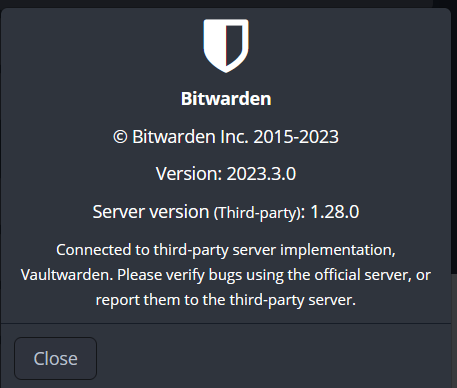
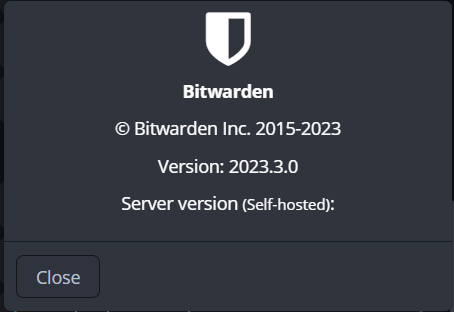
when I checked on firefox extension it still shows 1.28.0 but also when I checked via chrome or edge extension it doesnt display any version after the like server version (thrid party):
Firefox about page:
firefox extension
Edge/Chrome about page:
edge-chrome extension

Troubleshooting data

Originally created by @calvin-li-developer on GitHub (Apr 3, 2023). Original GitHub issue: https://github.com/dani-garcia/vaultwarden/issues/3410 <!-- # ### NOTE: Please update to the latest version of vaultwarden before reporting an issue! This saves you and us a lot of time and troubleshooting. See: * https://github.com/dani-garcia/vaultwarden/issues/1180 * https://github.com/dani-garcia/vaultwarden/wiki/Updating-the-vaultwarden-image # ### --> <!-- Please fill out the following template to make solving your problem easier and faster for us. This is only a guideline. If you think that parts are unnecessary for your issue, feel free to remove them. Remember to hide/redact personal or confidential information, such as passwords, IP addresses, and DNS names as appropriate. --> ### Subject of the issue <!-- Describe your issue here. --> ### Deployment environment <!-- ========================================================================================= Preferably, use the `Generate Support String` button on the admin page's Diagnostics tab. That will auto-generate most of the info requested in this section. ========================================================================================= --> <!-- The version number, obtained from the logs (at startup) or the admin diagnostics page --> <!-- This is NOT the version number shown on the web vault, which is versioned separately from vaultwarden --> <!-- Remember to check if your issue exists on the latest version first! --> * vaultwarden version: 1.28.1 <!-- How the server was installed: Docker image, OS package, built from source, etc. --> * Install method: docker via `docker compose up -d` * Clients used: <!-- web vault, desktop, Android, iOS, etc. (if applicable) --> web browser extension firefox / edge /chrome * Reverse proxy and version: <!-- if applicable --> yes via cloudflare tunnels * MySQL/MariaDB or PostgreSQL version: <!-- if applicable --> n/a * Other relevant details: ### Steps to reproduce <!-- Tell us how to reproduce this issue. What parameters did you set (differently from the defaults) and how did you start vaultwarden? --> So I have updated to the latest version of vaultwarden using `docker compose pull` and `docker compose up -d` then I checked the version via cli with command `docker exec vaultwarden /vaultwarden --version` and got version 1.28.1 ### Expected behaviour <!-- Tell us what you expected to happen --> Should show version 1.28.1 for server version on the extension about page. ### Actual behaviour when I checked on firefox extension it still shows 1.28.0 but also when I checked via chrome or edge extension it doesnt display any version after the like server version (thrid party): Firefox about page: ![firefox extension](https://user-images.githubusercontent.com/65045619/229397584-9933f145-de98-4271-9571-2f00e7c075d0.PNG) Edge/Chrome about page: ![edge-chrome extension](https://user-images.githubusercontent.com/65045619/229397599-1b743d7d-df70-4145-8055-b6a5f721aedd.PNG) <!-- Tell us what actually happened --> ### Troubleshooting data <!-- Share any log files, screenshots, or other relevant troubleshooting data -->
kerem closed this issue 2026-03-03 02:10:14 +03:00
Author
Owner

@BlackDex commented on GitHub (Apr 3, 2023):

It's probably cached on the client side.
You can check the version we return by going to https://your.domsin.tld/api/config

<!-- gh-comment-id:1493664030 --> @BlackDex commented on GitHub (Apr 3, 2023): It's probably cached on the client side. You can check the version we return by going to `https://your.domsin.tld/api/config`
Author
Owner

@calvin-li-developer commented on GitHub (Apr 3, 2023):

Oddly enough when I reinstall bitwarden extension on firefox it has the same screenshot result has the edge / chrome one.

It's probably cached on the client side. You can check the version we return by going to https://your.domsin.tld/api/config

This does display the correct version of vaultwarden. Thanks for the link.

I guess now i'm not sure if its an issue but it doesn't display version at all for the extension about page.

<!-- gh-comment-id:1493692974 --> @calvin-li-developer commented on GitHub (Apr 3, 2023): Oddly enough when I reinstall bitwarden extension on firefox it has the same screenshot result has the edge / chrome one. > It's probably cached on the client side. You can check the version we return by going to `https://your.domsin.tld/api/config` This does display the correct version of vaultwarden. Thanks for the link. I guess now i'm not sure if its an issue but it doesn't display version at all for the extension about page.
Sign in to join this conversation.
No milestone
No project
No assignees
1 participant
Notifications
Due date
The due date is invalid or out of range. Please use the format "yyyy-mm-dd".

No due date set.

Dependencies

No dependencies set.

Reference
starred/vaultwarden#1559
No description provided.