[GH-ISSUE #2946] Cannot access attachments when offline (No network) #1422

Closed
opened 2026-03-03 02:09:04 +03:00 by kerem · 1 comment
Owner

Originally created by @meichthys on GitHub (Dec 2, 2022).
Original GitHub issue: https://github.com/dani-garcia/vaultwarden/issues/2946

Subject of the issue

Cannot access attachments when offline (No network).
This may be an upstream issue, but I wanted to report it here first.

Deployment environment

Show Running Config

Your environment (Generated via diagnostics page)

  • Vaultwarden version: v1.26.0
  • Web-vault version: v2022.10.0
  • Running within Docker: true (Base: Debian)
  • Environment settings overridden: true
  • Uses a reverse proxy: true
  • IP Header check: true (X-Real-IP)
  • Internet access: true
  • Internet access via a proxy: false
  • DNS Check: true
  • Time Check: true
  • Domain Configuration Check: true
  • HTTPS Check: true
  • Database type: SQLite
  • Database version: 3.35.4
  • Clients used:
  • Reverse proxy and version:
  • Other relevant information:

Config (Generated via diagnostics page)

Environment settings which are overridden: DOMAIN, ADMIN_TOKEN, SMTP_HOST, SMTP_SSL, SMTP_PORT, SMTP_FROM, SMTP_USERNAME, SMTP_PASSWORD

{
  "_duo_akey": null,
  "_enable_duo": false,
  "_enable_email_2fa": true,
  "_enable_smtp": true,
  "_enable_yubico": true,
  "_icon_service_csp": "",
  "_icon_service_url": "",
  "_ip_header_enabled": true,
  "admin_ratelimit_max_burst": 3,
  "admin_ratelimit_seconds": 300,
  "admin_token": "***",
  "allowed_iframe_ancestors": "",
  "attachments_folder": "data/attachments",
  "authenticator_disable_time_drift": false,
  "data_folder": "data",
  "database_conn_init": "",
  "database_max_conns": 10,
  "database_timeout": 30,
  "database_url": "****/**.*******",
  "db_connection_retries": 15,
  "disable_2fa_remember": false,
  "disable_admin_token": false,
  "disable_icon_download": false,
  "domain": "*****://*********.************.***/",
  "domain_origin": "*****://*********.************.***",
  "domain_path": "",
  "domain_set": true,
  "duo_host": null,
  "duo_ikey": null,
  "duo_skey": null,
  "email_attempts_limit": 5,
  "email_expiration_time": 600,
  "email_token_size": 6,
  "emergency_access_allowed": true,
  "emergency_notification_reminder_schedule": "0 5 * * * *",
  "emergency_request_timeout_schedule": "0 5 * * * *",
  "enable_db_wal": true,
  "extended_logging": true,
  "helo_name": null,
  "hibp_api_key": null,
  "icon_blacklist_non_global_ips": true,
  "icon_blacklist_regex": null,
  "icon_cache_folder": "data/icon_cache",
  "icon_cache_negttl": 259200,
  "icon_cache_ttl": 2592000,
  "icon_download_timeout": 10,
  "icon_redirect_code": 302,
  "icon_service": "internal",
  "incomplete_2fa_schedule": "30 * * * * *",
  "incomplete_2fa_time_limit": 3,
  "invitation_expiration_hours": 120,
  "invitation_org_name": "ENG Bitwarden",
  "invitations_allowed": true,
  "ip_header": "X-Real-IP",
  "job_poll_interval_ms": 30000,
  "log_file": null,
  "log_level": "Info",
  "log_timestamp_format": "%Y-%m-%d %H:%M:%S.%3f",
  "login_ratelimit_max_burst": 10,
  "login_ratelimit_seconds": 60,
  "org_attachment_limit": null,
  "org_creation_users": "",
  "password_hints_allowed": true,
  "password_iterations": 100000,
  "reload_templates": false,
  "require_device_email": false,
  "rsa_key_filename": "data/rsa_key",
  "send_purge_schedule": "0 5 * * * *",
  "sends_allowed": true,
  "sends_folder": "data/sends",
  "show_password_hint": true,
  "signups_allowed": true,
  "signups_domains_whitelist": "",
  "signups_verify": true,
  "signups_verify_resend_limit": 6,
  "signups_verify_resend_time": 3600,
  "smtp_accept_invalid_certs": false,
  "smtp_accept_invalid_hostnames": false,
  "smtp_auth_mechanism": null,
  "smtp_debug": false,
  "smtp_explicit_tls": false,
  "smtp_from": "*********@************.***",
  "smtp_from_name": "Bitwarden",
  "smtp_host": "******.*********.***",
  "smtp_password": "***",
  "smtp_port": 587,
  "smtp_security": "starttls",
  "smtp_ssl": true,
  "smtp_timeout": 15,
  "smtp_username": "*******@************.***",
  "templates_folder": "data/templates",
  "tmp_folder": "data/tmp",
  "trash_auto_delete_days": null,
  "trash_purge_schedule": "0 5 0 * * *",
  "use_syslog": false,
  "user_attachment_limit": null,
  "web_vault_enabled": true,
  "web_vault_folder": "web-vault/",
  "websocket_address": "0.0.0.0",
  "websocket_enabled": false,
  "websocket_port": 3012,
  "yubico_client_id": null,
  "yubico_secret_key": null,
  "yubico_server": null
}

Steps to reproduce

  1. Disable network on client machine
  2. Try to access a bitwarden attachment

Expected behaviour

The attachment should be accessible.

Actual behaviour

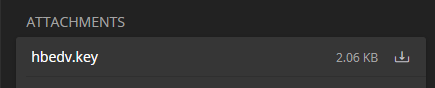
Nothing happens when clicking on the attachment.

Troubleshooting data

The attachments are visible, but nothing happens when trying to click/tap on them:
image

Originally created by @meichthys on GitHub (Dec 2, 2022). Original GitHub issue: https://github.com/dani-garcia/vaultwarden/issues/2946 ### Subject of the issue Cannot access attachments when offline (No network). This may be an upstream issue, but I wanted to report it here first. ### Deployment environment <details><summary>Show Running Config</summary> #### Your environment (Generated via diagnostics page) * Vaultwarden version: v1.26.0 * Web-vault version: v2022.10.0 * Running within Docker: true (Base: Debian) * Environment settings overridden: true * Uses a reverse proxy: true * IP Header check: true (X-Real-IP) * Internet access: true * Internet access via a proxy: false * DNS Check: true * Time Check: true * Domain Configuration Check: true * HTTPS Check: true * Database type: SQLite * Database version: 3.35.4 * Clients used: * Reverse proxy and version: * Other relevant information: ### Config (Generated via diagnostics page) **Environment settings which are overridden:** DOMAIN, ADMIN_TOKEN, SMTP_HOST, SMTP_SSL, SMTP_PORT, SMTP_FROM, SMTP_USERNAME, SMTP_PASSWORD ```json { "_duo_akey": null, "_enable_duo": false, "_enable_email_2fa": true, "_enable_smtp": true, "_enable_yubico": true, "_icon_service_csp": "", "_icon_service_url": "", "_ip_header_enabled": true, "admin_ratelimit_max_burst": 3, "admin_ratelimit_seconds": 300, "admin_token": "***", "allowed_iframe_ancestors": "", "attachments_folder": "data/attachments", "authenticator_disable_time_drift": false, "data_folder": "data", "database_conn_init": "", "database_max_conns": 10, "database_timeout": 30, "database_url": "****/**.*******", "db_connection_retries": 15, "disable_2fa_remember": false, "disable_admin_token": false, "disable_icon_download": false, "domain": "*****://*********.************.***/", "domain_origin": "*****://*********.************.***", "domain_path": "", "domain_set": true, "duo_host": null, "duo_ikey": null, "duo_skey": null, "email_attempts_limit": 5, "email_expiration_time": 600, "email_token_size": 6, "emergency_access_allowed": true, "emergency_notification_reminder_schedule": "0 5 * * * *", "emergency_request_timeout_schedule": "0 5 * * * *", "enable_db_wal": true, "extended_logging": true, "helo_name": null, "hibp_api_key": null, "icon_blacklist_non_global_ips": true, "icon_blacklist_regex": null, "icon_cache_folder": "data/icon_cache", "icon_cache_negttl": 259200, "icon_cache_ttl": 2592000, "icon_download_timeout": 10, "icon_redirect_code": 302, "icon_service": "internal", "incomplete_2fa_schedule": "30 * * * * *", "incomplete_2fa_time_limit": 3, "invitation_expiration_hours": 120, "invitation_org_name": "ENG Bitwarden", "invitations_allowed": true, "ip_header": "X-Real-IP", "job_poll_interval_ms": 30000, "log_file": null, "log_level": "Info", "log_timestamp_format": "%Y-%m-%d %H:%M:%S.%3f", "login_ratelimit_max_burst": 10, "login_ratelimit_seconds": 60, "org_attachment_limit": null, "org_creation_users": "", "password_hints_allowed": true, "password_iterations": 100000, "reload_templates": false, "require_device_email": false, "rsa_key_filename": "data/rsa_key", "send_purge_schedule": "0 5 * * * *", "sends_allowed": true, "sends_folder": "data/sends", "show_password_hint": true, "signups_allowed": true, "signups_domains_whitelist": "", "signups_verify": true, "signups_verify_resend_limit": 6, "signups_verify_resend_time": 3600, "smtp_accept_invalid_certs": false, "smtp_accept_invalid_hostnames": false, "smtp_auth_mechanism": null, "smtp_debug": false, "smtp_explicit_tls": false, "smtp_from": "*********@************.***", "smtp_from_name": "Bitwarden", "smtp_host": "******.*********.***", "smtp_password": "***", "smtp_port": 587, "smtp_security": "starttls", "smtp_ssl": true, "smtp_timeout": 15, "smtp_username": "*******@************.***", "templates_folder": "data/templates", "tmp_folder": "data/tmp", "trash_auto_delete_days": null, "trash_purge_schedule": "0 5 0 * * *", "use_syslog": false, "user_attachment_limit": null, "web_vault_enabled": true, "web_vault_folder": "web-vault/", "websocket_address": "0.0.0.0", "websocket_enabled": false, "websocket_port": 3012, "yubico_client_id": null, "yubico_secret_key": null, "yubico_server": null } ``` </details> ### Steps to reproduce 1. Disable network on client machine 2. Try to access a bitwarden attachment ### Expected behaviour <!-- Tell us what you expected to happen --> The attachment should be accessible. ### Actual behaviour <!-- Tell us what actually happened --> Nothing happens when clicking on the attachment. ### Troubleshooting data <!-- Share any log files, screenshots, or other relevant troubleshooting data --> The attachments are visible, but nothing happens when trying to click/tap on them: ![image](https://user-images.githubusercontent.com/10717998/205331248-ac73150e-0991-4ce7-8d75-bafc8a1b71b3.png)
kerem closed this issue 2026-03-03 02:09:04 +03:00
Author
Owner

@BlackDex commented on GitHub (Dec 2, 2022):

Attachments are not stored locally on the client side.
You always need a working network connection and a working server to be able to download attachments.

<!-- gh-comment-id:1335462249 --> @BlackDex commented on GitHub (Dec 2, 2022): Attachments are not stored locally on the client side. You always need a working network connection and a working server to be able to download attachments.
Sign in to join this conversation.
No milestone
No project
No assignees
1 participant
Notifications
Due date
The due date is invalid or out of range. Please use the format "yyyy-mm-dd".

No due date set.

Dependencies

No dependencies set.

Reference
starred/vaultwarden#1422
No description provided.