mirror of
https://github.com/dani-garcia/vaultwarden.git
synced 2026-04-26 01:35:54 +03:00
[GH-ISSUE #1871] Chrome Extension and Browser not Syncing / Updating #1092
Labels
No labels
SSO
Third party
better for forum
bug
bug
documentation
duplicate
enhancement
future Vault
future Vault
future Vault
good first issue
help wanted
low priority
notes
pull-request
question
troubleshooting
wontfix
No milestone
No project
No assignees
1 participant

Notifications
Due date
No due date set.
Dependencies
No dependencies set.
Reference
starred/vaultwarden#1092
Loading…
Add table
Add a link
Reference in a new issue
No description provided.
Delete branch "%!s()"
Deleting a branch is permanent. Although the deleted branch may continue to exist for a short time before it actually gets removed, it CANNOT be undone in most cases. Continue?
Originally created by @mokshmridul on GitHub (Jul 26, 2021).
Original GitHub issue: https://github.com/dani-garcia/vaultwarden/issues/1871
Subject of the issue
Chrome Extension and Browser not Syncing / Updating
Deployment environment
Install method: Docker on Ubuntu 20.04 LTS (updated with all updates as on date)
Clients used: Web Vault (Chrome Extension), Chrome Browser
Reverse proxy and version: Nginx 1.20.1 (via Linuxserver.io's SWAG Image)
Other relevant details:
Steps to reproduce
No steps available, as its a random occurrence.
Expected behavior
Actual behavior
Troubleshooting data
@BlackDex commented on GitHub (Jul 26, 2021):
We need at least some logs from Vaultwarden when this occurs.
Also some logs from the browser (F12), and the reverse proxy would be useful.
We can't help you with the current info you gave.
@mokshmridul commented on GitHub (Jul 26, 2021):
Apologies for not attaching it earlier.
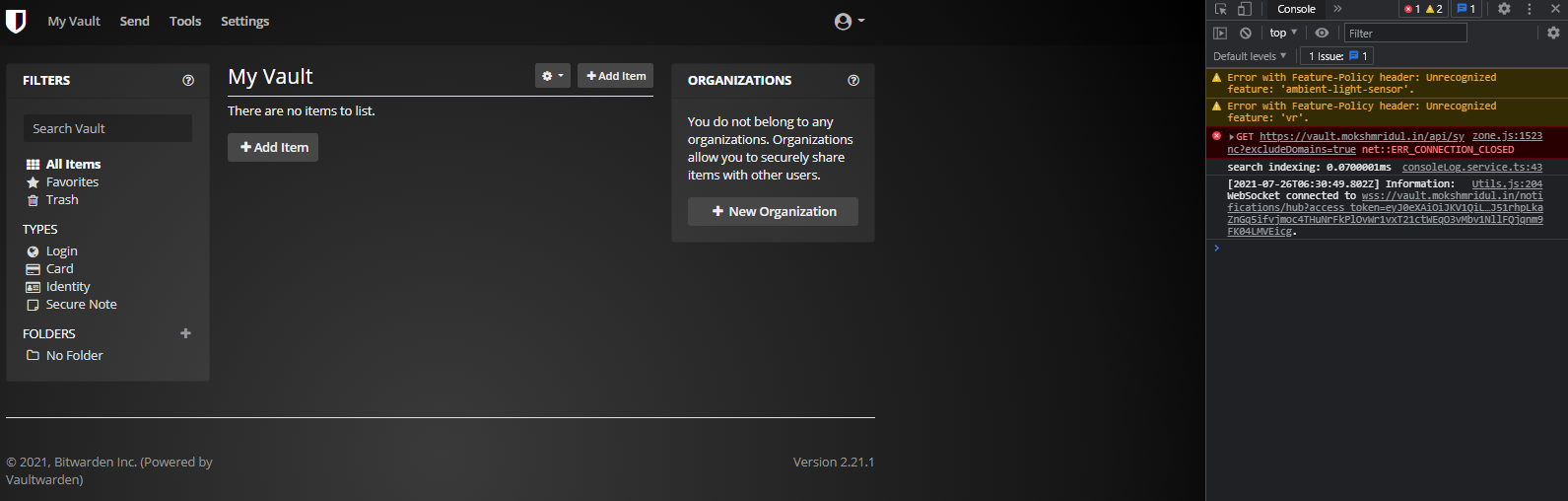
Chrome Browser Dev Output
Vaultwarden Logs
Note: I have replaced my actual domain name with "example"
@BlackDex commented on GitHub (Jul 26, 2021):
Unfortunately, i do not see the /api/sync request in the logs of nginx or vaultwarden, so for me it now looks like it doesn't even reaches either nginx or vaultwarden. Which to me looks like the browser is having some issues.
Have you tried a different browser and also try a private/incognito window maybe?
@mokshmridul commented on GitHub (Jul 26, 2021):
It works perfectly if I use either incognito mode, or use another browser.
Ive tried numerous times to clear ALL the history and cache in chrome and then try, but that doesn't work 100% of the times. Very hit and miss.
Anything else I could try ?
@BlackDex commented on GitHub (Jul 26, 2021):
You probably need to clear the local storage also.
A quick search provided this link which i think should work: https://www.howtogeek.com/664912/how-to-clear-storage-and-site-data-for-a-single-site-on-google-chrome/