mirror of
https://github.com/DrDonk/unlocker.git
synced 2026-04-26 06:06:01 +03:00
[GH-ISSUE #87] ./unlock: 1: Syntax error: "(" unexpected on Debian 11 #67
Labels
No milestone
No project
No assignees
1 participant

Notifications
Due date
No due date set.
Dependencies
No dependencies set.
Reference
starred/unlocker#67
Loading…
Add table
Add a link
Reference in a new issue
No description provided.
Delete branch "%!s()"
Deleting a branch is permanent. Although the deleted branch may continue to exist for a short time before it actually gets removed, it CANNOT be undone in most cases. Continue?
Originally created by @earthmoon on GitHub (Feb 6, 2023).
Original GitHub issue: https://github.com/DrDonk/unlocker/issues/87
IMPORTANT
Please note this is not a discussion forum for help on running macOS, finding the installation images etc.
Also please checkout the wiki https://github.com/DrDonk/unlocker/wiki as it may answer your question.
Describe the bug
.
When I run unlock script on Debian 11, it returns:
To Reproduce
Steps to reproduce the behavior:
Expected behavior
I hope it would unlock the vmware for macos
Screenshots
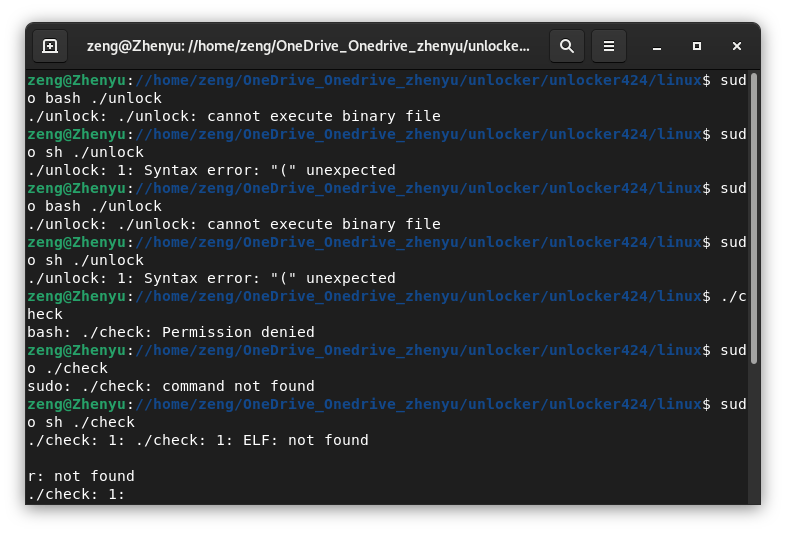
Desktop (please complete the following information):
Additional context
None
@DrDonk commented on GitHub (Feb 6, 2023):
Try just:
sudo ./unlockThe unlocker is a Go compiled binary file not a shell script.
@earthmoon commented on GitHub (Feb 6, 2023):
@DrDonk commented on GitHub (Feb 6, 2023):
What are the contents of the folder with the unzipped files?
@earthmoon commented on GitHub (Feb 6, 2023):
I download it from here
@DrDonk commented on GitHub (Feb 6, 2023):
That's fine. Can you send me the list of files after you unzipped the download? Use terminal and ls command
@earthmoon commented on GitHub (Feb 6, 2023):
It seems right.
@DrDonk commented on GitHub (Feb 6, 2023):
OK so do this please:
and send me the output
@earthmoon commented on GitHub (Feb 6, 2023):
These
@DrDonk commented on GitHub (Feb 6, 2023):
No please run it exactly as I asked.
cd linux
ls -l
@earthmoon commented on GitHub (Feb 6, 2023):
Sorry, Now I do as you asked:
@DrDonk commented on GitHub (Feb 6, 2023):
right the executable bit has somehow been removed. Type this in the terminal in the linux folder:
chmod +x *the try running the command again:
sudo ./unlock@earthmoon commented on GitHub (Feb 6, 2023):
Thanks for your help.zip and rar can't save the executable bit. If save them as tar.gz, it would not have this error.
@earthmoon commented on GitHub (Feb 6, 2023):
This way works well.
@DrDonk commented on GitHub (Feb 6, 2023):
Actually the zip file does have the executable bits (I check each release) and I'm not sure what happened to your system. I don't use TGZ as 95%+ users as on Windows and it's a non-native format.
@earthmoon commented on GitHub (Feb 6, 2023):
How about make the Linux folder to .tar.gz? And still make the all files in a .zip or .rar file. The Linux users can use .tar.gz without any problem with the permission errors and the Windows users can unzip them as before.
@DrDonk commented on GitHub (Feb 6, 2023):
OK done for the next release.
@earthmoon commented on GitHub (Feb 7, 2023):
Thanks a lot.