[GH-ISSUE #761] If a DropDown opens over another flex container, mouse clicks don't get recognized and the DropDown doesn't close as expected #554

Closed
opened 2026-03-04 01:05:58 +03:00 by kerem · 3 comments
Owner

Originally created by @MarvinJWendt on GitHub (Sep 15, 2022).
Original GitHub issue: https://github.com/rivo/tview/issues/761

Description

When a DropDown opens over another flex container, the options cannot be clicked with the mouse. It also does not close properly (leaves the part, that is reaching into another flex container, open).

DropDown opened

image

DropDown closed

image

Reproduction code

package main

import (
	"github.com/gdamore/tcell/v2"
	"github.com/rivo/tview"
)

func main() {
	app := tview.NewApplication()
	wrapper := tview.NewFlex()

	topBar := tview.NewFlex()
	topBar.SetBorder(true)
	topBar.SetBackgroundColor(tcell.ColorDefault)

	mainContent := tview.NewFlex()
	mainContent.SetBorder(true)
	mainContent.SetBackgroundColor(tcell.ColorDefault)

	wrapper.SetDirection(tview.FlexRow)
	wrapper.AddItem(topBar, 3, 0, false)
	wrapper.AddItem(mainContent, 0, 1, false)

	dropDown := tview.NewDropDown()
	dropDown.SetBackgroundColor(tcell.ColorDefault)
	dropDown.SetLabel("Placeholder: ")
	dropDown.SetOptions([]string{"Option 1", "Option 2", "Option 3"}, nil)

	topBar.SetDirection(tview.FlexColumn)
	topBar.AddItem(dropDown, 20, 0, false)

	app.EnableMouse(true)
	app.SetRoot(wrapper, true)
	app.Run()
}
Originally created by @MarvinJWendt on GitHub (Sep 15, 2022). Original GitHub issue: https://github.com/rivo/tview/issues/761 ### Description When a `DropDown` opens over another flex container, the options cannot be clicked with the mouse. It also does not close properly (leaves the part, that is reaching into another flex container, open). ### DropDown opened <img width="405" alt="image" src="https://user-images.githubusercontent.com/31022056/190343307-a914433a-70ec-4b34-a0a5-5e582ad88043.png"> ### DropDown closed <img width="332" alt="image" src="https://user-images.githubusercontent.com/31022056/190343380-effc4dc7-507b-4234-8e13-133224716499.png"> ### Reproduction code ```go package main import ( "github.com/gdamore/tcell/v2" "github.com/rivo/tview" ) func main() { app := tview.NewApplication() wrapper := tview.NewFlex() topBar := tview.NewFlex() topBar.SetBorder(true) topBar.SetBackgroundColor(tcell.ColorDefault) mainContent := tview.NewFlex() mainContent.SetBorder(true) mainContent.SetBackgroundColor(tcell.ColorDefault) wrapper.SetDirection(tview.FlexRow) wrapper.AddItem(topBar, 3, 0, false) wrapper.AddItem(mainContent, 0, 1, false) dropDown := tview.NewDropDown() dropDown.SetBackgroundColor(tcell.ColorDefault) dropDown.SetLabel("Placeholder: ") dropDown.SetOptions([]string{"Option 1", "Option 2", "Option 3"}, nil) topBar.SetDirection(tview.FlexColumn) topBar.AddItem(dropDown, 20, 0, false) app.EnableMouse(true) app.SetRoot(wrapper, true) app.Run() } ```
kerem closed this issue 2026-03-04 01:05:58 +03:00
Author
Owner

@rivo commented on GitHub (Sep 16, 2022):

The mouse handling for drop-downs was indeed buggy. Thanks for catching this. The latest commit fixes this.

Regarding the lingering option, there are two things to consider:

  1. An empty Flex has "nothing" in it. So it also doesn't delete anything. You may want to put a Box in there instead. (See code below.)
  2. Don't use tcell.ColorDefault. It never works the way you would expect. See the FAQ for more details.
package main

import (
	"github.com/rivo/tview"
)

func main() {
	app := tview.NewApplication()
	wrapper := tview.NewFlex()

	topBar := tview.NewFlex()
	topBar.SetBorder(true)

	mainContent := tview.NewBox()
	mainContent.SetBorder(true)

	wrapper.SetDirection(tview.FlexRow)
	wrapper.AddItem(topBar, 3, 0, false)
	wrapper.AddItem(mainContent, 0, 1, false)

	dropDown := tview.NewDropDown()
	dropDown.SetLabel("Placeholder: ")
	dropDown.SetOptions([]string{"Option 1", "Option 2", "Option 3"}, nil)

	topBar.SetDirection(tview.FlexColumn)
	topBar.AddItem(dropDown, 30, 0, false)

	app.EnableMouse(true)
	app.SetRoot(wrapper, true)
	app.Run()
}
<!-- gh-comment-id:1249064615 --> @rivo commented on GitHub (Sep 16, 2022): The mouse handling for drop-downs was indeed buggy. Thanks for catching this. The latest commit fixes this. Regarding the lingering option, there are two things to consider: 1. An empty `Flex` has "nothing" in it. So it also doesn't delete anything. You may want to put a `Box` in there instead. (See code below.) 2. Don't use `tcell.ColorDefault`. It never works the way you would expect. See the [FAQ](https://github.com/rivo/tview/wiki/FAQ) for more details. ```go package main import ( "github.com/rivo/tview" ) func main() { app := tview.NewApplication() wrapper := tview.NewFlex() topBar := tview.NewFlex() topBar.SetBorder(true) mainContent := tview.NewBox() mainContent.SetBorder(true) wrapper.SetDirection(tview.FlexRow) wrapper.AddItem(topBar, 3, 0, false) wrapper.AddItem(mainContent, 0, 1, false) dropDown := tview.NewDropDown() dropDown.SetLabel("Placeholder: ") dropDown.SetOptions([]string{"Option 1", "Option 2", "Option 3"}, nil) topBar.SetDirection(tview.FlexColumn) topBar.AddItem(dropDown, 30, 0, false) app.EnableMouse(true) app.SetRoot(wrapper, true) app.Run() } ```
Author
Owner

@MarvinJWendt commented on GitHub (Sep 16, 2022):

Thanks for the fast fix!

An empty Flex has "nothing" in it. So it also doesn't delete anything. You may want to put a Box in there instead. (See code below.)

Yes, that makes sense.


Don't use tcell.ColorDefault. It never works the way you would expect. See the FAQ for more details.

The DefaultColor works on all my tested terminals (Windows Terminal, IntelliJ Integrated Terminal, VS Code Integrated Terminal, macOS iTerm).

The linked tcell issue says:

I've been unable to find any escape sequences which would allow the terminal to report what it's "default" colors are.

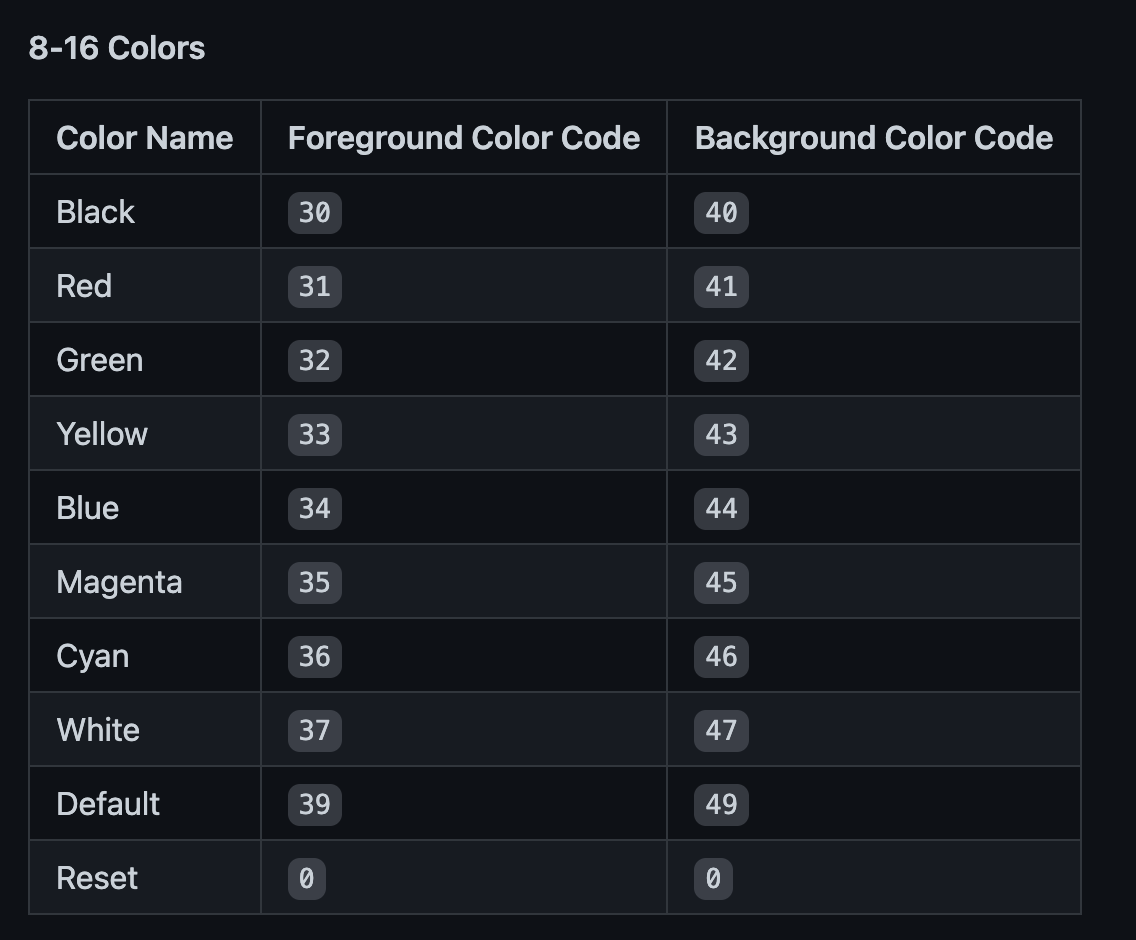
But there is an ANSI Code for default colors:
image

AFAIK, the ANSI Default Color code is rendered as the background color of the terminal. It's true that not every terminal supports it, but I haven't come across one.

<!-- gh-comment-id:1249119671 --> @MarvinJWendt commented on GitHub (Sep 16, 2022): Thanks for the fast fix! > An empty `Flex` has "nothing" in it. So it also doesn't delete anything. You may want to put a Box in there instead. (See code below.) Yes, that makes sense. --- > Don't use tcell.ColorDefault. It never works the way you would expect. See the [FAQ](https://github.com/rivo/tview/wiki/FAQ) for more details. The DefaultColor works on all my tested terminals (Windows Terminal, IntelliJ Integrated Terminal, VS Code Integrated Terminal, macOS iTerm). The linked tcell issue says: > I've been unable to find any escape sequences which would allow the terminal to report what it's "default" colors are. But there is an ANSI Code for default colors: <img width="568" alt="image" src="https://user-images.githubusercontent.com/31022056/190596458-b795fdc0-8a33-439b-9283-e35e67ffdb37.png"> AFAIK, the ANSI Default Color code is rendered as the background color of the terminal. It's true that not every terminal supports it, but I haven't come across one.
Author
Owner

@rivo commented on GitHub (Sep 16, 2022):

To be honest, I'm not that familiar with the capabilities of different terminals. @gdamore from tcell is the expert here. I do know that we had issues with ColorDefault in the past and the solution was always to pick a specific colour. Also, people often ask for default colours in a sense that tview might adjust accordingly on dark terminals (black background) or light terminals (white background) but my understanding is that this can't be made to work reliably on a variety of terminals. But if tcell ends up finding a way to do this somehow, I'm happy to include it in tview.

<!-- gh-comment-id:1249317735 --> @rivo commented on GitHub (Sep 16, 2022): To be honest, I'm not that familiar with the capabilities of different terminals. @gdamore from `tcell` is the expert here. I do know that we had issues with `ColorDefault` in the past and the solution was always to pick a specific colour. Also, people often ask for default colours in a sense that `tview` might adjust accordingly on dark terminals (black background) or light terminals (white background) but my understanding is that this can't be made to work reliably on a variety of terminals. But if `tcell` ends up finding a way to do this somehow, I'm happy to include it in `tview`.
Sign in to join this conversation.
No milestone
No project
No assignees
1 participant
Notifications
Due date
The due date is invalid or out of range. Please use the format "yyyy-mm-dd".

No due date set.

Dependencies

No dependencies set.

Reference
starred/tview#554
No description provided.