[GH-ISSUE #731] Scrolling table makes it loosing expansion #535

Closed
opened 2026-03-04 01:05:50 +03:00 by kerem · 3 comments
Owner

Originally created by @p3g4asus on GitHub (May 9, 2022).
Original GitHub issue: https://github.com/rivo/tview/issues/731

Hi,
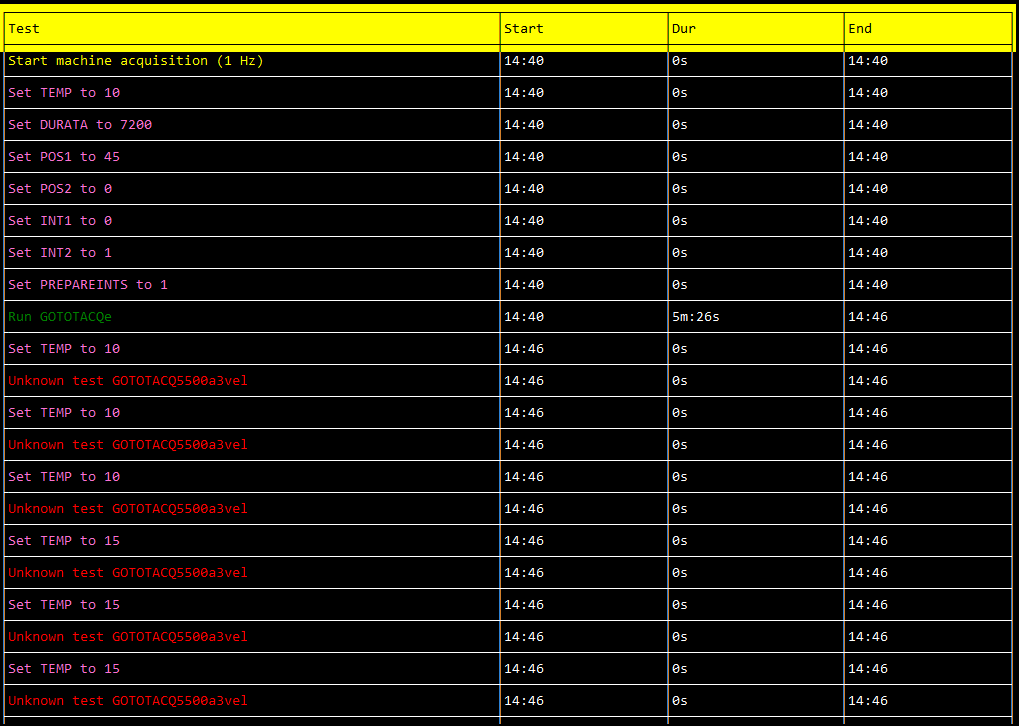
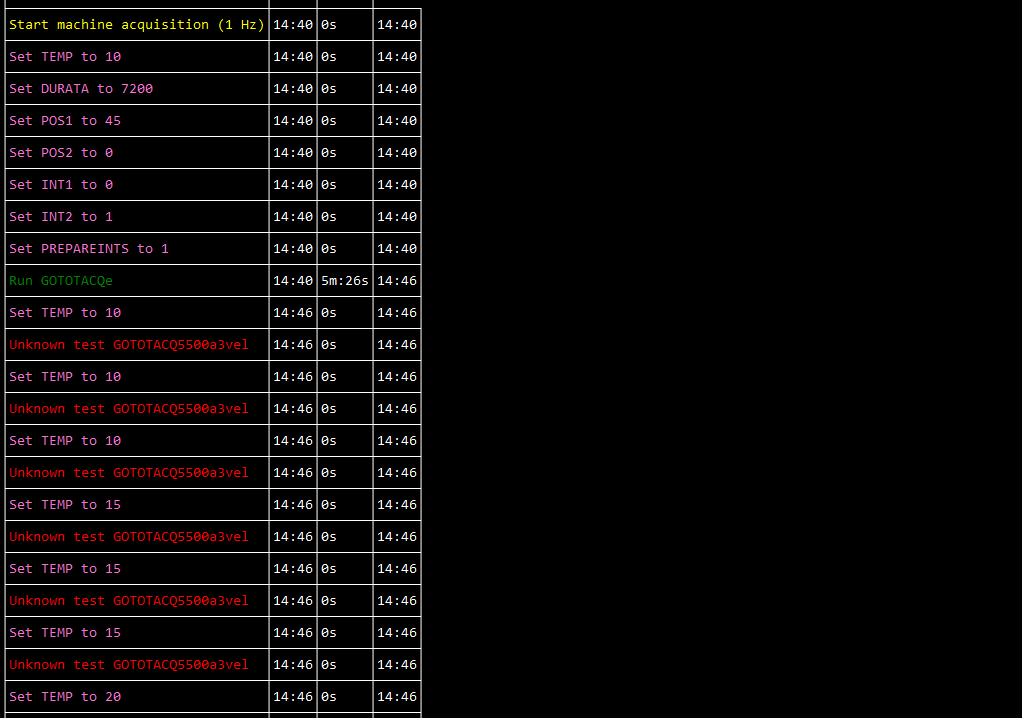
I developed an app that uses tview.Table with many linses (much more lines that can actually be visualized) with expansion set. Before scrolling, the expansion is correctly applied. If I scroll down to see "hidden" lines the table "looses" the expansion properties and the columns are not expanded (as if SetExpansion was not called). If I scroll again to the top, the expansion is applied again.
Scrolled to the top:
immagine
On line below the top:
immagine
Is this the expected behaviour?
Thanks in advance for support and thank you for this great library.

Originally created by @p3g4asus on GitHub (May 9, 2022). Original GitHub issue: https://github.com/rivo/tview/issues/731 Hi, I developed an app that uses tview.Table with many linses (much more lines that can actually be visualized) with expansion set. Before scrolling, the expansion is correctly applied. If I scroll down to see "hidden" lines the table "looses" the expansion properties and the columns are not expanded (as if SetExpansion was not called). If I scroll again to the top, the expansion is applied again. Scrolled to the top: ![immagine](https://user-images.githubusercontent.com/3275734/167418588-d80108c9-490e-4ab1-8a35-c45297dd6a49.png) On line below the top: ![immagine](https://user-images.githubusercontent.com/3275734/167418808-75d6145b-9f83-4f0a-a848-dcbd248c164d.png) Is this the expected behaviour? Thanks in advance for support and thank you for this great library.
kerem closed this issue 2026-03-04 01:05:50 +03:00
Author
Owner

@rivo commented on GitHub (May 14, 2022):

Are you sure you have the expansion set on all rows? From what you're describing, it seems that you only have the expansion value set on cells in the first row. So when it goes out of view, nothing is expanded anymore.

<!-- gh-comment-id:1126713444 --> @rivo commented on GitHub (May 14, 2022): Are you sure you have the expansion set on _all_ rows? From what you're describing, it seems that you only have the expansion value set on cells in the first row. So when it goes out of view, nothing is expanded anymore.
Author
Owner

@p3g4asus commented on GitHub (May 16, 2022):

Are you sure you have the expansion set on all rows? From what you're describing, it seems that you only have the expansion value set on cells in the first row. So when it goes out of view, nothing is expanded anymore.

You are absolutely right. I am sorry. That was my stupid fault. I am closing this issue.
Thanks again.

<!-- gh-comment-id:1127418626 --> @p3g4asus commented on GitHub (May 16, 2022): > Are you sure you have the expansion set on _all_ rows? From what you're describing, it seems that you only have the expansion value set on cells in the first row. So when it goes out of view, nothing is expanded anymore. You are absolutely right. I am sorry. That was my stupid fault. I am closing this issue. Thanks again.
Author
Owner

@rivo commented on GitHub (May 16, 2022):

No problem at all. I'm glad you were able to resolve it.

<!-- gh-comment-id:1127754395 --> @rivo commented on GitHub (May 16, 2022): No problem at all. I'm glad you were able to resolve it.
Sign in to join this conversation.
No milestone
No project
No assignees
1 participant
Notifications
Due date
The due date is invalid or out of range. Please use the format "yyyy-mm-dd".

No due date set.

Dependencies

No dependencies set.

Reference
starred/tview#535
No description provided.