[GH-ISSUE #575] Colors not being set/being "unset" #420

Closed
opened 2026-03-04 01:04:48 +03:00 by kerem · 5 comments
Owner

Originally created by @mimadrone on GitHub (Mar 6, 2021).
Original GitHub issue: https://github.com/rivo/tview/issues/575

Probably connected to #519 and #520, I'm seeing a whole slew of issues since I updated tcell and tview around colors. The code is pretty involved, but the gist is:

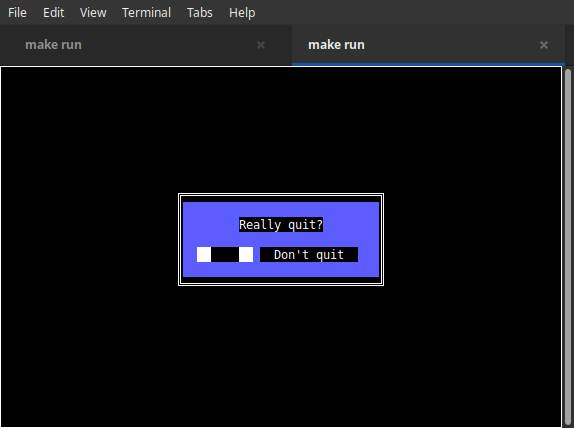
  • Borders always have tcell's background color instead of the background color of the box they belong to; if tcell's background color is not set, they have the terminal background color instead.
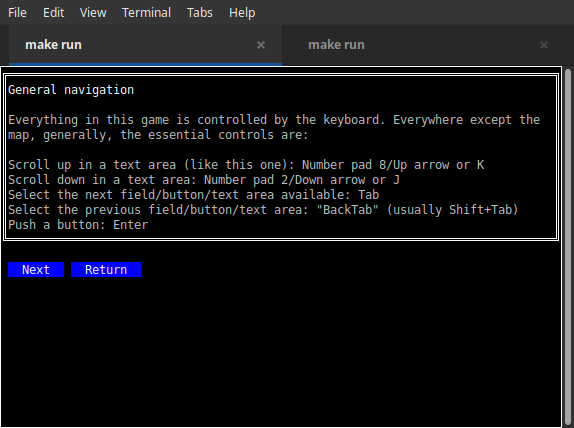
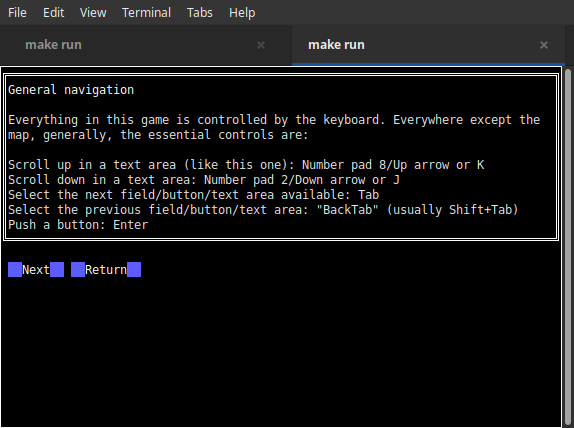
  • Button text has the color/background color from tcell likewise instead of from the button (e.g. I have tcell's default background color set to black, the button is blue -> a black rectangle in the middle of the blue button instead of it being solidly blue as before.)
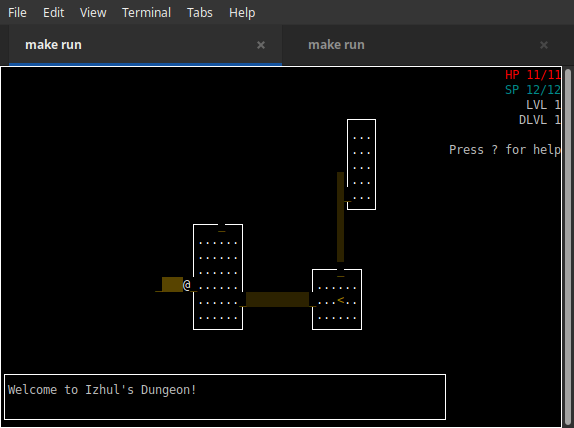
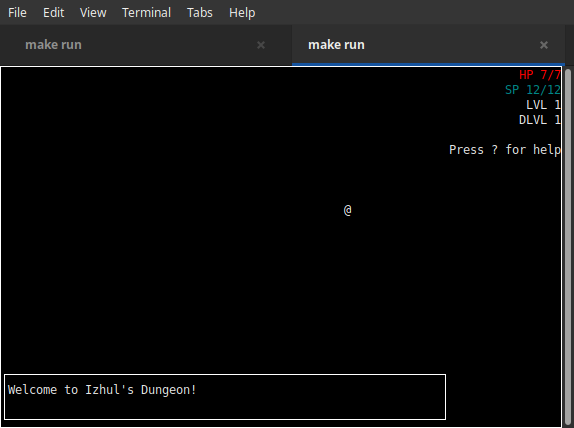
  • Some color choices seem to be being actively overwritten now — I have a type built on Box that draws a map with individual ASCII characters as "tiles" and all of those are now being drawn in the terminal default color instead of the color I set for them. (Nothing in my map-rendering code changed except updating tview and switching to tcell v2.)

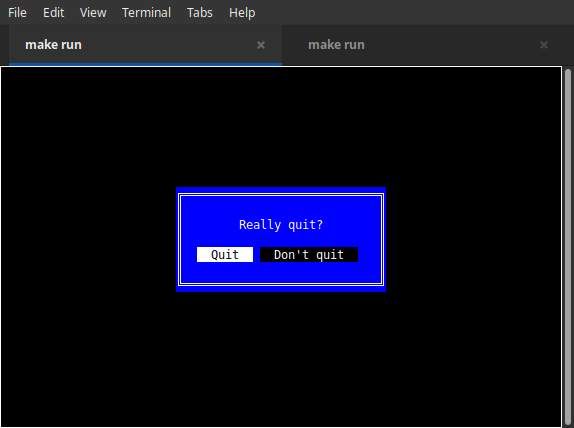
I'm attaching comparison screenshots showing 1) the map 2) a textbox and form and 3) a modal.
mapbefore
mapafter
helpbefore
helpafter
quitbefore
quitafter

Originally created by @mimadrone on GitHub (Mar 6, 2021). Original GitHub issue: https://github.com/rivo/tview/issues/575 Probably connected to #519 and #520, I'm seeing a whole slew of issues since I updated tcell and tview around colors. The code is pretty involved, but the gist is: - Borders always have tcell's background color instead of the background color of the box they belong to; if tcell's background color is not set, they have the terminal background color instead. - Button text has the color/background color from tcell likewise instead of from the button (e.g. I have tcell's default background color set to black, the button is blue -> a black rectangle in the middle of the blue button instead of it being solidly blue as before.) - Some color choices seem to be being actively overwritten now — I have a type built on Box that draws a map with individual ASCII characters as "tiles" and all of those are now being drawn in the terminal default color instead of the color I set for them. (Nothing in my map-rendering code changed except updating tview and switching to tcell v2.) I'm attaching comparison screenshots showing 1) the map 2) a textbox and form and 3) a modal. ![mapbefore](https://user-images.githubusercontent.com/5333939/110224639-33601200-7ed5-11eb-8de1-717c959e00bb.png) ![mapafter](https://user-images.githubusercontent.com/5333939/110224640-35c26c00-7ed5-11eb-95d0-d0282dba5b81.png) ![helpbefore](https://user-images.githubusercontent.com/5333939/110224641-3824c600-7ed5-11eb-9934-0b141511dc5a.png) ![helpafter](https://user-images.githubusercontent.com/5333939/110224642-39ee8980-7ed5-11eb-87a2-7b4bbbe166af.png) ![quitbefore](https://user-images.githubusercontent.com/5333939/110224644-3bb84d00-7ed5-11eb-9816-c602b2953174.png) ![quitafter](https://user-images.githubusercontent.com/5333939/110224645-3ce97a00-7ed5-11eb-8c16-02c48417b2c5.png)
kerem closed this issue 2026-03-04 01:04:49 +03:00
Author
Owner

@mimadrone commented on GitHub (Mar 7, 2021):

Addendum: having poked around a little, I suspect the actual issue here is that tcell.Color is now uint64 instead of int32 with the tcell v2 conversion and that something is not handling that well. However, since this affects unmodified tview types, I'm going to continue to consider this a tview bug.

<!-- gh-comment-id:792135666 --> @mimadrone commented on GitHub (Mar 7, 2021): Addendum: having poked around a little, I suspect the actual issue here is that tcell.Color is now uint64 instead of int32 with the tcell v2 conversion and that something is not handling that well. However, since this affects unmodified tview types, I'm going to continue to consider this a tview bug.
Author
Owner

@joegrasse commented on GitHub (Mar 8, 2021):

Looks like issue #521 might be related as well.

<!-- gh-comment-id:792812151 --> @joegrasse commented on GitHub (Mar 8, 2021): Looks like issue #521 might be related as well.
Author
Owner

@rivo commented on GitHub (Mar 12, 2021):

It seems that the default colour in tcell has a different meaning now. (I believe it used to be "transparent", i.e. "don't change", whereas now it means "the default background colour".) I can definitely reproduce the issue with the borders but I'm having trouble with your other two points:

Button text has the color/background color from tcell likewise instead of from the button (e.g. I have tcell's default background color set to black, the button is blue -> a black rectangle in the middle of the blue button instead of it being solidly blue as before.)

How do you style the buttons? I tried to set all kinds of colours on the button example in the repo but couldn't reproduce the issue seen in your screenshots. Can you post maybe post some code?

Some color choices seem to be being actively overwritten now — I have a type built on Box that draws a map with individual
ASCII characters as "tiles" and all of those are now being drawn in the terminal default color instead of the color I set for them. (Nothing in my map-rendering code changed except updating tview and switching to tcell v2.)

How do you draw these tiles? Do you use any method from tview or do you draw using tcell's Screen methods directly?

<!-- gh-comment-id:797327049 --> @rivo commented on GitHub (Mar 12, 2021): It seems that the default colour in `tcell` has a different meaning now. (I believe it used to be "transparent", i.e. "don't change", whereas now it means "the default background colour".) I can definitely reproduce the issue with the borders but I'm having trouble with your other two points: > Button text has the color/background color from tcell likewise instead of from the button (e.g. I have tcell's default background color set to black, the button is blue -> a black rectangle in the middle of the blue button instead of it being solidly blue as before.) How do you style the buttons? I tried to set all kinds of colours on the button example in the repo but couldn't reproduce the issue seen in your screenshots. Can you post maybe post some code? > Some color choices seem to be being actively overwritten now — I have a type built on Box that draws a map with individual ASCII characters as "tiles" and all of those are now being drawn in the terminal default color instead of the color I set for them. (Nothing in my map-rendering code changed except updating tview and switching to tcell v2.) How do you draw these tiles? Do you use any method from `tview` or do you draw using `tcell`'s `Screen` methods directly?
Author
Owner

@rivo commented on GitHub (Mar 12, 2021):

Actually, could you please upgrade to the latest tview version and let me know if it resolves your issue?

(Refer to https://github.com/rivo/tview/issues/520#issuecomment-797659408 for details.)

<!-- gh-comment-id:797660567 --> @rivo commented on GitHub (Mar 12, 2021): Actually, could you please upgrade to the latest `tview` version and let me know if it resolves your issue? (Refer to https://github.com/rivo/tview/issues/520#issuecomment-797659408 for details.)
Author
Owner

@mimadrone commented on GitHub (Mar 15, 2021):

Upgrading fixed it, yes!

(I suspect the reason you didn't see it repro, FTR, had to do with the fact that I'm using Pages. A standalone Modal did seem to work normally when I messed with it.)

<!-- gh-comment-id:799090580 --> @mimadrone commented on GitHub (Mar 15, 2021): Upgrading fixed it, yes! (I suspect the reason you didn't see it repro, FTR, had to do with the fact that I'm using Pages. A standalone Modal did seem to work normally when I messed with it.)
Sign in to join this conversation.
No milestone
No project
No assignees
1 participant
Notifications
Due date
The due date is invalid or out of range. Please use the format "yyyy-mm-dd".

No due date set.

Dependencies

No dependencies set.

Reference
starred/tview#420
No description provided.