[GH-ISSUE #557] TextView.SetText() doesn't seem to clear existing text #408

Closed
opened 2026-03-04 01:04:42 +03:00 by kerem · 7 comments
Owner

Originally created by @farzadmf on GitHub (Jan 27, 2021).
Original GitHub issue: https://github.com/rivo/tview/issues/557

Hi,
First of all, thank you for this cool package you created.

I had a question about SetText() in a TextView; this is a minimal sample I have:

package main

import (
	"log"

	"github.com/gdamore/tcell/v2"
	"github.com/rivo/tview"
)

func main() {
	tview.Styles.PrimitiveBackgroundColor = tcell.ColorDefault
	app := tview.NewApplication()

	text1 := tview.NewTextView()

	text1.SetBorder(true).
		SetTitle(" text 1 ")

	grid := tview.NewGrid().
		SetBorders(false)

	grid.SetBorderPadding(1, 1, 1, 1)

	grid.AddItem(text1, 0, 0, 1, 1, 0, 0, false)

	grid.SetInputCapture(func(event *tcell.EventKey) *tcell.EventKey {
		switch event.Rune() {
		case '1':
			text1.SetText("something long on the text view")
		case '2':
			text1.SetText("something shorter")
		}
		return event
	})

	if err := app.SetRoot(grid, true).SetFocus(grid).Run(); err != nil {
		log.Fatal(err)
	}
}

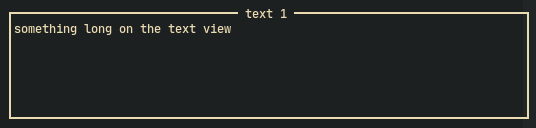
If I press 1, the text is displayed in the text field:
image

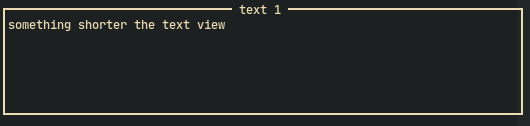
And then if I press 2, the shorter text is displayed, but the text is not replaced:
image

You see that only something long on is replaced by something shorter, and the rest of the text stays there!

Is there something that I need to do that I'm not?

Thank you

Originally created by @farzadmf on GitHub (Jan 27, 2021). Original GitHub issue: https://github.com/rivo/tview/issues/557 Hi, First of all, thank you for this cool package you created. I had a question about `SetText()` in a `TextView`; this is a minimal sample I have: ```go package main import ( "log" "github.com/gdamore/tcell/v2" "github.com/rivo/tview" ) func main() { tview.Styles.PrimitiveBackgroundColor = tcell.ColorDefault app := tview.NewApplication() text1 := tview.NewTextView() text1.SetBorder(true). SetTitle(" text 1 ") grid := tview.NewGrid(). SetBorders(false) grid.SetBorderPadding(1, 1, 1, 1) grid.AddItem(text1, 0, 0, 1, 1, 0, 0, false) grid.SetInputCapture(func(event *tcell.EventKey) *tcell.EventKey { switch event.Rune() { case '1': text1.SetText("something long on the text view") case '2': text1.SetText("something shorter") } return event }) if err := app.SetRoot(grid, true).SetFocus(grid).Run(); err != nil { log.Fatal(err) } } ``` If I press `1`, the text is displayed in the text field: ![image](https://user-images.githubusercontent.com/5768792/105997573-c5c0fa80-6079-11eb-8d0d-c895ae7c1f6f.png) And then if I press `2`, the shorter text is displayed, but the text is not replaced: ![image](https://user-images.githubusercontent.com/5768792/105997702-e9844080-6079-11eb-85f4-ab2145adb429.png) You see that only `something long on` is replaced by `something shorter`, and the rest of the text stays there! Is there something that I need to do that I'm not? Thank you
kerem closed this issue 2026-03-04 01:04:42 +03:00
Author
Owner

@farzadmf commented on GitHub (Jan 28, 2021):

Seems like the issue here is the line where I set PrimitiveBackgroundColor to be ColorDefault. For some reason, the default background color when tview creates an app is a very bright grey (at least for my eyes 🙂 ), so I researched and saw the line as a solution.

But from what I understand, it basically sets the background to be transparent, which creates the illusion that things are not being "cleaned up" visually.

Closing this since I found the solution.

<!-- gh-comment-id:768781264 --> @farzadmf commented on GitHub (Jan 28, 2021): Seems like the issue here is the line where I set `PrimitiveBackgroundColor` to be `ColorDefault`. For some reason, the default background color when `tview` creates an app is a very bright grey (at least for my eyes :slightly_smiling_face: ), so I researched and saw the line as a solution. But from what I understand, it basically sets the background to be transparent, which creates the illusion that things are not being "cleaned up" visually. Closing this since I found the solution.
Author
Owner

@rivo commented on GitHub (Jan 28, 2021):

Thanks for the update. You can search for ColorDefault in the issues and you'll find a few conversations around the same topic. Indeed, ColorDefault means "transparent". There is currently no way to use the custom colours of your terminal so you'll have to decide on specific colours. (There are also issues about this topic.)

<!-- gh-comment-id:768900720 --> @rivo commented on GitHub (Jan 28, 2021): Thanks for the update. You can search for `ColorDefault` in the issues and you'll find a few conversations around the same topic. Indeed, `ColorDefault` means "transparent". There is currently no way to use the custom colours of your terminal so you'll have to decide on specific colours. (There are also issues about this topic.)
Author
Owner

@farzadmf commented on GitHub (Jan 28, 2021):

@rivo thank you for replying to a closed issue 🙂

My go-to terminal UI framework was termui, but I wanted to also try tview since it looks very promising 👍

termui seems to pick up the default terminal colors by default, so maybe the same can be done here. I think the difference is that they're based on termbox-go, but maybe the general idea can be applied here too.

Of course, I'm just speculating and I may be totally saying BS 😁

<!-- gh-comment-id:769079002 --> @farzadmf commented on GitHub (Jan 28, 2021): @rivo thank you for replying to a closed issue :slightly_smiling_face: My go-to terminal UI framework was [termui](https://github.com/gizak/termui), but I wanted to also try `tview` since it looks very promising :+1: `termui` seems to pick up the default terminal colors by default, so maybe the same can be done here. I think the difference is that they're based on `termbox-go`, but maybe the general idea can be applied here too. Of course, I'm just speculating and I may be totally saying BS :grin:
Author
Owner

@rivo commented on GitHub (Jan 28, 2021):

This has been discussed before. Check out gdamore/tcell#292. tview is based on tcell so I'm dependent on whatever is possible there.

<!-- gh-comment-id:769175147 --> @rivo commented on GitHub (Jan 28, 2021): This has been discussed before. Check out gdamore/tcell#292. `tview` is based on `tcell` so I'm dependent on whatever is possible there.
Author
Owner

@farzadmf commented on GitHub (Jan 28, 2021):

Yup, that's why I said I'm speculating since the two libraries use different underlying "frameworks".

Just one question actually: what setting controls the highlight colors? I looked at tview.Styles, and I don't see a mention of "highlight" there, is it controlled by one of the "contrast background" ones?

Also, while I have you here ;), was wondering about scrollbar support (at least displaying it), I see #396 being open, but it's almost 1 year old.

<!-- gh-comment-id:769259702 --> @farzadmf commented on GitHub (Jan 28, 2021): Yup, that's why I said I'm _speculating_ since the two libraries use different underlying "frameworks". Just one question actually: what setting controls the highlight colors? I looked at `tview.Styles`, and I don't see a mention of "highlight" there, is it controlled by one of the "contrast background" ones? Also, while I have you here ;), was wondering about scrollbar support (at least displaying it), I see #396 being open, but it's almost 1 year old.
Author
Owner

@rivo commented on GitHub (Jan 28, 2021):

I'm not sure I understand what you mean by "highlight colors". If you're referring to something like a selected item in List, that object has its own parameters that control the colour and they're set in the constructor to something like Styles.PrimitiveBackgroundColor.

I know there are some items that have been open for a long time. I'd love to work on new features like that. Unfortunately, the little time I have to work on tview is spent dealing with all the new issues, which are mostly smaller additions to the package or reproducing bug reports. And those "smaller" additions often turn out to be larger efforts (e.g. anything with Unicode is usually a major undertaking).

I'm trying to find ways to make more time for tview so hopefully by then, I'll be able to get to some of the features that have stuck around for a long time.

<!-- gh-comment-id:769267510 --> @rivo commented on GitHub (Jan 28, 2021): I'm not sure I understand what you mean by "highlight colors". If you're referring to something like a selected item in `List`, that object has its own parameters that control the colour and they're set in the constructor to something like `Styles.PrimitiveBackgroundColor`. I know there are some items that have been open for a long time. I'd love to work on new features like that. Unfortunately, the little time I have to work on `tview` is spent dealing with all the new issues, which are mostly smaller additions to the package or reproducing bug reports. And those "smaller" additions often turn out to be larger efforts (e.g. anything with Unicode is usually a major undertaking). I'm trying to find ways to make more time for `tview` so hopefully by then, I'll be able to get to some of the features that have stuck around for a long time.
Author
Owner

@farzadmf commented on GitHub (Jan 28, 2021):

Thank you for the explanation.

And that's great to hear you're planning to put more time. Just to clarify, the things I said don't change the fact that you already have created an awesome framework. Kudos to you for that.

<!-- gh-comment-id:769301482 --> @farzadmf commented on GitHub (Jan 28, 2021): Thank you for the explanation. And that's great to hear you're planning to put more time. Just to clarify, the things I said don't change the fact that you already have created an awesome framework. Kudos to you for that.
Sign in to join this conversation.
No milestone
No project
No assignees
1 participant
Notifications
Due date
The due date is invalid or out of range. Please use the format "yyyy-mm-dd".

No due date set.

Dependencies

No dependencies set.

Reference
starred/tview#408
No description provided.