[GH-ISSUE #544] Double borders rendered incorrectly on vmware console #399

Closed
opened 2026-03-04 01:04:38 +03:00 by kerem · 2 comments
Owner

Originally created by @SimoneLazzaris on GitHub (Jan 7, 2021).
Original GitHub issue: https://github.com/rivo/tview/issues/544

Hi all;
I've got an application that runs fine in terminal emulator but shows incorrect double borders when run through vmware console.

Screenshot_20210107_110444

Single line borders are displayed correctly.
I've already tried and set LC_CTYPE as suggested in the FAQ.

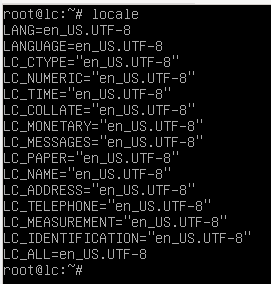
My locale:
Screenshot_20210107_110644

Any tips? It would also be acceptable to convert all double borders to single one

Originally created by @SimoneLazzaris on GitHub (Jan 7, 2021). Original GitHub issue: https://github.com/rivo/tview/issues/544 Hi all; I've got an application that runs fine in terminal emulator but shows incorrect double borders when run through vmware console. ![Screenshot_20210107_110444](https://user-images.githubusercontent.com/11316967/103879465-3064c300-50d8-11eb-85f3-9497d6b9c6fb.png) Single line borders are displayed correctly. I've already tried and set LC_CTYPE as suggested in the FAQ. My locale: ![Screenshot_20210107_110644](https://user-images.githubusercontent.com/11316967/103879689-7c176c80-50d8-11eb-9fd9-371e50c36d81.png) Any tips? It would also be acceptable to convert all double borders to single one
kerem closed this issue 2026-03-04 01:04:38 +03:00
Author
Owner

@rivo commented on GitHub (Jan 11, 2021):

It looks to me like your terminal emulator isn't able to print all the required characters. For example, if you run something like this in your terminal:

package main

import (
	"fmt"
)

func main() {
	fmt.Println("\u2550")
}

You should see a double line like this:

image

If you don't, then the font used by the emulator may be incomplete. You could check the settings and change the font maybe, I don't know. Or like you suggested yourself, change the semigraphics characters used in the Borders variable.

Let me know if any of this helps.

<!-- gh-comment-id:758087586 --> @rivo commented on GitHub (Jan 11, 2021): It looks to me like your terminal emulator isn't able to print all the required characters. For example, if you run something like this in your terminal: ```go package main import ( "fmt" ) func main() { fmt.Println("\u2550") } ``` You should see a double line like this: ![image](https://user-images.githubusercontent.com/480930/104213356-79997780-5436-11eb-914e-ec3567d733a1.png) If you don't, then the font used by the emulator may be incomplete. You could check the settings and change the font maybe, I don't know. Or like you suggested yourself, change the semigraphics characters used in the [`Borders`](https://pkg.go.dev/github.com/rivo/tview#Borders) variable. Let me know if any of this helps.
Author
Owner

@SimoneLazzaris commented on GitHub (Jan 15, 2021):

I've ended up changing the semigraphics characters to always use single borders. Thanks

<!-- gh-comment-id:761066136 --> @SimoneLazzaris commented on GitHub (Jan 15, 2021): I've ended up changing the semigraphics characters to always use single borders. Thanks
Sign in to join this conversation.
No milestone
No project
No assignees
1 participant
Notifications
Due date
The due date is invalid or out of range. Please use the format "yyyy-mm-dd".

No due date set.

Dependencies

No dependencies set.

Reference
starred/tview#399
No description provided.