[GH-ISSUE #49] Feature Request: Modal with flexbox items #34

Closed
opened 2026-03-04 01:01:17 +03:00 by kerem · 3 comments
Owner

Originally created by @Hecatoncheir on GitHub (Feb 4, 2018).
Original GitHub issue: https://github.com/rivo/tview/issues/49

It will be useful for add some items to modal.
Some description of input for example.

Originally created by @Hecatoncheir on GitHub (Feb 4, 2018). Original GitHub issue: https://github.com/rivo/tview/issues/49 It will be useful for add some items to modal. Some description of input for example.
kerem closed this issue 2026-03-04 01:01:18 +03:00
Author
Owner

@rivo commented on GitHub (Feb 4, 2018):

At the moment, the modal is basically a message window like the browsers' alert() or confirm() modals. I'm not sure I understand what you mean by "description of input". Could you provide me with an example?

<!-- gh-comment-id:362933026 --> @rivo commented on GitHub (Feb 4, 2018): At the moment, the modal is basically a message window like the browsers' `alert()` or `confirm()` modals. I'm not sure I understand what you mean by "description of input". Could you provide me with an example?
Author
Owner

@Hecatoncheir commented on GitHub (Feb 5, 2018):

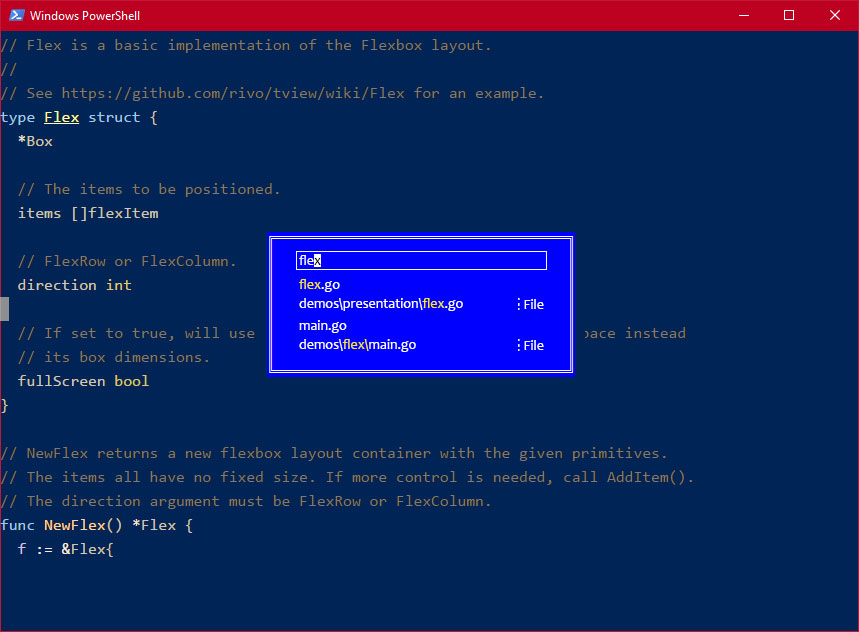
Yes, something like this:
example

<!-- gh-comment-id:363184112 --> @Hecatoncheir commented on GitHub (Feb 5, 2018): Yes, something like this: ![example](https://user-images.githubusercontent.com/910917/35822963-ffbf5088-0abe-11e8-933d-6cb5bc93d7c7.jpg)
Author
Owner

@rivo commented on GitHub (Feb 6, 2018):

This looks much more specific than just a form. I don't know exactly what it does but it looks like an InputField for the search along with a TextView for the results. As this seems too far from the idea of the Modal as it is at the moment, I would suggest that you build this yourself:

The latest commit for tview allows you to provide nil values to the Flex layout. This should allow you to center your box on the screen even if you don't know the actual screen size.

Alternatively, you could build your own Primitive. It's a bit more complicated but it will give you precise control over all aspects. You can check out the Modal class on how this is done. Here's an example which I quickly wrote up for your case (I haven't run this, it's just a rough draft):

package tview

import (
	"github.com/gdamore/tcell"
	"github.com/rivo/tview"
)

// SearchBox let's the user search for text.
type SearchBox struct {
	*Box

	// The input field for queries.
	query *tview.InputField

	// The search results.
	results *tview.TextView
}

// NewSearchBox returns a new search box.
func NewSearchBox() *SearchBox {
	m := &SearchBox{
		Box:     tview.NewBox(),
		query:   tview.NewInputField(),
		results: tview.NewTextView(),
	}
	m.focus = m
	return m
}

// Focus is called when this primitive receives focus.
func (m *SearchBox) Focus(delegate func(p tview.Primitive)) {
	delegate(m.query) // When we receive focus, we delegate it to the input field.
}

// HasFocus returns whether or not this primitive has focus.
func (m *SearchBox) HasFocus() bool {
	return m.query.HasFocus() // We have focus if the contained input field has focus.
}

// Draw draws this primitive onto the screen.
func (m *SearchBox) Draw(screen tcell.Screen) {
	// Calculate the position and size of this search box.
	screenWidth, screenHeight := screen.Size()
	//...
	//m.SetRect(...)
	//m.query.SetRect(...)
	//m.results.SetRect(...)

	// Draw the contained primitives.
	m.query.Draw(screen)
	m.results.Draw(screen)
}

Let me know if this helps.

<!-- gh-comment-id:363396514 --> @rivo commented on GitHub (Feb 6, 2018): This looks much more specific than just a form. I don't know exactly what it does but it looks like an `InputField` for the search along with a `TextView` for the results. As this seems too far from the idea of the `Modal` as it is at the moment, I would suggest that you build this yourself: The latest commit for `tview` allows you to provide `nil` values to the `Flex` layout. This should allow you to center your box on the screen even if you don't know the actual screen size. Alternatively, you could build your own `Primitive`. It's a bit more complicated but it will give you precise control over all aspects. You can check out the `Modal` class on how this is done. Here's an example which I quickly wrote up for your case (I haven't run this, it's just a rough draft): ```go package tview import ( "github.com/gdamore/tcell" "github.com/rivo/tview" ) // SearchBox let's the user search for text. type SearchBox struct { *Box // The input field for queries. query *tview.InputField // The search results. results *tview.TextView } // NewSearchBox returns a new search box. func NewSearchBox() *SearchBox { m := &SearchBox{ Box: tview.NewBox(), query: tview.NewInputField(), results: tview.NewTextView(), } m.focus = m return m } // Focus is called when this primitive receives focus. func (m *SearchBox) Focus(delegate func(p tview.Primitive)) { delegate(m.query) // When we receive focus, we delegate it to the input field. } // HasFocus returns whether or not this primitive has focus. func (m *SearchBox) HasFocus() bool { return m.query.HasFocus() // We have focus if the contained input field has focus. } // Draw draws this primitive onto the screen. func (m *SearchBox) Draw(screen tcell.Screen) { // Calculate the position and size of this search box. screenWidth, screenHeight := screen.Size() //... //m.SetRect(...) //m.query.SetRect(...) //m.results.SetRect(...) // Draw the contained primitives. m.query.Draw(screen) m.results.Draw(screen) } ``` Let me know if this helps.
Sign in to join this conversation.
No milestone
No project
No assignees
1 participant
Notifications
Due date
The due date is invalid or out of range. Please use the format "yyyy-mm-dd".

No due date set.

Dependencies

No dependencies set.

Reference
starred/tview#34
No description provided.