[GH-ISSUE #466] Input field can not be fully displayed #335

Closed
opened 2026-03-04 01:04:06 +03:00 by kerem · 4 comments
Owner

Originally created by @zhouke66 on GitHub (Jul 8, 2020).
Original GitHub issue: https://github.com/rivo/tview/issues/466

I need multiple input field and switch them with pressing Up or Down key

This code is shown below

package main

import (
	"strconv"

	"github.com/gdamore/tcell"
	"github.com/rivo/tview"
)

func switchNextField(app *tview.Application, inputField [20]tview.Primitive) {
	focusLabel := app.GetFocus().(*tview.InputField).GetLabel()
	focusIndex, _ := strconv.Atoi(focusLabel)

	if focusIndex == 19 {
		focusIndex = 0
	} else {
		focusIndex = focusIndex + 1
	}

	app.SetFocus(inputField[focusIndex])
}

func switchLastField(app *tview.Application, inputField [20]tview.Primitive) {
	focusLabel := app.GetFocus().(*tview.InputField).GetLabel()
	focusIndex, _ := strconv.Atoi(focusLabel)

	if focusIndex == 0 {
		focusIndex = 19
	} else {
		focusIndex = focusIndex - 1
	}

	app.SetFocus(inputField[focusIndex])
}

func main() {
	app := tview.NewApplication()
	var inputField [20]tview.Primitive
	var inputText [20]tview.Primitive

	inputFlex := tview.NewFlex().SetDirection(tview.FlexRow)

	for i := 0; i < 20; i++ {
		inputField[i] = tview.NewInputField().SetLabel(strconv.Itoa(i)).
			SetLabelWidth(15).SetText(strconv.Itoa(i)).SetFieldWidth(30)

		inputText[i] = tview.NewTextView().SetText(strconv.Itoa(i))

		inputFlex.AddItem(inputField[i], 0, 1, true).
			AddItem(inputText[i], 0, 1, true)
	}

	app.SetInputCapture(func(event *tcell.EventKey) *tcell.EventKey {
		if _, ok := app.GetFocus().(*tview.InputField); ok {
			switch event.Key() {
			case tcell.KeyTab, tcell.KeyEnter, tcell.KeyDown:
				switchNextField(app, inputField)
			case tcell.KeyUp:
				switchLastField(app, inputField)
			}
		}

		return event
	})

	flex := tview.NewFlex().SetDirection(tview.FlexRow).
		AddItem(tview.NewBox(), 0, 1, false).AddItem(inputFlex, 0, 1, true).
		AddItem(tview.NewBox(), 0, 1, false)

	if err := app.SetRoot(flex, true).Run(); err != nil {
		panic(err)
	}
}

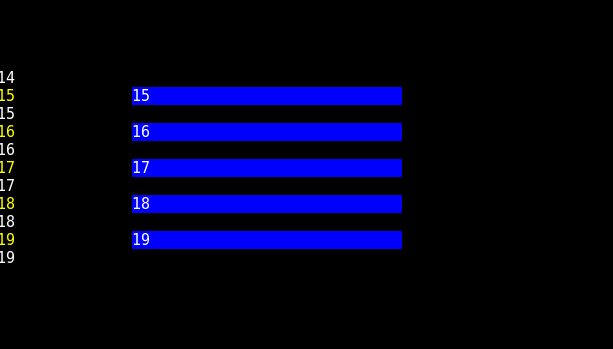
Run the code, only the last few input field are displayed on the screen.
input
How to display the focused field when press Up or Down key?
If you have answer and discuss this issue, please tell me. Thanks

Originally created by @zhouke66 on GitHub (Jul 8, 2020). Original GitHub issue: https://github.com/rivo/tview/issues/466 I need multiple input field and switch them with pressing Up or Down key This code is shown below ``` package main import ( "strconv" "github.com/gdamore/tcell" "github.com/rivo/tview" ) func switchNextField(app *tview.Application, inputField [20]tview.Primitive) { focusLabel := app.GetFocus().(*tview.InputField).GetLabel() focusIndex, _ := strconv.Atoi(focusLabel) if focusIndex == 19 { focusIndex = 0 } else { focusIndex = focusIndex + 1 } app.SetFocus(inputField[focusIndex]) } func switchLastField(app *tview.Application, inputField [20]tview.Primitive) { focusLabel := app.GetFocus().(*tview.InputField).GetLabel() focusIndex, _ := strconv.Atoi(focusLabel) if focusIndex == 0 { focusIndex = 19 } else { focusIndex = focusIndex - 1 } app.SetFocus(inputField[focusIndex]) } func main() { app := tview.NewApplication() var inputField [20]tview.Primitive var inputText [20]tview.Primitive inputFlex := tview.NewFlex().SetDirection(tview.FlexRow) for i := 0; i < 20; i++ { inputField[i] = tview.NewInputField().SetLabel(strconv.Itoa(i)). SetLabelWidth(15).SetText(strconv.Itoa(i)).SetFieldWidth(30) inputText[i] = tview.NewTextView().SetText(strconv.Itoa(i)) inputFlex.AddItem(inputField[i], 0, 1, true). AddItem(inputText[i], 0, 1, true) } app.SetInputCapture(func(event *tcell.EventKey) *tcell.EventKey { if _, ok := app.GetFocus().(*tview.InputField); ok { switch event.Key() { case tcell.KeyTab, tcell.KeyEnter, tcell.KeyDown: switchNextField(app, inputField) case tcell.KeyUp: switchLastField(app, inputField) } } return event }) flex := tview.NewFlex().SetDirection(tview.FlexRow). AddItem(tview.NewBox(), 0, 1, false).AddItem(inputFlex, 0, 1, true). AddItem(tview.NewBox(), 0, 1, false) if err := app.SetRoot(flex, true).Run(); err != nil { panic(err) } } ``` Run the code, only the last few input field are displayed on the screen. ![input](https://user-images.githubusercontent.com/37580718/86871002-03752a80-c10c-11ea-8c68-fbc1038a1893.png) How to display the focused field when press Up or Down key? If you have answer and discuss this issue, please tell me. Thanks
kerem closed this issue 2026-03-04 01:04:07 +03:00
Author
Owner

@rivo commented on GitHub (Jul 12, 2020):

You might want to use Grid instead of Flex here. Grid has SetOffset() which allows you to scroll the grid elements.

<!-- gh-comment-id:657230898 --> @rivo commented on GitHub (Jul 12, 2020): You might want to use `Grid` instead of `Flex` here. `Grid` has [`SetOffset()`](https://pkg.go.dev/github.com/rivo/tview?tab=doc#Grid.SetOffset) which allows you to scroll the grid elements.
Author
Owner

@zhouke66 commented on GitHub (Jul 15, 2020):

Thanks for your suggestion. According to your suggestion I wrote the following code
package main

import (
	"strconv"

	"github.com/gdamore/tcell"
	"github.com/rivo/tview"
)

func switchNextField(app *tview.Application, inputField [10]tview.Primitive) {
	focusLabel := app.GetFocus().(*tview.InputField).GetLabel()
	focusIndex, _ := strconv.Atoi(focusLabel)

	if focusIndex == 9 {
		focusIndex = 0
	} else {
		focusIndex = focusIndex + 1
	}

	app.SetFocus(inputField[focusIndex])
}

func switchLastField(app *tview.Application, inputField [10]tview.Primitive) {
	focusLabel := app.GetFocus().(*tview.InputField).GetLabel()
	focusIndex, _ := strconv.Atoi(focusLabel)

	if focusIndex == 0 {
		focusIndex = 9
	} else {
		focusIndex = focusIndex - 1
	}

	app.SetFocus(inputField[focusIndex])
}

func main() {
	app := tview.NewApplication()
	var inputField [10]tview.Primitive

	grid := tview.NewGrid().
		SetSize(20, 0, 1, 0).
		SetColumns(0, -3, 0)

	grid.SetBorders(true).SetBackgroundColor(tcell.ColorBlack)

	for i := 0; i < 10; i++ {
		inputField[i] = tview.NewInputField().SetLabel(strconv.Itoa(i)).
			SetLabelWidth(15).SetText(strconv.Itoa(i)).SetFieldWidth(30)

		grid.AddItem(inputField[i], i, 1, 1, 1, 0, 0, true)
	}

	app.SetInputCapture(func(event *tcell.EventKey) *tcell.EventKey {
		if _, ok := app.GetFocus().(*tview.InputField); ok {
			switch event.Key() {
			case tcell.KeyTab, tcell.KeyEnter, tcell.KeyDown:
				switchNextField(app, inputField)
			case tcell.KeyUp:
				switchLastField(app, inputField)
			}
		}

		return event
	})

	flex := tview.NewFlex().SetDirection(tview.FlexRow).
		AddItem(tview.NewBox(), 0, 1, false).AddItem(grid, 0, 1, true).
		AddItem(tview.NewBox(), 0, 1, false)

	if err := app.SetRoot(flex, true).Run(); err != nil {
		panic(err)
	}
}

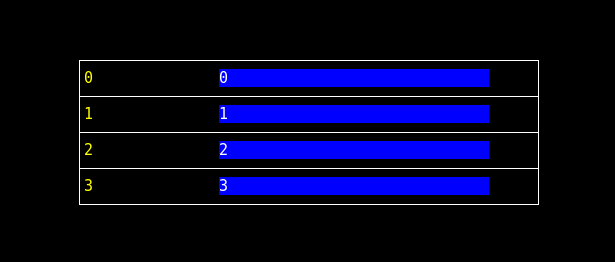
Run the code, four input field are displayed
image
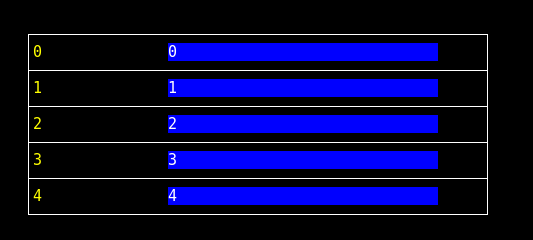
But after pressing Down key in the fourth input field, the number of input field be changed to 5.
image

May I ask why?

<!-- gh-comment-id:658529591 --> @zhouke66 commented on GitHub (Jul 15, 2020): Thanks for your suggestion. According to your suggestion I wrote the following code package main ``` import ( "strconv" "github.com/gdamore/tcell" "github.com/rivo/tview" ) func switchNextField(app *tview.Application, inputField [10]tview.Primitive) { focusLabel := app.GetFocus().(*tview.InputField).GetLabel() focusIndex, _ := strconv.Atoi(focusLabel) if focusIndex == 9 { focusIndex = 0 } else { focusIndex = focusIndex + 1 } app.SetFocus(inputField[focusIndex]) } func switchLastField(app *tview.Application, inputField [10]tview.Primitive) { focusLabel := app.GetFocus().(*tview.InputField).GetLabel() focusIndex, _ := strconv.Atoi(focusLabel) if focusIndex == 0 { focusIndex = 9 } else { focusIndex = focusIndex - 1 } app.SetFocus(inputField[focusIndex]) } func main() { app := tview.NewApplication() var inputField [10]tview.Primitive grid := tview.NewGrid(). SetSize(20, 0, 1, 0). SetColumns(0, -3, 0) grid.SetBorders(true).SetBackgroundColor(tcell.ColorBlack) for i := 0; i < 10; i++ { inputField[i] = tview.NewInputField().SetLabel(strconv.Itoa(i)). SetLabelWidth(15).SetText(strconv.Itoa(i)).SetFieldWidth(30) grid.AddItem(inputField[i], i, 1, 1, 1, 0, 0, true) } app.SetInputCapture(func(event *tcell.EventKey) *tcell.EventKey { if _, ok := app.GetFocus().(*tview.InputField); ok { switch event.Key() { case tcell.KeyTab, tcell.KeyEnter, tcell.KeyDown: switchNextField(app, inputField) case tcell.KeyUp: switchLastField(app, inputField) } } return event }) flex := tview.NewFlex().SetDirection(tview.FlexRow). AddItem(tview.NewBox(), 0, 1, false).AddItem(grid, 0, 1, true). AddItem(tview.NewBox(), 0, 1, false) if err := app.SetRoot(flex, true).Run(); err != nil { panic(err) } } ``` Run the code, four input field are displayed ![image](https://user-images.githubusercontent.com/37580718/87501082-ca4f3400-c690-11ea-8e33-5a89ff371e7b.png) But after pressing Down key in the fourth input field, the number of input field be changed to 5. ![image](https://user-images.githubusercontent.com/37580718/87501190-10a49300-c691-11ea-94aa-89ebbf874df9.png) May I ask why?
Author
Owner

@rivo commented on GitHub (Sep 15, 2020):

I'm sorry but your code doesn't compile. Can you please make it compile first and post it again? I'll have a look then.

<!-- gh-comment-id:692634002 --> @rivo commented on GitHub (Sep 15, 2020): I'm sorry but your code doesn't compile. Can you please make it compile first and post it again? I'll have a look then.
Author
Owner

@rivo commented on GitHub (Jan 11, 2021):

If this topic is still relevant, please open a new issue with your answer and reference this one.

<!-- gh-comment-id:757954319 --> @rivo commented on GitHub (Jan 11, 2021): If this topic is still relevant, please open a new issue with your answer and reference this one.
Sign in to join this conversation.
No milestone
No project
No assignees
1 participant
Notifications
Due date
The due date is invalid or out of range. Please use the format "yyyy-mm-dd".

No due date set.

Dependencies

No dependencies set.

Reference
starred/tview#335
No description provided.