[GH-ISSUE #448] Escaped and then colored brackets rendered wrong #323

Closed
opened 2026-03-04 01:03:58 +03:00 by kerem · 6 comments
Owner

Originally created by @gnojus on GitHub (May 21, 2020).
Original GitHub issue: https://github.com/rivo/tview/issues/448

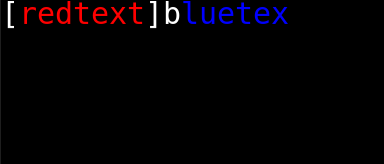
If one escapes bracketed text and then colors it with tags, the text might be rendered wrong. Here is example code:

package main

import (
	"strings"

	"github.com/rivo/tview"
)

func main() {
	text := "[redtext]bluetext"
	text = tview.Escape(text)
	// "[redtext[]bluetext"
	text = strings.ReplaceAll(text, "redtext", "[red]redtext[-]")
	text = strings.ReplaceAll(text, "bluetext", "[blue]bluetext[-]")
	// "[[red]redtext[-][][blue]bluetext[-]"
	tv := tview.NewTextView().SetDynamicColors(true).SetText(text)
	tview.NewApplication().SetRoot(tv, true).Run()
	// Note the missing 't' at the end.
}

that results in:
tview_color
(the missing 't' at the end too).
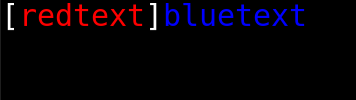
I managed to solve it by changing the escapePattern regex to include color tags inside too. -> \[((\[[a-zA-Z0-9_,;: \-\."#]+\]|[a-zA-Z0-9_,;: \-\."#]+)+?)\[(\[*)\]
github.com/rivo/tview@823f280c54/util.go (L25)
It's also necessary to change the replacement regex to [$1$3] in places like this:
github.com/rivo/tview@823f280c54/util.go (L226)
tview_color png
While this does seem to work correctly, I'm not sure, how good of a fix this is. I hope that it's at least clear what I mean.

Originally created by @gnojus on GitHub (May 21, 2020). Original GitHub issue: https://github.com/rivo/tview/issues/448 If one escapes bracketed text and then colors it with tags, the text might be rendered wrong. Here is example code: ```go package main import ( "strings" "github.com/rivo/tview" ) func main() { text := "[redtext]bluetext" text = tview.Escape(text) // "[redtext[]bluetext" text = strings.ReplaceAll(text, "redtext", "[red]redtext[-]") text = strings.ReplaceAll(text, "bluetext", "[blue]bluetext[-]") // "[[red]redtext[-][][blue]bluetext[-]" tv := tview.NewTextView().SetDynamicColors(true).SetText(text) tview.NewApplication().SetRoot(tv, true).Run() // Note the missing 't' at the end. } ``` that results in: ![tview_color](https://user-images.githubusercontent.com/46261165/82587447-e313ff80-9ba1-11ea-9a19-a9b8b28abdf5.png) (the missing 't' at the end too). I managed to solve it by changing the `escapePattern` regex to include color tags inside too. -> `\[((\[[a-zA-Z0-9_,;: \-\."#]+\]|[a-zA-Z0-9_,;: \-\."#]+)+?)\[(\[*)\]` https://github.com/rivo/tview/blob/823f280c5426cca5387aee61e3ab946af059dede/util.go#L25 It's also necessary to change the replacement regex to `[$1$3]` in places like this: https://github.com/rivo/tview/blob/823f280c5426cca5387aee61e3ab946af059dede/util.go#L226 ![tview_color png](https://user-images.githubusercontent.com/46261165/82588378-5c602200-9ba3-11ea-9ae7-447f9e68e406.png) While this does seem to work correctly, I'm not sure, how good of a fix this is. I hope that it's at least clear what I mean.
kerem closed this issue 2026-03-04 01:03:59 +03:00
Author
Owner

@rivo commented on GitHub (May 28, 2020):

Thanks for letting me know about this. So I have good news and bad news. The good news is, there was a bug which surfaced by investigating your issue. And I believe I was able to fix it with the latest commit.

The bad news is that it does not result in the output you expect. This is what your code will result in now:

image

But this is expected. The short explanation is, you cannot simply paste tags inside other tags without side effects. It will change the sequence of opening and closing brackets, thus creating new tags or breaking up existing tags. A bracket is not like an opening and closing HTML/XML tag which can be nested at will.

As you write in your comment, you end up with the following sequence:

[[red]redtext[-][][blue]bluetext[-]

Let me break this down into its components:

  1. [: Just one opening bracket. It's left as is.
  2. [red]: A color tag which changes the text to red.
  3. redtext: Normal text.
  4. [-]: A reset tag, changing the color back to white.
  5. []: Normal text, output as is (see package documentation).
  6. [blue]: A color tag which changes the text to blue.
  7. bluetext: Normal text.
  8. [-]: A reset tag, changing the color back to white.

The output that you want would be achieved like this:

[[red]redtext[-]][blue]bluetext[-]

I hope this helps explain how this works a bit.

<!-- gh-comment-id:635207815 --> @rivo commented on GitHub (May 28, 2020): Thanks for letting me know about this. So I have good news and bad news. The good news is, there was a bug which surfaced by investigating your issue. And I believe I was able to fix it with the latest commit. The bad news is that it does not result in the output you expect. This is what your code will result in now: ![image](https://user-images.githubusercontent.com/480930/83118537-c9f1de00-a0ce-11ea-98f2-d612dc4161d8.png) But this is expected. The short explanation is, you cannot simply paste tags inside other tags without side effects. It will change the sequence of opening and closing brackets, thus creating new tags or breaking up existing tags. A bracket is not like an opening and closing HTML/XML tag which can be nested at will. As you write in your comment, you end up with the following sequence: ```[[red]redtext[-][][blue]bluetext[-]``` Let me break this down into its components: 1. `[`: Just one opening bracket. It's left as is. 1. `[red]`: A color tag which changes the text to red. 1. `redtext`: Normal text. 1. `[-]`: A reset tag, changing the color back to white. 1. `[]`: Normal text, output as is (see package documentation). 1. `[blue]`: A color tag which changes the text to blue. 1. `bluetext`: Normal text. 1. `[-]`: A reset tag, changing the color back to white. The output that you want would be achieved like this: ```[[red]redtext[-]][blue]bluetext[-]``` I hope this helps explain how this works a bit.
Author
Owner

@gnojus commented on GitHub (May 28, 2020):

Thanks for the explanation, I now understand that my proposed fix won't work very well.
However, your suggested syntax [[red]redtext[-]][blue]bluetext[-] won't work for me, because I need to color the text dynamically. (I'm highlighting code in particular, which often has text like array[10]). Therefore I need to escape the text first and then color it, which would now produce unwanted result.

Maybe tview could use a different approach to escape the brackets? E. g. instead of escaping possibly-dangerous bracket pairs it could replace all the left and right brackets with special characters (either unused Unicode or special sequences like html has?)

<!-- gh-comment-id:635290451 --> @gnojus commented on GitHub (May 28, 2020): Thanks for the explanation, I now understand that my proposed fix won't work very well. However, your suggested syntax `[[red]redtext[-]][blue]bluetext[-]` won't work for me, because I need to color the text dynamically. (I'm highlighting code in particular, which often has text like `array[10]`). Therefore I need to escape the text first and then color it, which would now produce unwanted result. Maybe tview could use a different approach to escape the brackets? E. g. instead of escaping possibly-dangerous bracket pairs it could replace all the left and right brackets with special characters (either unused Unicode or special sequences like html has?)
Author
Owner

@rivo commented on GitHub (May 28, 2020):

Maybe there are better solutions, I don't know. But I'm not planning on breaking backwards-compatibility here.

In your example, you escape the text before adding your tags. Maybe escaping is not necessary here because by inserting your tags, you break up any previously (randomly occurring) tags anyway.

I mean, if you had something like array[index] in the original text, [index] would need to be escaped because it would be recognized as a colour. But if you intend to colour index anyway, you don't need to escape because in [[red]index[-]], the original brackets don't open a valid colour tag anymore. But it depends on your specific use case. If you still expect strings that look like tags but will not be coloured by your code, it will be difficult to detect.

Another alternative is to use ANSI escape sequences instead of these brackets and then translate them with TranslateANSI(). Then you won't have to think about these things too much.

<!-- gh-comment-id:635320834 --> @rivo commented on GitHub (May 28, 2020): Maybe there are better solutions, I don't know. But I'm not planning on breaking backwards-compatibility here. In your example, you escape the text before adding your tags. Maybe escaping is not necessary here because by inserting your tags, you break up any previously (randomly occurring) tags anyway. I mean, if you had something like `array[index]` in the original text, `[index]` would need to be escaped because it would be recognized as a colour. But if you intend to colour `index` anyway, you don't need to escape because in `[[red]index[-]]`, the original brackets don't open a valid colour tag anymore. But it depends on your specific use case. If you still expect strings that look like tags but will _not_ be coloured by your code, it will be difficult to detect. Another alternative is to use ANSI escape sequences instead of these brackets and then translate them with `TranslateANSI()`. Then you won't have to think about these things too much.
Author
Owner

@gnojus commented on GitHub (May 28, 2020):

I don't want to depend on the coloring engine and try to guess whether it will color the text or not. And I like the fact that currently with tview I don't deal with ANSI escape codes at all.

Since I'm using my own fork anyway, its not that important to me to get this implemented here, but I just had the last idea: maybe TranslateANSI() could still work the same way, but there would be added some special characters that would get rendered like [ and ]. User could escape these himself and have a reliable way to render those brackets.

<!-- gh-comment-id:635372083 --> @gnojus commented on GitHub (May 28, 2020): I don't want to depend on the coloring engine and try to guess whether it will color the text or not. And I like the fact that currently with tview I don't deal with ANSI escape codes at all. Since I'm using my own fork anyway, its not that important to me to get this implemented here, but I just had the last idea: maybe `TranslateANSI()` could still work the same way, but there would be added some special characters that would get rendered like `[` and `]`. User could escape these himself and have a reliable way to render those brackets.
Author
Owner

@rivo commented on GitHub (May 28, 2020):

With TranslateANSI(), you're using ANSI escape codes. Then you won't need to think about escaping anything.

In the tview colouring engine, you may want to replace the brackets with similar-looking Unicode characters. I'm not sure if those exist, though.

Another idea is to use your own tags, e.g. [{red}], then escape any remaining regular tags, e.g. [blue] to [blue[]], and finally convert your custom tags back, [{reg}] to [red].

In the beginning, I thought about introducing another escape character, i.e. \ for \[ or, like HTML, & for &quot;. But then you also need \\ or &amp; and these characters always need to be escaped. It makes things more difficult, especially for those who don't want to display complicated strings. So I kept it to [ and ] only. And for more advanced handling, there is ANSI.

<!-- gh-comment-id:635482844 --> @rivo commented on GitHub (May 28, 2020): With `TranslateANSI()`, you're using ANSI escape codes. Then you won't need to think about escaping anything. In the `tview` colouring engine, you may want to replace the brackets with similar-looking Unicode characters. I'm not sure if those exist, though. Another idea is to use your own tags, e.g. `[{red}]`, then escape any remaining regular tags, e.g. `[blue]` to `[blue[]]`, and finally convert your custom tags back, `[{reg}]` to `[red]`. In the beginning, I thought about introducing another escape character, i.e. `\` for `\[` or, like HTML, `&` for `&quot;`. But then you also need `\\` or `&amp;` and these characters _always_ need to be escaped. It makes things more difficult, especially for those who don't want to display complicated strings. So I kept it to `[` and `]` only. And for more advanced handling, there is ANSI.
Author
Owner

@gnojus commented on GitHub (May 29, 2020):

Another idea is to use your own tags, e.g. [{red}], then escape any remaining regular tags, e.g. [blue] to [blue[]], and finally convert your custom tags back, [{reg}] to [red].

This should actually work, thanks. I quess I will stick to this.

<!-- gh-comment-id:635789080 --> @gnojus commented on GitHub (May 29, 2020): > Another idea is to use your own tags, e.g. `[{red}]`, then escape any remaining regular tags, e.g. `[blue]` to `[blue[]]`, and finally convert your custom tags back, `[{reg}]` to `[red]`. This should actually work, thanks. I quess I will stick to this.
Sign in to join this conversation.
No milestone
No project
No assignees
1 participant
Notifications
Due date
The due date is invalid or out of range. Please use the format "yyyy-mm-dd".

No due date set.

Dependencies

No dependencies set.

Reference
starred/tview#323
No description provided.