mirror of
https://github.com/rivo/tview.git
synced 2026-04-26 21:35:54 +03:00
[GH-ISSUE #320] ANSIWriter doesn't support SGR 2;37;0m #242
Labels
No milestone
No project
No assignees
1 participant

Notifications
Due date
No due date set.
Dependencies
No dependencies set.
Reference
starred/tview#242
Loading…
Add table
Add a link
Reference in a new issue
No description provided.
Delete branch "%!s()"
Deleting a branch is permanent. Although the deleted branch may continue to exist for a short time before it actually gets removed, it CANNOT be undone in most cases. Continue?
Originally created by @flw-cn on GitHub (Jul 2, 2019).
Original GitHub issue: https://github.com/rivo/tview/issues/320
ANSIWriterdoesn't support SGRESC [2;37;0m. This is a very popular sequence (sorry for can't give the standard which it follows).@rivo commented on GitHub (Jul 11, 2019):
This sequence is turned into
[white::d]which looks correct to me (2 = "faint (decreased intensity)", 37 = "foreground white"). I'm just not sure why the0is added as it is a reset code. Do you mean the fact that the background colour is not reset? Can you elaborate what you are expecting here?@flw-cn commented on GitHub (Jul 14, 2019):
Thank you for your reply!
Sorry rivo, I have some problems with this GitHub account, I re-describe this issue with another account(
dzpao <danzipao@gmail.com>), and another problem I just discovered. If possible, I am going to provide a patch.@dzpao commented on GitHub (Jul 14, 2019):
In my environment,
ESC [2;37;0mresets the foreground and background color to normal color. I use iTerm2 on my MacBook. Here's what I see on my computer:In other environments I have used, like
putty/xshell, they have similar display effects.In fact,
tviewdoes not reset the background color when rendering this code, causing some applications that rely on this code to display errors, like this:As can be seen from the above figure, the background color of the character on the right side of the portrait is contaminated. And below is the expected effect:
In fact, in order to get the above effect, I not only processed
SGR 2;37;0m, but also modified a piece of code related to bold attribute. If I don't process that bold attribute, I actually see something like this:(some of the text marked as bold black(
SGR 1;30m) is invisible):@dzpao commented on GitHub (Jul 14, 2019):
In order to figure out what happened when
2;37;0m, I carefully studied the ANSI code, especially the CSI/SGR related specifications (I mainly rely on google.com and Wikipedia, and www.vt100.net), and iTerm2+zsh did the experiment, and I finally came up with the following points:According to the above point of view, most of the code in
ansi.goabout SGR processing needs to be modified. include:SGR 1should be able to highlight the foreground color, similar to the effect ofSGR 90~97.SGR 21~27should be able to properly close the corresponding properties set previously.SGR 38/48should not terminateFieldLoop, and should not be considered to have any code behind them.@rivo commented on GitHub (Jul 21, 2019):
In your example, here is the part that I don't understand:
You have a black background. Why would you see any text if its foreground colour is also set to "black"? It should be invisible, shouldn't it? Are you sure this is a
SGR 1;30mcode?And in fact,
tviewtranslates this to[black::b]so it's according to the specification.@dzpao commented on GitHub (Jul 31, 2019):
Thank you for your reply. I took a vacation last week and I didn't see your reply in time.
I understand what you mean. But in fact I have observed several popular terminal emulators, such as iTerm2 and Terminal.app, which both render bold black to gray.
So although I can't find the basis for doing so (except for one Chinese page on zh.wikipedia.org), I believe they do justifiably.
@rivo commented on GitHub (Aug 29, 2019):
So I'm not sure if this was different before. But this sequence appears to be displayed correctly. Check this out:
This is what it looks like in iTerm:
If you have some (brief) code that illustrates how it doesn't work in your case, please post it here.
@dzpao commented on GitHub (Sep 12, 2019):
I tried the example you gave with the latest version of the code, and the effect is different from yours. It is not correct.
Below is the process of my testing.
@dzpao commented on GitHub (Sep 12, 2019):
You are right, I really should reproduce my problem with shorter code. I will give some other examples below. All examples are based on the latest tview code.
I wrote a piece of code to display my test case in the TextView.
And here is my test cases (all
\x1bare replaced with<ESC>, or you can download the file directly):color-test.txt
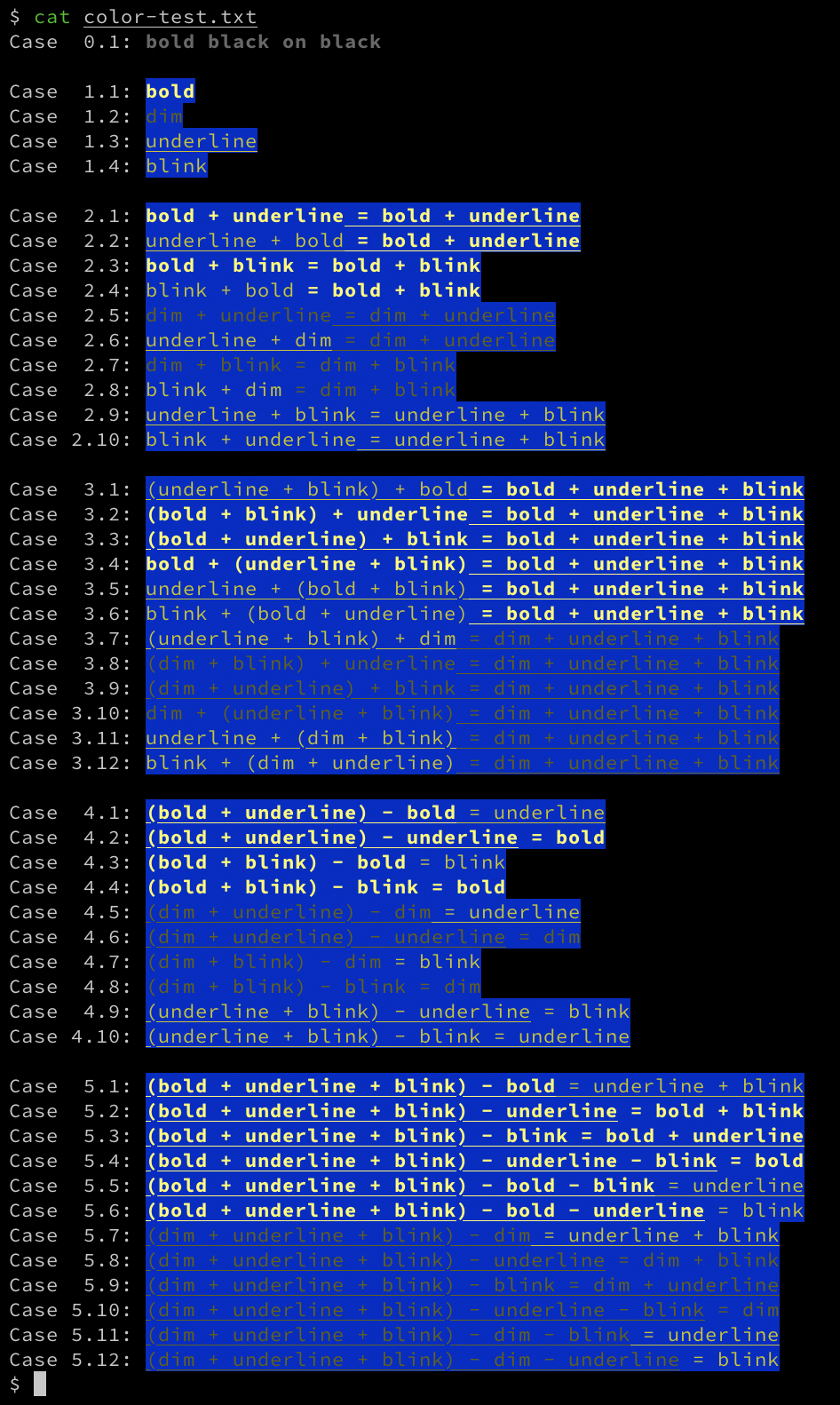
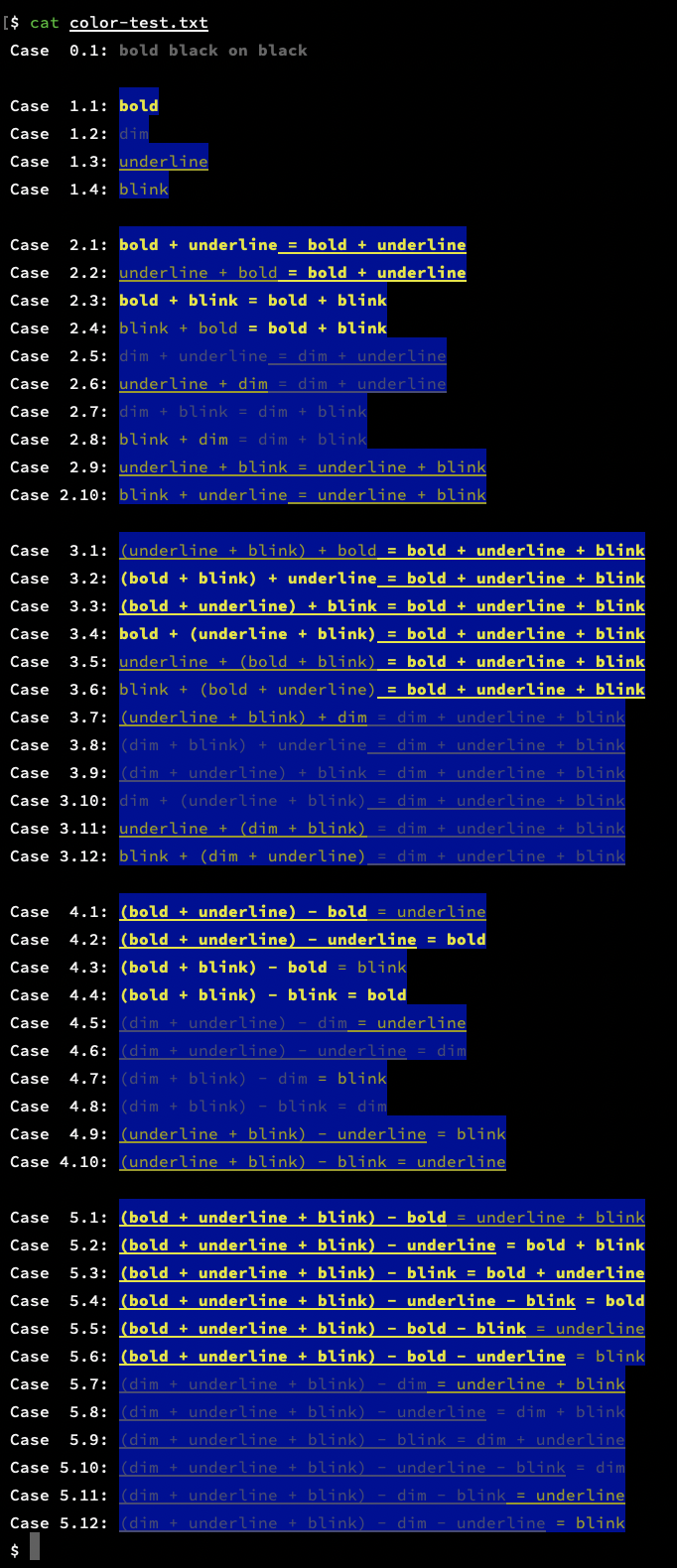
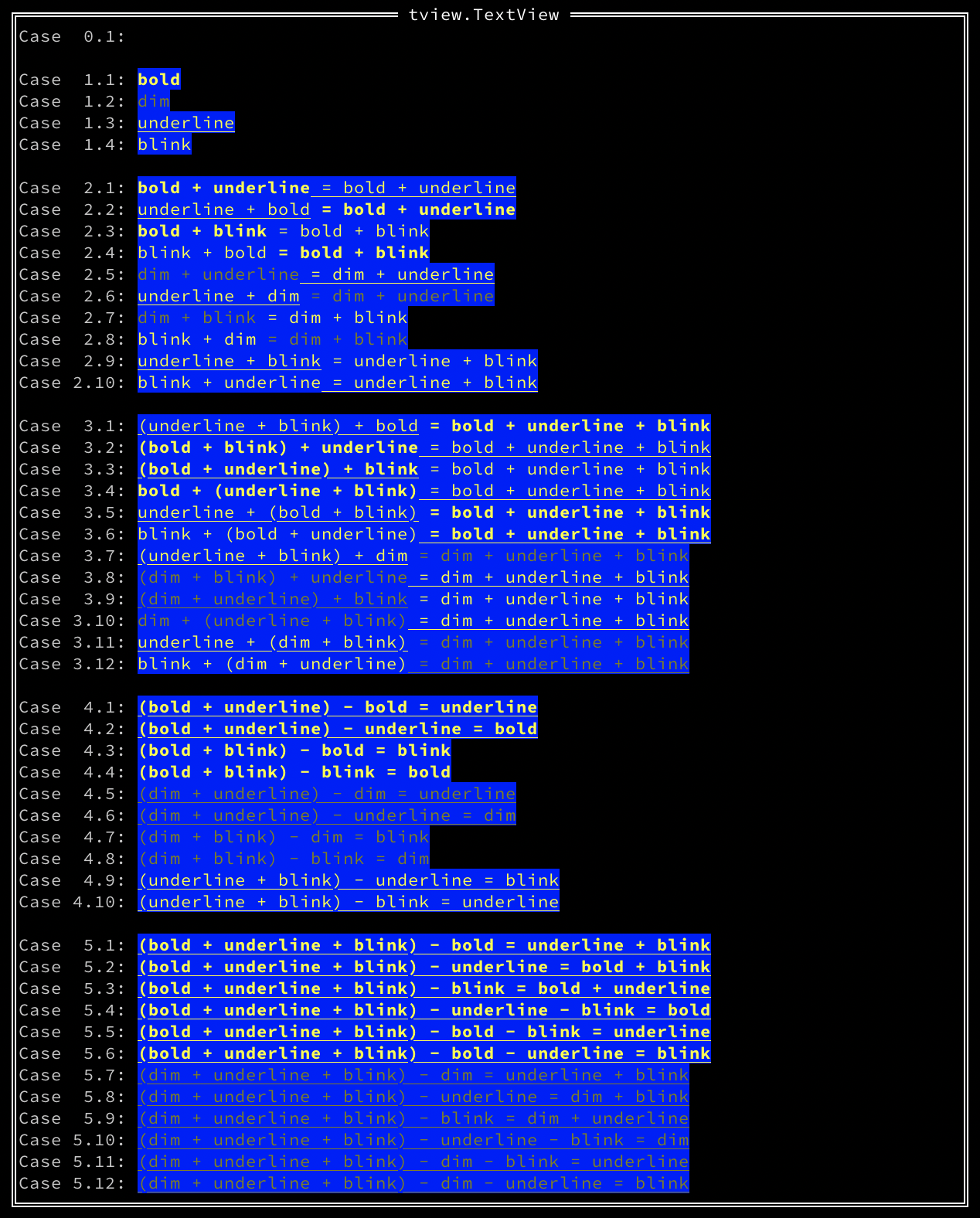
Then I tested with iTerm2, Terminal.app and tview respectively, the effect is as follows:
(iTerm2, without tmux/screen, TERM=xterm-256color, zsh 5.6.2, all the blinks are correct)
(Terminal.app, without tmux/screen, TERM=xterm-256color, zsh 5.6.2, all the blinks are correct)
(rivo/tview@master, commit ID=f8bc69b, iTerm2 and Terminal.app have the same effect)
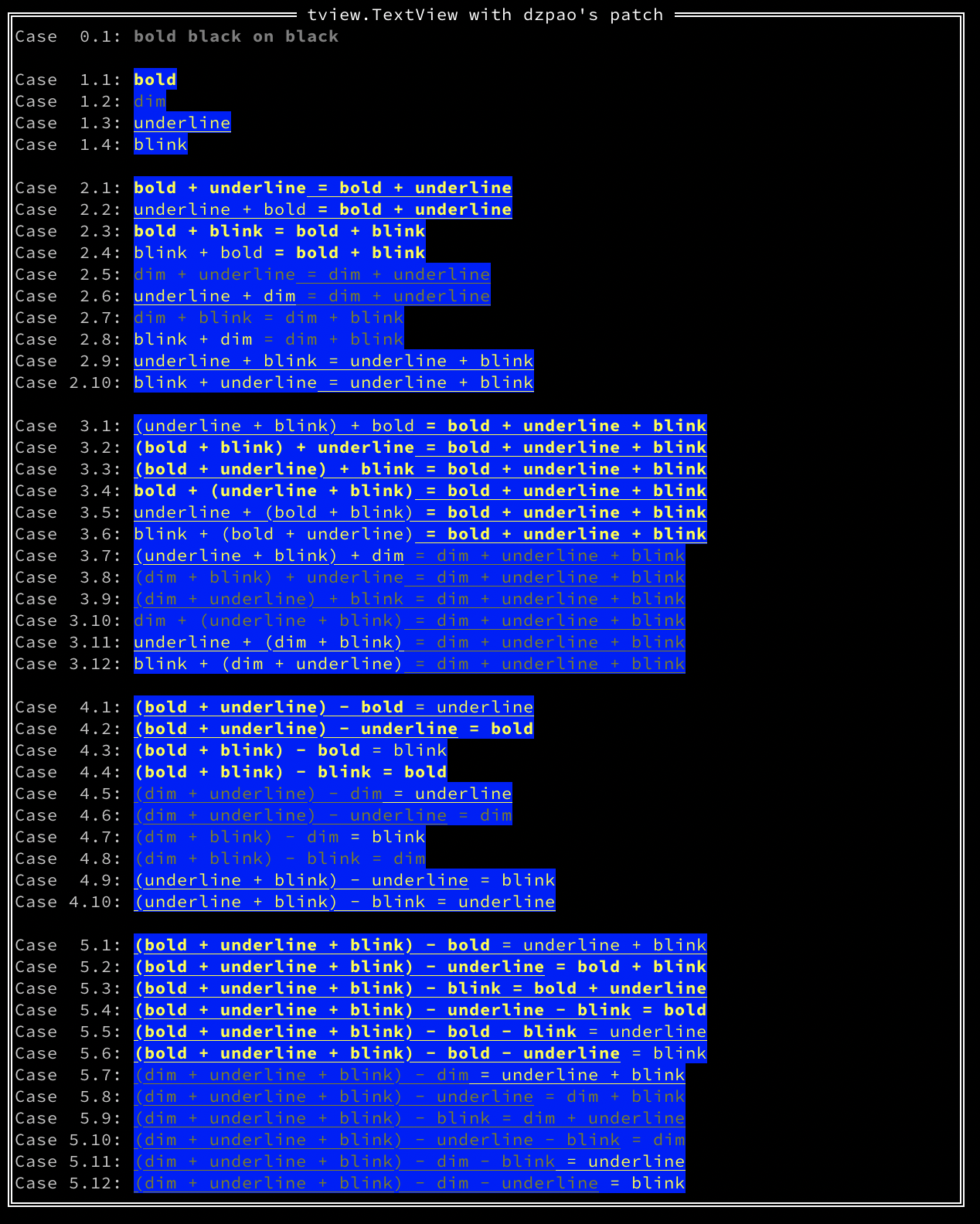
I also wrote a patch that can display correctly(all the blinks are correct):
@dzpao commented on GitHub (Sep 12, 2019):
The patch above is a phased result of my recent research on this issue. Since I don't know enough about tview, there may still be a lot of deficiencies, you can talk to me.
I hope this patch can help you solve this problem.
@dzpao commented on GitHub (Sep 13, 2019):
Here are two new cases to reveal the two bugs I just discovered:
In 6.1,
<ESC>[mshould be able to reset the current color attributes, but it doesn't.In 6.2, the color attributes should affect the next line, but it doesn't.
@rivo commented on GitHub (Oct 17, 2019):
I haven't had time yet to look at the details of your patch. But I've tried your code example. The "bold black" examples look the same directly in the terminal as well as in the application. The blinks also do. I tried iTerm2 and Terminal. There were differences in how these two terminal apps render the codes, though. Terminal actually renders "bold black" as black. You can hardly see it. And iTerm2 doesn't show blinking text but that's just my setting. Here's an example for iTerm2:
Direct:
tview:
There are some differences, though. Some of them are due to
tcellrequiring specific colours (there is no colour such as "use the terminal's default color", see also gdamore/tcell#292).But the partial attribute reset is actually a bug which I need to fix. I hope to be able to resolve this soon.
@rivo commented on GitHub (May 27, 2020):
Sorry it took so long. I believe the latest commit fixes these issues. Your test file looks like it's supposed to in
tview. Let me know if there's anything else. (Probably best to open a new issue in that case so that the topic doesn't get lost.)