[GH-ISSUE #264] [Question] How do I display form above the grid? #206

Closed
opened 2026-03-04 01:02:59 +03:00 by kerem · 2 comments
Owner

Originally created by @skanehira on GitHub (Apr 11, 2019).
Original GitHub issue: https://github.com/rivo/tview/issues/264

@rivo
Hi!
Thank you for develop tview.
This project is very good so I like it :)

BTW I developing the tui client for docker but I have a problem.
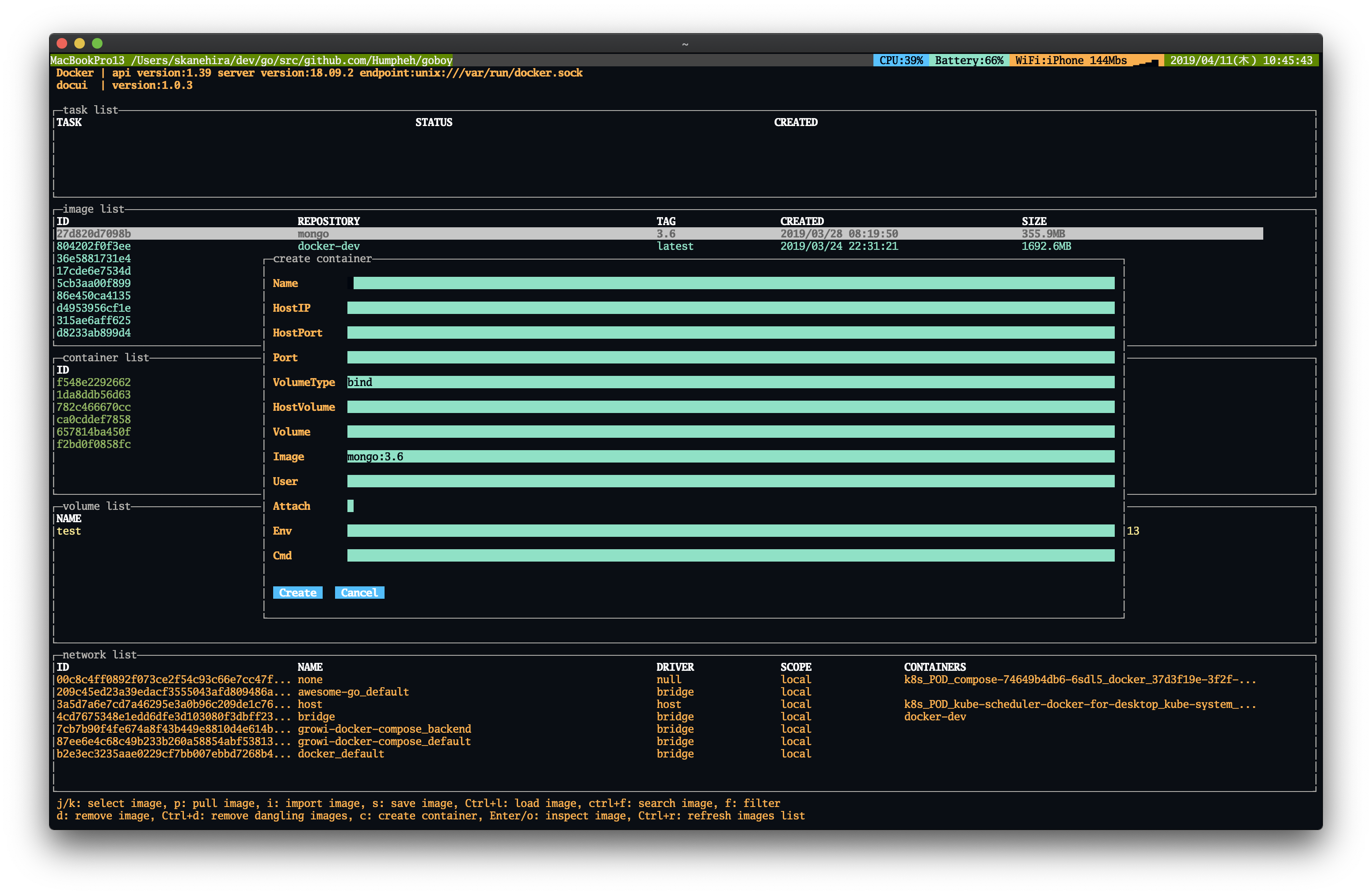
I want to display form primitive above the grid but I don't know how to do it.

grid := tview.NewGrid().SetRows(2, 0, 0, 0, 0, 0).
	AddItem(info, 0, 0, 1, 1, 0, 0, true).
	AddItem(tasks, 1, 0, 1, 1, 0, 0, true).
	AddItem(images, 2, 0, 1, 1, 0, 0, true).
	AddItem(containers, 3, 0, 1, 1, 0, 0, true).
	AddItem(volumes, 4, 0, 1, 1, 0, 0, true).
	AddItem(networks, 5, 0, 1, 1, 0, 0, true)

g.app.SetRoot(grid, true)

image

I want to do the following.(Current project uses gocui)
image

Originally created by @skanehira on GitHub (Apr 11, 2019). Original GitHub issue: https://github.com/rivo/tview/issues/264 @rivo Hi! Thank you for develop tview. This project is very good so I like it :) BTW I developing the tui client for docker but I have a problem. I want to display form primitive above the grid but I don't know how to do it. ```go grid := tview.NewGrid().SetRows(2, 0, 0, 0, 0, 0). AddItem(info, 0, 0, 1, 1, 0, 0, true). AddItem(tasks, 1, 0, 1, 1, 0, 0, true). AddItem(images, 2, 0, 1, 1, 0, 0, true). AddItem(containers, 3, 0, 1, 1, 0, 0, true). AddItem(volumes, 4, 0, 1, 1, 0, 0, true). AddItem(networks, 5, 0, 1, 1, 0, 0, true) g.app.SetRoot(grid, true) ``` ![image](https://user-images.githubusercontent.com/7888591/55924554-4a444e00-5c45-11e9-8520-ddaf5c617aec.png) I want to do the following.(Current [project](https://github.com/skanehira/docui) uses gocui) ![image](https://user-images.githubusercontent.com/7888591/55924983-f9cdf000-5c46-11e9-8c0b-97c194373e48.png)
kerem closed this issue 2026-03-04 01:02:59 +03:00
Author
Owner

@gstvg commented on GitHub (Apr 11, 2019):

Take a look at https://github.com/rivo/tview/wiki/Modal
I think this should work:

grid := tview.NewGrid().SetRows(2, 0, 0, 0, 0, 0).
	AddItem(info, 0, 0, 1, 1, 0, 0, true).
	AddItem(tasks, 1, 0, 1, 1, 0, 0, true).
	AddItem(images, 2, 0, 1, 1, 0, 0, true).
	AddItem(containers, 3, 0, 1, 1, 0, 0, true).
	AddItem(volumes, 4, 0, 1, 1, 0, 0, true).
	AddItem(networks, 5, 0, 1, 1, 0, 0, true)

form := tview.NewForm()....

pages := tview.NewPages().
        AddPage("form", form, true, true)
        AddAndSwitchToPage("main", grid, true, true)

g.app.SetRoot(pages, true)

//on display form event
pages.SwitchToPage("form")
<!-- gh-comment-id:481945355 --> @gstvg commented on GitHub (Apr 11, 2019): Take a look at https://github.com/rivo/tview/wiki/Modal I think this should work: ``` grid := tview.NewGrid().SetRows(2, 0, 0, 0, 0, 0). AddItem(info, 0, 0, 1, 1, 0, 0, true). AddItem(tasks, 1, 0, 1, 1, 0, 0, true). AddItem(images, 2, 0, 1, 1, 0, 0, true). AddItem(containers, 3, 0, 1, 1, 0, 0, true). AddItem(volumes, 4, 0, 1, 1, 0, 0, true). AddItem(networks, 5, 0, 1, 1, 0, 0, true) form := tview.NewForm().... pages := tview.NewPages(). AddPage("form", form, true, true) AddAndSwitchToPage("main", grid, true, true) g.app.SetRoot(pages, true) //on display form event pages.SwitchToPage("form") ```
Author
Owner

@skanehira commented on GitHub (Apr 11, 2019):

@gstvg
Thank you!
I solved this problem :)

pages.SwitchToPage ("form") will hide the grid, so g.pages.ShowPage ("main") was required.

image

<!-- gh-comment-id:482157970 --> @skanehira commented on GitHub (Apr 11, 2019): @gstvg Thank you! I solved this problem :) pages.SwitchToPage ("form") will hide the grid, so g.pages.ShowPage ("main") was required. ![image](https://user-images.githubusercontent.com/7888591/55968972-fde62600-5cb7-11e9-8cdb-db4564ac8628.png)
Sign in to join this conversation.
No milestone
No project
No assignees
1 participant
Notifications
Due date
The due date is invalid or out of range. Please use the format "yyyy-mm-dd".

No due date set.

Dependencies

No dependencies set.

Reference
starred/tview#206
No description provided.