mirror of
https://github.com/mum4k/termdash.git
synced 2026-04-27 03:15:55 +03:00
[GH-ISSUE #318] How to display the cursor position and color of textinput in Linux environment? #150
Labels
No labels
bug
cleanup
enhancement
enhancement
enhancement
good first issue
help wanted
help wanted
pull-request
question
wontfix
No milestone
No project
No assignees
1 participant

Notifications
Due date
No due date set.
Dependencies
No dependencies set.
Reference
starred/termdash#150
Loading…
Add table
Add a link
Reference in a new issue
No description provided.
Delete branch "%!s()"
Deleting a branch is permanent. Although the deleted branch may continue to exist for a short time before it actually gets removed, it CANNOT be undone in most cases. Continue?
Originally created by @post707 on GitHub (Jan 18, 2022).
Original GitHub issue: https://github.com/mum4k/termdash/issues/318
Originally assigned to: @mum4k on GitHub.
I use the formdemo
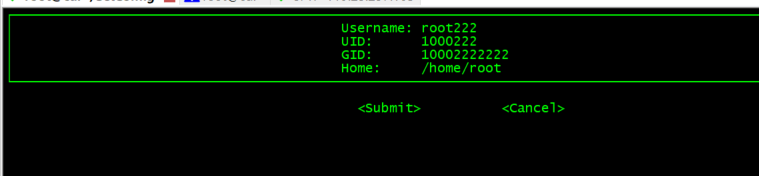
The execution results on Linux are as follows
How to display the cursor position and color of textinput in Linux environment?
Thanks!
@mum4k commented on GitHub (Jan 19, 2022):
Thank you for reaching out @post707. We have successfully used Termdash on Linux. To be noted, Termdash features heavily depend on the capabilities of the terminal emulator. To be able to utilize them correctly, we need to run in a terminal emulator supported by tcell.
XTerm and rxvt+ are examples of two terminal emulators that should work well.
@post707 commented on GitHub (Jan 19, 2022):
Thank you for your answer@mum4k .Is xshell or SecureCRT supported?
@post707 commented on GitHub (Jan 20, 2022):
I've solved it。Xhell is right by default。Secretcrt ANSI color needs to be checked
@mum4k commented on GitHub (Jan 20, 2022):
Thank you for sharing the solution @post707.