mirror of
https://github.com/mum4k/termdash.git
synced 2026-04-27 03:15:55 +03:00
[GH-ISSUE #239] Widget: Colored panel with text label #128
Labels
No labels
bug
cleanup
enhancement
enhancement
enhancement
good first issue
help wanted
help wanted
pull-request
question
wontfix
No milestone
No project
No assignees
1 participant

Notifications
Due date
No due date set.
Dependencies
No dependencies set.
Reference
starred/termdash#128
Loading…
Add table
Add a link
Reference in a new issue
No description provided.
Delete branch "%!s()"
Deleting a branch is permanent. Although the deleted branch may continue to exist for a short time before it actually gets removed, it CANNOT be undone in most cases. Continue?
Originally created by @flaviostutz on GitHub (Jul 27, 2020).
Original GitHub issue: https://github.com/mum4k/termdash/issues/239
Originally assigned to: @mum4k on GitHub.
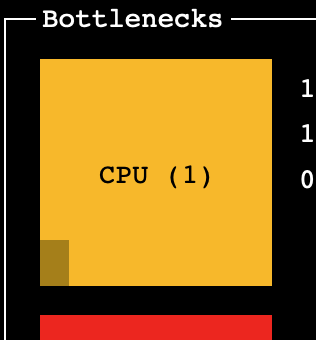
I wish I could create a panel with a colored background and a centered text.
Something like:
@flaviostutz commented on GitHub (Jul 27, 2020):
In the example, the bar on the left of the square is a measurement bar that shows the CPU load percent.
@mum4k commented on GitHub (Jul 29, 2020):
Hi @flaviostutz, did you try to achieve this behavior with the Gauge widget?
https://godoc.org/github.com/mum4k/termdash/widgets/gauge
The Gauge widget allows text alignment with these two options, so one can center the text:
https://godoc.org/github.com/mum4k/termdash/widgets/gauge#HorizontalTextAlign
https://godoc.org/github.com/mum4k/termdash/widgets/gauge#VerticalTextAlign
Additionally one can choose both the colors of the "filled" and the "empty" portions of the gauge:
https://godoc.org/github.com/mum4k/termdash/widgets/gauge#EmptyTextColor
https://godoc.org/github.com/mum4k/termdash/widgets/gauge#FilledTextColor
Can you try to see how far you can get with these? Once we identify the missing feature, we can add it of course.
@flaviostutz commented on GitHub (Jul 29, 2020):
Great! I tried with Gauge using 100% as its value and it worked. In the meantime I was using Button with shadow black ;)
Thanks again!