[GH-ISSUE #337] Pip claims to download version 2.4.4 but the files are actually from version 2.0.1 #198

Closed
opened 2026-02-27 23:21:20 +03:00 by kerem · 9 comments
Owner

Originally created by @SimonCadge on GitHub (Nov 3, 2018).
Original GitHub issue: https://github.com/spotipy-dev/spotipy/issues/337

When installing spotipy over pip I didn't get the latest version, so I checked what was wrong.
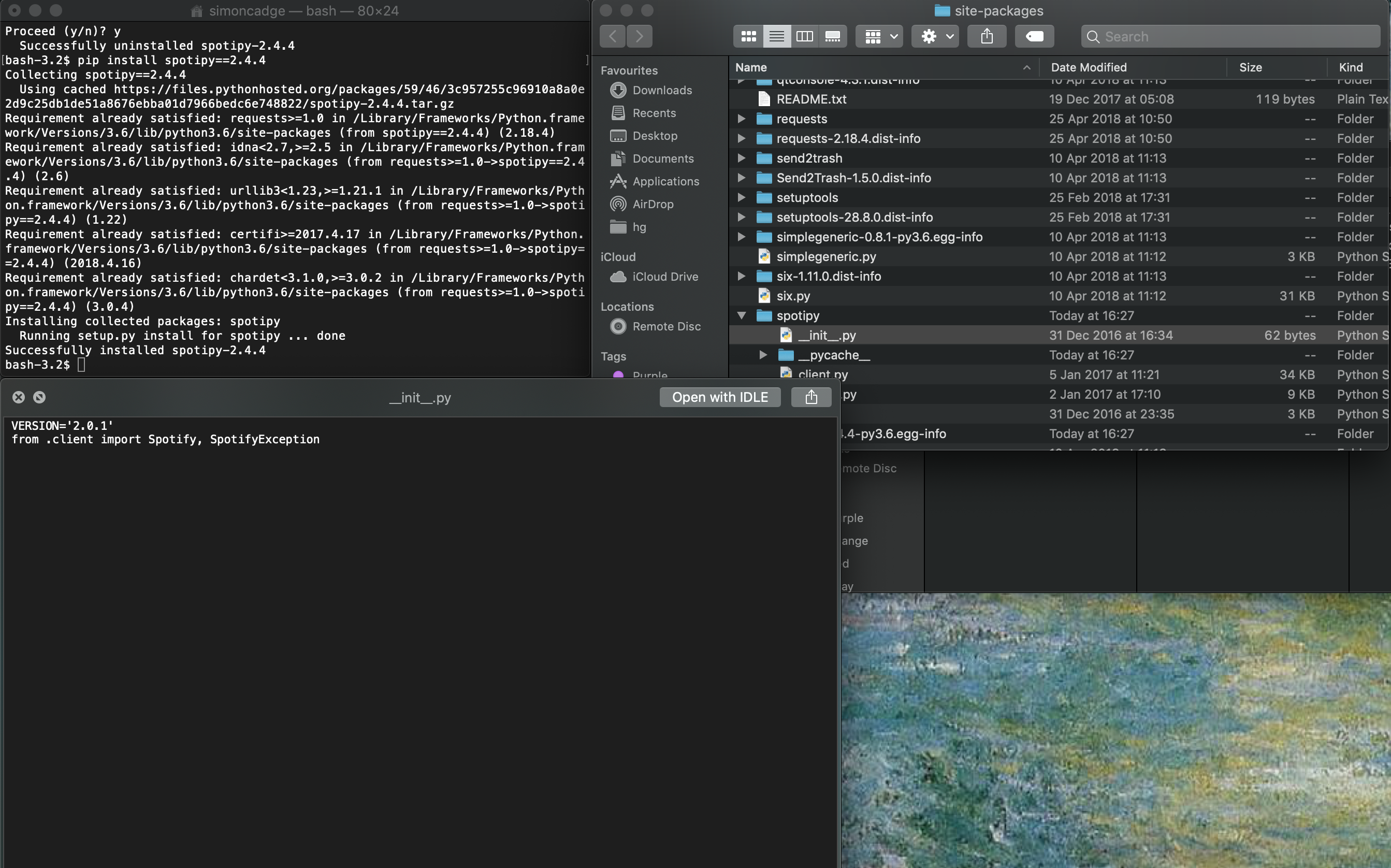
I uninstalled spotipy and reinstalled it again, specifying that I wanted version 2.4.4. The terminal says 'successfully installed spotipy-2.4.4' but still the init file states that it is in version 2.0.1 and the code is old such that it doesn't support descriptions.
I can't even use pip to update it to the latest version because as far as pip is concerned it has installed version 2.4.4.
screenshot 2018-11-03 at 16 33 32
Looking deeper it seems that the init file shows the incorrect version even when I download the correct files from GitHub, but it's still true that the actual code is up to date in the version downloaded from GitHub and is incorrect in the version from pip. For example, the user_playlist_create() function doesn't take a description parameter in the pip version, and the oauth is_token_expired() function has an underscore at the very beginning.

Originally created by @SimonCadge on GitHub (Nov 3, 2018). Original GitHub issue: https://github.com/spotipy-dev/spotipy/issues/337 When installing spotipy over pip I didn't get the latest version, so I checked what was wrong. I uninstalled spotipy and reinstalled it again, specifying that I wanted version 2.4.4. The terminal says 'successfully installed spotipy-2.4.4' but still the init file states that it is in version 2.0.1 and the code is old such that it doesn't support descriptions. I can't even use pip to update it to the latest version because as far as pip is concerned it has installed version 2.4.4. <img width="1343" alt="screenshot 2018-11-03 at 16 33 32" src="https://user-images.githubusercontent.com/11338764/47954779-4c173080-df86-11e8-93fb-4028af64d9ce.png"> Looking deeper it seems that the init file shows the incorrect version even when I download the correct files from GitHub, but it's still true that the actual code is up to date in the version downloaded from GitHub and is incorrect in the version from pip. For example, the user_playlist_create() function doesn't take a description parameter in the pip version, and the oauth is_token_expired() function has an underscore at the very beginning.
kerem closed this issue 2026-02-27 23:21:20 +03:00
Author
Owner

@shivasiddharth commented on GitHub (Nov 30, 2018):

do not install using the pre built package. Instead try this:
pip install git+https://github.com/plamere/spotipy.git --upgrade

<!-- gh-comment-id:443167416 --> @shivasiddharth commented on GitHub (Nov 30, 2018): do not install using the pre built package. Instead try this: `pip install git+https://github.com/plamere/spotipy.git --upgrade`
Author
Owner

@txoof commented on GitHub (Dec 15, 2018):

It would be a good idea if the maintainers either updated or deprecated the pypi version. This cost me an hour to figure out why my code was failing after migrating it to a newly created virtual environment and it appeared that I had the latest and correct versions installed.

Fortunately I found @shivasiddharth and @SimonCadge's comments to put me on the right track

<!-- gh-comment-id:447579401 --> @txoof commented on GitHub (Dec 15, 2018): It would be a good idea if the maintainers either updated or deprecated the pypi version. This cost me an hour to figure out why my code was failing after migrating it to a newly created virtual environment and it appeared that I had the latest and correct versions installed. Fortunately I found @shivasiddharth and @SimonCadge's comments to put me on the right track
Author
Owner

@txoof commented on GitHub (Dec 15, 2018):

The contact information for Paul at PyPi is also out of date. I'll post the message I attempted to send here in hopes that Paul (the currently listed package maintainer) sees it.

If the original package maintainer is no longer willing or able to maintain this package, what is the correct protocol for forking this and deprecating the version at PyPi?

Paul,

First, thanks for the great python module. I'm really enjoying it and terribly glad that someone wrote it so I didn't have to. I really appreciate your work.

There appears to be a conflict with the versions on PyPi and GitHub. The PyPi version is older than it claims to be and caused me much confusion when I tried to migrate my code to a new venv. Would you please consider either updating the PyPi version or removing it all together? I don't mind installing from the github version, but it is was very confusing and difficult to track down the problem when the version numbers appear to match, but the underlying code doesn't.

Thanks again for your help and for all the great work.

<!-- gh-comment-id:447580093 --> @txoof commented on GitHub (Dec 15, 2018): The contact information for Paul at PyPi is also out of date. I'll post the message I attempted to send here in hopes that Paul (the currently listed package maintainer) sees it. If the original package maintainer is no longer willing or able to maintain this package, what is the correct protocol for forking this and deprecating the version at PyPi? > Paul, > > First, thanks for the great python module. I'm really enjoying it and terribly glad that someone wrote it so I didn't have to. I really appreciate your work. > > There appears to be a conflict with the versions on PyPi and GitHub. The PyPi version is older than it claims to be and caused me much confusion when I tried to migrate my code to a new venv. Would you please consider either updating the PyPi version or removing it all together? I don't mind installing from the github version, but it is was very confusing and difficult to track down the problem when the version numbers appear to match, but the underlying code doesn't. > > Thanks again for your help and for all the great work.
Author
Owner

@onhernandes commented on GitHub (Dec 26, 2018):

So, I've an application that uses spotipy, but since it's out of date at PyPi, how can I set as dependency on setup.py?

Sorry for the dumb question, but I'm kinda of newbie with Python and its env.

<!-- gh-comment-id:449954835 --> @onhernandes commented on GitHub (Dec 26, 2018): So, I've an application that uses spotipy, but since it's out of date at PyPi, how can I set as dependency on `setup.py`? Sorry for the dumb question, but I'm kinda of newbie with Python and its env.
Author
Owner

@etedor commented on GitHub (Jan 7, 2019):

So, I've an application that uses spotipy, but since it's out of date at PyPi, how can I set as dependency on setup.py?

Sorry for the dumb question, but I'm kinda of newbie with Python and its env.

@onhernandes, I was able to get setup.py working with the following:

    dependency_links=["git+https://git@github.com/plamere/spotipy.git@master#egg=spotipy-2.4.4"],
    ...
    install_requires=["spotipy==2.4.4"],

And in Pipenv's Pipfile:

[packages]
spotipy-2-4-4 = {git = "https://github.com/plamere/spotipy.git"}
<!-- gh-comment-id:451803015 --> @etedor commented on GitHub (Jan 7, 2019): > > > So, I've an application that uses spotipy, but since it's out of date at PyPi, how can I set as dependency on `setup.py`? > > Sorry for the dumb question, but I'm kinda of newbie with Python and its env. @onhernandes, I was able to get `setup.py` working with the following: ```python dependency_links=["git+https://git@github.com/plamere/spotipy.git@master#egg=spotipy-2.4.4"], ... install_requires=["spotipy==2.4.4"], ``` And in Pipenv's `Pipfile`: ``` [packages] spotipy-2-4-4 = {git = "https://github.com/plamere/spotipy.git"} ```
Author
Owner

@txoof commented on GitHub (Jan 10, 2019):

@onhernandes
If you are using pipenv you can use the following:
$ pipenv install git+https://github.com/plamere/spotipy.git#egg=spotipy

<!-- gh-comment-id:453251137 --> @txoof commented on GitHub (Jan 10, 2019): @onhernandes If you are using pipenv you can use the following: `$ pipenv install git+https://github.com/plamere/spotipy.git#egg=spotipy`
Author
Owner

@onhernandes commented on GitHub (Jan 11, 2019):

@etedor this worked for me.

Thanks everyone =)

<!-- gh-comment-id:453493897 --> @onhernandes commented on GitHub (Jan 11, 2019): @etedor this worked for me. Thanks everyone =)
Author
Owner

@gesanderson commented on GitHub (Jun 13, 2019):

I also hit this issue today and spent some time before realizing the code in the installed package wasn't the same than what was on github. I agree with @txoof that updating the package on PyPI would be appreciated.

Adding git tags would also be nice, like that we can install a specific version with pip install git+https://github.com/plamere/spotipy.git@$VERSION.

<!-- gh-comment-id:501884287 --> @gesanderson commented on GitHub (Jun 13, 2019): I also hit this issue today and spent some time before realizing the code in the installed package wasn't the same than what was on github. I agree with @txoof that updating the package on PyPI would be appreciated. Adding git tags would also be nice, like that we can install a specific version with `pip install git+https://github.com/plamere/spotipy.git@$VERSION`.
Author
Owner

@stephanebruckert commented on GitHub (Jan 11, 2020):

Just released 2.5.0 which contains everything from 2.4.4 as well as everything that was merged to master but never released

pip install spotipy --upgrade
<!-- gh-comment-id:573337997 --> @stephanebruckert commented on GitHub (Jan 11, 2020): Just released [2.5.0](https://github.com/plamere/spotipy/releases/tag/2.5.0) which contains everything from 2.4.4 as well as everything that was merged to master but never released pip install spotipy --upgrade
Sign in to join this conversation.
No milestone
No project
No assignees
1 participant
Notifications
Due date
The due date is invalid or out of range. Please use the format "yyyy-mm-dd".

No due date set.

Dependencies

No dependencies set.

Reference
starred/spotipy#198
No description provided.