mirror of
https://github.com/Rigellute/spotify-tui.git
synced 2026-04-26 16:15:55 +03:00
[GH-ISSUE #813] error 500 select device #339
Labels
No labels
bug
enhancement
good first issue
help wanted
pull-request
No milestone
No project
No assignees
1 participant

Notifications
Due date
No due date set.
Dependencies
No dependencies set.
Reference
starred/spotify-tui#339
Loading…
Add table
Add a link
Reference in a new issue
No description provided.
Delete branch "%!s()"
Deleting a branch is permanent. Although the deleted branch may continue to exist for a short time before it actually gets removed, it CANNOT be undone in most cases. Continue?
Originally created by @x0rld on GitHub (May 12, 2021).
Original GitHub issue: https://github.com/Rigellute/spotify-tui/issues/813
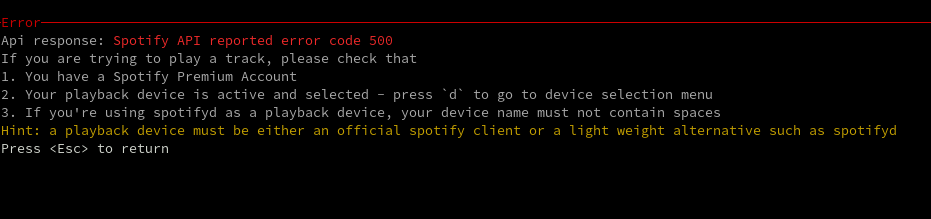
I've configured spotifyd with my creds and I have a premium account but when I select my device I have a code 500 from the API
@Weriel commented on GitHub (May 16, 2021):
What worked for me was to start playing a song in the Spotify-Client and then selecting the device. There was also a second Device in the "Connect to a device" menu in Spotify itself named after my PC. Might wanna check that.
Keep in mind that I am using the standard Spotify client for this and not spotifyd or anything like that.
Regarding the second point, I sadly cannot replicate this anymore otherwise I would add a screenshot of that.
@Darunada commented on GitHub (Oct 12, 2021):
I am seeing this issue now, with a brand new install using scoop.
I have Spotify running on another machine and spt is connected to an app correctly. When I start a song on spotify, spt shows it playing and I can change songs, interact, and stop the song without any problems.
If I stop playing and attempt to play again, though, it says I have no device selected. When I attempt to select a device it shows all my devices correctly, but when I select one I see this 500 error.
I see no issues with the devices in spotify connect in spotify, but spotify shows my chromecast twice (spotify connect and cast to tv) and spt only shows it once with no distinction. It seems like it is not reporting chromecast options, which makes sense to me, and I am not sure if it is related.