mirror of
https://github.com/Rigellute/spotify-tui.git
synced 2026-04-27 16:45:59 +03:00
[GH-ISSUE #316] a playback device must be either an spotify client #127
Labels
No labels
bug
enhancement
good first issue
help wanted
pull-request
No milestone
No project
No assignees
1 participant

Notifications
Due date
No due date set.
Dependencies
No dependencies set.
Reference
starred/spotify-tui#127
Loading…
Add table
Add a link
Reference in a new issue
No description provided.
Delete branch "%!s()"
Deleting a branch is permanent. Although the deleted branch may continue to exist for a short time before it actually gets removed, it CANNOT be undone in most cases. Continue?
Originally created by @JGcarvajal on GitHub (Feb 27, 2020).
Original GitHub issue: https://github.com/Rigellute/spotify-tui/issues/316
Hi, how are you?
Thank you for the great effort in creating spotify tui.
I am using to implement but I encountered a problem, I already created my Client ID and link my spotify developer secret key, and when playing from the official apps what I am hearing is displayed in your app, but when trying to play from your app is throwing me error 403, and the help it throws at me is "a playback device must be either an official spotify client or a light weight alternative such as spotifyd".
Thank you and I hope you can help me solve
@JGcarvajal commented on GitHub (Feb 27, 2020):
By the way, the client I'm using is windows
@Rigellute commented on GitHub (Feb 27, 2020):
Hi @JGcarvajal, sounds like you need to press
dto select a device that will control playback (spotify-tuidoesn't handle streaming audio, instead you'll need something likespotifydor the official client running and you need to select that device from withinspotify-tui)@rishvic commented on GitHub (Feb 28, 2020):
I'm also trying to use
spotify-tui, although I have selected my phone within the list of devices, it is still not playing it on my phone, but rather calling the same error 403. Btw, is Spotify Premium necessary for playing songs on my phone from tui?@MrPoliteGrizlyM commented on GitHub (Feb 29, 2020):
Hi, have the same issue but I'm using MAC. However, when I play music on my phone, I see title of the song that I'm playing.
@JGcarvajal commented on GitHub (Mar 2, 2020):
Hello @Rigellute, I know that Spotify-tui will be only the controller and I must have my account linked to an official app, desktop or mobile, and although I have it in reproduction in my official app, spotify-tui continues to throw error 403, saying that I must link a device with the app even if I already have it.
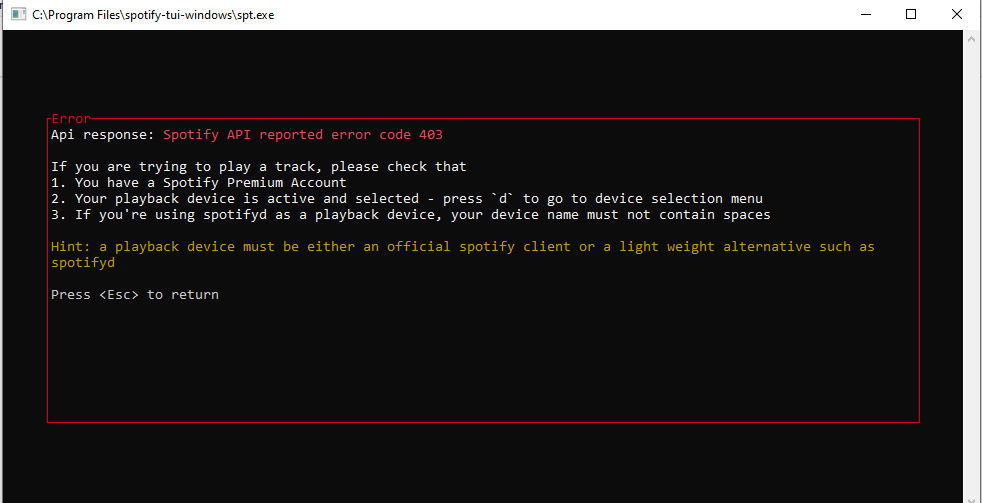
Attached error image in case it helps
Thanks for your help
@Rigellute commented on GitHub (Mar 3, 2020):
To confirm, spotify premium is needed to control playback,
@JGcarvajal what do you see when you type
d? This will bring up the device selection menu@Rigellute commented on GitHub (Mar 7, 2020):
Still having any issues with this? Please reopen if there is still an issue