[GH-ISSUE #308] Dockerfile #126

Open
opened 2026-02-28 14:47:12 +03:00 by kerem · 10 comments
Owner

Originally created by @hongkongkiwi on GitHub (Feb 24, 2020).
Original GitHub issue: https://github.com/Rigellute/spotify-tui/issues/308

I wanted to use this in a Docker, so I've created a dockerfile here you can include into the repo if you like. I just put it in the base repo, I suppose it would be good to create some per platform but I'm not so familiar with that. This can be used to build a RPI version by running it on a pi itself :-)

FROM rust:1.40 as builder
WORKDIR /usr/src/spt
COPY . .
RUN apt-get update && apt-get install -y \
  pkg-config libssl-dev \
  libxcb-shape0-dev libxcb-xfixes0-dev \
  libxcb1-dev libxcb-render0-dev
RUN sed -i 's/127\.0\.0\.1/0\.0\.0\.0/g' src/redirect_uri.rs
RUN cargo install --path .

FROM debian:buster-slim
RUN apt-get update && apt-get install -y \
  pkg-config libssl1.1 \
  libxcb1 libxcb-shape0 \
  libxcb-shape0 libxcb-xfixes0 \
  libxcb-render0
COPY --from=builder /usr/local/cargo/bin/spt /usr/local/bin/spt
CMD ["spt"]

Note that I have to do a sed to update 127.0.0.1 into 0.0.0.0, this is because we want the docker image listening to a public address, outside of the container, we can simply map this to localhost for safety. It would be great to have a option in the config or command line to set this, specifically it's in this file.j

Apart from this, I would like to have a variable to change "localhost" to something else.

UPDATE

After building the image with docker build . -t spotify-tui and running with something like this docker run --rm -p 8866:8866 -v ${PWD}/config:/root/.config/spotify-tui -it spotify-tui spt I can't seem to get anything after pasting the URL (which works and successfully tells me to go back to terminal, but then it seems like spt just dies and when I start again with my config it keeps asking me to enter the url. It seems like we don't have a device ID or something (?).

My client ID looks something like:

---
client_id: xxxx
client_secret: xxxx
device_id: ~
port: 8866%
Originally created by @hongkongkiwi on GitHub (Feb 24, 2020). Original GitHub issue: https://github.com/Rigellute/spotify-tui/issues/308 I wanted to use this in a Docker, so I've created a dockerfile here you can include into the repo if you like. I just put it in the base repo, I suppose it would be good to create some per platform but I'm not so familiar with that. This can be used to build a RPI version by running it on a pi itself :-) ``` FROM rust:1.40 as builder WORKDIR /usr/src/spt COPY . . RUN apt-get update && apt-get install -y \ pkg-config libssl-dev \ libxcb-shape0-dev libxcb-xfixes0-dev \ libxcb1-dev libxcb-render0-dev RUN sed -i 's/127\.0\.0\.1/0\.0\.0\.0/g' src/redirect_uri.rs RUN cargo install --path . FROM debian:buster-slim RUN apt-get update && apt-get install -y \ pkg-config libssl1.1 \ libxcb1 libxcb-shape0 \ libxcb-shape0 libxcb-xfixes0 \ libxcb-render0 COPY --from=builder /usr/local/cargo/bin/spt /usr/local/bin/spt CMD ["spt"] ``` Note that I have to do a sed to update 127.0.0.1 into 0.0.0.0, this is because we want the docker image listening to a public address, outside of the container, we can simply map this to localhost for safety. It would be great to have a option in the config or command line to set this, specifically it's in [this file](https://github.com/Rigellute/spotify-tui/blob/3d0abe9b40cc598b5c0be9310f15eb49fe9adec5/src/redirect_uri.rs#L8).j Apart from this, I would like to have a variable to change "localhost" to something else. **UPDATE** After building the image with `docker build . -t spotify-tui` and running with something like this ` docker run --rm -p 8866:8866 -v ${PWD}/config:/root/.config/spotify-tui -it spotify-tui spt` I can't seem to get anything after pasting the URL (which works and successfully tells me to go back to terminal, but then it seems like spt just dies and when I start again with my config it keeps asking me to enter the url. It seems like we don't have a device ID or something (?). My client ID looks something like: ``` --- client_id: xxxx client_secret: xxxx device_id: ~ port: 8866% ```
Author
Owner

@Rigellute commented on GitHub (Feb 24, 2020):

Interesting!

We could add a host option to user_config to allow you to define your own host.

As to the unexpected behaviour, my guess is that spotify-tui is trying to read and write your config files located in ${HOME}/.config/spotify-tui/ - perhaps this is not playing nicely with docker?

When spotify-tui starts up, it checks for the existence of the configuration files in that directory, if not found it starts the authentication flow. Once complete it writes the tokens etc. to that file

<!-- gh-comment-id:590236709 --> @Rigellute commented on GitHub (Feb 24, 2020): Interesting! We could add a `host` option to `user_config` to allow you to define your own host. As to the unexpected behaviour, my guess is that `spotify-tui` is trying to read and write your config files located in `${HOME}/.config/spotify-tui/` - perhaps this is not playing nicely with docker? When `spotify-tui` starts up, it checks for the existence of the configuration files in that directory, if not found it starts the authentication flow. Once complete it writes the tokens etc. to that file
Author
Owner

@raschmitt commented on GitHub (Sep 13, 2021):

A Docker version would be much appreciated.

<!-- gh-comment-id:918535173 --> @raschmitt commented on GitHub (Sep 13, 2021): A Docker version would be much appreciated.
Author
Owner

@AkselAllas commented on GitHub (Dec 7, 2021):

I got the same exact scenario as @hongkongkiwi
I had to use rust:1.57 to get the image to build, but otherwise it's the same.

Server works, clicking on link works. After clicking on link, spt exits with code 101.

I tried adding a different entrypoint, but the spt process exits nonetheless.

ENTRYPOINT ["/app/entrypoint.sh"]
$ cat entrypoint.sh
#!/usr/bin/env bash

spt & sh 

@Rigellute Seems like ${HOME}/.config/spotify-tui/ isn't the problem either.

image

Can we make some progress with this issue?

<!-- gh-comment-id:987676152 --> @AkselAllas commented on GitHub (Dec 7, 2021): I got the same exact scenario as @hongkongkiwi I had to use `rust:1.57` to get the image to build, but otherwise it's the same. Server works, clicking on link works. After clicking on link, `spt` exits with code 101. I tried adding a different entrypoint, but the `spt` process exits nonetheless. ``` ENTRYPOINT ["/app/entrypoint.sh"] ``` ``` $ cat entrypoint.sh #!/usr/bin/env bash spt & sh ``` @Rigellute Seems like `${HOME}/.config/spotify-tui/` isn't the problem either. ![image](https://user-images.githubusercontent.com/26136082/144991251-ac67a492-38b3-4a9a-9407-33abe70a5c6a.png) Can we make some progress with this issue?
Author
Owner

@AkselAllas commented on GitHub (Dec 10, 2021):

Docker version

Client: Docker Engine - Community
 Version:           20.10.11
 API version:       1.41
 Go version:        go1.16.9
 Git commit:        dea9396
 Built:             Thu Nov 18 00:37:06 2021
 OS/Arch:           linux/amd64
 Context:           default
 Experimental:      true

Server: Docker Engine - Community
 Engine:
  Version:          20.10.11
  API version:      1.41 (minimum version 1.12)
  Go version:       go1.16.9
  Git commit:       847da18
  Built:            Thu Nov 18 00:35:15 2021
  OS/Arch:          linux/amd64
  Experimental:     false
 containerd:
  Version:          1.4.12
  GitCommit:        7b11cfaabd73bb80907dd23182b9347b4245eb5d
 runc:
  Version:          1.0.2
  GitCommit:        v1.0.2-0-g52b36a2
 docker-init:
  Version:          0.19.0
  GitCommit:        de40ad0

<!-- gh-comment-id:990907250 --> @AkselAllas commented on GitHub (Dec 10, 2021): Docker version ``` Client: Docker Engine - Community Version: 20.10.11 API version: 1.41 Go version: go1.16.9 Git commit: dea9396 Built: Thu Nov 18 00:37:06 2021 OS/Arch: linux/amd64 Context: default Experimental: true Server: Docker Engine - Community Engine: Version: 20.10.11 API version: 1.41 (minimum version 1.12) Go version: go1.16.9 Git commit: 847da18 Built: Thu Nov 18 00:35:15 2021 OS/Arch: linux/amd64 Experimental: false containerd: Version: 1.4.12 GitCommit: 7b11cfaabd73bb80907dd23182b9347b4245eb5d runc: Version: 1.0.2 GitCommit: v1.0.2-0-g52b36a2 docker-init: Version: 0.19.0 GitCommit: de40ad0 ```
Author
Owner

@AkselAllas commented on GitHub (Dec 10, 2021):

@Rigellute @raschmitt How could I create a spotify-tui debug build that would give a stacktrace in docker?

I tried changing entrypoint to start with RUST_BACKTRACE=full and i tried adding

[profile.release]
debug = 1

to Cargo.toml

<!-- gh-comment-id:990912919 --> @AkselAllas commented on GitHub (Dec 10, 2021): @Rigellute @raschmitt How could I create a spotify-tui debug build that would give a stacktrace in docker? I tried changing entrypoint to start with `RUST_BACKTRACE=full` and i tried adding ``` [profile.release] debug = 1 ``` to Cargo.toml
Author
Owner

@Rigellute commented on GitHub (Dec 10, 2021):

@AkselAllas does RUST_BACKTRACE=1 help at all?

<!-- gh-comment-id:990918430 --> @Rigellute commented on GitHub (Dec 10, 2021): @AkselAllas does `RUST_BACKTRACE=1` help at all?
Author
Owner

@AkselAllas commented on GitHub (Dec 10, 2021):

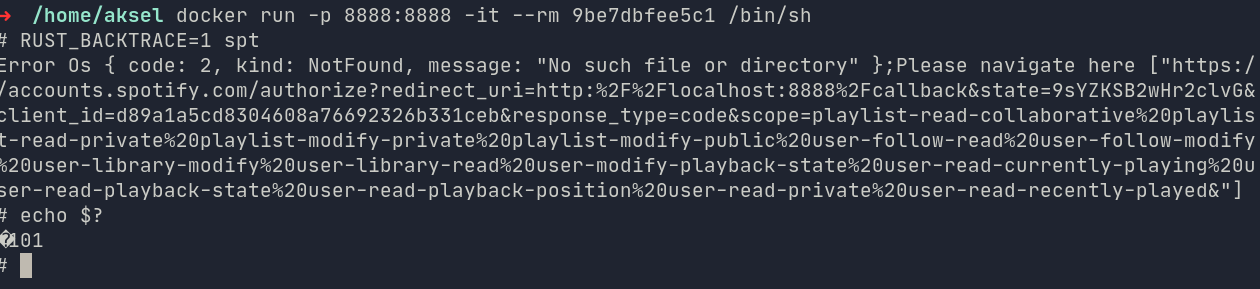
in Dockerfile CMD RUST_BACKTRACE=1 spt doesn't help.

Running shell in image and then running it doesn't help either.
image

Exporting it as env variable gives the same result.

<!-- gh-comment-id:990939408 --> @AkselAllas commented on GitHub (Dec 10, 2021): in Dockerfile `CMD RUST_BACKTRACE=1 spt` doesn't help. Running shell in image and then running it doesn't help either. ![image](https://user-images.githubusercontent.com/26136082/145575318-d54e930d-0330-4504-82c3-b03b57f1999a.png) Exporting it as env variable gives the same result.
Author
Owner

@AkselAllas commented on GitHub (Dec 13, 2021):

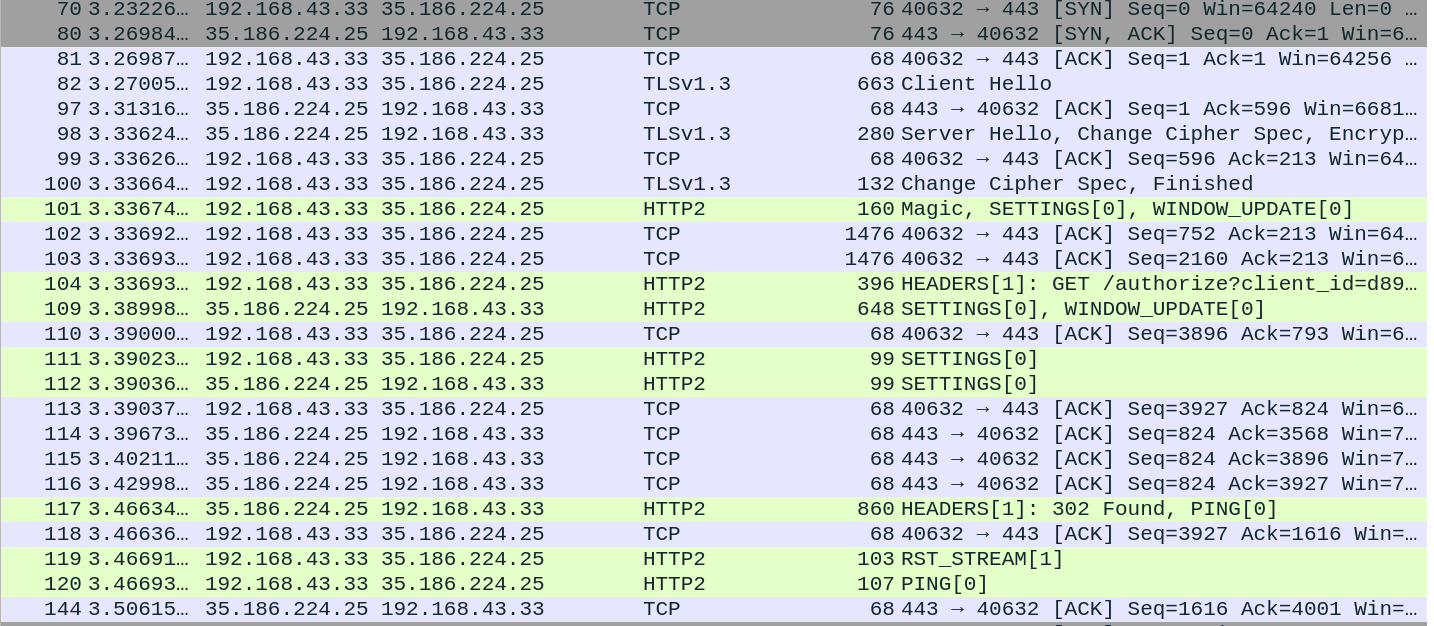
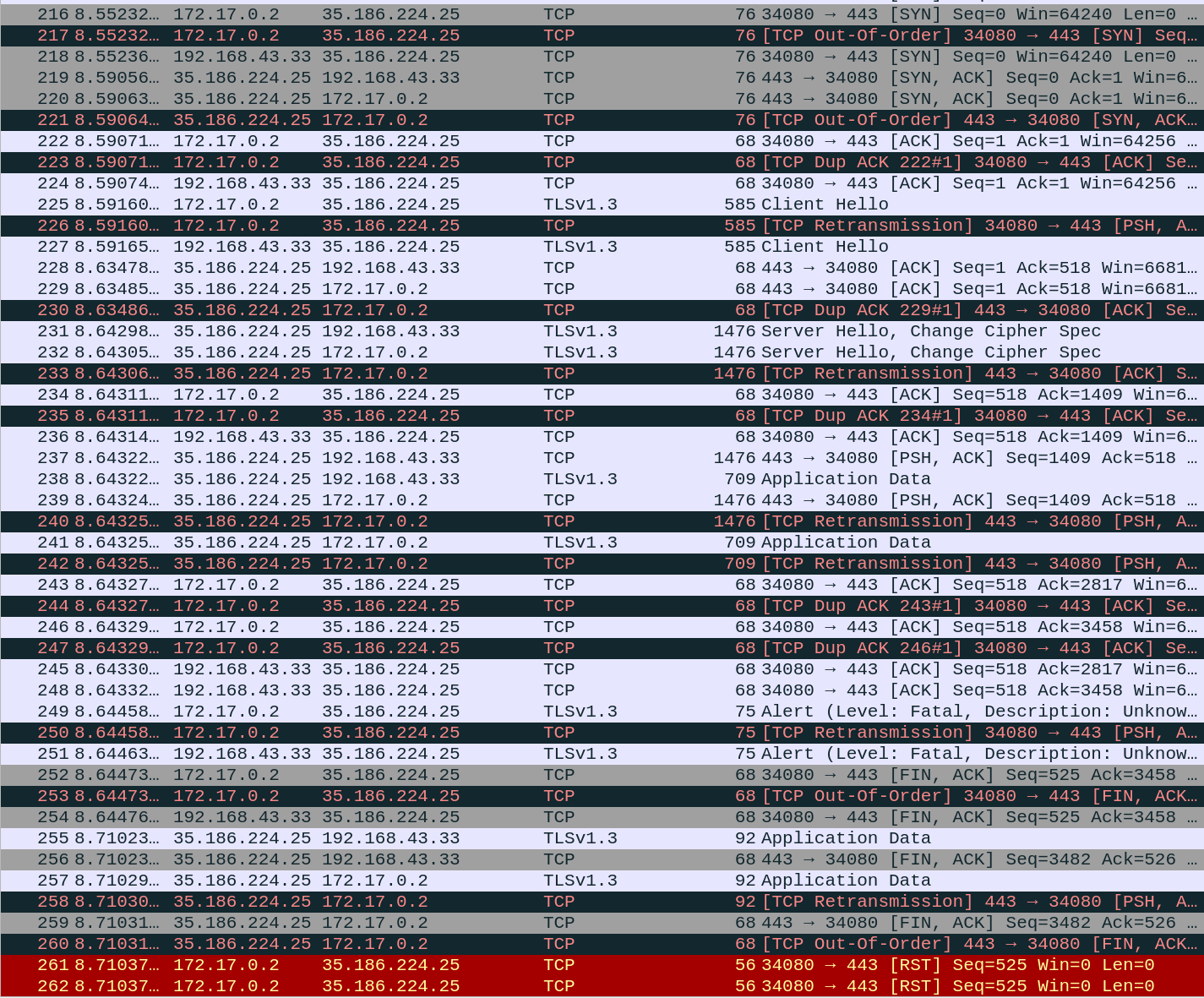
I looked at the TLS traffic (after trying to decrypt) in the docker scenario with wireshark.

Seems like there are 2 distinct communications:
The first I could decrypt using Google-chrome's SSL log
image
The second I couldn't decrypt when using docker:
image

<!-- gh-comment-id:992165476 --> @AkselAllas commented on GitHub (Dec 13, 2021): I looked at the TLS traffic (after trying to decrypt) in the docker scenario with wireshark. Seems like there are 2 distinct communications: The first I could decrypt using Google-chrome's SSL log ![image](https://user-images.githubusercontent.com/26136082/145766485-b6f614e8-7b9e-418d-8bd3-75e90bd9aa1f.png) The second I couldn't decrypt when using docker: ![image](https://user-images.githubusercontent.com/26136082/145766853-263cf71a-52cd-4405-a121-b2697610b512.png)
Author
Owner

@AkselAllas commented on GitHub (Dec 13, 2021):

When I look at non-docker wireshark traffic:
I still couldn't decrypt using browser TLS log(I assume it's a rust package doing the TLS)
The only thing to note is that the packet size from Spotify is the same (709)

image

The packet (Same for both :D ):
image

@Rigellute this is where my debug skills end at the moment.

<!-- gh-comment-id:992171552 --> @AkselAllas commented on GitHub (Dec 13, 2021): When I look at non-docker wireshark traffic: I still couldn't decrypt using browser TLS log(I assume it's a rust package doing the TLS) The only thing to note is that the packet size from Spotify is the same (709) ![image](https://user-images.githubusercontent.com/26136082/145767534-1cb1cd5f-ca0b-4ec0-9d75-661d1f8a8793.png) The packet (Same for both :D ): ![image](https://user-images.githubusercontent.com/26136082/145767854-7c3313ed-47bb-4a2f-a009-1e5b197a0534.png) @Rigellute this is where my debug skills end at the moment.
Author
Owner

@AkselAllas commented on GitHub (Jan 18, 2022):

@Rigellute RUST_BACKTRACE=1 doesn't help. Is there any tutorial for how to debug this project?

<!-- gh-comment-id:1015726979 --> @AkselAllas commented on GitHub (Jan 18, 2022): @Rigellute `RUST_BACKTRACE=1` doesn't help. Is there any tutorial for how to debug this project?
Sign in to join this conversation.
No milestone
No project
No assignees
1 participant
Notifications
Due date
The due date is invalid or out of range. Please use the format "yyyy-mm-dd".

No due date set.

Dependencies

No dependencies set.

Reference
starred/spotify-tui#126
No description provided.