[GH-ISSUE #74] Wrong image rendering aspect ratio in Kitty #22

Closed
opened 2026-03-02 23:43:46 +03:00 by kerem · 5 comments
Owner

Originally created by @LukeZBaker on GitHub (Aug 23, 2022).
Original GitHub issue: https://github.com/aome510/spotify-player/issues/74

Hi

I really like spotify-player. From my brief testing I think it's probably the best command-line Spotify client and fully warrants my star!

I have compiled the program with a few extras like image rendering which display as high res graphics in Kitty. But the images are displayed in the wrong aspect ratio in Kitty. They display in the correct aspect ratio in WezTerm but that terminal emulator seems to use a lot more CPU cycles when running spotify-player than Kitty does.

Just as an aside, are there keyboard shortcuts to jump forward and back in a track? I know there's mouse support to do this, but is it possible with the keyboard too? The volume defaults to 50 which seems a strange default. I have fixed this with setting volume = 90 in [device] within app.toml but is there any reason why the default is low?

Originally created by @LukeZBaker on GitHub (Aug 23, 2022). Original GitHub issue: https://github.com/aome510/spotify-player/issues/74 Hi I really like spotify-player. From my brief testing I think it's probably the best command-line Spotify client and fully warrants my star! I have compiled the program with a few extras like image rendering which display as high res graphics in Kitty. But the images are displayed in the wrong aspect ratio in Kitty. They display in the correct aspect ratio in WezTerm but that terminal emulator seems to use a lot more CPU cycles when running spotify-player than Kitty does. Just as an aside, are there keyboard shortcuts to jump forward and back in a track? I know there's mouse support to do this, but is it possible with the keyboard too? The volume defaults to 50 which seems a strange default. I have fixed this with setting volume = 90 in [device] within app.toml but is there any reason why the default is low?
kerem closed this issue 2026-03-02 23:43:46 +03:00
Author
Owner

@aome510 commented on GitHub (Aug 24, 2022):

Hi @LukeZBaker,

I really like spotify-player. From my brief testing I think it's probably the best command-line Spotify client and fully warrants my star!

Thanks for the kind words. Really appreciate it :).

I have compiled the program with a few extras like image rendering which display as high res graphics in Kitty. But the images are displayed in the wrong aspect ratio in Kitty.

Do you have an example picture of the incorrect rendering in Kitty?

They display in the correct aspect ratio in WezTerm but that terminal emulator seems to use a lot more CPU cycles when running spotify-player than Kitty does

Does WezTerm also display image in high res?

Goes back to Kitty, I won't have access to Linux machine for a while, so I don't really have a way to test it now. The example in Image README section is a good reference on how Kitty should render.

Dig a bit deeper into the implementation detail, the way image rendering currently works is that an rectangle of size 5x9(*) is used to render. Terminals with high res support like Iterm2 or kitty will resize/stretch the image to fit into the above rectangle. So, the rendering aspect ratio may depend on the length/width of a cell provided by your terminal.

(*): why 5x9 by default though? It's just a value that works best based on my experience with my machines. Unfortunately, the render rectangle is not configurable atm, but it should be easy to support it.

Just as an aside, are there keyboard shortcuts to jump forward and back in a track? I know there's mouse support to do this, but is it possible with the keyboard too?

Currently, it's not supported, but should be an easy addition. Maybe something like "seek forward/backward by 5s" commands.

The volume defaults to 50 which seems a strange default. I have fixed this with setting volume = 90 in [device] within app.toml but is there any reason why the default is low?

Yeah, agree that it seems a bit strange =)). I vaguely remember the reason I set the value is playing safe to avoid music playing too loud on people's machine. FYI, I usually listen at 70-75, but maybe it's different for others and it also depends on their system's "sound" value.

<!-- gh-comment-id:1225087875 --> @aome510 commented on GitHub (Aug 24, 2022): Hi @LukeZBaker, > I really like spotify-player. From my brief testing I think it's probably the best command-line Spotify client and fully warrants my star! Thanks for the kind words. Really appreciate it :). > I have compiled the program with a few extras like image rendering which display as high res graphics in Kitty. But the images are displayed in the wrong aspect ratio in Kitty. Do you have an example picture of the incorrect rendering in Kitty? > They display in the correct aspect ratio in WezTerm but that terminal emulator seems to use a lot more CPU cycles when running spotify-player than Kitty does Does `WezTerm` also display image in high res? Goes back to Kitty, I won't have access to Linux machine for a while, so I don't really have a way to test it now. The example in [Image README section](https://github.com/aome510/spotify-player#image) is a good reference on how Kitty should render. Dig a bit deeper into the implementation detail, the way image rendering currently works is that an rectangle of size 5x9(*) is used to render. Terminals with high res support like `Iterm2` or `kitty` will resize/stretch the image to fit into the above rectangle. So, the rendering aspect ratio *may* depend on **the length/width of a cell** provided by your terminal. (*): why **5x9** by default though? It's just a value that works best based on my experience with *my machines*. Unfortunately, the render rectangle is not configurable atm, but it should be easy to support it. > Just as an aside, are there keyboard shortcuts to jump forward and back in a track? I know there's mouse support to do this, but is it possible with the keyboard too? Currently, it's not supported, but should be an easy addition. Maybe something like "seek forward/backward by 5s" commands. > The volume defaults to 50 which seems a strange default. I have fixed this with setting volume = 90 in [device] within app.toml but is there any reason why the default is low? Yeah, agree that it seems a bit strange =)). I vaguely remember the reason I set the value is playing safe to avoid music playing too loud on people's machine. FYI, I usually listen at 70-75, but maybe it's different for others and it also depends on their system's "sound" value.
Author
Owner

@LukeZBaker commented on GitHub (Aug 24, 2022):

Looking at the Image README section, I think the images there are also the wrong aspect ratio?

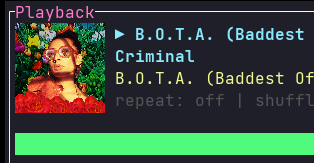
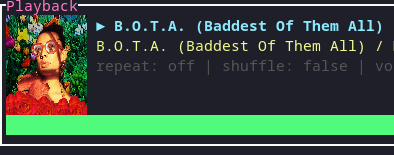
Here's how an album cover looks on WezTerm and Kitty respectively. WezTerm renders the image as a square, Kitty as a rectangle.

WezTerm
WezTerm

Kitty
Kitty

Both are rendered in high-res.

Thanks for listening to my suggestions, I'll mention this when I write up my review. I'm happy to email you a link to the URL when published; don't want to spam it here.

<!-- gh-comment-id:1225236938 --> @LukeZBaker commented on GitHub (Aug 24, 2022): Looking at the Image README section, I think the images there are also the wrong aspect ratio? Here's how an album cover looks on WezTerm and Kitty respectively. WezTerm renders the image as a square, Kitty as a rectangle. WezTerm ![WezTerm](https://user-images.githubusercontent.com/42400104/186341654-4816c7d1-e603-4db0-b00c-315dc9f339fb.png) Kitty ![Kitty](https://user-images.githubusercontent.com/42400104/186341657-88cbcf9a-6f07-46fb-8e7d-0c72e5a3093d.png) Both are rendered in high-res. Thanks for listening to my suggestions, I'll mention this when I write up my review. I'm happy to email you a link to the URL when published; don't want to spam it here.
Author
Owner

@aome510 commented on GitHub (Aug 30, 2022):

@LukeZBaker,

Thanks for listening to my suggestions, I'll mention this when I write up my review. I'm happy to email you a link to the URL when published; don't want to spam it here.

Look forward to your blog!

(*): why 5x9 by default though? It's just a value that works best based on my experience with my machines. Unfortunately, the render rectangle is not configurable atm, but it should be easy to support it.

I've added layout configs in #75. The cover image's rectangle size should be configurable through cover_img_{width|length} options. You can try to tweak those settings (along with playback_window_width) to see if it can fix the wrong rendering ratio.

Currently, it's not supported, but should be an easy addition. Maybe something like "seek forward/backward by 5s" commands.

Implemented in #76. Default bindings: > for seek forward and < for seek backward.

Please lmk if something doesn't work.

<!-- gh-comment-id:1231086002 --> @aome510 commented on GitHub (Aug 30, 2022): @LukeZBaker, > Thanks for listening to my suggestions, I'll mention this when I write up my review. I'm happy to email you a link to the URL when published; don't want to spam it here. Look forward to your blog! > (*): why 5x9 by default though? It's just a value that works best based on my experience with my machines. Unfortunately, the render rectangle is not configurable atm, but it should be easy to support it. I've added layout configs in #75. The cover image's rectangle size should be configurable through `cover_img_{width|length}` options. You can try to tweak those settings (along with `playback_window_width`) to see if it can fix the wrong rendering ratio. > Currently, it's not supported, but should be an easy addition. Maybe something like "seek forward/backward by 5s" commands. Implemented in #76. Default bindings: `>` for seek forward and `<` for seek backward. Please lmk if something doesn't work.
Author
Owner

@LukeZBaker commented on GitHub (Sep 1, 2022):

Thanks, after testing I confirm #75 and #76 work well.

<!-- gh-comment-id:1233811768 --> @LukeZBaker commented on GitHub (Sep 1, 2022): Thanks, after testing I confirm #75 and #76 work well.
Author
Owner

@aome510 commented on GitHub (Sep 1, 2022):

Thanks, after testing I confirm #75 and #76 work well.

Sounds good. I'll close this issue for now. Feel free to reopen it if encounter any issues.

<!-- gh-comment-id:1234138035 --> @aome510 commented on GitHub (Sep 1, 2022): > Thanks, after testing I confirm #75 and #76 work well. Sounds good. I'll close this issue for now. Feel free to reopen it if encounter any issues.
Sign in to join this conversation.
No milestone
No project
No assignees
1 participant
Notifications
Due date
The due date is invalid or out of range. Please use the format "yyyy-mm-dd".

No due date set.

Dependencies

No dependencies set.

Reference
starred/spotify-player#22
No description provided.