mirror of
https://github.com/aome510/spotify-player.git
synced 2026-04-26 01:15:55 +03:00
[GH-ISSUE #41] Default device #12
Labels
No labels
bug
documentation
enhancement
good first issue
help wanted
pull-request
question
third-party
third-party
wontfix
No milestone
No project
No assignees
1 participant

Notifications
Due date
No due date set.
Dependencies
No dependencies set.
Reference
starred/spotify-player#12
Loading…
Add table
Add a link
Reference in a new issue
No description provided.
Delete branch "%!s()"
Deleting a branch is permanent. Although the deleted branch may continue to exist for a short time before it actually gets removed, it CANNOT be undone in most cases. Continue?
Originally created by @elkrien on GitHub (May 25, 2022).
Original GitHub issue: https://github.com/aome510/spotify-player/issues/41
Originally assigned to: @aome510 on GitHub.
Just one more question. Each time I open spotify-player it starts using my TV as a device and music starts there. Is there an option to set my computer as a default device (player detects 3 devices that I have - my computer, TV and Denon player)?
@aome510 commented on GitHub (May 25, 2022):
This should be an easy-to-implement feature. Just want to have a confirmation,
AFAIK,
spotify-playershould respect the currently playing device and use it on startup. If no device is playing, it'll will connect to the first device in the list and the playing state should be "pause". If the player starts playing music in your TV (which is not playing before) on startup, it's a bug.@elkrien commented on GitHub (May 25, 2022):
Here is the list of my devices:
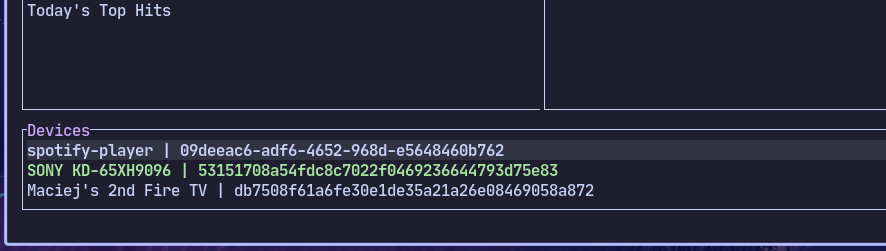
Anytime I start spotify player it's playing on Sony TV. Even if I change it to spotify-player (computer) next time when I start application it's "playing" on Sony TV (it's paused but anyway TV changes it's mode) - and my kids are screaming from downstairs that I mess with sound when they watch TV :)
@aome510 commented on GitHub (May 25, 2022):
Oh that's interesting lol. TIL about that TV behaviour when being requested to connect with Spotify. Thanks for the clarification.
@aome510 commented on GitHub (May 31, 2022):
@elkrien just implemented this with the latest change in
master. The default device is "spotify-player" by default. You can also configure the default device by modifying the general config file.@elkrien commented on GitHub (May 31, 2022):
Tested. Works great - from now it's my default Spotify player. Great job.
Btw - I did themes for Catppuccin and it is now in official Catppuccin organization repositories and with link to spotify-player repo.
I hope it will also allow to let more people know about this great player:
https://github.com/catppuccin/spotify-player
You can close this issue as solved.
v0.3.0#938