mirror of
https://github.com/jberkel/sms-backup-plus.git
synced 2026-04-25 17:05:59 +03:00
[GH-ISSUE #839] Clean up security settings for IMAP servers #663
Labels
No labels
AM+RCS
FAQ
awaiting response
backup
bespoke
bug
calendar
call log
cannot reproduce
cloudless
device-specific
documentation
dual- & multi-SIM
duplicate
feature-request
fixed in beta
good first issue
half-missing
help wanted
helpful
meta
misattribution
mms
other message sources
pull-request
question
rejuvenation
restore
schedule
security
stale
task
thanks
v1.5.1
v1.5.10
v1.5.11
v1.5.2
v1.5.3
v1.5.3
v1.5.4
v1.5.4
v1.5.5
v1.5.5
v1.5.6
v1.5.7
v1.5.8
v1.5.9
v1.6β
xoauth
~$ bounty $~
No milestone
No project
No assignees
1 participant

Notifications
Due date
No due date set.
Dependencies
No dependencies set.
Reference
starred/sms-backup-plus-jberkel#663
Loading…
Add table
Add a link
Reference in a new issue
No description provided.
Delete branch "%!s()"
Deleting a branch is permanent. Although the deleted branch may continue to exist for a short time before it actually gets removed, it CANNOT be undone in most cases. Continue?
Originally created by @Woi on GitHub (Feb 12, 2018).
Original GitHub issue: https://github.com/jberkel/sms-backup-plus/issues/839
I just stumpled on configuration options in extended settings -> IMAP server settings -> Security. First the difference between SSL and TLS is unclear. I assume it's the very old and confusing naming scheme of Netscape and Mozilla for STARTTLS vs. IMAPS [1].
Second: the optional settings could allow for silent downgrade attacks. I can't imagine any reason why there could be an IMAP server supporting STARTTLS sometimes and sometimes not.
So my suggestion is to remove the (optional) settings completely and make clear what is meant by SSL and TLS. Maybe ending up with None, SSL/TLS and STARTTLS as options, just as Mozilla did [1].
[1] http://forums.mozillazine.org/viewtopic.php?t=2730845
@jberkel commented on GitHub (Feb 16, 2018):
@Woi thanks for the feedback, I'll change it for the next version
@Woi commented on GitHub (Feb 23, 2018):
That's great. Thanks :)
@jberkel commented on GitHub (Mar 13, 2018):
@Woi I'm just looking at this issue. You're right:
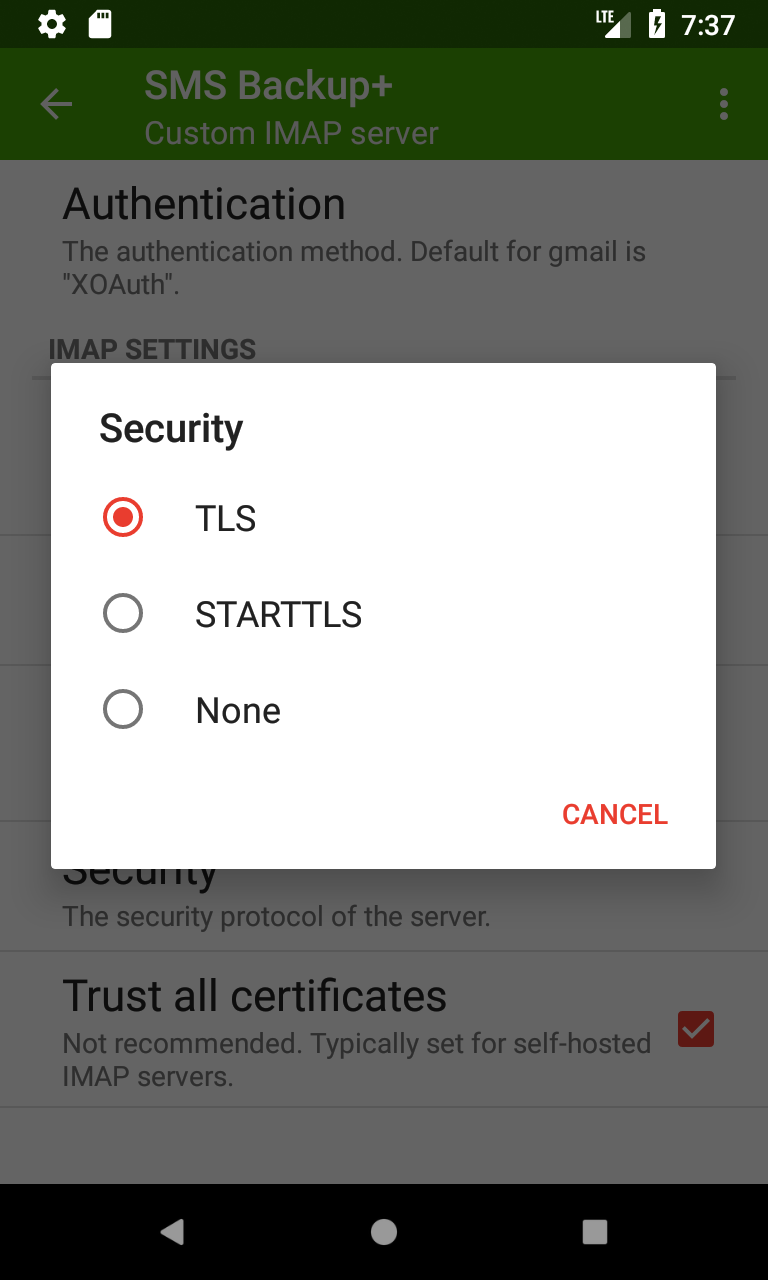
SSLv3 is actually blacklisted and cannot even be used. so the options should be
TLS,STARTTLS,None.Optional has been renamed to "Trust all" (#391). It doesn't downgrade the connection but rather trusts all certificates (usually for self-hosted IMAP servers). Maybe this should be a separate option named "trust all certificates", since it applies both to
TLSandSTARTTLS.@jberkel commented on GitHub (Mar 13, 2018):
@Woi does this make sense?
@Woi commented on GitHub (Apr 2, 2018):
Looks great in 1.5.11-BETA18. Thanks a lot :)
However, I have some concerns about the "trust all" settings: If the certificate changes, there needs to be a notification to the user. Otherwise we allow for silent man-in-the-middle attacks. (Dunno how it really behaves, because I can't test it)
One solution would be to pin the certificate after the first connection. A second solution would be to remove this option, and just allow users to (permanently) trust a self-singed cert whenever it occurs. A third way to handle this, is to remove the code completely. People running their own email-server, can easily get a let's encrypt certificate nowadays. The code can still be re-added and improved, should people complain. Plus: we know know that this feature is used and worth the effort :)
@jberkel commented on GitHub (Apr 3, 2018):
Yes, it could be improved, pinning would help to some degree. Can't say for sure but there are definitely many users will self-signed certificates out there, so I'm a bit hesitant about removing it completely. Maybe for version 1.6.0.
@madduck commented on GitHub (Apr 13, 2018):
Just chiming in quickly here, because I noticed that SMS Backup+ changed its behaviour and stopped syncing for me with the last backup. I use CAcert.org certificates (for now), and those are not in the "official" trust chain, but I imported them manually into Android. That works fine for K9 Mail, but it stopped working for SMS Backup+ — and I don't think I ever had "(trust all)" selected beforehand.
Anyway, I am currently forced to "trust all certificates", which is terrible in terms of the risk of MITM attacks as pointed out by @Woi . And no, it's sometimes not possible to get Letsencrypt certificates yet (in my case for lack of wildcard support).
@madduck commented on GitHub (Apr 13, 2018):
So I actually just deployed LE wildcard certs, but I still think that there ought to be a TOFU approach of sorts.
@jberkel commented on GitHub (Apr 13, 2018):
@madduck how did you import the certs into Android? when you say it stopped working, when did it stop? did it work with SMS Backup+ 1.5.10?
and what's a TOFU approach?
@Woi commented on GitHub (Apr 19, 2018):
I found the answer: "Trust on first use", that's exactly what I described as second solution :).
Usually I like the iterative approach: things have improved, let's ship and do further improvements for later releases.
But this is a security relevant topic, so I hesitate to say it to easily.
I would base the decision on the following points:
Do you like to have an issue/feature request for TOFU support?
@madduck commented on GitHub (Apr 19, 2018):
@jberkel sorry for the late response. I imported the certs into Android using the settings dialog, and yes, it used to work with prior versions, though I admit I don't know for sure that I hadn't selected "TLS (trust all)" beforehand, though I seriously doubt it, because I just would not settle for that.
@jberkel commented on GitHub (Apr 20, 2018):
@Woi I'm with you regarding the importance of security related issues but I'd like to ship 1.5.11 soon. I don't have the numbers but only a very small percentage use this feature (as you said, default settings are save). I think it will be a bit of work since some GUI / notification is needed, which also means new strings + translations + testing. Let's do this for the next version (shouldn't be too long this time). Can you create a ticket for it? (for the tofu approach)
@Woi commented on GitHub (Apr 22, 2018):
@jberkel Created
@acht commented on GitHub (Dec 18, 2018):
I have the same observation like madduck. A self-signed certificates imported to the android key-store worked fine. For me it changed after the upgrade to android 7.
Never the less I would prefer a certificate pinning.