mirror of
https://github.com/s3fs-fuse/s3fs-fuse.git
synced 2026-04-25 13:26:00 +03:00
[GH-ISSUE #1936] S3FS mount point, upload restart if file > 5GB #973
Labels
No labels
bug
bug
dataloss
duplicate
enhancement
feature request
help wanted
invalid
need info
performance
pull-request
question
question
testing
No milestone
No project
No assignees
1 participant

Notifications
Due date
No due date set.
Dependencies
No dependencies set.
Reference
starred/s3fs-fuse#973
Loading…
Add table
Add a link
Reference in a new issue
No description provided.
Delete branch "%!s()"
Deleting a branch is permanent. Although the deleted branch may continue to exist for a short time before it actually gets removed, it CANNOT be undone in most cases. Continue?
Originally created by @yguerchet on GitHub (Apr 21, 2022).
Original GitHub issue: https://github.com/s3fs-fuse/s3fs-fuse/issues/1936
Hello,
I did a mount point with the s3fs solution, when I copy a file smaller than 5GB I have no problem, but when it exceeds 5GB the upload is restarted one or more times. In the end it works, my file is fully uploaded with segment sizes defined according to my multipart_size directive. But the problem is that all the upload segments that failed at the beginning remain in my S3 bucket
.
This poses two problems for me, the first is that I pay for storage per gigabyte so I have orphan segments that I pay for nothing. The second problem is that I pay for incoming traffic (in gigabytes), so I pay for uploads that fail.
I looked at the logs but I don't see any error, don't hesitate to ask me for the logs or a specific part if necessary.
Here is the command I do: s3fs BucketName /MountPoint -o passwd_file="/root/.passwd-s3fs" -o url=https://URL_Of_My_Provider -o use_path_request_style -o multipart_size=500 -o max_stat_cache_size=100000 -o parallel_count= 50 -o multireq_max=50
I tried to change the value of my multipart_size multiple times but it didn't change anything.
Thank you in advance for your help.
version s3fs : V1.91
version fuse : 2.9.2, release 11.el7
kernel information : 3.10.0-1160.62.1.el7.x86_64
GNU/Linux Distribution : Centos Linux 7
@sbrudenell commented on GitHub (Apr 24, 2022):
I have the same problem, using s3fs with backblaze b2. I have:
Debug logs around the time when the upload restarts:
As you can see, it creates a new
upload_id.@yguerchet commented on GitHub (Apr 25, 2022):
Hello,
Yes I confirm on my side, it also create a new upload id.
@sbrudenell commented on GitHub (Apr 30, 2022):
I did some more testing.
-o nomixupload. With that option, I just get a single upload id with all my data, as opposed to a bunch of overlapping partitions.max_dirty_data. If I use-o max_dirty_data=1024(without-o nomixupload) I get partitions having sizes which are multiples of 1GB, rather than 5GB.Cross-referencing this to the code, it looks like
FdEntity::RowFlushMixMultiparthas some bug where it rewrites data from zero every time, rather than only a new chunk of dirty data.I can use
-o nomixuploadfor my use case for now, so I won't do any more testing.@yguerchet commented on GitHub (May 2, 2022):
Hello,
Thank's you it work for me to ! :)
But i don't understand this sentence : "as opposed to a bunch of overlapping partitions.". Can you explain ? Thank's
@imorandinwnp commented on GitHub (Jul 22, 2022):
Hi,
I have the same problem @sbrudenell and using nomixupload kind of works: in a 75GB file instead of having around 11 partial files I have 2 large files in B2:
Ignacio
@imorandinwnp commented on GitHub (Jul 25, 2022):
After weekend backups I can see 4 of each large file:
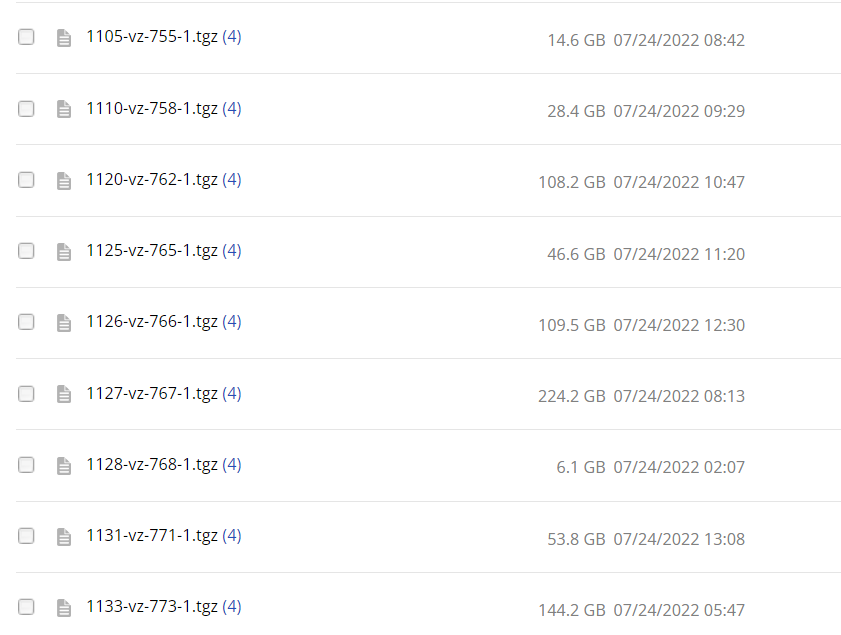
Still not working for me. Any recommendations?
@celesteking commented on GitHub (Mar 1, 2024):
Absolutely terrible backblaze s3fs / b2 s3fs / backblaze linux mount support. Same problem with the same multiple created versions as described above (your cost would be multitude
).Backblaze won't work properly with this thing! Have spent several hours debugging and adjusting parameters.