[GH-ISSUE #241] IAM_Role Cross Account - full ARN syntax #129

Closed
opened 2026-03-04 01:42:24 +03:00 by kerem · 11 comments
Owner

Originally created by @marcanthony on GitHub (Aug 17, 2015).
Original GitHub issue: https://github.com/s3fs-fuse/s3fs-fuse/issues/241

S3FS cant seem to use the FULL ARN of an IAM ROLE

This is critical to use s3fs to assume a role in another account for correct object ownership (this critical for buckets with replication enabled)

$> s3fs -d -d bucket /mnt/s3fs/bucket/ -o rw,nosuid,nodev,allow_other,stat_cache_expire=1,iam_role=arn:aws:iam::XXXXXXXXX:role/myrole,d efault_acl=public-read

--error
max_readahead=0x00020000
s3fs: Failed to check IAM role name(arn:aws:iam::##########:role/my-role).

Originally created by @marcanthony on GitHub (Aug 17, 2015). Original GitHub issue: https://github.com/s3fs-fuse/s3fs-fuse/issues/241 S3FS cant seem to use the FULL ARN of an IAM ROLE This is critical to use s3fs to assume a role in another account for correct object ownership (this critical for buckets with replication enabled) $> s3fs -d -d bucket /mnt/s3fs/bucket/ -o rw,nosuid,nodev,allow_other,stat_cache_expire=1,iam_role=arn:aws:iam::XXXXXXXXX:role/myrole,d efault_acl=public-read --error max_readahead=0x00020000 s3fs: Failed to check IAM role name(arn:aws:iam::##########:role/my-role).
kerem closed this issue 2026-03-04 01:42:25 +03:00
Author
Owner

@ggtakec commented on GitHub (Oct 1, 2015):

@marcanthony
I think s3fs need only IAM role name, not need full ARN.
s3fs call following URL for getting AccessKeyId & SecretAccessKey & Token by IAM role.

http://169.254.169.254/latest/meta-data/iam/security-credentials/<IAM role>

This result is following(example):

{
  "Code" : "Success",
  "LastUpdated" : "2015-10-01T14:15:42Z",
  "Type" : "AWS-HMAC",
  "AccessKeyId" : “*****”,
  "SecretAccessKey" : “****”,
  "Token" : “****”,
  "Expiration" : "2015-10-01T20:19:28Z"
}

we can call “http://169.254.169.254/latest/meta-data/iam/info/“ and get following result.
But we do not need to check InstanceProfileArn because “security-credentials” result is get at only security permit.

{
  "Code" : "Success",
  "LastUpdated" : "2015-10-01T13:13:40Z",
  "InstanceProfileArn" : "arn:aws:iam::*******:instance-profile/<IAM role>”,
  "InstanceProfileId" : “*****”
}

Then iam_role option requires only IAM role name.

Please tell me if my thinking or usage IAM role for s3fs is wrong.
Thanks in advance for your help.

<!-- gh-comment-id:144746893 --> @ggtakec commented on GitHub (Oct 1, 2015): @marcanthony I think s3fs need only IAM role name, not need full ARN. s3fs call following URL for getting AccessKeyId & SecretAccessKey & Token by IAM role. ``` http://169.254.169.254/latest/meta-data/iam/security-credentials/<IAM role> ``` This result is following(example): ``` { "Code" : "Success", "LastUpdated" : "2015-10-01T14:15:42Z", "Type" : "AWS-HMAC", "AccessKeyId" : “*****”, "SecretAccessKey" : “****”, "Token" : “****”, "Expiration" : "2015-10-01T20:19:28Z" } ``` we can call “http://169.254.169.254/latest/meta-data/iam/info/“ and get following result. But we do not need to check InstanceProfileArn because “security-credentials” result is get at only security permit. ``` { "Code" : "Success", "LastUpdated" : "2015-10-01T13:13:40Z", "InstanceProfileArn" : "arn:aws:iam::*******:instance-profile/<IAM role>”, "InstanceProfileId" : “*****” } ``` Then iam_role option requires only IAM role name. Please tell me if my thinking or usage IAM role for s3fs is wrong. Thanks in advance for your help.
Author
Owner

@marcanthony commented on GitHub (Oct 2, 2015):

The full ARN would permit the IAM ROLE in another AWS Account and Permit
Cross Region Bucket replication Ownership to work.

<!-- gh-comment-id:145051153 --> @marcanthony commented on GitHub (Oct 2, 2015): The full ARN would permit the IAM ROLE in another AWS Account and Permit Cross Region Bucket replication Ownership to work.
Author
Owner

@ggtakec commented on GitHub (Oct 3, 2015):

I think you are correct about using role, but...
I think that you have set an IAM role at launching your EC2 instance for controlling s3fs by IAM role.

s3fs gets the security information by the IAM role on your EC2 instance, it is specified at launching.
It means that s3fs gets the role information that is specified in the instance rather than the user.
It gets by accessing the following URL from within the instance.

http://169.254.169.254/latest/meta-data/iam/security-credentials/<IAM role name>

In other words, the s3fs to check is the IAM roles assigned to EC2, not the role assigned to the user.
s3fs can not be another access control AWS user with IAM role.

So that, iam_role option requires only IAM role name.
Following document explains about this.

http://docs.aws.amazon.com/AWSEC2/latest/UserGuide/iam-roles-for-amazon-ec2.html

Regards,

<!-- gh-comment-id:145212039 --> @ggtakec commented on GitHub (Oct 3, 2015): I think you are correct about using role, but... I think that you have set an IAM role at launching your EC2 instance for controlling s3fs by IAM role. s3fs gets the security information by the IAM role on your EC2 instance, it is specified at launching. It means that s3fs gets the role information that is specified in the instance rather than the user. It gets by accessing the following URL from within the instance. ``` http://169.254.169.254/latest/meta-data/iam/security-credentials/<IAM role name> ``` In other words, the s3fs to check is the IAM roles assigned to EC2, not the role assigned to the user. s3fs can not be another access control AWS user with IAM role. So that, iam_role option requires only IAM role name. Following document explains about this. ``` http://docs.aws.amazon.com/AWSEC2/latest/UserGuide/iam-roles-for-amazon-ec2.html ``` Regards,
Author
Owner

@marcanthony commented on GitHub (Oct 4, 2015):

What I am saying is currently the s3fs codebase assumes the IAM Role is from the EC2 instance launched on.

What I am suggesting is permit the FULL ARN

Check for ARN syntax
https://github.com/s3fs-fuse/s3fs-fuse/search?utf8=✓&q=IAM_CRED_URL&type=Code

Set it (don't assume local IAM role only)
string S3fsCurl::SetIAMRole(const char* role)
{
string old = S3fsCurl::IAM_role;
S3fsCurl::IAM_role = role ? role : "";
return old;
}

http://docs.aws.amazon.com/IAM/latest/UserGuide/walkthru_cross-account-with-roles.html

Why is cross account useful?

We have servers in AWS Account A that have authority on Buckets in Account's B, C and D.

In Accounts B, C and D we have bucket replication and versioning enabled. So for example:

Account B, Bucket 1 (region us-west-2) and Bucket 1 replicated (region us-east-1).

From Account A we U/L to Bucket 1 in Account B and its replicated by the STS/S3 service for Replication to occur the Account B must be the owner or have rights to the objects in Bucket 1.

Hence if you can do the full ARN we can use delegated roles to another account and or region.
This permits many use case other then the example just given.

<!-- gh-comment-id:145354713 --> @marcanthony commented on GitHub (Oct 4, 2015): What I am saying is currently the s3fs codebase assumes the IAM Role is from the EC2 instance launched on. What I am suggesting is permit the FULL ARN Check for ARN syntax https://github.com/s3fs-fuse/s3fs-fuse/search?utf8=✓&q=IAM_CRED_URL&type=Code Set it (don't assume local IAM role only) string S3fsCurl::SetIAMRole(const char\* role) { string old = S3fsCurl::IAM_role; S3fsCurl::IAM_role = role ? role : ""; return old; } http://docs.aws.amazon.com/IAM/latest/UserGuide/walkthru_cross-account-with-roles.html Why is cross account useful? We have servers in AWS Account A that have authority on Buckets in Account's B, C and D. In Accounts B, C and D we have bucket replication and versioning enabled. So for example: Account B, Bucket 1 (region us-west-2) and Bucket 1 replicated (region us-east-1). From Account A we U/L to Bucket 1 in Account B and its replicated by the STS/S3 service for Replication to occur the Account B must be the owner or have rights to the objects in Bucket 1. Hence if you can do the full ARN we can use delegated roles to another account and or region. This permits many use case other then the example just given.
Author
Owner

@ggtakec commented on GitHub (Oct 6, 2015):

I think that now s3fs could not support full ARN IAM role without big change codes.
Because s3fs uses static URL access for getting simple security data by only IAM role name.
If full ARN is supported, I think s3fs access to IAM role API and AWS user, etc.
Instead of that change, if you can, s3fs uses IAM role name only yet, and you can associate AWS users to that IAM role.

Regards,

<!-- gh-comment-id:145900505 --> @ggtakec commented on GitHub (Oct 6, 2015): I think that now s3fs could not support full ARN IAM role without big change codes. Because s3fs uses static URL access for getting simple security data by only IAM role name. If full ARN is supported, I think s3fs access to IAM role API and AWS user, etc. Instead of that change, if you can, s3fs uses IAM role name only yet, and you can associate AWS users to that IAM role. Regards,
Author
Owner

@ggtakec commented on GitHub (Mar 30, 2019):

We kept this issue open for a long time.
I will close this, but if the problem persists, please reopen or post a new issue.

<!-- gh-comment-id:478213518 --> @ggtakec commented on GitHub (Mar 30, 2019): We kept this issue open for a long time. I will close this, but if the problem persists, please reopen or post a new issue.
Author
Owner

@gitcrunch commented on GitHub (Apr 21, 2019):

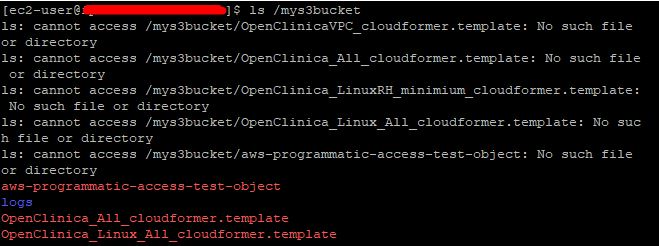
Although this discussion has been closed, I am trying my luck. I had the similar issue to access S3 in the other account B that is mounted on EC2 instance of account A. It seemed bucket was mounted. but get the error message "cannot access" even though the content of bucket was listed correctly. Then SFTP into the instance and able to see the mounted bucket folder and subfolder (of S3 in account B). But no files were displayed. Didn't quite understand the difference between full arn and role name only.
s3fserror

<!-- gh-comment-id:485221593 --> @gitcrunch commented on GitHub (Apr 21, 2019): Although this discussion has been closed, I am trying my luck. I had the similar issue to access S3 in the other account B that is mounted on EC2 instance of account A. It seemed bucket was mounted. but get the error message "cannot access" even though the content of bucket was listed correctly. Then SFTP into the instance and able to see the mounted bucket folder and subfolder (of S3 in account B). But no files were displayed. Didn't quite understand the difference between full arn and role name only. ![s3fserror](https://user-images.githubusercontent.com/7730432/56465045-cec06a80-63c3-11e9-9733-430da1b12f48.JPG)
Author
Owner

@ggtakec commented on GitHub (Apr 22, 2019):

@gitcrunch It seems to depend on the setting of IAM(access permission about HEAD/READ/POST/etc).
Another way, the latest master branch is compatible with AWS STS TOKEN, so it might help you.

<!-- gh-comment-id:485444890 --> @ggtakec commented on GitHub (Apr 22, 2019): @gitcrunch It seems to depend on the setting of IAM(access permission about HEAD/READ/POST/etc). Another way, the latest master branch is compatible with AWS STS TOKEN, so it might help you.
Author
Owner

@and3rson commented on GitHub (Aug 10, 2021):

Same issue here. I'm trying to assume role from a different account like this:

s3fs my-bucket-name:/ -o profile=XXX -o iam_role=arn:aws:iam::YYY:role/ZZZ /tmp/s3/ -f -d

s3fs just gets stuck on "IAM Access Token refreshing..."

I've also tried to fetch the credentials manually (via aws sts assume-role) before running s3fs, but those include SessionToken which s3fs does not accept.

EDIT: Just found the use_session_token option. Getting this in logs now:

2021-08-10T11:26:38.882Z [INF]     s3fs.cpp:get_access_keys(4004): access key from env variables
2021-08-10T11:26:38.882Z [INF]     s3fs.cpp:get_access_keys(4006): session token is available

...which means credentials are getting picked up. However I'm still getting 403. Do I need to provide anything else beside AWSACCESSKEYID, AWSSECRETACCESSKEY and AWS_SESSION_TOKEN?

<!-- gh-comment-id:895945377 --> @and3rson commented on GitHub (Aug 10, 2021): Same issue here. I'm trying to assume role from a different account like this: ``` s3fs my-bucket-name:/ -o profile=XXX -o iam_role=arn:aws:iam::YYY:role/ZZZ /tmp/s3/ -f -d ``` `s3fs` just gets stuck on "IAM Access Token refreshing..." I've also tried to fetch the credentials manually (via `aws sts assume-role`) before running `s3fs`, but those include `SessionToken` which `s3fs` does not accept. EDIT: Just found the `use_session_token` option. Getting this in logs now: ``` 2021-08-10T11:26:38.882Z [INF] s3fs.cpp:get_access_keys(4004): access key from env variables 2021-08-10T11:26:38.882Z [INF] s3fs.cpp:get_access_keys(4006): session token is available ``` ...which means credentials are getting picked up. However I'm still getting 403. Do I need to provide anything else beside `AWSACCESSKEYID`, `AWSSECRETACCESSKEY` and `AWS_SESSION_TOKEN`?
Author
Owner

@srinisakh commented on GitHub (Dec 3, 2021):

iam_role option is used to retrieve credentials from instance metadata. AWS_SESSION_TOKEN need to be AWSSESSIONTOKEN without _

also I had to remove the path specification, just give bucket name. This is with s3fs v1.86

<!-- gh-comment-id:985557260 --> @srinisakh commented on GitHub (Dec 3, 2021): iam_role option is used to retrieve credentials from instance metadata. AWS_SESSION_TOKEN need to be AWSSESSIONTOKEN without `_` also I had to remove the path specification, just give bucket name. This is with s3fs v1.86
Author
Owner

@rads18 commented on GitHub (Jul 11, 2022):

@srinisakh were you able to successfully mount bucket cross account?,
like bucketA in account A mount at EC2 in account B

i am not using IAM roles in the test phase but user account key/secret with no luck cross account. The AWS S3 cp/mv work fine cross account.

<!-- gh-comment-id:1179912840 --> @rads18 commented on GitHub (Jul 11, 2022): @srinisakh were you able to successfully mount bucket cross account?, like bucketA in account A mount at EC2 in account B i am not using IAM roles in the test phase but user account key/secret with no luck cross account. The AWS S3 cp/mv work fine cross account.
Sign in to join this conversation.
No milestone
No project
No assignees
1 participant
Notifications
Due date
The due date is invalid or out of range. Please use the format "yyyy-mm-dd".

No due date set.

Dependencies

No dependencies set.

Reference
starred/s3fs-fuse#129
No description provided.