[GH-ISSUE #2118] Change ownership of a file #1079

Open
opened 2026-03-04 01:51:13 +03:00 by kerem · 1 comment
Owner

Originally created by @ValentinNikin on GitHub (Feb 20, 2023).
Original GitHub issue: https://github.com/s3fs-fuse/s3fs-fuse/issues/2118

Additional Information

Version of s3fs being used (s3fs --version)

V1.89

Version of fuse being used (pkg-config --modversion fuse, rpm -qi fuse or dpkg -s fuse)

fuse3 3.10.3-2

Kernel information (uname -r)

5.10.0-21-cloud-amd64

GNU/Linux Distribution, if applicable (cat /etc/os-release)

Debian GNU/Linux 11 (bullseye)

Details about issue

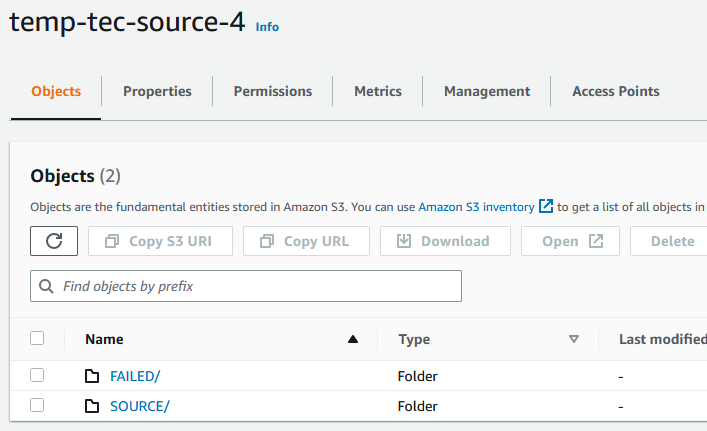
I have bucket with 2 folders (SOURCE and FAILED). Bucket is available through the IAM role.
image

I also have 2 EC2 instances.


On the first instance I login with the "userserver" user and mounted 2 folders.

sudo su -l userserver
s3fs -o iam_role=auto temp-tec-source-4:/SOURCE SOURCE/
s3fs -o iam_role=auto temp-tec-source-4:/FAILED FAILED/

In the SOURCE folder I have 1 file. The file is owned by "userserver".

userserver@ip-172-31-95-120:~/SOURCE$ ls -la
total 5008
drwx------ 1 userserver userserver 0 Jan 1 1970 .
drwxr-xr-x 4 userserver userserver 4096 Feb 20 11:13 ..
-rw-r----- 1 userserver userserver 5123078 Feb 20 11:39 lett_pill_wind_Premiere_15.mp4


On the second instance I login with the "admin" user and mounted 1 folders.

s3fs -o iam_role=auto temp-tec-source-4:/SOURCE SOURCE/

In the SOURCE folder I have 1 file. The file is owned by "admin".

admin@ip-172-31-93-47:~/SOURCE$ ls -la
total 5008
drwx------ 1 admin admin 0 Jan 1 1970 .
drwxr-xr-x 7 admin admin 4096 Feb 20 10:29 ..
-rw-r----- 1 admin admin 5123078 Feb 20 11:54 lett_pill_wind_Premiere_15.mp4


Next on the first EC2 instance I moved the file to the FAILED folder and return it back.

userserver@ip-172-31-95-120:~/SOURCE$ mv lett_pill_wind_Premiere_15.mp4 ../FAILED/
userserver@ip-172-31-95-120:~/SOURCE$ mv ../FAILED/lett_pill_wind_Premiere_15.mp4 ./

The owner of the file on this instance has not changed.

userserver@ip-172-31-95-120:~/SOURCE$ ls -la
total 5008
drwx------ 1 userserver userserver 0 Jan 1 1970 .
drwxr-xr-x 4 userserver userserver 4096 Feb 20 11:13 ..
-rw-r----- 1 userserver userserver 5123078 Feb 20 11:39 lett_pill_wind_Premiere_15.mp4


But on the second EC2 instance, the owner of the file has changed (now is "user").

admin@ip-172-31-93-47:~/SOURCE$ ls -la
total 5008
drwx------ 1 admin admin 0 Jan 1 1970 .
drwxr-xr-x 7 admin admin 4096 Feb 20 10:29 ..
-rw-r----- 1 user user 5123078 Feb 20 11:39 lett_pill_wind_Premiere_15.mp4

And I have lost read access to this file with "admin" user rights.

"userserver" and "user" users have equals ids (1002). I think that's why the current owner of the file is "user".


Is it correct behaviour? Is there a way to keep the rights for file on the second EC2 instance for the "admin" user?

Originally created by @ValentinNikin on GitHub (Feb 20, 2023). Original GitHub issue: https://github.com/s3fs-fuse/s3fs-fuse/issues/2118 ### Additional Information #### Version of s3fs being used (`s3fs --version`) V1.89 #### Version of fuse being used (`pkg-config --modversion fuse`, `rpm -qi fuse` or `dpkg -s fuse`) fuse3 3.10.3-2 #### Kernel information (`uname -r`) 5.10.0-21-cloud-amd64 #### GNU/Linux Distribution, if applicable (`cat /etc/os-release`) Debian GNU/Linux 11 (bullseye) ### Details about issue I have bucket with 2 folders (SOURCE and FAILED). Bucket is available through the IAM role. ![image](https://user-images.githubusercontent.com/30625611/220100226-36b2a40b-ac34-4c07-988d-325f5f9059c6.png) I also have 2 EC2 instances. -------- On the first instance I login with the "userserver" user and mounted 2 folders. > sudo su -l userserver > s3fs -o iam_role=auto temp-tec-source-4:/SOURCE SOURCE/ > s3fs -o iam_role=auto temp-tec-source-4:/FAILED FAILED/ In the SOURCE folder I have 1 file. The file is owned by "userserver". > userserver@ip-172-31-95-120:~/SOURCE$ ls -la > total 5008 > drwx------ 1 userserver userserver 0 Jan 1 1970 . > drwxr-xr-x 4 userserver userserver 4096 Feb 20 11:13 .. > -rw-r----- 1 userserver userserver 5123078 Feb 20 11:39 lett_pill_wind_Premiere_15.mp4 -------- On the second instance I login with the "admin" user and mounted 1 folders. > s3fs -o iam_role=auto temp-tec-source-4:/SOURCE SOURCE/ In the SOURCE folder I have 1 file. The file is owned by "admin". > admin@ip-172-31-93-47:~/SOURCE$ ls -la > total 5008 > drwx------ 1 admin admin 0 Jan 1 1970 . > drwxr-xr-x 7 admin admin 4096 Feb 20 10:29 .. > -rw-r----- 1 admin admin 5123078 Feb 20 11:54 lett_pill_wind_Premiere_15.mp4 -------- Next on the first EC2 instance I moved the file to the FAILED folder and return it back. > userserver@ip-172-31-95-120:\~/SOURCE$ mv lett_pill_wind_Premiere_15.mp4 ../FAILED/ > userserver@ip-172-31-95-120:~/SOURCE$ mv ../FAILED/lett_pill_wind_Premiere_15.mp4 ./ The owner of the file on this instance has not changed. > userserver@ip-172-31-95-120:~/SOURCE$ ls -la > total 5008 > drwx------ 1 userserver userserver 0 Jan 1 1970 . > drwxr-xr-x 4 userserver userserver 4096 Feb 20 11:13 .. > -rw-r----- 1 userserver userserver 5123078 Feb 20 11:39 lett_pill_wind_Premiere_15.mp4 -------- But on the second EC2 instance, the owner of the file has changed (now is "user"). > admin@ip-172-31-93-47:~/SOURCE$ ls -la > total 5008 > drwx------ 1 admin admin 0 Jan 1 1970 . > drwxr-xr-x 7 admin admin 4096 Feb 20 10:29 .. > -rw-r----- 1 user user 5123078 Feb 20 11:39 lett_pill_wind_Premiere_15.mp4 And I have lost read access to this file with "admin" user rights. "userserver" and "user" users have equals ids (1002). I think that's why the current owner of the file is "user". -------- Is it correct behaviour? Is there a way to keep the rights for file on the second EC2 instance for the "admin" user?
Author
Owner

@ggtakec commented on GitHub (Mar 12, 2023):

Maybe those files weren't created using s3fs.
Objects(files, directories) created from S3 clients other than s3fs, such as the AWS console, aws cli, do not have attributes in Linux.
Files and objects without attributes are displayed and operated as attributes of the user who started s3fs.
I think your phenomenon is this effect.

When performing exactly the same operation (attribute operation) as for local files such as Linux, the files and objects to be operated must have attributes in advance.
For example, you can give attributes to a file with the touch command before operating on it.

<!-- gh-comment-id:1465079750 --> @ggtakec commented on GitHub (Mar 12, 2023): Maybe those files weren't created using s3fs. Objects(files, directories) created from S3 clients other than s3fs, such as the AWS console, aws cli, do not have attributes in Linux. Files and objects without attributes are displayed and operated as attributes of the user who started s3fs. I think your phenomenon is this effect. When performing exactly the same operation (attribute operation) as for local files such as Linux, the files and objects to be operated must have attributes in advance. For example, you can give attributes to a file with the `touch` command before operating on it.
Sign in to join this conversation.
No milestone
No project
No assignees
1 participant
Notifications
Due date
The due date is invalid or out of range. Please use the format "yyyy-mm-dd".

No due date set.

Dependencies

No dependencies set.

Reference
starred/s3fs-fuse#1079
No description provided.