[GH-ISSUE #3417] Project Diva 2nd (ULJM05681):- Incorrect Internal FPS when rendering the opening CG since v0.9.1-36-g8d00ab6 #1434

Open
opened 2026-03-17 23:33:42 +03:00 by kerem · 32 comments
Owner

Originally created by @solarmystic on GitHub (Aug 26, 2013).
Original GitHub issue: https://github.com/hrydgard/ppsspp/issues/3417

Issue is as stated in the title. Responsible commit found via bisecting is github.com/hrydgard/ppsspp@8d00ab61e3

The internal FPS during video playback before that commit was 60, which was correct:-

60fps

After the commit github.com/hrydgard/ppsspp@8d00ab61e3 was merged to master in v0.9.1-41-g65e4d76 github.com/hrydgard/ppsspp@65e4d76543, the internal FPS during video playback dropped to 45:-

45fps

Apparently merging the commit also happens to cause a whole host of other video related issues in other games as well (like Persona 3 and others) as related here github.com/hrydgard/ppsspp@65e4d76543 in the comments section and in the forums.

Temporary solution:-

a. Resize the screen manually (via switching back and forth between full screen and windowed, or playing around with the 1x,2x,3x options) and the FPS will jump back to 60 during the video playback in the affected builds. Until the next CG playback of course.

capture

b. Reverting that commit restores the earlier working behaviour. Apparently this game needs the line that was deleted from the source file for proper FMV playback.

Originally created by @solarmystic on GitHub (Aug 26, 2013). Original GitHub issue: https://github.com/hrydgard/ppsspp/issues/3417 Issue is as stated in the title. Responsible commit found via bisecting is https://github.com/hrydgard/ppsspp/commit/8d00ab61e3b5974e38afec92e4f07453008c5a9c The internal FPS during video playback before that commit was 60, which was correct:- ![60fps](https://f.cloud.github.com/assets/4345150/1025632/54d9f7ce-0e4a-11e3-8728-86363385207f.JPG) After the commit https://github.com/hrydgard/ppsspp/commit/8d00ab61e3b5974e38afec92e4f07453008c5a9c was merged to master in v0.9.1-41-g65e4d76 https://github.com/hrydgard/ppsspp/commit/65e4d76543b7310ba63bb0b8742d753dc6dcc417, the internal FPS during video playback dropped to 45:- ![45fps](https://f.cloud.github.com/assets/4345150/1025633/590354ee-0e4a-11e3-966b-1fcc57b4e5ed.JPG) Apparently merging the commit also happens to cause a whole host of other video related issues in other games as well (like Persona 3 and others) as related here https://github.com/hrydgard/ppsspp/commit/65e4d76543b7310ba63bb0b8742d753dc6dcc417 in the comments section and in the forums. Temporary solution:- a. Resize the screen manually (via switching back and forth between full screen and windowed, or playing around with the 1x,2x,3x options) and the FPS will jump back to 60 during the video playback in the affected builds. Until the next CG playback of course. ![capture](https://f.cloud.github.com/assets/4345150/1025638/ac5172e8-0e4a-11e3-9361-baf7375e1c3a.JPG) b. Reverting that commit restores the earlier working behaviour. Apparently this game needs the line that was deleted from the source file for proper FMV playback.
Author
Owner

@unknownbrackets commented on GitHub (Aug 26, 2013):

It shouldn't be possible for that line to affect ingame timing.

As for the other issues, they were pre-existing. The difference is just that certain games are going through a different code path now when drawing their videos. They go away if you turn off 2xSSAA.

-[Unknown]

<!-- gh-comment-id:23266850 --> @unknownbrackets commented on GitHub (Aug 26, 2013): It shouldn't be possible for that line to affect ingame timing. As for the other issues, they were pre-existing. The difference is just that certain games are going through a different code path now when drawing their videos. They go away if you turn off 2xSSAA. -[Unknown]
Author
Owner

@solarmystic commented on GitHub (Aug 26, 2013):

@unknownbrackets

And yet, it does. I can repro the issue rather consistently, 100% of the time when that line is removed from the MediaEngine.cpp file.

<!-- gh-comment-id:23289339 --> @solarmystic commented on GitHub (Aug 26, 2013): @unknownbrackets And yet, it does. I can repro the issue rather consistently, 100% of the time when that line is removed from the MediaEngine.cpp file.
Author
Owner

@thedax commented on GitHub (Aug 26, 2013):

That's really bizarre. I can also reproduce it by adding the removed line back.

<!-- gh-comment-id:23292950 --> @thedax commented on GitHub (Aug 26, 2013): That's really bizarre. I can also reproduce it by adding the removed line back.
Author
Owner

@unknownbrackets commented on GitHub (Aug 26, 2013):

It'd be helpful to see a debug log with the resized line, and without it. Doesn't need to be the full thing, just a couple hundred lines in the same area with different FPS.

It's also possible, though unlikely, that the video is actually 45 fps and we simply detect it incorrectly when there's no framebuffer.

-[Unknown]

<!-- gh-comment-id:23301948 --> @unknownbrackets commented on GitHub (Aug 26, 2013): It'd be helpful to see a debug log with the resized line, and without it. Doesn't need to be the full thing, just a couple hundred lines in the same area with different FPS. It's also _possible_, though unlikely, that the video is actually 45 fps and we simply detect it incorrectly when there's no framebuffer. -[Unknown]
Author
Owner

@thedax commented on GitHub (Aug 26, 2013):

If @solarmystic doesn't beat me to it, I'll get you one tomorrow.

<!-- gh-comment-id:23304262 --> @thedax commented on GitHub (Aug 26, 2013): If @solarmystic doesn't beat me to it, I'll get you one tomorrow.
Author
Owner

@solarmystic commented on GitHub (Aug 27, 2013):

@unknownbrackets

Insomnia strikes. Bah.

Here they are, in 7z ultra compression because of the massive sizes. Logfiles were captured from boot up to OP FMV playback after lingering at the title screen for a bit.

With the resized line (60 FPS)
http://www.mediafire.com/?dzs4b8930q0dvv9

Without the resized line (45 FPS)
http://www.mediafire.com/?wikz41adr5o319x

<!-- gh-comment-id:23306877 --> @solarmystic commented on GitHub (Aug 27, 2013): @unknownbrackets Insomnia strikes. Bah. Here they are, in 7z ultra compression because of the massive sizes. Logfiles were captured from boot up to OP FMV playback after lingering at the title screen for a bit. With the resized line (60 FPS) http://www.mediafire.com/?dzs4b8930q0dvv9 Without the resized line (45 FPS) http://www.mediafire.com/?wikz41adr5o319x
Author
Owner

@unknownbrackets commented on GitHub (Aug 27, 2013):

Okay, the good news is they look identical. This means the timing of the game is not effected at all, and as I hoped, the game has not noticed the change (it should not have.)

Most likely, this is due to a difference in the dirty framebuffer detection.

I notice that when displaying ram directly, the vfb->reallyDirtyAfterDisplay = false; flag is never cleared. What happens if, inside:

void FramebufferManager::UpdateFromMemory(u32 addr, int size) {

You set vfb->reallyDirtyAfterDisplay = true;? Does it go back to 60 (it probably will not)? Keeping that change, what if you then go to:

void FramebufferManager::CopyDisplayToOutput() {

And right after it's called, set vfb->reallyDirtyAfterDisplay = false;, in addition to adding the "gpu->Resized();" line back to the MediaEngine? Does it drop down to 45 fps?

I don't think the above change would be entirely "correct", but it might help to identify if 60 fps was not accurate for this particular area. If the game is only drawing a video frame 45 or 30 times per second (whatever frequency it is), then 60 fps is technically a lie. It would be more expensive to validate the frame than just assuming it has changed and calling it 60 fps, though.

Is the video dropping frames or anything? Or is the only impact that the fps counter shows a lower number?

-[Unknown]

<!-- gh-comment-id:23307293 --> @unknownbrackets commented on GitHub (Aug 27, 2013): Okay, the good news is they look identical. This means the timing of the game is not effected at all, and as I hoped, the game has not noticed the change (it should not have.) Most likely, this is due to a difference in the dirty framebuffer detection. I notice that when displaying ram directly, the `vfb->reallyDirtyAfterDisplay = false;` flag is never cleared. What happens if, inside: ``` c++ void FramebufferManager::UpdateFromMemory(u32 addr, int size) { ``` You set `vfb->reallyDirtyAfterDisplay = true;`? Does it go back to 60 (it probably will not)? Keeping that change, what if you then go to: ``` c++ void FramebufferManager::CopyDisplayToOutput() { ``` And right after it's called, set `vfb->reallyDirtyAfterDisplay = false;`, in addition to adding the "gpu->Resized();" line back to the MediaEngine? Does it drop down to 45 fps? I don't think the above change would be entirely "correct", but it might help to identify if 60 fps was not accurate for this particular area. If the game is only drawing a video frame 45 or 30 times per second (whatever frequency it is), then 60 fps is technically a lie. It would be more expensive to validate the frame than just assuming it has changed and calling it 60 fps, though. Is the video dropping frames or anything? Or is the only impact that the fps counter shows a lower number? -[Unknown]
Author
Owner

@solarmystic commented on GitHub (Aug 27, 2013):

@unknownbrackets

Setting vfb->reallyDirtyAfterDisplay = true; in any of those sections gives me a vfb is underfined error, how do I rectify that?

I was trying out what you've mentioned in your post in Framebuffer.cpp file, with no success.

The video doesn't look like it's dropping frames with 45 FPS but it's very, very shaky (vibrating). This doesn't occur when the video is playing back at 60 FPS. Especially evident in fullscreen mode if set to it before game is started up.

<!-- gh-comment-id:23308124 --> @solarmystic commented on GitHub (Aug 27, 2013): @unknownbrackets Setting vfb->reallyDirtyAfterDisplay = true; in any of those sections gives me a vfb is underfined error, how do I rectify that? I was trying out what you've mentioned in your post in Framebuffer.cpp file, with no success. The video doesn't look like it's dropping frames with 45 FPS but it's very, very shaky (vibrating). This doesn't occur when the video is playing back at 60 FPS. Especially evident in fullscreen mode if set to it before game is started up.
Author
Owner

@unknownbrackets commented on GitHub (Aug 27, 2013):

Duh, sorry. In CopyDisplayToOutput(), do it right after VirtualFramebuffer *vfb = GetDisplayFBO();. Maybe it's not needed in UpdateFromMemory().

-[Unknown]

<!-- gh-comment-id:23308229 --> @unknownbrackets commented on GitHub (Aug 27, 2013): Duh, sorry. In `CopyDisplayToOutput()`, do it right after `VirtualFramebuffer *vfb = GetDisplayFBO();`. Maybe it's not needed in `UpdateFromMemory()`. -[Unknown]
Author
Owner

@solarmystic commented on GitHub (Aug 27, 2013):

@unknownbrackets

Heh, adding that line vfb->reallyDirtyAfterDisplay = false; after the VirtualFramebuffer *vfb = GetDisplayFBO(); makes it compile, but launching the game crashes PPSSPP straight away. Heck, any game crashes PPSSPP.

Something's not right.

EDIT:- This is correct change you wanted me to make, right? In addition to that other line in the MediaEngine.cpp file.

capture

<!-- gh-comment-id:23308398 --> @solarmystic commented on GitHub (Aug 27, 2013): @unknownbrackets Heh, adding that line vfb->reallyDirtyAfterDisplay = false; after the VirtualFramebuffer *vfb = GetDisplayFBO(); makes it compile, but launching the game crashes PPSSPP straight away. Heck, any game crashes PPSSPP. Something's not right. EDIT:- This is correct change you wanted me to make, right? In addition to that other line in the MediaEngine.cpp file. ![capture](https://f.cloud.github.com/assets/4345150/1030604/646a9b22-0ebc-11e3-898f-1f05172f4fe9.JPG)
Author
Owner

@unknownbrackets commented on GitHub (Aug 27, 2013):

Err, inside the if. Sorry, I'm trying to multitask too much here clearly.

-[Unknown]

<!-- gh-comment-id:23309355 --> @unknownbrackets commented on GitHub (Aug 27, 2013): Err, inside the if. Sorry, I'm trying to multitask too much here clearly. -[Unknown]
Author
Owner

@solarmystic commented on GitHub (Aug 27, 2013):

@unknownbrackets

Just to be sure, which if?

This if?

capture

or this if?

capture1

Putting it under the first "main" if like in picture 1 also causes another crash upon booting any game. Putting it under the second if works just fine.

Also, the internal FPS is still 60 when vfb->reallyDirtyAfterDisplay = false; is added as shown in the 2nd picture, in conjunction with the gpu resize line in MediaEngine.cpp.

screen00007

<!-- gh-comment-id:23309836 --> @solarmystic commented on GitHub (Aug 27, 2013): @unknownbrackets Just to be sure, which if? This if? ![capture](https://f.cloud.github.com/assets/4345150/1030737/2060eb10-0ec2-11e3-94b3-46142409b17c.JPG) or this if? ![capture1](https://f.cloud.github.com/assets/4345150/1030742/4e7f2d72-0ec2-11e3-95b7-5641010b602e.JPG) Putting it under the first "main" if like in picture 1 also causes another crash upon booting any game. Putting it under the second if works just fine. Also, the internal FPS is still 60 when vfb->reallyDirtyAfterDisplay = false; is added as shown in the 2nd picture, in conjunction with the gpu resize line in MediaEngine.cpp. ![screen00007](https://f.cloud.github.com/assets/4345150/1030753/e42a552c-0ec2-11e3-81a2-8500f8f1412f.jpg)
Author
Owner

@dbz400 commented on GitHub (Aug 27, 2013):

Shouldn't be vfb->reallyDirtyAfterDisplay = true in 1st ifdef ? then the false flag will be cleared .

<!-- gh-comment-id:23310065 --> @dbz400 commented on GitHub (Aug 27, 2013): Shouldn't be vfb->reallyDirtyAfterDisplay = true in 1st ifdef ? then the false flag will be cleared .
Author
Owner

@solarmystic commented on GitHub (Aug 27, 2013):

@raven02

Do you have this game too? Would be nice to have someone more proficient at C++ have a go at what unknownbrackets suggested.

I really have no idea what I'm doing.

<!-- gh-comment-id:23310275 --> @solarmystic commented on GitHub (Aug 27, 2013): @raven02 Do you have this game too? Would be nice to have someone more proficient at C++ have a go at what unknownbrackets suggested. I really have no idea what I'm doing.
Author
Owner

@unknownbrackets commented on GitHub (Aug 27, 2013):

Sorry, looking at the code more, I'm wrong, that can't work. Basically, it'd need to be a global flag. That's what I get for making comments while I'm so distracted, sorry.

Since it handles the dirty flag on a framebuffer, and gpu->Resized() deletes the framebuffer, then it can't know if they're dirty and it'll always say "yes." That means it will always report 60 fps in that case, I think, unless the game is drawing anything, in which case it would've had the issues e.g. God of War had before with videos.

-[Unknown]

<!-- gh-comment-id:23310375 --> @unknownbrackets commented on GitHub (Aug 27, 2013): Sorry, looking at the code more, I'm wrong, that can't work. Basically, it'd need to be a global flag. That's what I get for making comments while I'm so distracted, sorry. Since it handles the dirty flag on a framebuffer, and gpu->Resized() deletes the framebuffer, then it can't know if they're dirty and it'll always say "yes." That means it will always report 60 fps in that case, I think, unless the game is drawing anything, in which case it would've had the issues e.g. God of War had before with videos. -[Unknown]
Author
Owner

@thedax commented on GitHub (Aug 27, 2013):

I can take a stab at it now: where would one need this global variable to be checked and set? In just those spots mentioned thus far? Or would it replace vfb->reallyDirtyAfterDisplay, everywhere?

<!-- gh-comment-id:23323397 --> @thedax commented on GitHub (Aug 27, 2013): I can take a stab at it now: where would one need this global variable to be checked and set? In just those spots mentioned thus far? Or would it replace vfb->reallyDirtyAfterDisplay, everywhere?
Author
Owner

@unknownbrackets commented on GitHub (Aug 27, 2013):

Well, I'm not sure. I guess just when there's no display vfb. Maybe an easier thing is just to see how many times per second the UpdateFromMemory function is called (which it is called every time the game renders a frame of video.)

-[Unknown]

<!-- gh-comment-id:23341432 --> @unknownbrackets commented on GitHub (Aug 27, 2013): Well, I'm not sure. I guess just when there's no display vfb. Maybe an easier thing is just to see how many times per second the UpdateFromMemory function is called (which it is called every time the game renders a frame of video.) -[Unknown]
Author
Owner

@unknownbrackets commented on GitHub (Jan 11, 2014):

What is the FPS now?

Also, if you play the game on a PSP with cwcheat installed, and hold select before/during the video, you can have it show the framerate. This should show if it should actually be 30, 45, 60, etc.

-[Unknown]

<!-- gh-comment-id:32104387 --> @unknownbrackets commented on GitHub (Jan 11, 2014): What is the FPS now? Also, if you play the game on a PSP with cwcheat installed, and hold select before/during the video, you can have it show the framerate. This should show if it should actually be 30, 45, 60, etc. -[Unknown]
Author
Owner

@thedax commented on GitHub (Jan 11, 2014):

It's still at 45. I'll check what the FPS on the PSP is in a bit.

<!-- gh-comment-id:32106204 --> @thedax commented on GitHub (Jan 11, 2014): It's still at 45. I'll check what the FPS on the PSP is in a bit.
Author
Owner

@dbz400 commented on GitHub (Jan 18, 2014):

Project Diva Extend also run as 45 FPS through the video

<!-- gh-comment-id:32684550 --> @dbz400 commented on GitHub (Jan 18, 2014): Project Diva Extend also run as 45 FPS through the video
Author
Owner

@unknownbrackets commented on GitHub (Jan 25, 2014):

According to cwcheat, it seems the FPS ought to be 30, which is a sensical fps for video. In any case, 60 was wrong also.

-[Unknown]

<!-- gh-comment-id:33285124 --> @unknownbrackets commented on GitHub (Jan 25, 2014): According to cwcheat, it seems the FPS ought to be 30, which is a sensical fps for video. In any case, 60 was wrong also. -[Unknown]
Author
Owner

@thedax commented on GitHub (Jan 25, 2014):

Screenshot 01

Correct.

<!-- gh-comment-id:33285152 --> @thedax commented on GitHub (Jan 25, 2014): ![Screenshot 01](http://i.minus.com/iHPjlEOg9dJBs.bmp) Correct.
Author
Owner

@dbz400 commented on GitHub (Jan 26, 2014):

It is interesting that if i escape to menu and back , it will become 60 again from 45 (Becasue guz->resized() when back from menu ??)

screen00399

<!-- gh-comment-id:33318602 --> @dbz400 commented on GitHub (Jan 26, 2014): It is interesting that if i escape to menu and back , it will become 60 again from 45 (Becasue guz->resized() when back from menu ??) ![screen00399](https://f.cloud.github.com/assets/3000282/2004124/13f346a2-869a-11e3-9b1d-9197a0c3167f.jpg)
Author
Owner

@unknownbrackets commented on GitHub (Jan 26, 2014):

That's because it's killing some framebuffer I guess and not creating. It would be ideal if the logic was more tight such that the same framebuffers would always be created no matter when they went away.

Anyway, 60 is also wrong.

-[Unknown]

<!-- gh-comment-id:33323281 --> @unknownbrackets commented on GitHub (Jan 26, 2014): That's because it's killing some framebuffer I guess and not creating. It would be ideal if the logic was more tight such that the same framebuffers would always be created no matter when they went away. Anyway, 60 is also wrong. -[Unknown]
Author
Owner

@unknownbrackets commented on GitHub (Jun 8, 2014):

Has this changed in the latest build? The question is why it's 45 and not 30. Something must be "poking" the FPS to make it think it's got an extra frame once every other frame...

-[Unknown]

<!-- gh-comment-id:45443061 --> @unknownbrackets commented on GitHub (Jun 8, 2014): Has this changed in the latest build? The question is why it's 45 and not 30. Something must be "poking" the FPS to make it think it's got an extra frame once every other frame... -[Unknown]
Author
Owner

@solarmystic commented on GitHub (Jun 8, 2014):

Nope, it's still showing 45 in the latest builds.
uljm05681_00000

<!-- gh-comment-id:45443160 --> @solarmystic commented on GitHub (Jun 8, 2014): Nope, it's still showing 45 in the latest builds. ![uljm05681_00000](https://cloud.githubusercontent.com/assets/4345150/3211863/2fe953a8-ef34-11e3-9757-ed6851b8340d.jpg)
Author
Owner

@unknownbrackets commented on GitHub (Jul 2, 2014):

From a log, sceDisplaySetFramebuf is being called 30 times per second, so technically the fps is correct. The only problem is that PPSSPP thinks something is being dirtied. It's possible that with "simulate block transfers" on, this might not happen or might at least happen differently.

Failing that, somewhere dirtyAfterDisplay is being set to true, or else there's no framebuffer for every other frame (which would also explain it.) In that case, it's not actually rendering a wrong number of frames and might be hard to detect.

-[Unknown]

<!-- gh-comment-id:47746440 --> @unknownbrackets commented on GitHub (Jul 2, 2014): From a log, sceDisplaySetFramebuf is being called 30 times per second, so technically the fps is correct. The only problem is that PPSSPP thinks something is being dirtied. It's possible that with "simulate block transfers" on, this might not happen or might at least happen differently. Failing that, somewhere dirtyAfterDisplay is being set to true, or else there's no framebuffer for every other frame (which would also explain it.) In that case, it's not actually rendering a wrong number of frames and might be hard to detect. -[Unknown]
Author
Owner

@hrydgard commented on GitHub (Nov 14, 2017):

This is no longer an issue, right?

<!-- gh-comment-id:344263026 --> @hrydgard commented on GitHub (Nov 14, 2017): This is no longer an issue, right?
Author
Owner

@tuankiet65 commented on GitHub (Nov 14, 2017):

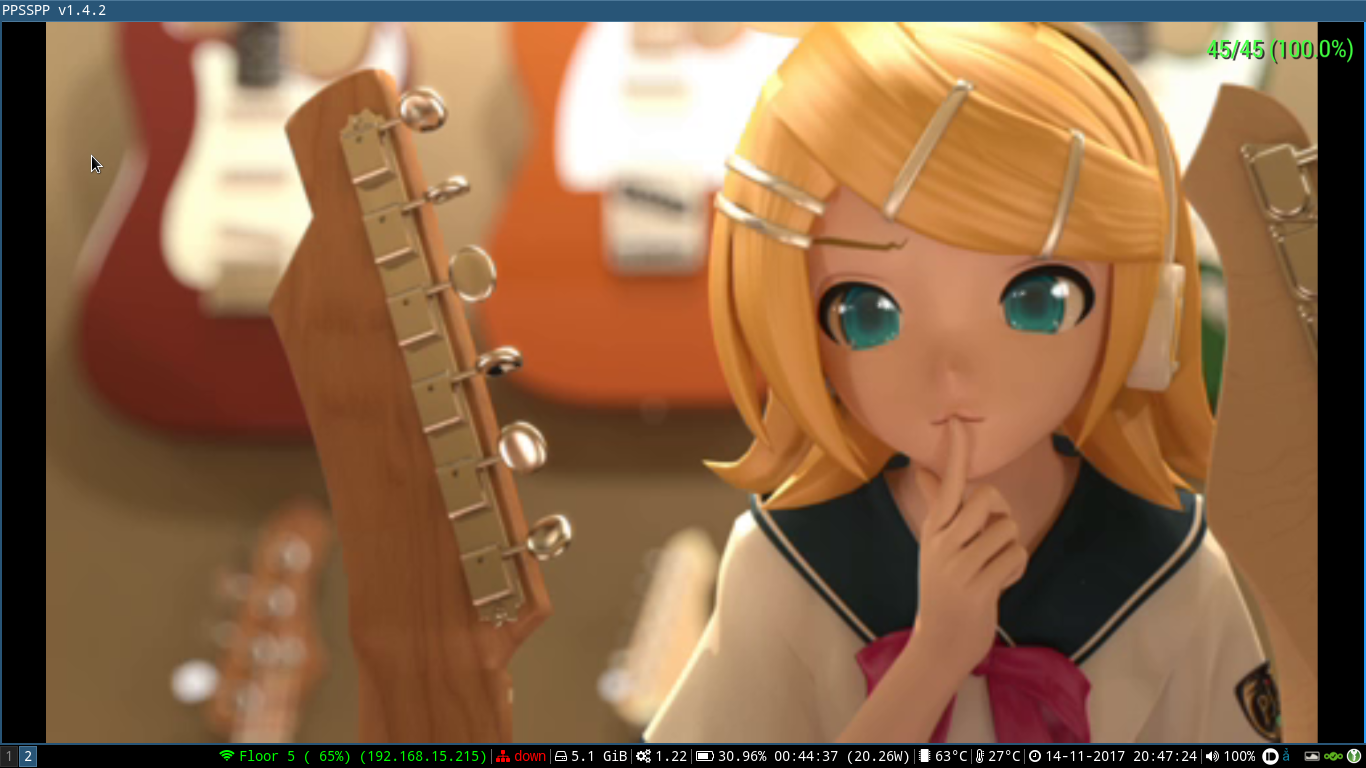
I did a quick test with the latest stable PPSSPP (1.4.2) and the problem still persists.
screenshot from 2017-11-14 20-47-24

<!-- gh-comment-id:344264689 --> @tuankiet65 commented on GitHub (Nov 14, 2017): I did a quick test with the latest stable PPSSPP (1.4.2) and the problem still persists. ![screenshot from 2017-11-14 20-47-24](https://user-images.githubusercontent.com/1905496/32783128-42f8f972-c97d-11e7-809d-21f8c0125de2.png)
Author
Owner

@unknownbrackets commented on GitHub (Nov 15, 2017):

It's just that it detects an incorrect frame speed (and I guess would frameskip incorrectly.) My theory is still that it's:

Vblank = 1, Flip = 1: Dirty FBO from video upload, flips++
Vblank = 2, Flip = 1: Clean FBO (same frame, 30fps video)
Vblank = 3, Flip = 2: New video frame in always-dirty VRAM, flips++
Vblank = 4, Flip = 3: Same frame, but always-dirty VRAM, flips++

Therefore, we have 45 fps - even though it's actually only displaying 30 unique frames. This is just a theory, not verified - don't have the game. I don't remember if there's a demo, or if it has this issue.

I guess we could remember a texhash in the // The game is displaying something directly from RAM. In GTA, it's decoded video. case, and avoid the draw if it's the same, or otherwise avoid marking the display dirty.

-[Unknown]

<!-- gh-comment-id:344485249 --> @unknownbrackets commented on GitHub (Nov 15, 2017): It's just that it detects an incorrect frame speed (and I guess would frameskip incorrectly.) My theory is still that it's: Vblank = 1, Flip = 1: Dirty FBO from video upload, flips++ Vblank = 2, Flip = 1: Clean FBO (same frame, 30fps video) Vblank = 3, Flip = 2: New video frame in always-dirty VRAM, flips++ Vblank = 4, Flip = 3: Same frame, but always-dirty VRAM, flips++ Therefore, we have 45 fps - even though it's actually only displaying 30 unique frames. This is just a theory, not verified - don't have the game. I don't remember if there's a demo, or if it has this issue. I guess we could remember a texhash in the `// The game is displaying something directly from RAM. In GTA, it's decoded video.` case, and avoid the draw if it's the same, or otherwise avoid marking the display dirty. -[Unknown]
Author
Owner

@hrydgard commented on GitHub (Nov 15, 2017):

Ah yes. Not sure that's actually worth bothering with though, as long as the speed is right anyway and it renders correctly.

<!-- gh-comment-id:344512000 --> @hrydgard commented on GitHub (Nov 15, 2017): Ah yes. Not sure that's actually worth bothering with though, as long as the speed is right anyway and it renders correctly.
Author
Owner

@ghost commented on GitHub (Sep 14, 2021):

This is still an issue using the latest git?

<!-- gh-comment-id:918938401 --> @ghost commented on GitHub (Sep 14, 2021): This is still an issue using the latest git?
Sign in to join this conversation.
No milestone
No project
No assignees
1 participant
Notifications
Due date
The due date is invalid or out of range. Please use the format "yyyy-mm-dd".

No due date set.

Dependencies

No dependencies set.

Reference
starred/ppsspp#1434
No description provided.