mirror of
https://github.com/clechasseur/pathcopycopy.git
synced 2026-04-25 12:15:58 +03:00
[GH-ISSUE #67] New feature: Paste short name to selected file of parent dir and filename #65
Labels
No labels
bug
duplicate
enhancement
enhancement
enhancement
fixed
help wanted
help wanted
invalid
pull-request
question
waiting for input
wontfix
No milestone
No project
No assignees
1 participant

Notifications
Due date
No due date set.
Dependencies
No dependencies set.
Reference
starred/pathcopycopy#65
Loading…
Add table
Add a link
Reference in a new issue
No description provided.
Delete branch "%!s()"
Deleting a branch is permanent. Although the deleted branch may continue to exist for a short time before it actually gets removed, it CANNOT be undone in most cases. Continue?
Originally created by @stephen147 on GitHub (Jun 22, 2019).
Original GitHub issue: https://github.com/clechasseur/pathcopycopy/issues/67
I know this is against the name of the script but I was wondering if this functionality could be added.
So it, in essence, it pastes what's in the programs memory removing everything except:
These examples.
C:\Program Files\Path Copy Copynames the selected filePath Copy CopyC:\Program Files\Path Copy Copy\PathCopyCopySettings.exenames the selected filePathCopyCopySettingsEDIT
Scenario 1
Let us say I copy a path
C:\Program Files\Path Copy Copy,I select a different file then right click and pastePath Copy Copy.Scenario 2
Let us say I copy a filename
this file.txt, I select a different file then right click and pastethis fileleaving the extension intact.This program has this functionality but this is much better as it's customisable.
https://www.extrabit.com/copyfilenames
Example screenshot
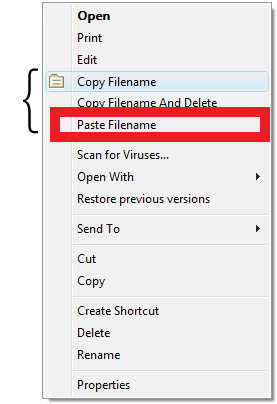
@clechasseur commented on GitHub (Jun 24, 2019):
I'm not sure I understand what you mean by "paste" here. Could you explain this? Paste where?
@stephen147 commented on GitHub (Jun 24, 2019):
Paste the name to the selected file. See the new examples in OP.
@clechasseur commented on GitHub (Jun 25, 2019):
That's a feature that has little to do with Path Copy Copy's namesake functionality, although I see the link. I'll think it over and leave this open in the meantime.
@clechasseur commented on GitHub (Aug 26, 2019):
I thought about this and I don't think this feature belongs in Path Copy Copy. This extension's goal is to emulate the original Path Copy extension, which copied paths. Pasting them is another thing altogether.
Furthermore, the tool you link to seems to do the job alright - you could install both Path Copy Copy and that other tools, it seems, which would solve your problem.
Closing this. I will only reopen if I get a good PR for this.
@stephen147 commented on GitHub (Aug 26, 2019):
Okay no problem, I just thought that copying and pasting filenames were very closely related.
@clechasseur commented on GitHub (Aug 27, 2019):
I think they are. But the tool you linked to seems to do the job properly already, which means we can keep it out of Path Copy Copy, it seems.