mirror of
https://github.com/clechasseur/pathcopycopy.git
synced 2026-04-25 12:15:58 +03:00
[GH-ISSUE #60] Keylock command modifies submenu #58
Labels
No labels
bug
duplicate
enhancement
enhancement
enhancement
fixed
help wanted
help wanted
invalid
pull-request
question
waiting for input
wontfix
No milestone
No project
No assignees
1 participant

Notifications
Due date
No due date set.
Dependencies
No dependencies set.
Reference
starred/pathcopycopy#58
Loading…
Add table
Add a link
Reference in a new issue
No description provided.
Delete branch "%!s()"
Deleting a branch is permanent. Although the deleted branch may continue to exist for a short time before it actually gets removed, it CANNOT be undone in most cases. Continue?
Originally created by @Agivx3 on GitHub (Mar 24, 2019).
Original GitHub issue: https://github.com/clechasseur/pathcopycopy/issues/60
Originally assigned to: @clechasseur on GitHub.
When using keylock command in registry the submenu which you defined before is modified to
suddenly show other entries
@clechasseur commented on GitHub (Mar 25, 2019):
Can you post a screenshot of the menu with and without KeyLock so that we can see the difference?
@Agivx3 commented on GitHub (Mar 25, 2019):
Please review the attached screenshots: 1. Settings 2. Without keylock set 3. Keylock set
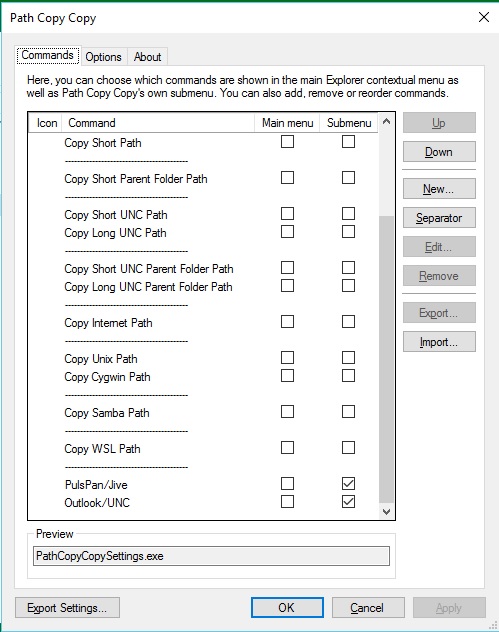
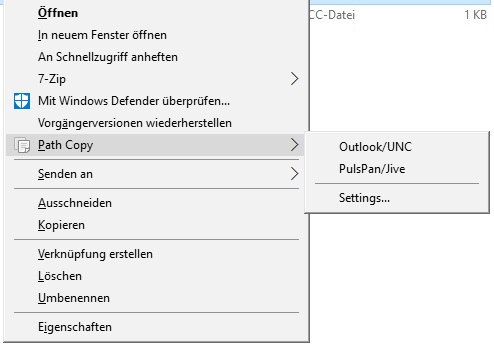
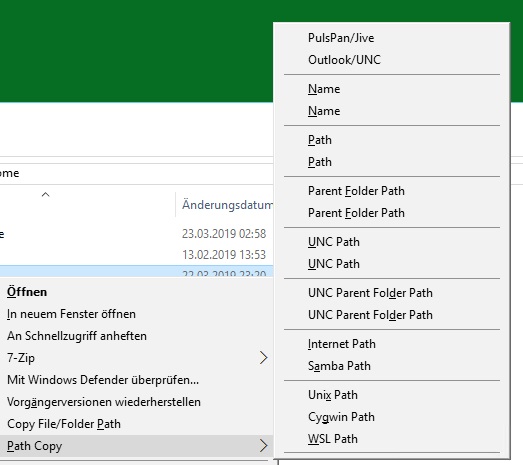
@clechasseur commented on GitHub (Mar 25, 2019):
Hmm. Thanks for the screenshot, I'll look at the code to see what's going on...
@Agivx3 commented on GitHub (Apr 4, 2019):
Anything new about this ?
@clechasseur commented on GitHub (Apr 30, 2019):
Ok, sorry it got me so long to get back to this, but I finally took some time to check the code. Basically, this is working as intended.
Path Copy Copy reads settings from registry keys under Software\clechasseur\PathCopyCopy. There's a global copy of this key in HKEY_LOCAL_MACHINE and one for each user in HKEY_CURRENT_USER. Settings in HKCU override those in HKLM.
The KeyLock registry value is a way to lock users out of overriding the global settings. When this is set, the user key is not checked at all - we only use the global key in HKLM.
Thus, what you see is a result of only using the global settings.
If you wanted to see proper settings when using KeyLock, you'd have to configure those settings and then copy them to the registry key in HKEY_LOCAL_MACHINE.
I hope this makes sense, ping here if you need more info. I'll leave this open for a while.