[GH-ISSUE #133] [BUG] rendering issues with some .ico files #131

Closed
opened 2026-02-25 21:32:42 +03:00 by kerem · 1 comment
Owner

Originally created by @moon6969 on GitHub (Sep 1, 2020).
Original GitHub issue: https://github.com/clechasseur/pathcopycopy/issues/133

Originally assigned to: @clechasseur on GitHub.

Describe the bug
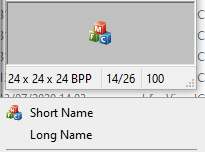
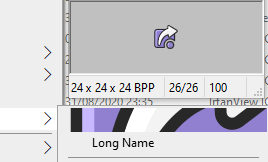
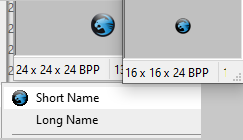
Some .ico files appear smaller or far larger or more jagged than expected in PathCopyCopy context sub-menu.
PCC-ico-render-01
PCC-ico-render-02
PCC-ico-render-03

PathCopyCopy-icon-issue-2.zip

To Reproduce
Steps to reproduce the behavior:

  1. Open PathCopyCopy Settings (Right-click on a file in Explorer → PathCopy → Settings)
  2. Assign attached .ico files to various entries (ensure "Submenu" is checked for each)
  3. Click Apply to save
  4. Check the PathCopyCopy context menu (Right-click on a file in Explorer → PathCopy)

Expected behavior
The context menu icons appear crisp and clear - especially when the .ico file contains the required resolutions.

Software

  • OS: Microsoft Windows [Version 10.0.18362.1016]
    • Rig 1: 1920x1200 (100%) & 2560x1600 (125%)
    • Rig 2: 3440x1440 (125%)
  • Path Copy Copy Version 19.0

Additional context
My feeling from experimenting with various .ico files is that the appropriate sized image/frame in some .ico files is not being selected - typically ones where the images are not sorted by increasing bit-depth → decreasing resolution (attached roccat.ico and root.ico).
Also, in the .ico files where there is not an appropriate sized frame, PathCopyCopy doesn't seem to scale it. (VSLiveShare.ico).

Originally created by @moon6969 on GitHub (Sep 1, 2020). Original GitHub issue: https://github.com/clechasseur/pathcopycopy/issues/133 Originally assigned to: @clechasseur on GitHub. **Describe the bug** Some .ico files appear smaller or far larger or more jagged than expected in PathCopyCopy context sub-menu. ![PCC-ico-render-01](https://user-images.githubusercontent.com/30491315/91779560-e7fb3d00-ebed-11ea-9790-5e8422b12188.png) ![PCC-ico-render-02](https://user-images.githubusercontent.com/30491315/91779561-e893d380-ebed-11ea-8028-ef3ec6d7e4a1.png) ![PCC-ico-render-03](https://user-images.githubusercontent.com/30491315/91779563-e893d380-ebed-11ea-8751-cb10434e5c7d.png) [PathCopyCopy-icon-issue-2.zip](https://github.com/clechasseur/pathcopycopy/files/5153179/PathCopyCopy-icon-issue-2.zip) **To Reproduce** Steps to reproduce the behavior: 1. Open PathCopyCopy Settings (Right-click on a file in Explorer → PathCopy → Settings) 2. Assign attached .ico files to various entries (ensure "Submenu" is checked for each) 3. Click Apply to save 4. Check the PathCopyCopy context menu (Right-click on a file in Explorer → PathCopy) **Expected behavior** The context menu icons appear crisp and clear - especially when the .ico file contains the required resolutions. **Software** - OS: Microsoft Windows [Version 10.0.18362.1016] - Rig 1: 1920x1200 (100%) & 2560x1600 (125%) - Rig 2: 3440x1440 (125%) - Path Copy Copy Version 19.0 **Additional context** My feeling from experimenting with various .ico files is that the appropriate sized image/frame in some .ico files is not being selected - typically ones where the images are not sorted by increasing bit-depth → decreasing resolution (attached roccat.ico and root.ico). Also, in the .ico files where there is not an appropriate sized frame, PathCopyCopy doesn't seem to scale it. (VSLiveShare.ico).
kerem 2026-02-25 21:32:42 +03:00
  • closed this issue
  • added the
    bug
    label
Author
Owner

@clechasseur commented on GitHub (Feb 12, 2021):

This bug has been fixed. The next release will now properly rescale non-fitting images.

<!-- gh-comment-id:778032738 --> @clechasseur commented on GitHub (Feb 12, 2021): This bug has been fixed. The next release will now properly rescale non-fitting images.
Sign in to join this conversation.
No milestone
No project
No assignees
1 participant
Notifications
Due date
The due date is invalid or out of range. Please use the format "yyyy-mm-dd".

No due date set.

Dependencies

No dependencies set.

Reference
starred/pathcopycopy#131
No description provided.