mirror of
https://github.com/ciur/papermerge.git
synced 2026-04-25 12:05:58 +03:00
[GH-ISSUE #118] Email Import does not reach INBOX #90
Labels
No labels
2.1
3.0
3.0.1
3.0.2
3.0.3
3.0.3
3.1
3.2
3.2
3.3
3.5
3.x
Fixed. Waiting for feedback.
Fixed. Waiting for feedback.
UX
Version 2.1 - alpha
XSS
announcement
beta
blocker
bug
cannot reproduce
confirmed
confirmed
critical
demo
dependencies
deployment
detchnical debt
discussion
docker
documentation
donations
duplicate
enhancement
feature request
frontend
fundraising
good first issue
good issue
help wanted
high
implemented
important
improvement
incomplete
invalid
investigation
kubernetes
low
low impact
medium
medium
medium impact
migration from 2.0
migration from 2.1
missing-language
missing-ocr-language
no-activity
note
ocr
outofscope
packaging
performance
popular request
pull-request
pypi
question
raspberry pi
roadmap
search
security
setup
status
task
technical debt
updates
user xp
version 1.4.0 - demo
will be implemented
will not be implemented
wontfix
No milestone
No project
No assignees
1 participant

Notifications
Due date
No due date set.
Dependencies
No dependencies set.
Reference
starred/papermerge#90
Loading…
Add table
Add a link
Reference in a new issue
No description provided.
Delete branch "%!s()"
Deleting a branch is permanent. Although the deleted branch may continue to exist for a short time before it actually gets removed, it CANNOT be undone in most cases. Continue?
Originally created by @cbirkenbeul on GitHub (Sep 10, 2020).
Original GitHub issue: https://github.com/ciur/papermerge/issues/118
Hi,
I just setup papermerge via docker and setup my Email Import. In the logs I can see, that the worker is finding new emails. But after that nothing happen.
In the next trigger the log says no unseen messages. In the INBOX of papermerge no file will appear.
Uploading a new document by the website works perfectly fine.
First I thought its just the missing secret, so I configure that, restarted completely my docker container, send a new mail with the secret in subject and message body, but still no document in papermerge inbox.
Did I miss something in the documentation?
Thanks in advance.
@ciur commented on GitHub (Sep 10, 2020):
Hi @cbirkenbeul, thank you for opening the ticket.
I will have a look at the issue and I will come back tomorrow with updates.
@ciur commented on GitHub (Sep 11, 2020):
Hi @cbirkenbeul,
I had a look into the issue. I was unable to reproduce it -> means it worked in my case.
Here is what you can do:
@ciur commented on GitHub (Sep 11, 2020):
Here is my papermerge.conf.py from worker container
Which I got using:
Then I entered into worker container with:
And then:
In my case IMPORT_MAIL_USER was specified in username@example.com format. Just sayin' it, maybe is relevant for your context.
@cbirkenbeul commented on GitHub (Sep 11, 2020):
Hi,
thanks for your help.
My papermerge version wasn't the latest, so I upgraded. The prebuild container still have issues with hard coded database-host so I build it by myself. (docker-compose build) So I have the 1.4.2 running.
My IMAP Settings are correct. In the logs of the docker container you can see, that the worker process try to do something with the mail:
At the moment I just using the pre configured "admin" user. No additional user are setup. My worker config is read correct, so my map settings are in the right config file. Otherwise, I would guess, I don't have a successful connection to my server.
The Test email just contain one pdf file, just created with the iOS "Scanner Pro" App. Maybe you know them. But also try a pdf just from a vendor.
I also double check, that the inbox folder is named "inbox", because its a self hosted mail server. If I setup the mailbox in a email client I can see that the mail is switched from unread to read. So the worker do something, but not extracting the file.
Are there more detailed logs anywhere, that I can have a look? For testing I've masked the queue and media folder with 777 rights, so that is nothing happen there.
@cbirkenbeul commented on GitHub (Sep 11, 2020):
Next info: The worker seems to do something. I have a lot of msg files in my queue folder. Keep in mind, that's just one email in my inbox of this mailbox!
In the Files itself I cannot inspect some problems.
Maybe this would help.
@ciur commented on GitHub (Sep 11, 2020):
Those messages, in queue folder are saved by "period tasks", you can safely delete all content in that folder.
Your use case is very interesting :)
This log message "IMAP UNSEEN messages 1 for..." clearly indicates that email message was read/imported from IMAP account. This definitely means that you configuration/setup is correct.
Here is another troubleshooting idea.
Can you please try to upload manually (via user interface, i.e upload button) exactly that/those document(s) which fail to appear in Inbox?
I am thinking, maybe there is an error during processing of your document, an error which escapes log messages.
If a document is successfully uploaded and OCRed - you will 1. see UI Log message with "OCR completed" 2. after a minute or so, it will be searchable (periodic tasks saves extracted text into database).
Ah, another idea. In this documentation page it is described how documents are stored. Notice that part which details about .txt and .hocr files.
In case of documents imported via IMAP which do not appear in Inbox - is there a new entry created in media storage ?
i.e. is there a new entry <media_dir>/results/user_/document_ created ?
I am very curious what may be the problem in your case.
Thank you very much for helping to improve Papermerge!
@cbirkenbeul commented on GitHub (Sep 11, 2020):
Of course, i'll try to help as much as i can.
Upload of the exact same document. (of course without renaming, because i allready thought of special characters, but that does not matter)
In the results folder there does not appear a new document. I allready checked this some time ago, but double check that now.
@ciur commented on GitHub (Sep 14, 2020):
From log above I see that your instance is working as expected.
I will add UI Logs messages for IMAP import activity in 1.4.3 version. I kindly ask you to try that version with docker (and same papermerge.conf.py configuration) so that we can troubleshoot further your issue.
I will release version 1.4.3 on 16th of September 2020.
@cbirkenbeul commented on GitHub (Sep 14, 2020):
Of course i will to. In the meantime i will try a full installation on a new vm. Just to be sure, that there is no problem with the docker container.
I just choose the docker installation, because it looked easier and i was to lazy to do a full installation.
@ciur commented on GitHub (Sep 16, 2020):
Hi @cbirkenbeul,
I know where might be the problem. It might be Papermerge application bug. When importing email attachment, application ignores any payload which is not of 'application/pdf' type.. My fault :(. For testing I use ADS 2800W scanner which basically sends all scans to an IMAP account as "application/pdf" mime types attachments.
In your case, it might be that attachments mime type is different. (e.g. application/octet-stream, just guessing...).
Updates will follow...
@ciur commented on GitHub (Sep 16, 2020):
@cbirkenbeul,
please try again email import with Papermerge version 1.4.3 docker image AND add following LOGGING settings to /opt/app/config/settings/production.py file:
this will add IMAP related debug messages to /opt/app/imap_importer.log
Please paste imap_importer.log messages here for further investigation. What is important for me to learn is what is mime type of imported attachment.
@cbirkenbeul commented on GitHub (Sep 16, 2020):
Hey. Thanks for your work. I've updated the container and see something in the log files. I'm at work atm and will have some deeper looks into it this evening and reporting back.
@cbirkenbeul commented on GitHub (Sep 16, 2020):
Okay, now I've setup the logging part, but there will no imap_importer.log created in worker or app container. But in the app.log there is now more output. Maybe this is the same that you expected:
@ciur commented on GitHub (Sep 17, 2020):
Yes! This is exactly what I was looking for! Now I know the problem - it is because of mime types!
Here is the fix..
@cbirkenbeul, it will take 2 weeks until the fix will make it to official 1.4.4 release.
Thank you for your patience and help!
@ciur commented on GitHub (Sep 28, 2020):
Hi @cbirkenbeul, as I promised, new 1.4.4 version is out.
1.4.4 contains the fix for Email import issue. Also I pushed new docker image tagged with 1.4.4.
I would be very happy to learn if solution fixed Email import issue.
@cbirkenbeul commented on GitHub (Sep 28, 2020):
First, thank you very much for your work.
I just setup a quick test environment to be sure to start from scratch and no other issues are involved.
I just took your docker-compse.yaml file, pulled the container and started it.
To be sure, that all other works fine, I upload a regular pdf and papermerge process is fast and successful.
Now I edit the papermerge.conf.py like in your comment above. Connection to my mail server works. I send a regular scanned pdf but no luck.
I uploaded the Document to my SharePoint, so you can inspect this by yourself.
I also tried it with a pdf that I got as an invoice from a company. Same behavior.
@ciur commented on GitHub (Sep 28, 2020):
@cbirkenbeul, I am really sorry! I did a stupid mistake, one letter typo in code. I will fix it and release tomorrow the version 1.4.5. That will be the smallest release in history of software (just because of one single typo)!
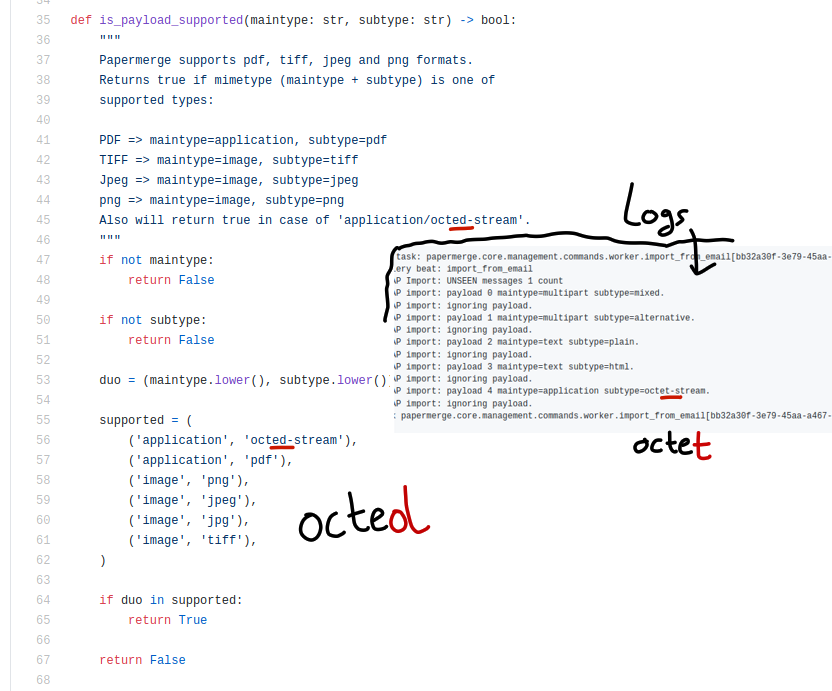
@cbirkenbeul commented on GitHub (Sep 28, 2020):
All fine. I will check it tomorrow evening and report back.
@ciur commented on GitHub (Sep 29, 2020):
Hi @cbirkenbeul, I pushed version 1.4.5. Hopefully this time it will work 🙏
@cbirkenbeul commented on GitHub (Sep 29, 2020):
First quick and dirty test seems fine. But just with view on the log files. I will try it later in detail and came back with complete feedback.
@cbirkenbeul commented on GitHub (Sep 29, 2020):
Okay, I've tried it with multiple documents and now it works perfectly fine! Thank you very much for your fast help.