mirror of
https://github.com/ciur/papermerge.git
synced 2026-04-25 12:05:58 +03:00
[GH-ISSUE #121] Have you considered a Move to action? #89
Labels
No labels
2.1
3.0
3.0.1
3.0.2
3.0.3
3.0.3
3.1
3.2
3.2
3.3
3.5
3.x
Fixed. Waiting for feedback.
Fixed. Waiting for feedback.
UX
Version 2.1 - alpha
XSS
announcement
beta
blocker
bug
cannot reproduce
confirmed
confirmed
critical
demo
dependencies
deployment
detchnical debt
discussion
docker
documentation
donations
duplicate
enhancement
feature request
frontend
fundraising
good first issue
good issue
help wanted
high
implemented
important
improvement
incomplete
invalid
investigation
kubernetes
low
low impact
medium
medium
medium impact
migration from 2.0
migration from 2.1
missing-language
missing-ocr-language
no-activity
note
ocr
outofscope
packaging
performance
popular request
pull-request
pypi
question
raspberry pi
roadmap
search
security
setup
status
task
technical debt
updates
user xp
version 1.4.0 - demo
will be implemented
will not be implemented
wontfix
No milestone
No project
No assignees
1 participant

Notifications
Due date
No due date set.
Dependencies
No dependencies set.
Reference
starred/papermerge#89
Loading…
Add table
Add a link
Reference in a new issue
No description provided.
Delete branch "%!s()"
Deleting a branch is permanent. Although the deleted branch may continue to exist for a short time before it actually gets removed, it CANNOT be undone in most cases. Continue?
Originally created by @ciur on GitHub (Sep 15, 2020).
Original GitHub issue: https://github.com/ciur/papermerge/issues/121
Have you considered a Move to action?
Feels a bit more intuitive to me, especially if you are filing a large number of things from the inbox.
Drag and drop is less useful when you have multiple levels of folders.
@ciur commented on GitHub (Sep 15, 2020):
Above comment is my copy/paste from another ticket's feedback (from @tf198 ).
@Ionshard commented on GitHub (Jul 1, 2021):
Pretty pretty please! I just installed Papermerge on my local server and based on how painful it is to organize the Inbox during my trial use of importing just 100 documents I am tempted to look elsewhere but I really like a lot of the other features!
Maybe I am doing something wrong but the here is what typically happens when attempting to organize my Inbox (except of course for automates which are amazing and part of why I want to stick with Papermerge) is the following:
Now I know some of these steps are mistakes and cheeky complaints, but they are genuine mistakes I have made many many times since trying to get used to this software. Ultimately involving 2-4 page loads per document I move.
What I wish the way to organize my files went:
Since I never leave the Inbox page this means I can organize my entire Inbox with just 1 single page load instead of 2 page loads per document.
This is exactly what my current solution for managing my scans does which is pCloud (which is like a Google Drive alternative) so I have recorded it's use so hopefully you can see how useful such a move functionality would be.
Now pCloud has no OCR, barebones previews, no page management, garbage search ... so obviously Papermerge is functionally superior in almost every way (once the documents are stable) but I do miss that ease of use in working with new documents!
Now I am aware that it's not just a couple lines of code to implement this and you're basically doing a lot of this in your spare time so I'd be happy to put a bounty of some kind on this enhancement request if that's something you are willing to allow. It's one thing to come on the internet and complain about this completely free software doesn't do the thing I want and I don't want to be that person.
@ciur commented on GitHub (Jul 1, 2021):
Hi @Ionshard, thank you for your detailed feedback.
I know that cutting/pasting documents/pages is a painful experience as it involves too many redundant steps.
In Papermerge 2.1 (which is in development right now) I am addressing this issue by... providing dual panel document browser. This means that basically you would be able open in one panel the destination folder/document and drag/drop document/pages from another panel. Similarly you would be able open source/destination documents and just drag/drop pages between documents in one move! Dual-panel document browsing is really cool feature, you will love it I promise!
See below gif for a short preview (this is very early preview I as I am still working on this):
@Ionshard commented on GitHub (Jul 2, 2021):
That is a much more powerful solution to this problem, that solves my issue and probably many more. That is a tantalizing preview and I am definitely looking forward to the next release now!
Edit: Of course as long as 1 of the panels can be the inbox which the gif doesn't show and I'm sure it's an obvious thing but I'd kick myself if I didn't mention it.
@ciur commented on GitHub (Aug 6, 2022):
@Ionshard
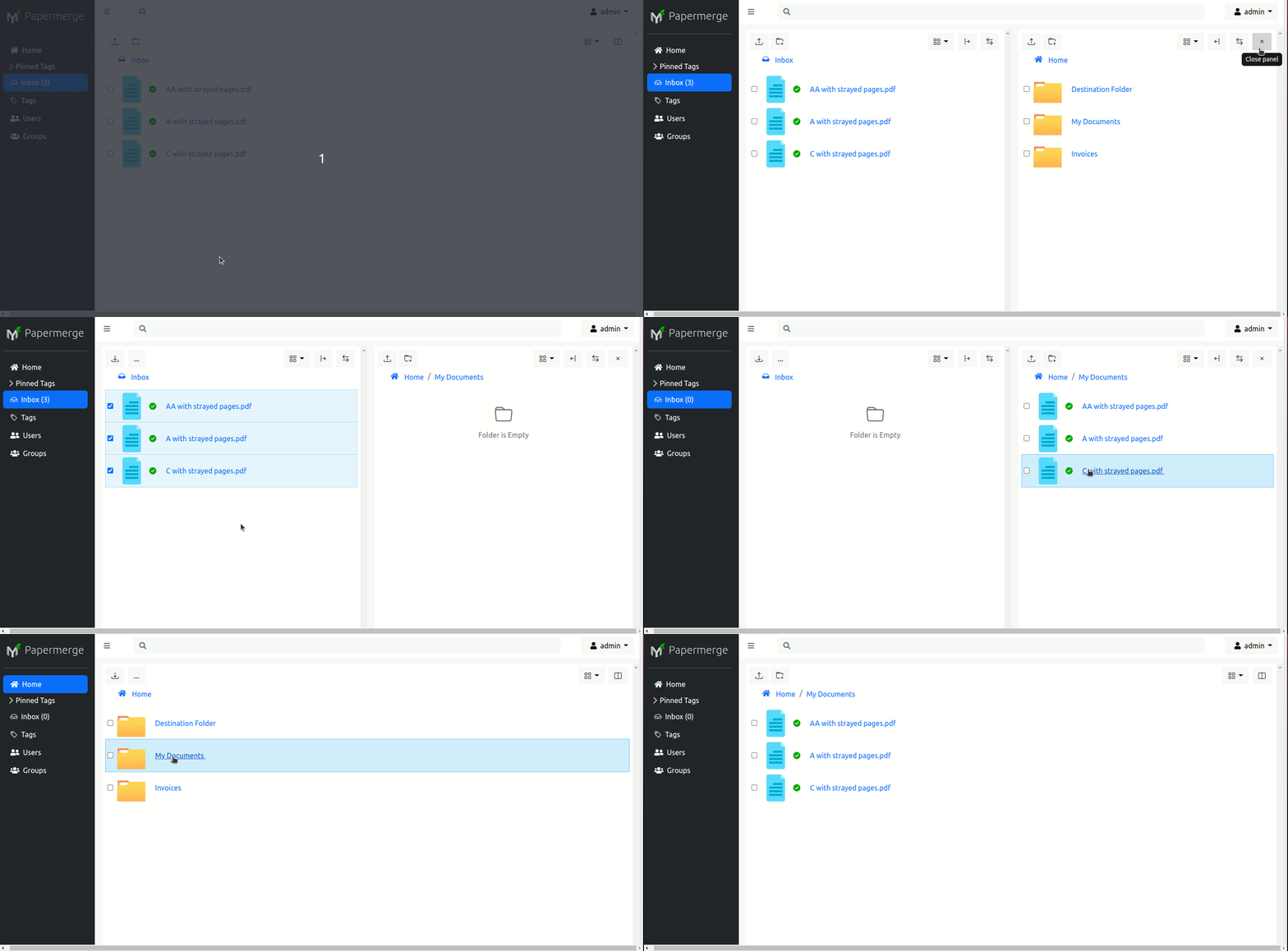
Dual panel mode landed in 2.1. Here is a quick demo of moving some documents from Inbox folder to Home > My Documents: