mirror of
https://github.com/aluxnimm/outlookcaldavsynchronizer.git
synced 2026-04-26 03:25:48 +03:00
[GH-ISSUE #310] Import an exported profile from file #302
Labels
No labels
1.0
1.0
1.0
2.0
Feature
Feature request
Google
Google Calendar
async
attachement
auto-migrated
auto-migrated
auto-migrated
bug
critical
enhancement
help wanted
implemented
pull-request
solved
solved
sourceforge
sourceforge
sourceforge
No milestone
No project
No assignees
1 participant

Notifications
Due date
No due date set.
Dependencies
No dependencies set.
Reference
starred/outlookcaldavsynchronizer#302
Loading…
Add table
Add a link
Reference in a new issue
No description provided.
Delete branch "%!s()"
Deleting a branch is permanent. Although the deleted branch may continue to exist for a short time before it actually gets removed, it CANNOT be undone in most cases. Continue?
Originally created by @CrysK on GitHub (Mar 29, 2021).
Original GitHub issue: https://github.com/aluxnimm/outlookcaldavsynchronizer/issues/310
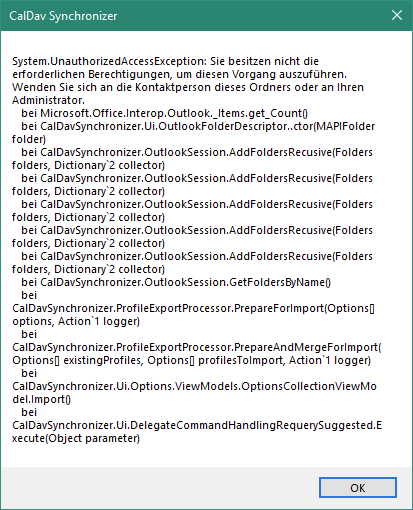
I got Caldavsynchronizer 4.0.0, Outlook 365 and some Nextcloud profiles. These are running fine on my device A. There I click in Caldavsynchronizer on "Export profiles to file" and on device B (with the same configuration) on "Import profiles from file" now I get the following error message and no profile is imported:
@aluxnimm commented on GitHub (Feb 17, 2023):
Should be fixed in next release. There is an access problem to one of the exchange folders.