[GH-ISSUE #281] Install/upgrade fails on Windows 10 #1173

Closed
opened 2026-03-14 00:32:33 +03:00 by kerem · 1 comment
Owner

Originally created by @danielkoch on GitHub (Jul 8, 2020).
Original GitHub issue: https://github.com/aluxnimm/outlookcaldavsynchronizer/issues/281

I'm having trouble upgrading (and re-install) the latest release v3.8.2.
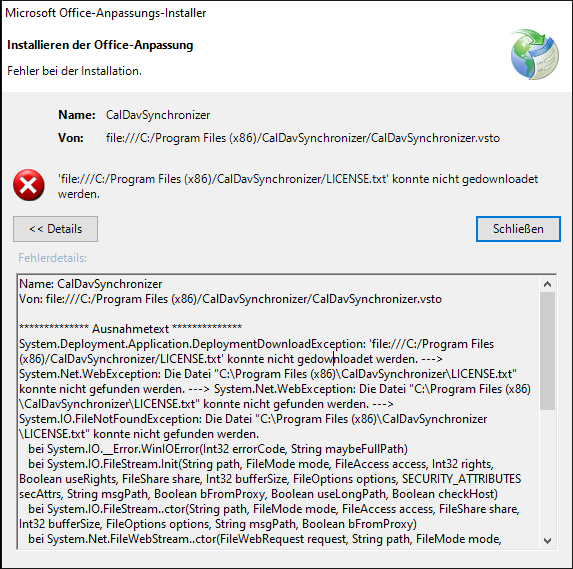
The installer runs through without any error. But If I want to start CalDavSynchronizer I get the following error messagen:
outlookcaldavsynchronizer
Full error message:

Name: CalDavSynchronizer
Von: file:///C:/Program Files (x86)/CalDavSynchronizer/CalDavSynchronizer.vsto

************** Ausnahmetext **************
System.Deployment.Application.DeploymentDownloadException: 'file:///C:/Program Files (x86)/CalDavSynchronizer/LICENSE.txt' konnte nicht gedownloadet werden. ---> System.Net.WebException: Die Datei "C:\Program Files (x86)\CalDavSynchronizer\LICENSE.txt" konnte nicht gefunden werden. ---> System.Net.WebException: Die Datei "C:\Program Files (x86)\CalDavSynchronizer\LICENSE.txt" konnte nicht gefunden werden. ---> System.IO.FileNotFoundException: Die Datei "C:\Program Files (x86)\CalDavSynchronizer\LICENSE.txt" konnte nicht gefunden werden.
   bei System.IO.__Error.WinIOError(Int32 errorCode, String maybeFullPath)
   bei System.IO.FileStream.Init(String path, FileMode mode, FileAccess access, Int32 rights, Boolean useRights, FileShare share, Int32 bufferSize, FileOptions options, SECURITY_ATTRIBUTES secAttrs, String msgPath, Boolean bFromProxy, Boolean useLongPath, Boolean checkHost)
   bei System.IO.FileStream..ctor(String path, FileMode mode, FileAccess access, FileShare share, Int32 bufferSize, FileOptions options, String msgPath, Boolean bFromProxy)
   bei System.Net.FileWebStream..ctor(FileWebRequest request, String path, FileMode mode, FileAccess access, FileShare sharing, Int32 length, Boolean async)
   bei System.Net.FileWebResponse..ctor(FileWebRequest request, Uri uri, FileAccess access, Boolean asyncHint)
   --- Ende der internen Ausnahmestapelüberwachung ---
   bei System.Net.FileWebResponse..ctor(FileWebRequest request, Uri uri, FileAccess access, Boolean asyncHint)
   bei System.Net.FileWebRequest.GetResponseCallback(Object state)
   --- Ende der internen Ausnahmestapelüberwachung ---
   bei System.Net.FileWebRequest.EndGetResponse(IAsyncResult asyncResult)
   bei System.Net.FileWebRequest.GetResponse()
   bei System.Deployment.Application.SystemNetDownloader.DownloadSingleFile(DownloadQueueItem next)
   --- Ende der internen Ausnahmestapelüberwachung ---
   bei Microsoft.VisualStudio.Tools.Applications.Deployment.ClickOnceAddInDeploymentManager.DownloadAddIn(TimeSpan timeout)
   bei Microsoft.VisualStudio.Tools.Applications.Deployment.ClickOnceAddInDeploymentManager.InstallAddIn()
Originally created by @danielkoch on GitHub (Jul 8, 2020). Original GitHub issue: https://github.com/aluxnimm/outlookcaldavsynchronizer/issues/281 I'm having trouble upgrading (and re-install) the latest release `v3.8.2`. The installer runs through without any error. But If I want to start CalDavSynchronizer I get the following error messagen: ![outlookcaldavsynchronizer](https://user-images.githubusercontent.com/142055/86921200-07fd0b80-c12b-11ea-8b4a-a2098b2d7ff6.png) Full error message: ``` Name: CalDavSynchronizer Von: file:///C:/Program Files (x86)/CalDavSynchronizer/CalDavSynchronizer.vsto ************** Ausnahmetext ************** System.Deployment.Application.DeploymentDownloadException: 'file:///C:/Program Files (x86)/CalDavSynchronizer/LICENSE.txt' konnte nicht gedownloadet werden. ---> System.Net.WebException: Die Datei "C:\Program Files (x86)\CalDavSynchronizer\LICENSE.txt" konnte nicht gefunden werden. ---> System.Net.WebException: Die Datei "C:\Program Files (x86)\CalDavSynchronizer\LICENSE.txt" konnte nicht gefunden werden. ---> System.IO.FileNotFoundException: Die Datei "C:\Program Files (x86)\CalDavSynchronizer\LICENSE.txt" konnte nicht gefunden werden. bei System.IO.__Error.WinIOError(Int32 errorCode, String maybeFullPath) bei System.IO.FileStream.Init(String path, FileMode mode, FileAccess access, Int32 rights, Boolean useRights, FileShare share, Int32 bufferSize, FileOptions options, SECURITY_ATTRIBUTES secAttrs, String msgPath, Boolean bFromProxy, Boolean useLongPath, Boolean checkHost) bei System.IO.FileStream..ctor(String path, FileMode mode, FileAccess access, FileShare share, Int32 bufferSize, FileOptions options, String msgPath, Boolean bFromProxy) bei System.Net.FileWebStream..ctor(FileWebRequest request, String path, FileMode mode, FileAccess access, FileShare sharing, Int32 length, Boolean async) bei System.Net.FileWebResponse..ctor(FileWebRequest request, Uri uri, FileAccess access, Boolean asyncHint) --- Ende der internen Ausnahmestapelüberwachung --- bei System.Net.FileWebResponse..ctor(FileWebRequest request, Uri uri, FileAccess access, Boolean asyncHint) bei System.Net.FileWebRequest.GetResponseCallback(Object state) --- Ende der internen Ausnahmestapelüberwachung --- bei System.Net.FileWebRequest.EndGetResponse(IAsyncResult asyncResult) bei System.Net.FileWebRequest.GetResponse() bei System.Deployment.Application.SystemNetDownloader.DownloadSingleFile(DownloadQueueItem next) --- Ende der internen Ausnahmestapelüberwachung --- bei Microsoft.VisualStudio.Tools.Applications.Deployment.ClickOnceAddInDeploymentManager.DownloadAddIn(TimeSpan timeout) bei Microsoft.VisualStudio.Tools.Applications.Deployment.ClickOnceAddInDeploymentManager.InstallAddIn() ```
kerem closed this issue 2026-03-14 00:32:38 +03:00
Author
Owner

@danielkoch commented on GitHub (Jul 27, 2020):

Re-tried after some weeks. Works now without any changes on Outlook CalDav Synchronizer side. Looks like there was a problem with a windows component...

<!-- gh-comment-id:664173332 --> @danielkoch commented on GitHub (Jul 27, 2020): Re-tried after some weeks. Works now without any changes on Outlook CalDav Synchronizer side. Looks like there was a problem with a windows component...
Sign in to join this conversation.
No milestone
No project
No assignees
1 participant
Notifications
Due date
The due date is invalid or out of range. Please use the format "yyyy-mm-dd".

No due date set.

Dependencies

No dependencies set.

Reference
starred/outlookcaldavsynchronizer#1173
No description provided.