mirror of
https://github.com/nsupdate-info/nsupdate.info.git
synced 2026-04-25 08:35:56 +03:00
[GH-ISSUE #318] OpenWRT ddns-scripts timer settings ? #248
Labels
No labels
bug
bug
duplicate
easy
easy
enhancement
enhancement
invalid
needs help
pull-request
scalability
security
task
urgent
wontfix
No milestone
No project
No assignees
1 participant

Notifications
Due date
No due date set.
Dependencies
No dependencies set.
Reference
starred/nsupdate.info-nsupdate-info#248
Loading…
Add table
Add a link
Reference in a new issue
No description provided.
Delete branch "%!s()"
Deleting a branch is permanent. Although the deleted branch may continue to exist for a short time before it actually gets removed, it CANNOT be undone in most cases. Continue?
Originally created by @ghost on GitHub (Jun 20, 2017).
Original GitHub issue: https://github.com/nsupdate-info/nsupdate.info/issues/318
I think it would be less confusing for some users if you could please state the correct timer settings for ddns-scripts on OpenWRT, such as in the attachment
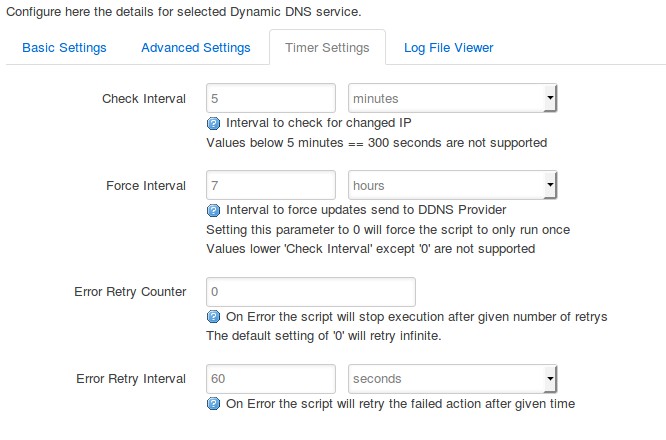
Would these settings be correct to not cause abuse?
Force interval was set to every one hour, and noticed that it caused abuse every few months or so.
@ThomasWaldmann commented on GitHub (Jun 20, 2017):
Well, this updater seems a bit strange.
If this is your external router (that has your public IP), it should precisely "know" when the IP changes because this is a local event on its own internet-facing interface.
Thus, a timer-based check interval should not be needed.
So, try choosing a medium check interval, like every 30 minutes.
In case you have to wait 30 minutes then after each IP change (that means the router does not implement a "interface ip changed" event triggering a dyndns update otherwise), go back to 5 or 10 minutes.
Force interval should not be needed at all, but for us, it is good if you configure a very long force interval, like once per month. Then the service knows your host is alive even if it never changes its IP.
Error retry counter should be a low value, thus not 0 (infinite). If there is a problem that does not resolve after a "few" tries (100), someone likely has to manually fix something.
Error retry interval: I'ld use 10 minutes or so.