[GH-ISSUE #24] 编译安装报错 #147

Closed
opened 2026-03-13 16:34:18 +03:00 by kerem · 8 comments
Owner

Originally created by @Jerryye17 on GitHub (Feb 26, 2021).
Original GitHub issue: https://github.com/ADD-SP/ngx_waf/issues/24

你好,我在编译安装ngx_waf时报错,不知道怎么解决
nginx版本为:1.19.5
系统为:CentOS 7.9
编译时加入--add-module=/root/ngx_waf
报错:
adding module in /root/ngx_waf
checking for uthash library ... not found
./configure: error: the ngx_http_waf_module module requires the uthash library.

Originally created by @Jerryye17 on GitHub (Feb 26, 2021). Original GitHub issue: https://github.com/ADD-SP/ngx_waf/issues/24 你好,我在编译安装ngx_waf时报错,不知道怎么解决 nginx版本为:1.19.5 系统为:CentOS 7.9 编译时加入--add-module=/root/ngx_waf 报错: adding module in /root/ngx_waf checking for uthash library ... not found ./configure: error: the ngx_http_waf_module module requires the uthash library.
kerem 2026-03-13 16:34:18 +03:00
  • closed this issue
  • added the
    bug
    label
Author
Owner

@ADD-SP commented on GitHub (Feb 26, 2021):

缺少 uthash 库。通过 yum 或者 apt 安装一下。

centos:yum install uthash-devel

ubuntu: apt install uthash-dev

<!-- gh-comment-id:786638550 --> @ADD-SP commented on GitHub (Feb 26, 2021): 缺少 uthash 库。通过 `yum` 或者 `apt` 安装一下。 centos:`yum install uthash-devel` ubuntu: `apt install uthash-dev`
Author
Owner

@ADD-SP commented on GitHub (Feb 28, 2021):

@Jerryye17 已经更新使用文档,解决方式见 https://docs.addesp.com/ngx_waf/zh-cn/guide/faq.html

<!-- gh-comment-id:787480177 --> @ADD-SP commented on GitHub (Feb 28, 2021): @Jerryye17 已经更新使用文档,解决方式见 https://docs.addesp.com/ngx_waf/zh-cn/guide/faq.html 。
Author
Owner

@Jerryye17 commented on GitHub (Mar 1, 2021):

已经安装了uthash-devel了,但还是说缺少uthash库
adding module in /root/ngx_waf
checking for uthash library ... not found
./configure: error: the ngx_http_waf_module module requires the uthash library.
[root@Nginx nginx-1.19.5]# yum list installed | grep uthash-devel
uthash-devel.noarch 2.0.2-1.el7 @epel
[root@Nginx nginx-1.19.5]#

<!-- gh-comment-id:787571057 --> @Jerryye17 commented on GitHub (Mar 1, 2021): 已经安装了uthash-devel了,但还是说缺少uthash库 adding module in /root/ngx_waf checking for uthash library ... not found ./configure: error: the ngx_http_waf_module module requires the uthash library. [root@Nginx nginx-1.19.5]# yum list installed | grep uthash-devel uthash-devel.noarch 2.0.2-1.el7 @epel [root@Nginx nginx-1.19.5]#
Author
Owner

@ADD-SP commented on GitHub (Mar 1, 2021):

请依次尝试下列方法,应该可以解决。

更换 nginx 源码版本

发现您用的是 nginx-1.19.5,目前稳定版为 nginx-1.18.0,最新的开发版为 nginx-1.19.7,建议使用这两个版本,下载页面

检查是否能正常 #include <uthash.h>

尝试编译下面的 C 语言源代码,如果库文件存在则下面的源代码应该可以成功编译。

#include <uthash.h>

int main() { return 0; }

如果不能编译的话建议检查一下 gcc 的默认编译包含路径,可能默认路径中没有下面这些路径,没有的话就添加进去。

/usr/include

检查 uthash 库文件是否存在

请先检查是否有下列文件,按理说安装完 uthash 库之后下列文件应该全部存在。

/usr/include/utarray.h
/usr/include/uthash.h
/usr/include/utlist.h
/usr/include/utmm.h
/usr/include/utringbuffer.h
/usr/include/utstring.h

如果不存在可以尝试重新安装 uthash 库。如果重新安装依旧不行则前往 https://github.com/troydhanson/uthash 下载对应的库文件并按照上面的路径拷贝。

重启机器

最后一招,重启机器,没准就好了。

<!-- gh-comment-id:787650471 --> @ADD-SP commented on GitHub (Mar 1, 2021): 请依次尝试下列方法,应该可以解决。 ## 更换 nginx 源码版本 发现您用的是 nginx-1.19.5,目前稳定版为 nginx-1.18.0,最新的开发版为 nginx-1.19.7,建议使用这两个版本,[下载页面](http://nginx.org/en/download.html)。 ## 检查是否能正常 `#include <uthash.h>` 尝试编译下面的 C 语言源代码,如果库文件存在则下面的源代码应该可以成功编译。 ```c #include <uthash.h> int main() { return 0; } ``` 如果不能编译的话建议检查一下 `gcc` 的默认编译包含路径,可能默认路径中没有下面这些路径,没有的话就添加进去。 ``` /usr/include ``` ## 检查 `uthash` 库文件是否存在 请先检查是否有下列文件,按理说安装完 `uthash` 库之后下列文件应该全部存在。 ``` /usr/include/utarray.h /usr/include/uthash.h /usr/include/utlist.h /usr/include/utmm.h /usr/include/utringbuffer.h /usr/include/utstring.h ``` 如果不存在可以尝试重新安装 `uthash` 库。如果重新安装依旧不行则前往 [https://github.com/troydhanson/uthash](https://github.com/troydhanson/uthash) 下载对应的库文件并按照上面的路径拷贝。 ## 重启机器 最后一招,重启机器,没准就好了。
Author
Owner

@Jerryye17 commented on GitHub (Mar 1, 2021):

1.重启无效
2.更换Nginx版本无效
3.检查gcc搜索路径,确认uthash模块文件都存在
4.重置操作系统,重新安装nginx后正常

感谢ADD-SP的帮助

<!-- gh-comment-id:787694860 --> @Jerryye17 commented on GitHub (Mar 1, 2021): 1.重启无效 2.更换Nginx版本无效 3.检查gcc搜索路径,确认uthash模块文件都存在 4.重置操作系统,重新安装nginx后正常 感谢ADD-SP的帮助
Author
Owner

@ADD-SP commented on GitHub (Mar 3, 2021):

@Jerryye17 您好,我刚刚也碰到了和您一样的问题,经过检查后发现是一个 bug,因为 config 脚本内一个错误,现在已经修复了。

<!-- gh-comment-id:789776666 --> @ADD-SP commented on GitHub (Mar 3, 2021): @Jerryye17 您好,我刚刚也碰到了和您一样的问题,经过检查后发现是一个 bug,因为 `config` 脚本内一个错误,现在已经修复了。
Author
Owner

@Jerryye17 commented on GitHub (Mar 4, 2021):

ADD-SP非常感谢,确实可以了

configuring additional modules
adding module in /root/nginx-module-vts

  • ngx_http_vhost_traffic_status_module was configured
    adding module in /root/ngx_http_geoip2_module-3.3
    checking for MaxmindDB library ... found
  • ngx_geoip2_module was configured
    adding module in /root/ngx_waf
    checking for uthash library ... found
  • ngx_http_waf_module was configured
<!-- gh-comment-id:790201023 --> @Jerryye17 commented on GitHub (Mar 4, 2021): ADD-SP非常感谢,确实可以了 configuring additional modules adding module in /root/nginx-module-vts + ngx_http_vhost_traffic_status_module was configured adding module in /root/ngx_http_geoip2_module-3.3 checking for MaxmindDB library ... found + ngx_geoip2_module was configured adding module in /root/ngx_waf checking for uthash library ... found + ngx_http_waf_module was configured
Author
Owner

@fanpiao commented on GitHub (Mar 9, 2023):

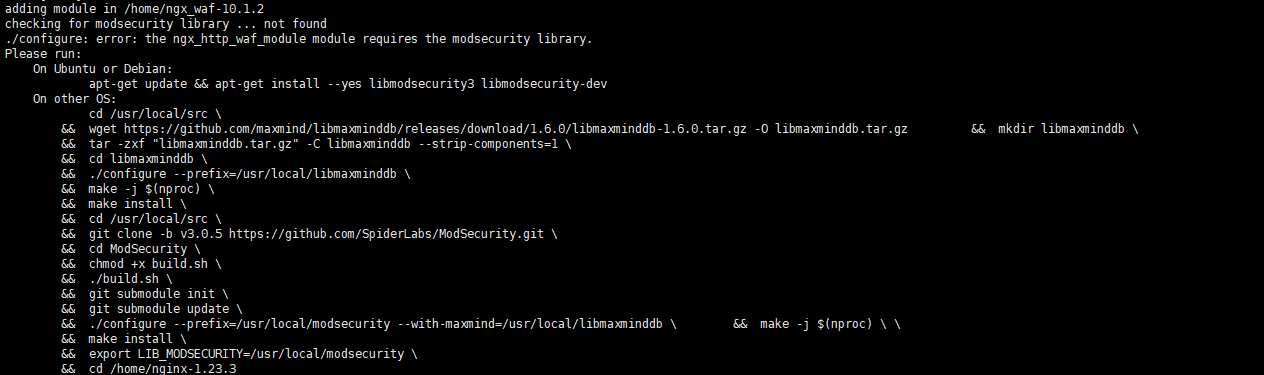
我使用 nginx-1.23.3 编译还是遇到这问题呀
ngx_waf-10.1.2
1

<!-- gh-comment-id:1461128933 --> @fanpiao commented on GitHub (Mar 9, 2023): 我使用 nginx-1.23.3 编译还是遇到这问题呀 ngx_waf-10.1.2 ![1](https://user-images.githubusercontent.com/19283324/223891760-3add24e4-8f28-4931-b3ee-bc39477c65c4.png)
Sign in to join this conversation.
No milestone
No project
No assignees
1 participant
Notifications
Due date
The due date is invalid or out of range. Please use the format "yyyy-mm-dd".

No due date set.

Dependencies

No dependencies set.

Reference
starred/ngx_waf#147
No description provided.