mirror of
https://github.com/NginxProxyManager/nginx-proxy-manager.git
synced 2026-04-25 17:35:52 +03:00
[GH-ISSUE #1183] How to set per domain options to allow to put something in an iframe #967
Labels
No labels
awaiting feedback
bug
cannot reproduce
dns provider request
duplicate
enhancement
enhancement
enhancement
good first issue
help wanted
invalid
need more info
no certbot plugin available
product-support
pull-request
question
stale
troll
upstream issue
v2
v2
v2
v3
wontfix
No milestone
No project
No assignees
1 participant

Notifications
Due date
No due date set.
Dependencies
No dependencies set.
Reference
starred/nginx-proxy-manager-NginxProxyManager#967
Loading…
Add table
Add a link
Reference in a new issue
No description provided.
Delete branch "%!s()"
Deleting a branch is permanent. Although the deleted branch may continue to exist for a short time before it actually gets removed, it CANNOT be undone in most cases. Continue?
Originally created by @erikthegamer1242 on GitHub (Jun 17, 2021).
Original GitHub issue: https://github.com/NginxProxyManager/nginx-proxy-manager/issues/1183
Sorry for being dumb, but how can I edit the configs per domain to set X frames to allowall because I can't log in to some sites(local WebUIs) to put them in an iframe. Or at least be able to tell the nginx that it can allowall from my webserver where the iframes are served
@chaptergy commented on GitHub (Jun 18, 2021):
One additional thing: For some browsers the
X-Frame-Optionsheader is not sufficient, you will need theContent-Security-Policyheader.Two options:
Use the advanced tab. Add something like the following:
This however prevents you from using the toggles with
HSTSand such on the main page and ssl page, so you would have to add those headers manually, as is already included in the above snippet.Add a custom location for this, where you repeat hostname and port of where you want to redirect, click on the cog and add the
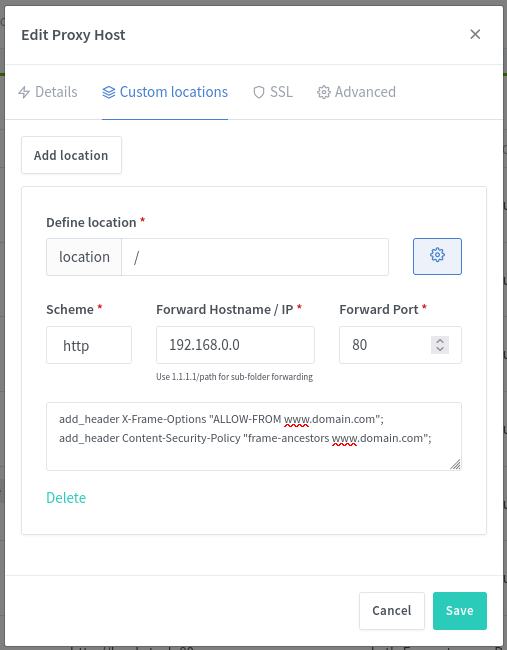
add_headercommands there. However this also prevents the toggle values from being used, as in 1., so make sure you add every header you need (e.g.HSTS) as in 1.@Tobstr02 commented on GitHub (May 4, 2023):
Got this problem again here in 2023.
Version v2.9.19
I tried to fix it with the 2 options above from @chaptergy, but it didn't changed anything.
The new header will be sent out, but as an 2nd content-policy header. So the first one with frame-src 'self' etc. will be used from my browser:
Content Security Policy: The page settings have blocked loading a resource on https://mydomain/realms/master/protocol/openid-connect/3p-cookies/step1.html ("frame-src").Is there something i can change to disable the content-security-policy header for that host?
@nickelswitte commented on GitHub (May 7, 2023):
I have exactly the same problem. The headers just duplicate and it seems like the browser just takes the other one
´´´
HTTP/2 200 OK
server: openresty
date: Sun, 07 May 2023 10:32:39 GMT
content-type: text/html
content-encoding: gzip
x-frame-options: sameorigin
x-xss-protection: 1; mode=block
x-content-type-options: nosniff
content-security-policy: default-src 'none'; script-src 'self'; style-src 'self' 'unsafe-inline'; img-src 'self' data:; font-src 'self' data:; connect-src 'self'; manifest-src 'self'; media-src 'self' blob:; child-src 'self' blob:; frame-src 'self'; frame-ancestors 'none'
referrer-policy: same-origin
permissions-policy: interest-cohort=()
x-frame-options: ALLOW-FROM my.do.main
content-security-policy: frame-ancestors my.do.main
X-Firefox-Spdy: h2
´´´
For another of my pages this works well, but that is because it does not send those two headers itself. Not quite sure how to fix this. It is possible to append the existing headers? Some guidance would be nice :)