mirror of
https://github.com/NginxProxyManager/nginx-proxy-manager.git
synced 2026-04-25 01:15:51 +03:00
[GH-ISSUE #1120] Passwords containing # symbol break the login #923
Labels
No labels
awaiting feedback
bug
cannot reproduce
dns provider request
duplicate
enhancement
enhancement
enhancement
good first issue
help wanted
invalid
need more info
no certbot plugin available
product-support
pull-request
question
stale
troll
upstream issue
v2
v2
v2
v3
wontfix
No milestone
No project
No assignees
1 participant

Notifications
Due date
No due date set.
Dependencies
No dependencies set.
Reference
starred/nginx-proxy-manager-NginxProxyManager#923
Loading…
Add table
Add a link
Reference in a new issue
No description provided.
Delete branch "%!s()"
Deleting a branch is permanent. Although the deleted branch may continue to exist for a short time before it actually gets removed, it CANNOT be undone in most cases. Continue?
Originally created by @maximchristo on GitHub (May 24, 2021).
Original GitHub issue: https://github.com/NginxProxyManager/nginx-proxy-manager/issues/1120
Checklist
jc21/nginx-proxy-manager:latestdocker image?Describe the bug
Each time I logout of the Nginx Proxy Manager, the web-panel no longer recognises my password and I cannot login. I've already reset my password twice through the database and the issue keeps occurring.
Nginx Proxy Manager Version
v2.9.3.
To Reproduce
I'm not quite sure, to be honest.
Operating System
Same issue is displayed on Mac, Windows - tired on Chrome, Firefox and Safari.
@Mgldvd commented on GitHub (Jun 6, 2021):
I got the same error, try on multiple servers and not always got this error, cant figure out what is causing this.
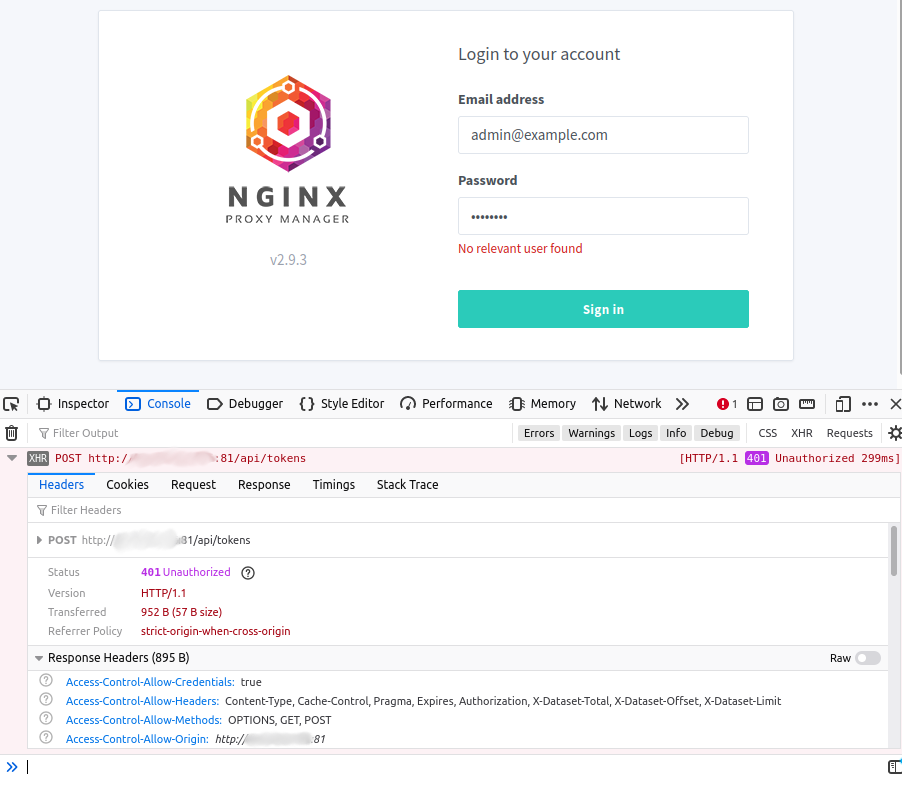
Use old and new login and password.
Here more info:
No relevant user foundPS: Thank you for this awesome work!!
@chaptergy commented on GitHub (Jun 6, 2021):
Does it happen with any password? Even alpanumeric ones? Maybe it has to do with some special character in the password which causes the issue.
@Mgldvd commented on GitHub (Jun 6, 2021):
OMG @chaptergy you nailed it.. it's the password.. use
#in my password, that character broke the login. Alphanumeric works .Thank you!!!
@chaptergy commented on GitHub (Aug 8, 2021):
Unfortunately I am not able to replicate the issue. I am able to set the password to
#+ä?ß!%$-_;.}<>|²€´`*~'"^°@µand am still able to login with this password. Both when changing the password of your own user and when changing the password of a different user.@thezoggy commented on GitHub (Mar 11, 2022):
I just ran into this as well, had a # in the middle of password -
jziDBsk#H@5gE^RS9.As I use a password manager I know it was being entered correct.
(dont worry i'm not using that pw anymore, generated a new one and made sure # wasnt included)
This is with NPM v2.9.16
Running from this docker - https://hub.docker.com/r/jlesage/nginx-proxy-manager/
@rickjames780 commented on GitHub (Jan 22, 2023):
My password manager always seems to put a # in. I have been having my logon page break every other time trying to logon and could not find out why. I assume this is related. Thanks!
https://hub.docker.com/r/jc21/nginx-proxy-manager
@github-actions[bot] commented on GitHub (Mar 11, 2024):
Issue is now considered stale. If you want to keep it open, please comment 👍
@github-actions[bot] commented on GitHub (Apr 23, 2025):
Issue was closed due to inactivity.
@thezoggy commented on GitHub (Apr 23, 2025):
boo, should not have been closed