[GH-ISSUE #104] How do i forward to a folder? #92

Closed
opened 2026-02-26 05:34:21 +03:00 by kerem · 116 comments
Owner

Originally created by @danmed on GitHub (Mar 15, 2019).
Original GitHub issue: https://github.com/NginxProxyManager/nginx-proxy-manager/issues/104

I'd like to have something like

https://sub.domain.com forward to https://192.168.1.1:8080/sub

is that currently possible? I can't find a way to achieve it.. I've tried searching issues but i think i'm missing some fundamental vocabulary to find my answer..

Originally created by @danmed on GitHub (Mar 15, 2019). Original GitHub issue: https://github.com/NginxProxyManager/nginx-proxy-manager/issues/104 I'd like to have something like https://sub.domain.com forward to https://192.168.1.1:8080/sub is that currently possible? I can't find a way to achieve it.. I've tried searching issues but i think i'm missing some fundamental vocabulary to find my answer..
kerem 2026-02-26 05:34:21 +03:00
Author
Owner

@jc21 commented on GitHub (Mar 18, 2019):

I guess it depends on the upstream service. What is "sub"? Does https://192.168.1.1:8080/ redirect to sub alone? If so, just forward to / and let it do it's thing.

FWIW this project isn't trying to solve these types of problems. It's just trying to expose upstream services, not redirect their paths.

<!-- gh-comment-id:473736134 --> @jc21 commented on GitHub (Mar 18, 2019): I guess it depends on the upstream service. What is "sub"? Does `https://192.168.1.1:8080/` redirect to sub alone? If so, just forward to `/` and let it do it's thing. FWIW this project isn't trying to solve these types of problems. It's just trying to expose upstream services, not redirect their paths.
Author
Owner

@danmed commented on GitHub (Mar 18, 2019):

sub can be anything... so http://jeff.mydomain.com forward to http://192.168.1.1/sonarr

for example..

<!-- gh-comment-id:473822275 --> @danmed commented on GitHub (Mar 18, 2019): sub can be anything... so http://jeff.mydomain.com forward to http://192.168.1.1/sonarr for example..
Author
Owner

@jc21 commented on GitHub (Mar 18, 2019):

So in that example, http://192.168.1.1/sonarr is another reverse proxy for http://192.168.1.1:8989 so why not just create http://sonarr.mydomain.com -> http://192.168.1.1:8989

<!-- gh-comment-id:474132622 --> @jc21 commented on GitHub (Mar 18, 2019): So in that example, `http://192.168.1.1/sonarr` is another reverse proxy for `http://192.168.1.1:8989` so why not just create `http://sonarr.mydomain.com` -> `http://192.168.1.1:8989`
Author
Owner

@danmed commented on GitHub (Mar 19, 2019):

I dont think i'm explaining myself very well..

Say for example i have a system that hosts many things... each of them available in different sub folders..

http://192.168.1.1/sonarr
http://192.168.1.1/randomsite
http://192.168.1.1/cameras

now i'd like, in nginx proxy manager to set up a subdomain for each one of those.

http://sonarr.domain.com
http://randomsite.domain.com
http://cameras.domain.com

i currently can't do this, yet it can be done in the config files that i used to use...

Now, if i'm being a dumbass here, it's because of a lack of vocabulary to fully explain myself..

<!-- gh-comment-id:474241260 --> @danmed commented on GitHub (Mar 19, 2019): I dont think i'm explaining myself very well.. Say for example i have a system that hosts many things... each of them available in different sub folders.. http://192.168.1.1/sonarr http://192.168.1.1/randomsite http://192.168.1.1/cameras now i'd like, in nginx proxy manager to set up a subdomain for each one of those. http://sonarr.domain.com http://randomsite.domain.com http://cameras.domain.com i currently can't do this, yet it can be done in the config files that i used to use... Now, if i'm being a dumbass here, it's because of a lack of vocabulary to fully explain myself..
Author
Owner

@kolbii commented on GitHub (Mar 19, 2019):

http://192.168.1.1/sonarr what does this mean? Do you already have a running web server that serves the sonar at that URL?

By the way, are you sure this project is that tool what you need?
To serve sonar, camera platform or any other things just set a standalone NGINX up.

<!-- gh-comment-id:474516786 --> @kolbii commented on GitHub (Mar 19, 2019): http://192.168.1.1/sonarr what does this mean? Do you already have a running web server that serves the sonar at that URL? By the way, are you sure this project is that tool what you need? To serve sonar, camera platform or any other things just set a standalone NGINX up.
Author
Owner

@danmed commented on GitHub (Mar 19, 2019):

Sonarr is installed on another server, a Windows one.. that is the URL that
it serves it's interface on.. it's already available... I want it on an
external address which is what nginx-proxy-manager does... I can very
easily point sonarr.domain.com to 192.168.2.2 on whatever Port.. but not
all applications (sonarr is just an example.. it really doesn't matter what
it is) only use a port.. they also have a folder as part of the URL.. how
do I send sonarr.domain.com to this URL folder...

Your project is exactly what I need.. I've been using NGINX to do this for
years.. but I cannot find a way to to do this in the nginx-proxy-manager

There is an example of a working config for NGINX here :
https://www.reddit.com/r/nginx/comments/6gbg9i/reverse_proxy_a_subdomain_to_a_folder_reward/dipf0x7/

On Tue, Mar 19, 2019, 6:35 PM kolbii notifications@github.com wrote:

http://192.168.1.1/sonarr what does this mean? Do you already have a
running web server that serves the sonar at that URL?

By the way, are you sure this project is that tool what you need?
To serve sonar, camera platform or any other things just set a standalone
NGINX up.


You are receiving this because you authored the thread.
Reply to this email directly, view it on GitHub
https://github.com/jc21/nginx-proxy-manager/issues/104#issuecomment-474516786,
or mute the thread
https://github.com/notifications/unsubscribe-auth/ADsuWpGLb-MeXqX_iZp_R1vMenMkp8l4ks5vYS4HgaJpZM4b2Qt4
.

<!-- gh-comment-id:474533410 --> @danmed commented on GitHub (Mar 19, 2019): Sonarr is installed on another server, a Windows one.. that is the URL that it serves it's interface on.. it's already available... I want it on an external address which is what nginx-proxy-manager does... I can very easily point sonarr.domain.com to 192.168.2.2 on whatever Port.. but not all applications (sonarr is just an example.. it really doesn't matter what it is) only use a port.. they also have a folder as part of the URL.. how do I send sonarr.domain.com to this URL folder... Your project is exactly what I need.. I've been using NGINX to do this for years.. but I cannot find a way to to do this in the nginx-proxy-manager There is an example of a working config for NGINX here : https://www.reddit.com/r/nginx/comments/6gbg9i/reverse_proxy_a_subdomain_to_a_folder_reward/dipf0x7/ On Tue, Mar 19, 2019, 6:35 PM kolbii <notifications@github.com> wrote: > http://192.168.1.1/sonarr what does this mean? Do you already have a > running web server that serves the sonar at that URL? > > By the way, are you sure this project is that tool what you need? > To serve sonar, camera platform or any other things just set a standalone > NGINX up. > > — > You are receiving this because you authored the thread. > Reply to this email directly, view it on GitHub > <https://github.com/jc21/nginx-proxy-manager/issues/104#issuecomment-474516786>, > or mute the thread > <https://github.com/notifications/unsubscribe-auth/ADsuWpGLb-MeXqX_iZp_R1vMenMkp8l4ks5vYS4HgaJpZM4b2Qt4> > . >
Author
Owner

@jc21 commented on GitHub (Mar 19, 2019):

I think you're explaining yourself ok, but I don't think you're understanding that you are already running a webserver as a reverse proxy on that windows machine that sits in front of your services. Since this project is just that, you don't need both. Whatever is running on port 80 on 192.168.1.1 is what you need to skip over and connect directly to the service.

FWIW the sonarr instructions for windows do in fact listen on port 8989 on the box you're running it on.

Just try it. Create a proxy hist in NPM that points to the machine running Sonarr on port 8989 and see what happens.

<!-- gh-comment-id:474607127 --> @jc21 commented on GitHub (Mar 19, 2019): I think you're explaining yourself ok, but I don't think you're understanding that you are already running a webserver as a reverse proxy on that windows machine that sits in front of your services. Since this project is just that, you don't need both. Whatever is running on port 80 on 192.168.1.1 is what you need to skip over and connect directly to the service. FWIW the [sonarr instructions](https://sonarr.tv/) for windows do in fact listen on port 8989 on the box you're running it on. Just try it. Create a proxy hist in NPM that points to the machine running Sonarr on port 8989 and see what happens.
Author
Owner

@danmed commented on GitHub (Mar 20, 2019):

Sonarr was just an example.. I know it runs on that Port.. don't worry,
I'll figure out a way to do what I'm talking about.. thanks for getting
back to me though.

On Tue, Mar 19, 2019, 10:20 PM jc21 notifications@github.com wrote:

I think you're explaining yourself ok, but I don't think you're
understanding that you are already running a webserver as a reverse proxy
on that windows machine that sits in front of your services. Since this
project is just that, you don't need both. Whatever is running on port 80
on 192.168.1.1 is what you need to skip over and connect directly to the
service.

FWIW the sonarr instructions https://sonarr.tv/ for windows do in fact
listen on port 8989 on the box you're running it on.

Just try it. Create a proxy hist in NPM that points to the machine running
Sonarr on port 8989 and see what happens.


You are receiving this because you authored the thread.
Reply to this email directly, view it on GitHub
https://github.com/jc21/nginx-proxy-manager/issues/104#issuecomment-474607127,
or mute the thread
https://github.com/notifications/unsubscribe-auth/ADsuWh1pt7Z9-jLHXczhuxGT-d_7HQYTks5vYWKwgaJpZM4b2Qt4
.

<!-- gh-comment-id:474698612 --> @danmed commented on GitHub (Mar 20, 2019): Sonarr was just an example.. I know it runs on that Port.. don't worry, I'll figure out a way to do what I'm talking about.. thanks for getting back to me though. On Tue, Mar 19, 2019, 10:20 PM jc21 <notifications@github.com> wrote: > I think you're explaining yourself ok, but I don't think you're > understanding that you are already running a webserver as a reverse proxy > on that windows machine that sits in front of your services. Since this > project is just that, you don't need both. Whatever is running on port 80 > on 192.168.1.1 is what you need to skip over and connect directly to the > service. > > FWIW the sonarr instructions <https://sonarr.tv/> for windows do in fact > listen on port 8989 on the box you're running it on. > > Just try it. Create a proxy hist in NPM that points to the machine running > Sonarr on port 8989 and see what happens. > > — > You are receiving this because you authored the thread. > Reply to this email directly, view it on GitHub > <https://github.com/jc21/nginx-proxy-manager/issues/104#issuecomment-474607127>, > or mute the thread > <https://github.com/notifications/unsubscribe-auth/ADsuWh1pt7Z9-jLHXczhuxGT-d_7HQYTks5vYWKwgaJpZM4b2Qt4> > . >
Author
Owner

@ursus69 commented on GitHub (Apr 30, 2019):

Hello,
I am having the same problem here.
I can serve my "Guacamole" installation out from "192.168.1.10:8080/guacamole" with clasic Nginx.
But impossible to join in Nginx Proxy Manager, I have tryed everything,
I just get to the "192.168.1.10:8080" wich is the Tomcat root and not the application root.

will you extend this functionallity in the near future?

<!-- gh-comment-id:487889184 --> @ursus69 commented on GitHub (Apr 30, 2019): Hello, I am having the same problem here. I can serve my "Guacamole" installation out from "192.168.1.10:8080/guacamole" with clasic Nginx. But impossible to join in Nginx Proxy Manager, I have tryed everything, I just get to the "192.168.1.10:8080" wich is the Tomcat root and not the application root. will you extend this functionallity in the near future?
Author
Owner

@danmed commented on GitHub (Apr 30, 2019):

Hopefully you can make the Dev understand the issue.. I wasn't able to
articulate the problem I was having even though I can achieve it perfectly
in plain old NGINX

On Tue, 30 Apr 2019, 10:39 Jose, notifications@github.com wrote:

Hello,
I am having the same problem here.
I can serve my "Guacamole" installation out from "
192.168.1.10:8080/guacamole" with clasic Nginx.
But impossible to join in Nginx Proxy Manager, I have tryed everything,
I just get to the "192.168.1.10:8080" wich is the Tomcat root and not the
application root.

will you extend this functionallity in the near future?


You are receiving this because you authored the thread.
Reply to this email directly, view it on GitHub
https://github.com/jc21/nginx-proxy-manager/issues/104#issuecomment-487889184,
or mute the thread
https://github.com/notifications/unsubscribe-auth/AA5S4WU7LIEEIGE47DXXGU3PTAHULANCNFSM4G6ZBN4A
.

<!-- gh-comment-id:487948160 --> @danmed commented on GitHub (Apr 30, 2019): Hopefully you can make the Dev understand the issue.. I wasn't able to articulate the problem I was having even though I can achieve it perfectly in plain old NGINX On Tue, 30 Apr 2019, 10:39 Jose, <notifications@github.com> wrote: > Hello, > I am having the same problem here. > I can serve my "Guacamole" installation out from " > 192.168.1.10:8080/guacamole" with clasic Nginx. > But impossible to join in Nginx Proxy Manager, I have tryed everything, > I just get to the "192.168.1.10:8080" wich is the Tomcat root and not the > application root. > > will you extend this functionallity in the near future? > > — > You are receiving this because you authored the thread. > Reply to this email directly, view it on GitHub > <https://github.com/jc21/nginx-proxy-manager/issues/104#issuecomment-487889184>, > or mute the thread > <https://github.com/notifications/unsubscribe-auth/AA5S4WU7LIEEIGE47DXXGU3PTAHULANCNFSM4G6ZBN4A> > . >
Author
Owner

@danmed commented on GitHub (May 3, 2019):

Here is an example that may help clarify things.

I am running PHPMyadmin on a MySQL box..

I have set up a proxy host in Nginx Proxy Manager as so :

image

The problem is, that to actually access Phpmyadmin, i have to visit

https://sub.domain.co.uk/phpmyadmin

i want to be able to access it by JUST visiting

https://sub.domain.co.uk

<!-- gh-comment-id:489004687 --> @danmed commented on GitHub (May 3, 2019): Here is an example that may help clarify things. I am running PHPMyadmin on a MySQL box.. I have set up a proxy host in Nginx Proxy Manager as so : ![image](https://user-images.githubusercontent.com/3878490/57126565-48256900-6d85-11e9-8f71-4ea12a59e838.png) The problem is, that to actually access Phpmyadmin, i have to visit https://sub.domain.co.uk/phpmyadmin i want to be able to access it by JUST visiting https://sub.domain.co.uk
Author
Owner

@jc21 commented on GitHub (May 8, 2019):

I was able to accomplish your situation with the existing interface. However there is a problem that I'll have to solve before it will work for everyone. Stay tuned.

<!-- gh-comment-id:490303874 --> @jc21 commented on GitHub (May 8, 2019): I was able to accomplish your situation with the existing interface. However there is a problem that I'll have to solve before it will work for everyone. Stay tuned.
Author
Owner

@danmed commented on GitHub (May 8, 2019):

That's awesome, thank you so much. Look forward to hearing from you

On Wed, 8 May 2019, 01:39 jc21, notifications@github.com wrote:

I was able to accomplish your situation with the existing interface.
However there is a problem that I'll have to solve before it will work for
everyone. Stay tuned.


You are receiving this because you authored the thread.
Reply to this email directly, view it on GitHub
https://github.com/jc21/nginx-proxy-manager/issues/104#issuecomment-490303874,
or mute the thread
https://github.com/notifications/unsubscribe-auth/AA5S4WSHKRLQSUEU6RH5OJLPUIOKRANCNFSM4G6ZBN4A
.

<!-- gh-comment-id:490347478 --> @danmed commented on GitHub (May 8, 2019): That's awesome, thank you so much. Look forward to hearing from you On Wed, 8 May 2019, 01:39 jc21, <notifications@github.com> wrote: > I was able to accomplish your situation with the existing interface. > However there is a problem that I'll have to solve before it will work for > everyone. Stay tuned. > > — > You are receiving this because you authored the thread. > Reply to this email directly, view it on GitHub > <https://github.com/jc21/nginx-proxy-manager/issues/104#issuecomment-490303874>, > or mute the thread > <https://github.com/notifications/unsubscribe-auth/AA5S4WSHKRLQSUEU6RH5OJLPUIOKRANCNFSM4G6ZBN4A> > . >
Author
Owner

@danmed commented on GitHub (May 8, 2019):

I notice you've pushed a fix.. how would i go about getting hold of that fix?

<!-- gh-comment-id:490419624 --> @danmed commented on GitHub (May 8, 2019): I notice you've pushed a fix.. how would i go about getting hold of that fix?
Author
Owner

@jc21 commented on GitHub (May 8, 2019):

I'm in the middle of testing it along with a few other fixes. Should be releasing within a day

<!-- gh-comment-id:490669762 --> @jc21 commented on GitHub (May 8, 2019): I'm in the middle of testing it along with a few other fixes. Should be releasing within a day
Author
Owner

@jc21 commented on GitHub (May 9, 2019):

v2.0.13 is up with the fix. Here's how you would setup:

http://example.com -> http://192.168.0.10/phpmyadmin/
  1. Create a proxy host
  2. On the details tab, enter any ip address and port, it's required for the form but it won't actually be used, so it can be anything
  3. On the Custom Locations tab, create a location with / as the location path and for the Forward Hostname / IP enter 192.168.0.10/phpmyadmin/ making sure you have that trailing slash, it's important.
  4. Save, and test.
<!-- gh-comment-id:490720849 --> @jc21 commented on GitHub (May 9, 2019): v2.0.13 is up with the fix. Here's how you would setup: ``` http://example.com -> http://192.168.0.10/phpmyadmin/ ``` 1. Create a proxy host 2. On the details tab, enter any ip address and port, it's required for the form but it won't actually be used, so it can be anything 3. On the Custom Locations tab, create a location with `/` as the location path and for the **Forward Hostname / IP** enter `192.168.0.10/phpmyadmin/` making sure you have that trailing slash, it's important. 4. Save, and test.
Author
Owner

@ursus69 commented on GitHub (May 9, 2019):

Hello,
could you put your changes in the latest-armhf so I can test them, is the
one that I use in a RasPi, and I just pulled the latest is from:

jc21/nginx-proxy-manager:latest-armhf 522.3 MB 2019-03-05 05:56:03

Many Thanks
On Thu, May 9, 2019 at 4:37 AM jc21 notifications@github.com wrote:

v2.0.13 is up with the fix. Here's how you would setup:

http://example.com -> http://192.168.0.10/phpmyadmin/

  1. Create a proxy host
  2. On the details tab, enter any ip address and port, it's required
    for the form but it won't actually be used, so it can be anything
  3. On the Custom Locations tab, create a location with / as the
    location path and for the Forward Hostname / IP enter
    192.168.0.10/phpmyadmin/ making sure you have that trailing slash,
    it's important.
  4. Save, and test.


You are receiving this because you commented.
Reply to this email directly, view it on GitHub
https://github.com/jc21/nginx-proxy-manager/issues/104#issuecomment-490720849,
or mute the thread
https://github.com/notifications/unsubscribe-auth/ABFXWB4NWDPMV3B3TIZ5NM3PUOE7VANCNFSM4G6ZBN4A
.

<!-- gh-comment-id:490949587 --> @ursus69 commented on GitHub (May 9, 2019): Hello, could you put your changes in the latest-armhf so I can test them, is the one that I use in a RasPi, and I just pulled the latest is from: jc21/nginx-proxy-manager:latest-armhf 522.3 MB 2019-03-05 05:56:03 Many Thanks On Thu, May 9, 2019 at 4:37 AM jc21 <notifications@github.com> wrote: > v2.0.13 is up with the fix. Here's how you would setup: > > http://example.com -> http://192.168.0.10/phpmyadmin/ > > > 1. Create a proxy host > 2. On the details tab, enter any ip address and port, it's required > for the form but it won't actually be used, so it can be anything > 3. On the Custom Locations tab, create a location with / as the > location path and for the *Forward Hostname / IP* enter > 192.168.0.10/phpmyadmin/ making sure you have that trailing slash, > it's important. > 4. Save, and test. > > — > You are receiving this because you commented. > Reply to this email directly, view it on GitHub > <https://github.com/jc21/nginx-proxy-manager/issues/104#issuecomment-490720849>, > or mute the thread > <https://github.com/notifications/unsubscribe-auth/ABFXWB4NWDPMV3B3TIZ5NM3PUOE7VANCNFSM4G6ZBN4A> > . >
Author
Owner

@jc21 commented on GitHub (May 9, 2019):

The latest-armhf tag is deprecated. You should be able to use the latest tag and because of docker manifests, you'll get the image applicable for your Pi, which is probably going to be latest-armv7l

<!-- gh-comment-id:491092231 --> @jc21 commented on GitHub (May 9, 2019): The `latest-armhf` tag is deprecated. You should be able to use the `latest` tag and because of docker manifests, you'll get the image applicable for your Pi, which is probably going to be `latest-armv7l`
Author
Owner

@danmed commented on GitHub (May 10, 2019):

Thanks for this.. works great (As long as you read the instructions and add the trailing / ) :)

thanks again

<!-- gh-comment-id:491196020 --> @danmed commented on GitHub (May 10, 2019): Thanks for this.. works great (As long as you read the instructions and add the trailing / ) :) thanks again
Author
Owner

@ursus69 commented on GitHub (May 10, 2019):

Great Work!

Exactly what I needed !

Sent from my iPhone

On 10 May 2019, at 09:55, danmed notifications@github.com wrote:

Thanks for this.. works great (As long as you read the instructions and add the trailing / ) :)

thanks again


You are receiving this because you commented.
Reply to this email directly, view it on GitHub, or mute the thread.

<!-- gh-comment-id:491204779 --> @ursus69 commented on GitHub (May 10, 2019): Great Work! Exactly what I needed ! Sent from my iPhone > On 10 May 2019, at 09:55, danmed <notifications@github.com> wrote: > > Thanks for this.. works great (As long as you read the instructions and add the trailing / ) :) > > thanks again > > — > You are receiving this because you commented. > Reply to this email directly, view it on GitHub, or mute the thread.
Author
Owner

@bba-dvhk commented on GitHub (Jan 18, 2020):

Hi.
What when we have some Services in folder but don't on default port:
ie:
panel.dom.local -> https://192.168.1.55:48443 Works fine
webmail.dom.local -> https://192.168.1.55/SOGo/:48443 not working
Nginx_Proxy_Manager_-_Google_Chrome_2020-01-18_16-59-49

Nginx_Proxy_Manager_-_Google_Chrome_2020-01-18_17-06-27

but when i point browser to http://192.168.1.55:48443/SOGo/ it works fine.

Is it possibile to make this working??

<!-- gh-comment-id:575918674 --> @bba-dvhk commented on GitHub (Jan 18, 2020): Hi. What when we have some Services in folder but don't on default port: ie: panel.dom.local -> https://192.168.1.55:48443 Works fine webmail.dom.local -> https://192.168.1.55/SOGo/:48443 not working ![Nginx_Proxy_Manager_-_Google_Chrome_2020-01-18_16-59-49](https://user-images.githubusercontent.com/60040052/72667537-f315aa00-3a1c-11ea-939b-bfed8cbc9332.png) ![Nginx_Proxy_Manager_-_Google_Chrome_2020-01-18_17-06-27](https://user-images.githubusercontent.com/60040052/72667568-4be54280-3a1d-11ea-9df8-2b7e541855ec.png) but when i point browser to http://192.168.1.55:48443/SOGo/ it works fine. Is it possibile to make this working??
Author
Owner

@jc21 commented on GitHub (Jan 19, 2020):

You're putting the Folder Path in the Hostname/IP section which is not the right place. Furthermore, your non-working upstream https://192.168.1.55/SOGo/:48443 is not a valid URL, it should be https://192.168.1.55:48443/SOGo/.

The Custom Locations tab is for sub-folders of your domains.

<!-- gh-comment-id:576053407 --> @jc21 commented on GitHub (Jan 19, 2020): You're putting the Folder Path in the Hostname/IP section which is not the right place. Furthermore, your non-working upstream `https://192.168.1.55/SOGo/:48443` is not a valid URL, it should be `https://192.168.1.55:48443/SOGo/`. The Custom Locations tab is for sub-folders of your domains.
Author
Owner

@bba-dvhk commented on GitHub (Jan 19, 2020):

As I understand Custom Locations work like:

Broswer -> panel.dom.local -> https://192.168.1.55:48443
Broswer -> panel.dom.local/SOGo -> http//192.168.1.55:48443/SOGo
Broswer -> panel.dom.local/admin -> http://192.168.1.55:8080/admin
Broswer -> panel.dom.local/something -> http://156.1.55.6:80/something

Untitled Diagram (2)

I look to achieve:

Broswer -> panel.dom.local -> https://192.168.1.55:48443
Broswer -> webmail.dom.local -> http//192.168.1.55:48443/SOGo
Broswer -> admin.dom.local -> http://192.168.1.55:8080/admin
Broswer -> something.dom.local-> http://156.1.55.6:80/something

Untitled Diagram (3)

<!-- gh-comment-id:576058801 --> @bba-dvhk commented on GitHub (Jan 19, 2020): As I understand Custom Locations work like: Broswer -> panel.dom.local -> https://192.168.1.55:48443 Broswer -> panel.dom.local/SOGo -> http//192.168.1.55:48443/SOGo Broswer -> panel.dom.local/admin -> http://192.168.1.55:8080/admin Broswer -> panel.dom.local/something -> http://156.1.55.6:80/something ![Untitled Diagram (2)](https://user-images.githubusercontent.com/60040052/72690080-efffe400-3b18-11ea-9ee6-598ae2f8ef3e.png) I look to achieve: Broswer -> panel.dom.local -> https://192.168.1.55:48443 Broswer -> webmail.dom.local -> http//192.168.1.55:48443/SOGo Broswer -> admin.dom.local -> http://192.168.1.55:8080/admin Broswer -> something.dom.local-> http://156.1.55.6:80/something ![Untitled Diagram (3)](https://user-images.githubusercontent.com/60040052/72690190-2e49d300-3b1a-11ea-91c4-57652aaf7489.png)
Author
Owner

@MartinKuhl commented on GitHub (May 1, 2020):

I have a similar setup, I would like to achieve the following:
Broswer -> sw.domain.org -> http://192.168.1.55:8000/sw
Broswer -> m1.domain.org -> http://192.168.1.55:8000/m1
Broswer -> m2.domain.org -> http://192.168.1.55:8000/m2

I that possible an If how?

<!-- gh-comment-id:622438533 --> @MartinKuhl commented on GitHub (May 1, 2020): I have a similar setup, I would like to achieve the following: Broswer -> sw.domain.org -> http://192.168.1.55:8000/sw Broswer -> m1.domain.org -> http://192.168.1.55:8000/m1 Broswer -> m2.domain.org -> http://192.168.1.55:8000/m2 I that possible an If how?
Author
Owner

@OptimusGREEN commented on GitHub (Jun 29, 2020):

I too would like to achieve this.

<!-- gh-comment-id:651024063 --> @OptimusGREEN commented on GitHub (Jun 29, 2020): I too would like to achieve this.
Author
Owner

@kaushikray1 commented on GitHub (Aug 19, 2020):

Hi.
What when we have some Services in folder but don't on default port:
ie:
panel.dom.local -> https://192.168.1.55:48443 Works fine
webmail.dom.local -> https://192.168.1.55/SOGo/:48443 not working
Nginx_Proxy_Manager_-_Google_Chrome_2020-01-18_16-59-49

Nginx_Proxy_Manager_-_Google_Chrome_2020-01-18_17-06-27

but when i point browser to http://192.168.1.55:48443/SOGo/ it works fine.

Is it possibile to make this working??

Hello Were you able to get this to work? i am actually trying the same thing but no luck so far.

I installed Mailcow and Mailcow webmail is being served at

mail.example.com/SOGo/

Now mail.example.com is pointing at say 192.168.1.5 and is serving the admin page for the mail server.

I want to make it so that webmail.example.com will point to
https://192.168.1.5/SOGo/

I followed the instructions here https://github.com/jc21/nginx-proxy-manager/issues/104#issuecomment-490720849 but no luck so far

This is what my setup looks like now

https://postimg.cc/6TD31yKC

https://postimg.cc/nsccQmKf

Any ideas what I may be doing wrong, any help is very appreciated.

Thank you

<!-- gh-comment-id:676479058 --> @kaushikray1 commented on GitHub (Aug 19, 2020): > Hi. > What when we have some Services in folder but don't on default port: > ie: > panel.dom.local -> https://192.168.1.55:48443 Works fine > webmail.dom.local -> https://192.168.1.55/SOGo/:48443 not working > ![Nginx_Proxy_Manager_-_Google_Chrome_2020-01-18_16-59-49](https://user-images.githubusercontent.com/60040052/72667537-f315aa00-3a1c-11ea-939b-bfed8cbc9332.png) > > ![Nginx_Proxy_Manager_-_Google_Chrome_2020-01-18_17-06-27](https://user-images.githubusercontent.com/60040052/72667568-4be54280-3a1d-11ea-9df8-2b7e541855ec.png) > > but when i point browser to http://192.168.1.55:48443/SOGo/ it works fine. > > Is it possibile to make this working?? Hello Were you able to get this to work? i am actually trying the same thing but no luck so far. I installed Mailcow and Mailcow webmail is being served at mail.example.com/SOGo/ Now mail.example.com is pointing at say 192.168.1.5 and is serving the admin page for the mail server. I want to make it so that webmail.example.com will point to https://192.168.1.5/SOGo/ I followed the instructions here https://github.com/jc21/nginx-proxy-manager/issues/104#issuecomment-490720849 but no luck so far This is what my setup looks like now https://postimg.cc/6TD31yKC https://postimg.cc/nsccQmKf Any ideas what I may be doing wrong, any help is very appreciated. Thank you
Author
Owner

@kaushikray1 commented on GitHub (Aug 19, 2020):

Thanks for this.. works great (As long as you read the instructions and add the trailing / ) :)

thanks again

Hello I understand you got thi to work, could you please help me with my setup. I am definitely doing something wrong. Thank you.

Hello Were you able to get this to work? i am actually trying the same thing but no luck so far.

I installed Mailcow and Mailcow webmail is being served at

mail.example.com/SOGo/

Now mail.example.com is pointing at say 192.168.1.5 and is serving the admin page for the mail server.

I want to make it so that webmail.example.com will point to
https://192.168.1.5/SOGo/

I followed the instructions here #104 (comment) but no luck so far

This is what my setup looks like now

https://postimg.cc/6TD31yKC

https://postimg.cc/nsccQmKf

Any ideas what I may be doing wrong, any help is very appreciated.

Thank you

<!-- gh-comment-id:676480966 --> @kaushikray1 commented on GitHub (Aug 19, 2020): > Thanks for this.. works great (As long as you read the instructions and add the trailing / ) :) > > thanks again Hello I understand you got thi to work, could you please help me with my setup. I am definitely doing something wrong. Thank you. Hello Were you able to get this to work? i am actually trying the same thing but no luck so far. I installed Mailcow and Mailcow webmail is being served at mail.example.com/SOGo/ Now mail.example.com is pointing at say 192.168.1.5 and is serving the admin page for the mail server. I want to make it so that webmail.example.com will point to https://192.168.1.5/SOGo/ I followed the instructions here #104 (comment) but no luck so far This is what my setup looks like now https://postimg.cc/6TD31yKC https://postimg.cc/nsccQmKf Any ideas what I may be doing wrong, any help is very appreciated. Thank you
Author
Owner

@Kh3nsu commented on GitHub (Oct 31, 2020):

Hello,

Is there something new about this ?
I need that as well!
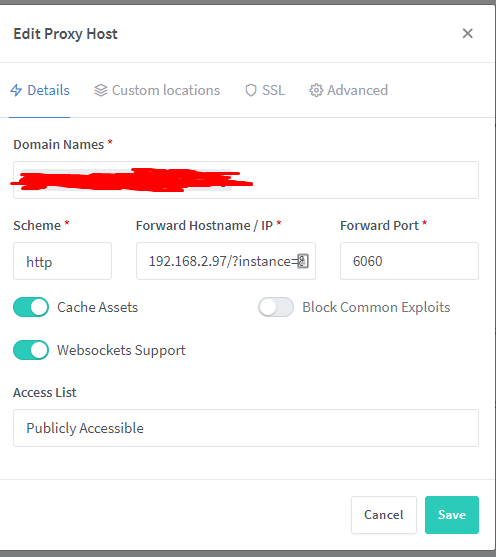
As example redirect from example.domain.de -> 192.168.2.97:6060/?instance=87ed0a9
If I try the things above I can only get this to work: 192.168.2.97/?instance=87ed0a9:6060 which is wrong :/

<!-- gh-comment-id:719854185 --> @Kh3nsu commented on GitHub (Oct 31, 2020): Hello, Is there something new about this ? I need that as well! As example redirect from example.domain.de -> 192.168.2.97:6060/?instance=87ed0a9 If I try the things above I can only get this to work: 192.168.2.97/?instance=87ed0a9:6060 which is wrong :/
Author
Owner

@OptimusGREEN commented on GitHub (Oct 31, 2020):

Try 192.168.2.97/?instance=87ed0a9/ with the port in the port box. The trailing slash is required.

<!-- gh-comment-id:719923792 --> @OptimusGREEN commented on GitHub (Oct 31, 2020): Try 192.168.2.97/?instance=87ed0a9/ with the port in the port box. The trailing slash is required.
Author
Owner

@Kh3nsu commented on GitHub (Oct 31, 2020):

Try 192.168.2.97/?instance=87ed0a9/ with the port in the port box. The trailing slash is required.

Hey thanks four your reply, I tried it like that:
Screenshot_2

Sadly the Destination is still wrong:
Screenshot_3

I need the port before the /?instance=87ed0a9/ like that: http://192.168.2.97:6060/?instance=87ed0a9/

<!-- gh-comment-id:719924926 --> @Kh3nsu commented on GitHub (Oct 31, 2020): > Try 192.168.2.97/?instance=87ed0a9/ with the port in the port box. The trailing slash is required. Hey thanks four your reply, I tried it like that: ![Screenshot_2](https://user-images.githubusercontent.com/17033125/97778756-9a616900-1b79-11eb-92c4-cf6b84be882d.png) Sadly the Destination is still wrong: ![Screenshot_3](https://user-images.githubusercontent.com/17033125/97778768-b82ece00-1b79-11eb-9b46-c91e63ae610f.png) I need the port before the /?instance=87ed0a9/ like that: http://192.168.2.97:6060/?instance=87ed0a9/
Author
Owner

@OptimusGREEN commented on GitHub (Oct 31, 2020):

Its not the details tab it goes in, it goes in the custom location tab.
The details tab still needs filled out but I believe it gets ignored.

nginx_custom_location

<!-- gh-comment-id:719986577 --> @OptimusGREEN commented on GitHub (Oct 31, 2020): Its not the details tab it goes in, it goes in the custom location tab. The details tab still needs filled out but I believe it gets ignored. ![nginx_custom_location](https://user-images.githubusercontent.com/17599575/97789658-2eebbb80-1bba-11eb-9afc-d411753c2f26.jpg)
Author
Owner

@kaushikray1 commented on GitHub (Nov 1, 2020):

Is the above example working, for me i am getting so unlucky i guess, its still not working for me. :(

<!-- gh-comment-id:720128043 --> @kaushikray1 commented on GitHub (Nov 1, 2020): Is the above example working, for me i am getting so unlucky i guess, its still not working for me. :(
Author
Owner

@Kh3nsu commented on GitHub (Nov 1, 2020):

Is the above example working, for me i am getting so unlucky i guess, its still not working for me. :(

No sadly it is not working for me :(

<!-- gh-comment-id:720129801 --> @Kh3nsu commented on GitHub (Nov 1, 2020): > Is the above example working, for me i am getting so unlucky i guess, its still not working for me. :( No sadly it is not working for me :(
Author
Owner

@kaushikray1 commented on GitHub (Nov 1, 2020):

Thanks for the update. hopefully it will be working soon in some newer version or someone will post the rit config. I will keep trying different config and if i get it to work I will post.

<!-- gh-comment-id:720130200 --> @kaushikray1 commented on GitHub (Nov 1, 2020): Thanks for the update. hopefully it will be working soon in some newer version or someone will post the rit config. I will keep trying different config and if i get it to work I will post.
Author
Owner

@bba-dvhk commented on GitHub (Nov 1, 2020):

Is the above example working, for me i am getting so unlucky i guess, its still not working for me. :(

No sadly it is not working for me :(

For me is working:
Look at screens

Nginx_Proxy_Manager_-_Google_Chrome_2020-11-01_19-32-40
Nginx_Proxy_Manager_-_Google_Chrome_2020-11-01_19-36-08

<!-- gh-comment-id:720132891 --> @bba-dvhk commented on GitHub (Nov 1, 2020): > > Is the above example working, for me i am getting so unlucky i guess, its still not working for me. :( > > No sadly it is not working for me :( For me is working: Look at screens ![Nginx_Proxy_Manager_-_Google_Chrome_2020-11-01_19-32-40](https://user-images.githubusercontent.com/60040052/97811275-b9dfbb00-1c79-11eb-9f83-23763ab3dc55.png) ![Nginx_Proxy_Manager_-_Google_Chrome_2020-11-01_19-36-08](https://user-images.githubusercontent.com/60040052/97811278-be0bd880-1c79-11eb-8975-65e1b1da507b.png)
Author
Owner

@OptimusGREEN commented on GitHub (Nov 1, 2020):

yes mines working.

<!-- gh-comment-id:720155298 --> @OptimusGREEN commented on GitHub (Nov 1, 2020): yes mines working.
Author
Owner

@fischdenflo commented on GitHub (Nov 28, 2020):

Unfortunately the access list doesn't work if you use it like that.

<!-- gh-comment-id:735018126 --> @fischdenflo commented on GitHub (Nov 28, 2020): Unfortunately the access list doesn't work if you use it like that.
Author
Owner

@kaushikray1 commented on GitHub (Nov 29, 2020):

Could you please share what to do in order for it to work. I have been trying for a while.

Get Outlook for Androidhttps://aka.ms/ghei36


From: fischdenflo notifications@github.com
Sent: Friday, November 27, 2020 7:32:06 PM
To: jc21/nginx-proxy-manager nginx-proxy-manager@noreply.github.com
Cc: Kaushik Ray ray.1_1@live.com; Comment comment@noreply.github.com
Subject: Re: [jc21/nginx-proxy-manager] How do i forward to a folder? (#104)

Unfortunately the access list doesn't work if you use it like that.


You are receiving this because you commented.
Reply to this email directly, view it on GitHubhttps://github.com/jc21/nginx-proxy-manager/issues/104#issuecomment-735018126, or unsubscribehttps://github.com/notifications/unsubscribe-auth/ABGA5GU2AASCRU7DGRB4IOLSSBAINANCNFSM4G6ZBN4A.

<!-- gh-comment-id:735478859 --> @kaushikray1 commented on GitHub (Nov 29, 2020): Could you please share what to do in order for it to work. I have been trying for a while. Get Outlook for Android<https://aka.ms/ghei36> ________________________________ From: fischdenflo <notifications@github.com> Sent: Friday, November 27, 2020 7:32:06 PM To: jc21/nginx-proxy-manager <nginx-proxy-manager@noreply.github.com> Cc: Kaushik Ray <ray.1_1@live.com>; Comment <comment@noreply.github.com> Subject: Re: [jc21/nginx-proxy-manager] How do i forward to a folder? (#104) Unfortunately the access list doesn't work if you use it like that. — You are receiving this because you commented. Reply to this email directly, view it on GitHub<https://github.com/jc21/nginx-proxy-manager/issues/104#issuecomment-735018126>, or unsubscribe<https://github.com/notifications/unsubscribe-auth/ABGA5GU2AASCRU7DGRB4IOLSSBAINANCNFSM4G6ZBN4A>.
Author
Owner

@meichthys commented on GitHub (Jan 15, 2021):

Just in case anyone else is still struggling with this, I've noticed that this seems to only work if also using an SSL certificate.

<!-- gh-comment-id:760631207 --> @meichthys commented on GitHub (Jan 15, 2021): Just in case anyone else is still struggling with this, I've noticed that [this](https://github.com/jc21/nginx-proxy-manager/issues/104#issuecomment-720132891) seems to only work if also using an SSL certificate.
Author
Owner

@meichthys commented on GitHub (Jan 17, 2021):

@kaushikray1 Also, I've noticed that if I have the following enabled, some resources won't load correctly when forwarding to a specific folder:
image
In other words, make sure the above option is turned off.

<!-- gh-comment-id:761722744 --> @meichthys commented on GitHub (Jan 17, 2021): @kaushikray1 Also, I've noticed that if I have the following enabled, some resources won't load correctly when forwarding to a specific folder: ![image](https://user-images.githubusercontent.com/10717998/104829915-c3bf9600-5846-11eb-89b7-682dda0e22e4.png) In other words, make sure the above option is turned off.
Author
Owner

@gmag11 commented on GitHub (Jan 19, 2021):

I'm trying to get this working but I've not got it.

I use Nginx Proxy Manager to publish some services on Docker. One of them is NodeRed. It listens on port 1880.

Main panel is on http://nodered:1880/ but I do not want to publish it. I only need dashboard to be accessible from Internet. It is on http://nodered:1880/ui. I want to map it to https://dashboard.mydomain.com.

I've tried using this config

image

But I do get 502 error from server and next line in default.log:

200 - GET http 130.xxx.xxx.xxx "/" [Client 132.xxx.xxx.xxx] [Length 1033] [Gzip -] "-" "-"

and this in error.log:

[error] 140819#140819: *34864 connect() failed (111: Connection refused) while connecting to upstream, client: xxx.xxx.xxx.xxx, server: dashboard.mydomain.com, request: "GET /favicon.ico HTTP/1.1", upstream: "http://172.20.0.4:80/ui/:1880", host: "dashboard.mydomain.com", referrer: "http://dashboard.mydomain.com/
<!-- gh-comment-id:762958855 --> @gmag11 commented on GitHub (Jan 19, 2021): I'm trying to get this working but I've not got it. I use Nginx Proxy Manager to publish some services on Docker. One of them is NodeRed. It listens on port 1880. Main panel is on http://nodered:1880/ but I do not want to publish it. I only need dashboard to be accessible from Internet. It is on http://nodered:1880/ui. I want to map it to https://dashboard.mydomain.com. I've tried using this config ![image](https://user-images.githubusercontent.com/6190183/105062363-d1f5f800-5a7a-11eb-863c-f0c9d2bf20a7.png) But I do get 502 error from server and next line in default.log: ``` 200 - GET http 130.xxx.xxx.xxx "/" [Client 132.xxx.xxx.xxx] [Length 1033] [Gzip -] "-" "-" ``` and this in error.log: ``` [error] 140819#140819: *34864 connect() failed (111: Connection refused) while connecting to upstream, client: xxx.xxx.xxx.xxx, server: dashboard.mydomain.com, request: "GET /favicon.ico HTTP/1.1", upstream: "http://172.20.0.4:80/ui/:1880", host: "dashboard.mydomain.com", referrer: "http://dashboard.mydomain.com/ ```
Author
Owner

@gmag11 commented on GitHub (Jan 19, 2021):

I've tried this config too:

image

image

After that, when I try to reach https://dashboard.mydomain.com I get this error from server

Cannot GET /uiui/

And this line on proxy_host.log

404 404 - GET http dashboard.mydomain.com "/ui/" [Client xxx.xxx.xxx.xxx] [Length 144] [Gzip 1.08] [Sent-to nodered] "Mozilla/5.0 (Windows NT 10.0; Win64; x64) AppleWebKit/537.36 (KHTML, like Gecko) Chrome/87.0.4280.88 Safari/537.36 OPR/73.0.3856.329" "-"
<!-- gh-comment-id:762963304 --> @gmag11 commented on GitHub (Jan 19, 2021): I've tried this config too: ![image](https://user-images.githubusercontent.com/6190183/105063459-0cac6000-5a7c-11eb-90b9-2bf54a51196b.png) ![image](https://user-images.githubusercontent.com/6190183/105063544-22ba2080-5a7c-11eb-94f8-fdacb50e8316.png) After that, when I try to reach https://dashboard.mydomain.com I get this error from server ``` Cannot GET /uiui/ ``` And this line on proxy_host.log ``` 404 404 - GET http dashboard.mydomain.com "/ui/" [Client xxx.xxx.xxx.xxx] [Length 144] [Gzip 1.08] [Sent-to nodered] "Mozilla/5.0 (Windows NT 10.0; Win64; x64) AppleWebKit/537.36 (KHTML, like Gecko) Chrome/87.0.4280.88 Safari/537.36 OPR/73.0.3856.329" "-" ```
Author
Owner

@gmag11 commented on GitHub (Jan 19, 2021):

As @jc21 stated on https://github.com/jc21/nginx-proxy-manager/issues/104#issuecomment-490720849

I've tried this:

image

image

Now I get this on web browser

Cannot GET /ui/ui/

So not working yet :(

<!-- gh-comment-id:762966383 --> @gmag11 commented on GitHub (Jan 19, 2021): As @jc21 stated on https://github.com/jc21/nginx-proxy-manager/issues/104#issuecomment-490720849 I've tried this: ![image](https://user-images.githubusercontent.com/6190183/105064487-28643600-5a7d-11eb-9a4d-64c0de2dd75f.png) ![image](https://user-images.githubusercontent.com/6190183/105064540-33b76180-5a7d-11eb-98d5-7f8b980ae4ef.png) Now I get this on web browser ``` Cannot GET /ui/ui/ ``` So not working yet :(
Author
Owner

@meichthys commented on GitHub (Jan 19, 2021):

@gmag11 I think you're close.
I'm using similar configurations. Are you using SSL? It sounds weird, but i wasn't able to get this to work until I started using an SSL cert.
My configuration looks like the following (note i had to forward the /zm location as well - this shouldn't be required for all services though - i think it was something to do with the zoneminder internal configuration)
image

<!-- gh-comment-id:762981868 --> @meichthys commented on GitHub (Jan 19, 2021): @gmag11 I think you're close. I'm using similar configurations. Are you using SSL? It sounds weird, but i wasn't able to get this to work until I started using an SSL cert. My configuration looks like the following (note i had to forward the `/zm` location as well - this shouldn't be required for all services though - i think it was something to do with the zoneminder internal configuration) ![image](https://user-images.githubusercontent.com/10717998/105067808-1c14b480-5a4e-11eb-8df7-3b644b8e25e5.png)
Author
Owner

@gmag11 commented on GitHub (Jan 20, 2021):

Thank you @meichthys . That worked!

I've found that even if Force SSL is marked, it still responds to plain HTTP too. Do you think it is a bug?

<!-- gh-comment-id:763962138 --> @gmag11 commented on GitHub (Jan 20, 2021): Thank you @meichthys . That worked! I've found that even if Force SSL is marked, it still responds to plain HTTP too. Do you think it is a bug?
Author
Owner

@meichthys commented on GitHub (Jan 20, 2021):

@gmag11 Interesting, I'm seeing that as well. It looks like a bug to me. Could you create a new issue for that?

<!-- gh-comment-id:763981188 --> @meichthys commented on GitHub (Jan 20, 2021): @gmag11 Interesting, I'm seeing that as well. It looks like a bug to me. Could you create a new issue for that?
Author
Owner

@kaushikray1 commented on GitHub (Jan 20, 2021):

Hey thank you for posting this configuration . This is the first time I got this working and I have no problem with redirecting to the secure page like someone else mentioned.

Thank you again.

Get Outlook for Androidhttps://aka.ms/ghei36


From: MeIchthys notifications@github.com
Sent: Tuesday, January 19, 2021 12:03:46 PM
To: jc21/nginx-proxy-manager nginx-proxy-manager@noreply.github.com
Cc: Kaushik Ray ray.1_1@live.com; Mention mention@noreply.github.com
Subject: Re: [jc21/nginx-proxy-manager] How do i forward to a folder? (#104)

@gmag11https://github.com/gmag11 I think you're close.
I'm using similar configurations. Are you using SSL? It sounds weird, but i wasn't able to get this to work until I started using an SSL cert.
My configuration looks like the following (note i had to forward the /zm location as well - this shouldn't be required for all services though - i think it was something to do with the zoneminder internal configuration)
[image]https://user-images.githubusercontent.com/10717998/105067808-1c14b480-5a4e-11eb-8df7-3b644b8e25e5.png


You are receiving this because you were mentioned.
Reply to this email directly, view it on GitHubhttps://github.com/jc21/nginx-proxy-manager/issues/104#issuecomment-762981868, or unsubscribehttps://github.com/notifications/unsubscribe-auth/ABGA5GTZEJGDZ3P2WFV2LITS2W3PFANCNFSM4G6ZBN4A.

<!-- gh-comment-id:763983898 --> @kaushikray1 commented on GitHub (Jan 20, 2021): Hey thank you for posting this configuration . This is the first time I got this working and I have no problem with redirecting to the secure page like someone else mentioned. Thank you again. Get Outlook for Android<https://aka.ms/ghei36> ________________________________ From: MeIchthys <notifications@github.com> Sent: Tuesday, January 19, 2021 12:03:46 PM To: jc21/nginx-proxy-manager <nginx-proxy-manager@noreply.github.com> Cc: Kaushik Ray <ray.1_1@live.com>; Mention <mention@noreply.github.com> Subject: Re: [jc21/nginx-proxy-manager] How do i forward to a folder? (#104) @gmag11<https://github.com/gmag11> I think you're close. I'm using similar configurations. Are you using SSL? It sounds weird, but i wasn't able to get this to work until I started using an SSL cert. My configuration looks like the following (note i had to forward the /zm location as well - this shouldn't be required for all services though - i think it was something to do with the zoneminder internal configuration) [image]<https://user-images.githubusercontent.com/10717998/105067808-1c14b480-5a4e-11eb-8df7-3b644b8e25e5.png> — You are receiving this because you were mentioned. Reply to this email directly, view it on GitHub<https://github.com/jc21/nginx-proxy-manager/issues/104#issuecomment-762981868>, or unsubscribe<https://github.com/notifications/unsubscribe-auth/ABGA5GTZEJGDZ3P2WFV2LITS2W3PFANCNFSM4G6ZBN4A>.
Author
Owner

@kaushikray1 commented on GitHub (Jan 20, 2021):

After a bit more experiment I actually see the same problem. It's not redirecting to the https page.

Get Outlook for Androidhttps://aka.ms/ghei36


From: MeIchthys notifications@github.com
Sent: Wednesday, January 20, 2021 5:08:07 PM
To: jc21/nginx-proxy-manager nginx-proxy-manager@noreply.github.com
Cc: Kaushik Ray ray.1_1@live.com; Mention mention@noreply.github.com
Subject: Re: [jc21/nginx-proxy-manager] How do i forward to a folder? (#104)

@gmag11https://github.com/gmag11 Interesting, I'm seeing that as well. It looks like a bug to me. Could you create a new issue for that?


You are receiving this because you were mentioned.
Reply to this email directly, view it on GitHubhttps://github.com/jc21/nginx-proxy-manager/issues/104#issuecomment-763981188, or unsubscribehttps://github.com/notifications/unsubscribe-auth/ABGA5GRHIYH4CNDZKJ75QQLS25H4PANCNFSM4G6ZBN4A.

<!-- gh-comment-id:764010959 --> @kaushikray1 commented on GitHub (Jan 20, 2021): After a bit more experiment I actually see the same problem. It's not redirecting to the https page. Get Outlook for Android<https://aka.ms/ghei36> ________________________________ From: MeIchthys <notifications@github.com> Sent: Wednesday, January 20, 2021 5:08:07 PM To: jc21/nginx-proxy-manager <nginx-proxy-manager@noreply.github.com> Cc: Kaushik Ray <ray.1_1@live.com>; Mention <mention@noreply.github.com> Subject: Re: [jc21/nginx-proxy-manager] How do i forward to a folder? (#104) @gmag11<https://github.com/gmag11> Interesting, I'm seeing that as well. It looks like a bug to me. Could you create a new issue for that? — You are receiving this because you were mentioned. Reply to this email directly, view it on GitHub<https://github.com/jc21/nginx-proxy-manager/issues/104#issuecomment-763981188>, or unsubscribe<https://github.com/notifications/unsubscribe-auth/ABGA5GRHIYH4CNDZKJ75QQLS25H4PANCNFSM4G6ZBN4A>.
Author
Owner

@kaushikray1 commented on GitHub (Jan 20, 2021):

After a bit more experiment I actually see the same problem. It's not redirecting to the https page.

Get Outlook for Androidhttps://aka.ms/ghei36


From: Kaushik ray.1_1@live.com
Sent: Wednesday, January 20, 2021 5:12:34 PM
To: jc21/nginx-proxy-manager reply@reply.github.com; jc21/nginx-proxy-manager nginx-proxy-manager@noreply.github.com
Cc: Mention mention@noreply.github.com
Subject: Re: [jc21/nginx-proxy-manager] How do i forward to a folder? (#104)

Hey thank you for posting this configuration . This is the first time I got this working and I have no problem with redirecting to the secure page like someone else mentioned.

Thank you again.

Get Outlook for Androidhttps://aka.ms/ghei36


From: MeIchthys notifications@github.com
Sent: Tuesday, January 19, 2021 12:03:46 PM
To: jc21/nginx-proxy-manager nginx-proxy-manager@noreply.github.com
Cc: Kaushik Ray ray.1_1@live.com; Mention mention@noreply.github.com
Subject: Re: [jc21/nginx-proxy-manager] How do i forward to a folder? (#104)

@gmag11https://github.com/gmag11 I think you're close.
I'm using similar configurations. Are you using SSL? It sounds weird, but i wasn't able to get this to work until I started using an SSL cert.
My configuration looks like the following (note i had to forward the /zm location as well - this shouldn't be required for all services though - i think it was something to do with the zoneminder internal configuration)
[image]https://user-images.githubusercontent.com/10717998/105067808-1c14b480-5a4e-11eb-8df7-3b644b8e25e5.png


You are receiving this because you were mentioned.
Reply to this email directly, view it on GitHubhttps://github.com/jc21/nginx-proxy-manager/issues/104#issuecomment-762981868, or unsubscribehttps://github.com/notifications/unsubscribe-auth/ABGA5GTZEJGDZ3P2WFV2LITS2W3PFANCNFSM4G6ZBN4A.

<!-- gh-comment-id:764011125 --> @kaushikray1 commented on GitHub (Jan 20, 2021): After a bit more experiment I actually see the same problem. It's not redirecting to the https page. Get Outlook for Android<https://aka.ms/ghei36> ________________________________ From: Kaushik <ray.1_1@live.com> Sent: Wednesday, January 20, 2021 5:12:34 PM To: jc21/nginx-proxy-manager <reply@reply.github.com>; jc21/nginx-proxy-manager <nginx-proxy-manager@noreply.github.com> Cc: Mention <mention@noreply.github.com> Subject: Re: [jc21/nginx-proxy-manager] How do i forward to a folder? (#104) Hey thank you for posting this configuration . This is the first time I got this working and I have no problem with redirecting to the secure page like someone else mentioned. Thank you again. Get Outlook for Android<https://aka.ms/ghei36> ________________________________ From: MeIchthys <notifications@github.com> Sent: Tuesday, January 19, 2021 12:03:46 PM To: jc21/nginx-proxy-manager <nginx-proxy-manager@noreply.github.com> Cc: Kaushik Ray <ray.1_1@live.com>; Mention <mention@noreply.github.com> Subject: Re: [jc21/nginx-proxy-manager] How do i forward to a folder? (#104) @gmag11<https://github.com/gmag11> I think you're close. I'm using similar configurations. Are you using SSL? It sounds weird, but i wasn't able to get this to work until I started using an SSL cert. My configuration looks like the following (note i had to forward the /zm location as well - this shouldn't be required for all services though - i think it was something to do with the zoneminder internal configuration) [image]<https://user-images.githubusercontent.com/10717998/105067808-1c14b480-5a4e-11eb-8df7-3b644b8e25e5.png> — You are receiving this because you were mentioned. Reply to this email directly, view it on GitHub<https://github.com/jc21/nginx-proxy-manager/issues/104#issuecomment-762981868>, or unsubscribe<https://github.com/notifications/unsubscribe-auth/ABGA5GTZEJGDZ3P2WFV2LITS2W3PFANCNFSM4G6ZBN4A>.
Author
Owner

@plato79 commented on GitHub (Feb 19, 2021):

I have been successful for some services. But plex refuses to accept
Here is the configuration I tried:

on the Custom locations tab:
location = /
Scheme = http
FW Hostname/IP = 192.168.1.XXX/web/
Port = 32400

It should work like this I assume but it doesn't

Force SSL, HSTS etc enabled. I tried Cache and WebSockets on and off, but it doesn't matter.

At last I only get 404 error. Here is the output of wget -v plex.mydomain.com

URL transformed to HTTPS due to an HSTS policy
--2021-02-19 17:02:31--  https://plex.mydomain.com/
Resolving plex.mydomain.com (plex.mydomain.com)... 212.XXX.XXX.XXX
Connecting to plex.mydomain.com (plex.mydomain.com)|212.XXX.XXX.XXX|:443... connected.
HTTP request sent, awaiting response... 302 Moved Temporarily
Location: http://plex.mydomain.com/web/index.html [following]
URL transformed to HTTPS due to an HSTS policy
--2021-02-19 17:02:36--  https://plex.mydomain.com/web/index.html
Reusing existing connection to plex.mydomain.com:443.
HTTP request sent, awaiting response... 404 Not Found
2021-02-19 17:02:36 ERROR 404: Not Found.
<!-- gh-comment-id:782099284 --> @plato79 commented on GitHub (Feb 19, 2021): I have been successful for some services. But plex refuses to accept Here is the configuration I tried: on the Custom locations tab: location = / Scheme = http FW Hostname/IP = 192.168.1.XXX/web/ Port = 32400 It should work like this I assume but it doesn't Force SSL, HSTS etc enabled. I tried Cache and WebSockets on and off, but it doesn't matter. At last I only get 404 error. Here is the output of wget -v plex.mydomain.com ``` URL transformed to HTTPS due to an HSTS policy --2021-02-19 17:02:31-- https://plex.mydomain.com/ Resolving plex.mydomain.com (plex.mydomain.com)... 212.XXX.XXX.XXX Connecting to plex.mydomain.com (plex.mydomain.com)|212.XXX.XXX.XXX|:443... connected. HTTP request sent, awaiting response... 302 Moved Temporarily Location: http://plex.mydomain.com/web/index.html [following] URL transformed to HTTPS due to an HSTS policy --2021-02-19 17:02:36-- https://plex.mydomain.com/web/index.html Reusing existing connection to plex.mydomain.com:443. HTTP request sent, awaiting response... 404 Not Found 2021-02-19 17:02:36 ERROR 404: Not Found. ```
Author
Owner

@meichthys commented on GitHub (Feb 19, 2021):

@plato79 It seems like your configuration matches mine. Perhaps it's Plex being a little over-defensive.
The only thing I can think of is to make sure you have a valid SSL certificate selected instead of the option to create a new one.

<!-- gh-comment-id:782149883 --> @meichthys commented on GitHub (Feb 19, 2021): @plato79 It seems like your configuration matches mine. Perhaps it's Plex being a little over-defensive. The only thing I can think of is to make sure you have a valid SSL certificate selected instead of the option to create a new one.
Author
Owner

@kaushikray1 commented on GitHub (Feb 19, 2021):

You don't need to add the web part for plex to work

Get Outlook for Androidhttps://aka.ms/ghei36


From: MeIchthys notifications@github.com
Sent: Friday, February 19, 2021 10:31:48 AM
To: jc21/nginx-proxy-manager nginx-proxy-manager@noreply.github.com
Cc: Kaushik Ray ray.1_1@live.com; Mention mention@noreply.github.com
Subject: Re: [jc21/nginx-proxy-manager] How do i forward to a folder? (#104)

@plato79https://github.com/plato79 It seems like your configuration matches mine. Perhaps it's Plex being a little over-defensive.
The only thing I can think of is to make sure you have a valid SSL certificate selected instead of the option to create a new one.


You are receiving this because you were mentioned.
Reply to this email directly, view it on GitHubhttps://github.com/jc21/nginx-proxy-manager/issues/104#issuecomment-782149883, or unsubscribehttps://github.com/notifications/unsubscribe-auth/ABGA5GW7VXIWQZBDUXHXXBTS7Z76JANCNFSM4G6ZBN4A.

<!-- gh-comment-id:782365172 --> @kaushikray1 commented on GitHub (Feb 19, 2021): You don't need to add the web part for plex to work Get Outlook for Android<https://aka.ms/ghei36> ________________________________ From: MeIchthys <notifications@github.com> Sent: Friday, February 19, 2021 10:31:48 AM To: jc21/nginx-proxy-manager <nginx-proxy-manager@noreply.github.com> Cc: Kaushik Ray <ray.1_1@live.com>; Mention <mention@noreply.github.com> Subject: Re: [jc21/nginx-proxy-manager] How do i forward to a folder? (#104) @plato79<https://github.com/plato79> It seems like your configuration matches mine. Perhaps it's Plex being a little over-defensive. The only thing I can think of is to make sure you have a valid SSL certificate selected instead of the option to create a new one. — You are receiving this because you were mentioned. Reply to this email directly, view it on GitHub<https://github.com/jc21/nginx-proxy-manager/issues/104#issuecomment-782149883>, or unsubscribe<https://github.com/notifications/unsubscribe-auth/ABGA5GW7VXIWQZBDUXHXXBTS7Z76JANCNFSM4G6ZBN4A>.
Author
Owner

@kaushikray1 commented on GitHub (Feb 19, 2021):

So you can basically just use the ip address and the port number, that's all you need to do. The '/web' part is not necessary for plex to work with reverse proxy only in case of ip address. I am using plex with just the port and a ip for a while now.

Get Outlook for Androidhttps://aka.ms/ghei36


From: Kaushik ray.1_1@live.com
Sent: Friday, February 19, 2021 4:26:54 PM
To: jc21/nginx-proxy-manager nginx-proxy-manager@noreply.github.com; jc21/nginx-proxy-manager reply@reply.github.com
Cc: Mention mention@noreply.github.com
Subject: Re: [jc21/nginx-proxy-manager] How do i forward to a folder? (#104)

You don't need to add the web part for plex to work

Get Outlook for Androidhttps://aka.ms/ghei36


From: MeIchthys notifications@github.com
Sent: Friday, February 19, 2021 10:31:48 AM
To: jc21/nginx-proxy-manager nginx-proxy-manager@noreply.github.com
Cc: Kaushik Ray ray.1_1@live.com; Mention mention@noreply.github.com
Subject: Re: [jc21/nginx-proxy-manager] How do i forward to a folder? (#104)

@plato79https://github.com/plato79 It seems like your configuration matches mine. Perhaps it's Plex being a little over-defensive.
The only thing I can think of is to make sure you have a valid SSL certificate selected instead of the option to create a new one.


You are receiving this because you were mentioned.
Reply to this email directly, view it on GitHubhttps://github.com/jc21/nginx-proxy-manager/issues/104#issuecomment-782149883, or unsubscribehttps://github.com/notifications/unsubscribe-auth/ABGA5GW7VXIWQZBDUXHXXBTS7Z76JANCNFSM4G6ZBN4A.

<!-- gh-comment-id:782387458 --> @kaushikray1 commented on GitHub (Feb 19, 2021): So you can basically just use the ip address and the port number, that's all you need to do. The '/web' part is not necessary for plex to work with reverse proxy only in case of ip address. I am using plex with just the port and a ip for a while now. Get Outlook for Android<https://aka.ms/ghei36> ________________________________ From: Kaushik <ray.1_1@live.com> Sent: Friday, February 19, 2021 4:26:54 PM To: jc21/nginx-proxy-manager <nginx-proxy-manager@noreply.github.com>; jc21/nginx-proxy-manager <reply@reply.github.com> Cc: Mention <mention@noreply.github.com> Subject: Re: [jc21/nginx-proxy-manager] How do i forward to a folder? (#104) You don't need to add the web part for plex to work Get Outlook for Android<https://aka.ms/ghei36> ________________________________ From: MeIchthys <notifications@github.com> Sent: Friday, February 19, 2021 10:31:48 AM To: jc21/nginx-proxy-manager <nginx-proxy-manager@noreply.github.com> Cc: Kaushik Ray <ray.1_1@live.com>; Mention <mention@noreply.github.com> Subject: Re: [jc21/nginx-proxy-manager] How do i forward to a folder? (#104) @plato79<https://github.com/plato79> It seems like your configuration matches mine. Perhaps it's Plex being a little over-defensive. The only thing I can think of is to make sure you have a valid SSL certificate selected instead of the option to create a new one. — You are receiving this because you were mentioned. Reply to this email directly, view it on GitHub<https://github.com/jc21/nginx-proxy-manager/issues/104#issuecomment-782149883>, or unsubscribe<https://github.com/notifications/unsubscribe-auth/ABGA5GW7VXIWQZBDUXHXXBTS7Z76JANCNFSM4G6ZBN4A>.
Author
Owner

@plato79 commented on GitHub (Feb 20, 2021):

Are you sure about that? When I write only IP and port, it shows an XML file only.

<!-- gh-comment-id:782629763 --> @plato79 commented on GitHub (Feb 20, 2021): Are you sure about that? When I write only IP and port, it shows an XML file only.
Author
Owner

@kaushikray1 commented on GitHub (Feb 20, 2021):

Works for me. My plex server runs on ubuntu. It Automatically redirects to /web

Get Outlook for Androidhttps://aka.ms/ghei36


From: Plato notifications@github.com
Sent: Saturday, February 20, 2021 7:30:16 AM
To: jc21/nginx-proxy-manager nginx-proxy-manager@noreply.github.com
Cc: Kaushik Ray ray.1_1@live.com; Mention mention@noreply.github.com
Subject: Re: [jc21/nginx-proxy-manager] How do i forward to a folder? (#104)

Are you sure about that? When I write only IP and port, it shows an XML file only.


You are receiving this because you were mentioned.
Reply to this email directly, view it on GitHubhttps://github.com/jc21/nginx-proxy-manager/issues/104#issuecomment-782629763, or unsubscribehttps://github.com/notifications/unsubscribe-auth/ABGA5GXC57XJTVOUT4FNGW3S76TNRANCNFSM4G6ZBN4A.

<!-- gh-comment-id:782725458 --> @kaushikray1 commented on GitHub (Feb 20, 2021): Works for me. My plex server runs on ubuntu. It Automatically redirects to /web Get Outlook for Android<https://aka.ms/ghei36> ________________________________ From: Plato <notifications@github.com> Sent: Saturday, February 20, 2021 7:30:16 AM To: jc21/nginx-proxy-manager <nginx-proxy-manager@noreply.github.com> Cc: Kaushik Ray <ray.1_1@live.com>; Mention <mention@noreply.github.com> Subject: Re: [jc21/nginx-proxy-manager] How do i forward to a folder? (#104) Are you sure about that? When I write only IP and port, it shows an XML file only. — You are receiving this because you were mentioned. Reply to this email directly, view it on GitHub<https://github.com/jc21/nginx-proxy-manager/issues/104#issuecomment-782629763>, or unsubscribe<https://github.com/notifications/unsubscribe-auth/ABGA5GXC57XJTVOUT4FNGW3S76TNRANCNFSM4G6ZBN4A>.
Author
Owner

@casperse commented on GitHub (Oct 20, 2021):

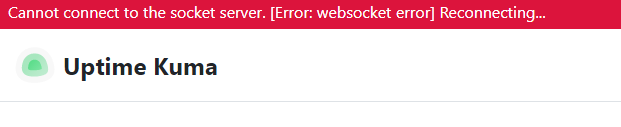
I have tried everything in this post and I still get:
image

Kuma uptime have a status page:
http://IP:PORT/status

But no matter what I do I cant access the page.
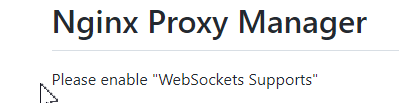
The instruction just say to enable websockets:
image
https://github.com/louislam/uptime-kuma/wiki/Reverse-Proxy#nginx-proxy-manager

<!-- gh-comment-id:947674210 --> @casperse commented on GitHub (Oct 20, 2021): I have tried everything in this post and I still get: ![image](https://user-images.githubusercontent.com/2026859/138102851-eb5e2738-194d-48c6-a1cd-d748eab031d5.png) Kuma uptime have a status page: http://IP:PORT/status But no matter what I do I cant access the page. The instruction just say to enable websockets: ![image](https://user-images.githubusercontent.com/2026859/138103286-46d4ee26-9f62-441c-9e38-7d2859d29dcb.png) https://github.com/louislam/uptime-kuma/wiki/Reverse-Proxy#nginx-proxy-manager
Author
Owner

@meichthys commented on GitHub (Oct 20, 2021):

@casperse Could you screenshot your Custom locations tab?

<!-- gh-comment-id:947705639 --> @meichthys commented on GitHub (Oct 20, 2021): @casperse Could you screenshot your `Custom locations` tab?
Author
Owner

@chaptergy commented on GitHub (Oct 20, 2021):

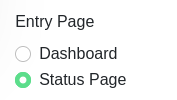
@casperse Websockets support is not actually required by kuma if you just want to expose the status page as described in this issue. Additionally, the /status path is not a real folder but a virtual path, so exposing just this location would not work. What you want is to expose your Kuma instance normally with just ip and port, and set the entry page to "Status page" within the kuma settings.
image

<!-- gh-comment-id:947717019 --> @chaptergy commented on GitHub (Oct 20, 2021): @casperse Websockets support is not actually required by kuma if you just want to expose the status page as described [in this issue](https://github.com/louislam/uptime-kuma/issues/4#issuecomment-932797961). Additionally, the `/status` path is not a real folder but a virtual path, so exposing just this location would not work. What you want is to expose your Kuma instance normally with just ip and port, and set the entry page to "Status page" within the kuma settings. ![image](https://user-images.githubusercontent.com/26956711/138111558-116abc8d-58f7-48b6-8b77-5a415379ebef.png)
Author
Owner

@Tyrian81 commented on GitHub (Oct 25, 2021):

Im also having some difficulty proxying Guacamole
Guac

this takes me to : https://mydomain.com/guacamole/:8084 and an tomcat 404 error
correcting the URL by removing :8084 does proxy to Guacamole , any suggestions on a clean proxy ?

<!-- gh-comment-id:950611921 --> @Tyrian81 commented on GitHub (Oct 25, 2021): Im also having some difficulty proxying Guacamole ![Guac](https://user-images.githubusercontent.com/31477524/138652996-fd053df3-64bc-430a-8c66-306e6b952d60.jpg) this takes me to : https://mydomain.com/guacamole/:8084 and an tomcat 404 error correcting the URL by removing :8084 does proxy to Guacamole , any suggestions on a clean proxy ?
Author
Owner

@vohaha7 commented on GitHub (Oct 31, 2021):

Hi, dear community

1st of all let me thank you for this GREAT tool! It works like a charm and ist really really useful!

I just wanted to help somebody who may be get the scenario "example.server.com --> 192.168.x.x:PORT/Address" to work not as expected. In my case I was trying to forward a mail-in-a-box system to my subdomain and got a problem with not working images, scripts etc.

My solution was to add such a configuration in the "Custom locations" section:

  1. Location: /

  2. Scheme: https

  3. Forward Hostname/IP: 192.168.x.x/mail/ <--- hier is a last slash very important

  4. Forward Port: 443

  5. Custom configuration (under the gear in upper right corner):

                 proxy_set_header X-Scheme $scheme;
                 proxy_set_header X-Forwarded-For $proxy_add_x_forwarded_for;
                 proxy_redirect    off;
                 add_header Pragma "no-cache";
                 add_header Cache-Control "no-cache";
    
                 sub_filter 'action="/'  'action="/mail/';
                 sub_filter 'href="/'  'href="/mail/';
                 sub_filter 'src="/'  'src="/mail/';
                 sub_filter_once off;
    

One more. Switches in a "Details" section work. So you can set "Block exploits" and "Websocket support" if you wish. "Cashe Assets" I left unswitched.

Sorry if some of my custom config lines are useless or wrong to place. I'm not a Nginx specialist, just wanted to post a solution that works for me.

Happy installing!
Voha

<!-- gh-comment-id:955711241 --> @vohaha7 commented on GitHub (Oct 31, 2021): Hi, dear community 1st of all let me thank you for this GREAT tool! It works like a charm and ist really really useful! I just wanted to help somebody who may be get the scenario "example.server.com --> 192.168.x.x:PORT/Address" to work not as expected. In my case I was trying to forward a mail-in-a-box system to my subdomain and got a problem with not working images, scripts etc. My solution was to add such a configuration in the "Custom locations" section: 1) Location: / 2) Scheme: https 3) Forward Hostname/IP: 192.168.x.x/mail/ <--- hier is a last slash very important 4) Forward Port: 443 5) Custom configuration (under the gear in upper right corner): proxy_set_header X-Scheme $scheme; proxy_set_header X-Forwarded-For $proxy_add_x_forwarded_for; proxy_redirect off; add_header Pragma "no-cache"; add_header Cache-Control "no-cache"; sub_filter 'action="/' 'action="/mail/'; sub_filter 'href="/' 'href="/mail/'; sub_filter 'src="/' 'src="/mail/'; sub_filter_once off; One more. Switches in a "Details" section work. So you can set "Block exploits" and "Websocket support" if you wish. "Cashe Assets" I left unswitched. Sorry if some of my custom config lines are useless or wrong to place. I'm not a Nginx specialist, just wanted to post a solution that works for me. Happy installing! Voha
Author
Owner

@vohaha7 commented on GitHub (Oct 31, 2021):

Im also having some difficulty proxying Guacamole Guac

this takes me to : https://mydomain.com/guacamole/:8084 and an tomcat 404 error correcting the URL by removing :8084 does proxy to Guacamole , any suggestions on a clean proxy ?

Your mistake is to put in a custom configuration "Location /... { .... }" section. UI settings are transferred to Location sections by itself. As a result you have such a config file "Location /..... { Location /.... { ........................ } }" and that is wrong.

<!-- gh-comment-id:955712361 --> @vohaha7 commented on GitHub (Oct 31, 2021): > Im also having some difficulty proxying Guacamole ![Guac](https://user-images.githubusercontent.com/31477524/138652996-fd053df3-64bc-430a-8c66-306e6b952d60.jpg) > > this takes me to : https://mydomain.com/guacamole/:8084 and an tomcat 404 error correcting the URL by removing :8084 does proxy to Guacamole , any suggestions on a clean proxy ? Your mistake is to put in a custom configuration "Location /... { .... }" section. UI settings are transferred to Location sections by itself. As a result you have such a config file "Location /..... { Location /.... { ........................ } }" and that is wrong.
Author
Owner

@Brailyn commented on GitHub (Nov 7, 2021):

I have the same issue with Guacamole. Probably easier to fix on that end, but it is strange and would be great if someone could see how to fix in NPM.

<!-- gh-comment-id:962569376 --> @Brailyn commented on GitHub (Nov 7, 2021): I have the same issue with Guacamole. Probably easier to fix on that end, but it is strange and would be great if someone could see how to fix in NPM.
Author
Owner

@danmed commented on GitHub (Nov 28, 2021):

This is the config that works for me for guacamole if it helps at all.. it probably came from here anyway :

location / {
    proxy_pass http://192.168.2.50:8084/guacamole/;
    proxy_buffering off;
    proxy_http_version 1.1;
    proxy_set_header X-Forwarded-For $proxy_add_x_forwarded_for;
    proxy_set_header Upgrade $http_upgrade;
    proxy_set_header Connection $http_connection;
    proxy_cookie_path /guacamole/ /;
    access_log off;
}

it's possibly worth noting though that i use an LE wildcard certificate via cloudflare.

<!-- gh-comment-id:981172218 --> @danmed commented on GitHub (Nov 28, 2021): This is the config that works for me for guacamole if it helps at all.. it probably came from here anyway : ``` location / { proxy_pass http://192.168.2.50:8084/guacamole/; proxy_buffering off; proxy_http_version 1.1; proxy_set_header X-Forwarded-For $proxy_add_x_forwarded_for; proxy_set_header Upgrade $http_upgrade; proxy_set_header Connection $http_connection; proxy_cookie_path /guacamole/ /; access_log off; } ``` it's possibly worth noting though that i use an LE wildcard certificate via cloudflare.
Author
Owner

@Graywolf9 commented on GitHub (Feb 10, 2022):

v2.0.13 is up with the fix. Here's how you would setup:

http://example.com -> http://192.168.0.10/phpmyadmin/
1. Create a proxy host

2. On the details tab, enter any ip address and port, it's required for the form but it won't actually be used, so it can be anything

3. On the Custom Locations tab, create a location with `/` as the location path and for the **Forward Hostname / IP** enter `192.168.0.10/phpmyadmin/` making sure you have that trailing slash, it's important.

4. Save, and test.

It works perfect, thank you so much!

<!-- gh-comment-id:1035656319 --> @Graywolf9 commented on GitHub (Feb 10, 2022): > v2.0.13 is up with the fix. Here's how you would setup: > > ``` > http://example.com -> http://192.168.0.10/phpmyadmin/ > ``` > > 1. Create a proxy host > > 2. On the details tab, enter any ip address and port, it's required for the form but it won't actually be used, so it can be anything > > 3. On the Custom Locations tab, create a location with `/` as the location path and for the **Forward Hostname / IP** enter `192.168.0.10/phpmyadmin/` making sure you have that trailing slash, it's important. > > 4. Save, and test. It works perfect, thank you so much!
Author
Owner

@Oscaramr commented on GitHub (Feb 20, 2022):

v2.0.13 is up with the fix. Here's how you would setup:

http://example.com -> http://192.168.0.10/phpmyadmin/
1. Create a proxy host

2. On the details tab, enter any ip address and port, it's required for the form but it won't actually be used, so it can be anything

3. On the Custom Locations tab, create a location with `/` as the location path and for the **Forward Hostname / IP** enter `192.168.0.10/phpmyadmin/` making sure you have that trailing slash, it's important.

4. Save, and test.

It works perfect, thank you so much!

I did this and i get ERR_TOO_MANY_REDIRECTS
https://i.imgur.com/MaIh9wu.png
https://i.imgur.com/3CrKIkD.png

<!-- gh-comment-id:1046315553 --> @Oscaramr commented on GitHub (Feb 20, 2022): > > v2.0.13 is up with the fix. Here's how you would setup: > > ``` > > http://example.com -> http://192.168.0.10/phpmyadmin/ > > ``` > > > > > > > > > > > > > > > > > > > > > > > > ``` > > 1. Create a proxy host > > > > 2. On the details tab, enter any ip address and port, it's required for the form but it won't actually be used, so it can be anything > > > > 3. On the Custom Locations tab, create a location with `/` as the location path and for the **Forward Hostname / IP** enter `192.168.0.10/phpmyadmin/` making sure you have that trailing slash, it's important. > > > > 4. Save, and test. > > ``` > > It works perfect, thank you so much! I did this and i get ERR_TOO_MANY_REDIRECTS https://i.imgur.com/MaIh9wu.png https://i.imgur.com/3CrKIkD.png
Author
Owner

@lstellway commented on GitHub (Mar 10, 2022):

Not sure if this could be helpful for anybody else, but I wanted a similar setup. A difference for me is the upstream server requires the upstream Host header. The default configuration passes the downstream Host header through. My solution was to create a custom configuration to pass my desired Host header:

location / {
    proxy_set_header X-Forwarded-Scheme $scheme;
    proxy_set_header X-Forwarded-Proto $scheme;
    proxy_set_header X-Forwarded-For $remote_addr;
    proxy_set_header X-Real-IP $remote_addr;
    proxy_set_header Host "example.upstreamserver.com";
    proxy_pass https://example.upstreamserver.com:443/rewritten/path/;
}
<!-- gh-comment-id:1064615634 --> @lstellway commented on GitHub (Mar 10, 2022): Not sure if this could be helpful for anybody else, but I wanted a similar setup. A difference for me is the upstream server requires the upstream `Host` header. The default configuration passes the downstream `Host` header through. My solution was to create a custom configuration to pass my desired `Host` header: <pre> location / { proxy_set_header X-Forwarded-Scheme $scheme; proxy_set_header X-Forwarded-Proto $scheme; proxy_set_header X-Forwarded-For $remote_addr; proxy_set_header X-Real-IP $remote_addr; <b>proxy_set_header Host "example.upstreamserver.com";</b> proxy_pass https://example.upstreamserver.com:443/rewritten/path/; } </pre>
Author
Owner

@nZeus commented on GitHub (May 15, 2022):

v2.0.13 is up with the fix. Here's how you would setup:

http://example.com -> http://192.168.0.10/phpmyadmin/

1. Create a proxy host
2. On the details tab, enter any ip address and port, it's required for the form but it won't actually be used, so it can be anything
3. On the Custom Locations tab, create a location with `/` as the location path and for the **Forward Hostname / IP** enter `192.168.0.10/phpmyadmin/` making sure you have that trailing slash, it's important.
4. Save, and test.

It works perfect, thank you so much!

I did this,and now when I open https://myserver.com/, it redirects me to https://myserver.com:88/subfolder

Anybody knows what am I doing wrong?

<!-- gh-comment-id:1126940547 --> @nZeus commented on GitHub (May 15, 2022): > > v2.0.13 is up with the fix. Here's how you would setup: > > > > > > ``` > > > http://example.com -> http://192.168.0.10/phpmyadmin/ > > > ``` > > > > > > 1. Create a proxy host > > > > > > 2. On the details tab, enter any ip address and port, it's required for the form but it won't actually be used, so it can be anything > > > > > > 3. On the Custom Locations tab, create a location with `/` as the location path and for the **Forward Hostname / IP** enter `192.168.0.10/phpmyadmin/` making sure you have that trailing slash, it's important. > > > > > > 4. Save, and test. > > > > It works perfect, thank you so much! I did this,and now when I open https://myserver.com/, it redirects me to https://myserver.com:88/subfolder Anybody knows what am I doing wrong?
Author
Owner

@nettoinfo commented on GitHub (Nov 4, 2022):

It worked for me... use the "Custom Locations" option, just put a / in Set location * and http in Scheme* the server server in Forward Hostname / IP* like this: 192.168.10.144/dir/ and in Forward Port * put the port, ex: 8081.
Thank'u!

<!-- gh-comment-id:1303954069 --> @nettoinfo commented on GitHub (Nov 4, 2022): It worked for me... use the "Custom Locations" option, just put a / in Set location * and http in Scheme* the server server in Forward Hostname / IP* like this: 192.168.10.144/dir/ and in Forward Port * put the port, ex: 8081. Thank'u!
Author
Owner

@nettoinfo commented on GitHub (Nov 4, 2022):

image

in detail you can repeat the information because it will be ignored.

<!-- gh-comment-id:1303955483 --> @nettoinfo commented on GitHub (Nov 4, 2022): ![image](https://user-images.githubusercontent.com/300473/200044102-e20d4431-f814-44bc-b4c2-639c534354c7.png) in detail you can repeat the information because it will be ignored.
Author
Owner

@oywino commented on GitHub (Nov 27, 2022):

I still can't get this to work.
It's beyond me why this appears to be so complicated. This is what I want to achieve:
test.mydomain.com --> https://192.168.x.x:8689/folder/
I use Let's encrypt certificates. I'm on NPM 2.9.19
All web apps I have that do not require redirection to a subfolder, works just perfect usng Nginx as an RProxy.
All web apps I have that do require such redirection, fails.

image

I have read this whole thread over and over and nothing works for me.
I used Apache as my reverse proxy before now trying to move to Nginx using NPM. In Apache , all I needed to get this to work, was:

<VirtualHost *:XXXX>
	ServerName test.mydomain.com
	SSLEngine on
	SSLCertificateFile /etc/stunnel/stunnel.pem
	SetEnvIf User-Agent ".*MSIE.*" nokeepalive ssl-unclean-shutdown
	ProxyPass / http://192.168.x.x:8689/folder/
	ProxyPassReverse / http://192.168.x.x:8689/folder/
</VirtualHost>

Pluss of course the redirect section:

<VirtualHost *:XX>
	ServerName test.mydomain.com
	Redirect / https://test.mydomain.com/
</VirtualHost>
<!-- gh-comment-id:1328272134 --> @oywino commented on GitHub (Nov 27, 2022): I still can't get this to work. It's beyond me why this appears to be so complicated. This is what I want to achieve: `test.mydomain.com --> https://192.168.x.x:8689/folder/` I use Let's encrypt certificates. I'm on NPM 2.9.19 All web apps I have that do not require redirection to a subfolder, works just perfect usng Nginx as an RProxy. All web apps I have that do require such redirection, fails. ![image](https://user-images.githubusercontent.com/18447119/204143649-7500b16a-bcd8-4b61-b715-efe4791cd0eb.png) I have read this whole thread over and over and nothing works for me. I used Apache as my reverse proxy before now trying to move to Nginx using NPM. In Apache \, all I needed to get this to work, was: ``` <VirtualHost *:XXXX> ServerName test.mydomain.com SSLEngine on SSLCertificateFile /etc/stunnel/stunnel.pem SetEnvIf User-Agent ".*MSIE.*" nokeepalive ssl-unclean-shutdown ProxyPass / http://192.168.x.x:8689/folder/ ProxyPassReverse / http://192.168.x.x:8689/folder/ </VirtualHost> ``` Pluss of course the redirect section: ``` <VirtualHost *:XX> ServerName test.mydomain.com Redirect / https://test.mydomain.com/ </VirtualHost> ```
Author
Owner

@nettoinfo commented on GitHub (Nov 28, 2022):

Try the following setup.
Fill in the configuration normally in Details (http/https)... and in
Advanced, put:
location = /{return 301 $scheme://$http_host/folder/;}


José Ferreira Neto
Profissional TI
Músico cristão membro da Assembleia de Deus.
Faça contato comigo | Visite meu site
Emails: @.*** | @.***
Lattes: https://t.co/O3fjQb6Zfb
Twitter's: @netto_info
http://www.facebook.com/profile.php?id=100000106146383MSN:
@.***
Perfil: http://fb.com/nettux
LinkedIn: https://www.linkedin.com/in/nettux/

Em dom., 27 de nov. de 2022 às 11:39, oywino @.***>
escreveu:

I still can't get this to work.
It's beyond me why this appears to be so complicated. This is what I want
to achieve:
test.mydomain.com --> https://192.168.x.x:8689/folder/
I use Let's encrypt certificates. I'm on NPM 2.9.19
All web apps I have that do not require redirection to a subfolder, works
just perfect usng Nginx as an RProxy.
All web apps I have that do require such redirection, fails.

[image: image]
https://user-images.githubusercontent.com/18447119/204143649-7500b16a-bcd8-4b61-b715-efe4791cd0eb.png

I have read this whole thread over and over and nothing works for me.
I used Apache as my reverse proxy before now trying to move to Nginx using
NPM. In Apache , all I needed to get this to work, was:
<VirtualHost *:XXXX> ServerName test.mydomain.com SSLEngine on
SSLCertificateFile /etc/stunnel/stunnel.pem SetEnvIf User-Agent ".MSIE."
nokeepalive ssl-unclean-shutdown ProxyPass /
http://192.168.x.x:8689/folder/ ProxyPassReverse /
http://192.168.x.x:8689/folder/
.... pluss of course the redirect section:
<VirtualHost *:XX>
ServerName test.mydomain.com
Redirect / https://test.mydomain.com/


Reply to this email directly, view it on GitHub
https://github.com/NginxProxyManager/nginx-proxy-manager/issues/104#issuecomment-1328272134,
or unsubscribe
https://github.com/notifications/unsubscribe-auth/AACJLOKPB5UFBSJRHRNYPVTWKN6DJANCNFSM4G6ZBN4A
.
You are receiving this because you commented.Message ID:
@.***>

<!-- gh-comment-id:1328939803 --> @nettoinfo commented on GitHub (Nov 28, 2022): Try the following setup. Fill in the configuration normally in Details (http/https)... and in Advanced, put: location = /{return 301 $scheme://$http_host/folder/;} ------------------------------------------------------------ José Ferreira Neto Profissional TI Músico cristão membro da Assembleia de Deus. *Faça contato comigo | Visite meu site* Emails: ***@***.*** | ***@***.*** Lattes: https://t.co/O3fjQb6Zfb Twitter's: @netto_info <http://www.facebook.com/profile.php?id=100000106146383>MSN: ***@***.*** Perfil: http://fb.com/nettux LinkedIn: https://www.linkedin.com/in/nettux/ Em dom., 27 de nov. de 2022 às 11:39, oywino ***@***.***> escreveu: > I still can't get this to work. > It's beyond me why this appears to be so complicated. This is what I want > to achieve: > test.mydomain.com --> https://192.168.x.x:8689/folder/ > I use Let's encrypt certificates. I'm on NPM 2.9.19 > All web apps I have that do not require redirection to a subfolder, works > just perfect usng Nginx as an RProxy. > All web apps I have that do require such redirection, fails. > > [image: image] > <https://user-images.githubusercontent.com/18447119/204143649-7500b16a-bcd8-4b61-b715-efe4791cd0eb.png> > > I have read this whole thread over and over and nothing works for me. > I used Apache as my reverse proxy before now trying to move to Nginx using > NPM. In Apache , all I needed to get this to work, was: > <VirtualHost *:XXXX> ServerName test.mydomain.com SSLEngine on > SSLCertificateFile /etc/stunnel/stunnel.pem SetEnvIf User-Agent ".*MSIE.*" > nokeepalive ssl-unclean-shutdown ProxyPass / > http://192.168.x.x:8689/folder/ ProxyPassReverse / > http://192.168.x.x:8689/folder/ </VirtualHost> > .... pluss of course the redirect section: > <VirtualHost *:XX> > ServerName test.mydomain.com > Redirect / https://test.mydomain.com/ > > — > Reply to this email directly, view it on GitHub > <https://github.com/NginxProxyManager/nginx-proxy-manager/issues/104#issuecomment-1328272134>, > or unsubscribe > <https://github.com/notifications/unsubscribe-auth/AACJLOKPB5UFBSJRHRNYPVTWKN6DJANCNFSM4G6ZBN4A> > . > You are receiving this because you commented.Message ID: > ***@***.***> >
Author
Owner

@oywino commented on GitHub (Nov 28, 2022):

Hi and thanks for your reply.
I tried this, but to no avail.
To give you a bit more background - the application I'm trying proxy, is Guacamole.
I worked perfectly using Apache, but for various reasons I decided to move to Nginx, and I can't get it to work.
I also tried to follow this guide: https://guacamole.apache.org/doc/gug/reverse-proxy.html#nginx
But still no-go.

<!-- gh-comment-id:1329105651 --> @oywino commented on GitHub (Nov 28, 2022): Hi and thanks for your reply. I tried this, but to no avail. To give you a bit more background - the application I'm trying proxy, is Guacamole. I worked perfectly using Apache, but for various reasons I decided to move to Nginx, and I can't get it to work. I also tried to follow this guide: https://guacamole.apache.org/doc/gug/reverse-proxy.html#nginx But still no-go.
Author
Owner

@oywino commented on GitHub (Nov 28, 2022):

Thanks for helping, but I am fully capable of Google search myself. I do not need someone to tell me how to do that. I need someone with in-depth understanding on how to debug an Nginx Proxy Manager configuration.
Sorry.

<!-- gh-comment-id:1329234009 --> @oywino commented on GitHub (Nov 28, 2022): Thanks for helping, but I am fully capable of Google search myself. I do not need someone to tell me how to do that. I need someone with in-depth understanding on how to debug an Nginx Proxy Manager configuration. Sorry.
Author
Owner

@nettoinfo commented on GitHub (Nov 28, 2022):

I apologize for trying to help you and getting a kick as a thank you.

Em seg., 28 de nov. de 2022 10:48, oywino @.***>
escreveu:

Thanks for helping, but I am fully capable of Google search myself. I do
not need someone to tell me how to do that. I need someone with in-depth
understanding on how to debug an Nginx Proxy Manager configuration.
Sorry.


Reply to this email directly, view it on GitHub
https://github.com/NginxProxyManager/nginx-proxy-manager/issues/104#issuecomment-1329234009,
or unsubscribe
https://github.com/notifications/unsubscribe-auth/AACJLOOPN4TUNM6WD27D32TWKTA3ZANCNFSM4G6ZBN4A
.
You are receiving this because you commented.Message ID:
@.***>

<!-- gh-comment-id:1329466775 --> @nettoinfo commented on GitHub (Nov 28, 2022): I apologize for trying to help you and getting a kick as a thank you. Em seg., 28 de nov. de 2022 10:48, oywino ***@***.***> escreveu: > Thanks for helping, but I am fully capable of Google search myself. I do > not need someone to tell me how to do that. I need someone with in-depth > understanding on how to debug an Nginx Proxy Manager configuration. > Sorry. > > — > Reply to this email directly, view it on GitHub > <https://github.com/NginxProxyManager/nginx-proxy-manager/issues/104#issuecomment-1329234009>, > or unsubscribe > <https://github.com/notifications/unsubscribe-auth/AACJLOOPN4TUNM6WD27D32TWKTA3ZANCNFSM4G6ZBN4A> > . > You are receiving this because you commented.Message ID: > ***@***.***> >
Author
Owner

@nettoinfo commented on GitHub (Nov 28, 2022):

The first tip I passed was not from Google... We have two NPM servers in
activity and there are almost thirty servers working, I work in a public
body and... maybe you need to know more about networks and NGInx (not NPM)
before using it, because that's how I started, despite "not having
technical knowledge".

José Ferreira Neto
Profissional TI

<!-- gh-comment-id:1329523827 --> @nettoinfo commented on GitHub (Nov 28, 2022): The first tip I passed was not from Google... We have two NPM servers in activity and there are almost thirty servers working, I work in a public body and... maybe you need to know more about networks and NGInx (not NPM) before using it, because that's how I started, despite "not having technical knowledge". ------------------------------------------------------------ José Ferreira Neto Profissional TI
Author
Owner

@VictorVonFrankenstein commented on GitHub (Dec 6, 2022):

Also need to sub.example.com -> IP:3001/app/list

Anyone was able to find a solution to this?

<!-- gh-comment-id:1340054316 --> @VictorVonFrankenstein commented on GitHub (Dec 6, 2022): Also need to sub.example.com -> IP:3001/app/list Anyone was able to find a solution to this?
Author
Owner

@oywino commented on GitHub (Dec 7, 2022):

I managed to get it working using custom location setting in NPM. The trick was to assign a static IP-address to my NPM container.

<!-- gh-comment-id:1340534213 --> @oywino commented on GitHub (Dec 7, 2022): I managed to get it working using custom location setting in NPM. The trick was to assign a static IP-address to my NPM container.
Author
Owner

@wrt54gl commented on GitHub (Feb 12, 2023):

As @jc21 stated on #104 (comment)

I've tried this:

image

image

Now I get this on web browser

Cannot GET /ui/ui/

So not working yet :(

Having the same problem with node red:
Cannot GET /ui/ui/
Has anyone found a way to fix this?

<!-- gh-comment-id:1426950851 --> @wrt54gl commented on GitHub (Feb 12, 2023): > As @jc21 stated on [#104 (comment)](https://github.com/NginxProxyManager/nginx-proxy-manager/issues/104#issuecomment-490720849) > > I've tried this: > > ![image](https://user-images.githubusercontent.com/6190183/105064487-28643600-5a7d-11eb-9a4d-64c0de2dd75f.png) > > ![image](https://user-images.githubusercontent.com/6190183/105064540-33b76180-5a7d-11eb-98d5-7f8b980ae4ef.png) > > Now I get this on web browser > > ``` > Cannot GET /ui/ui/ > ``` > > So not working yet :( Having the same problem with node red: `Cannot GET /ui/ui/` Has anyone found a way to fix this?
Author
Owner

@nettoinfo commented on GitHub (Feb 13, 2023):

just put in the top box
location /ui

José Ferreira Neto
Profissional TI
Músico cristão membro da Assembleia de Deus.
Faça contato comigo | Visite meu site
Emails: @.*** | @.***
Lattes: https://t.co/O3fjQb6Zfb
Twitter's: @netto_info
http://www.facebook.com/profile.php?id=100000106146383MSN:
@.***
Perfil: http://fb.com/nettux
LinkedIn: https://www.linkedin.com/in/nettux/

Em dom., 12 de fev. de 2023 às 02:01, wrt54gl @.***>
escreveu:

As @jc21 https://github.com/jc21 stated on #104 (comment)
https://github.com/NginxProxyManager/nginx-proxy-manager/issues/104#issuecomment-490720849

I've tried this:

[image: image]
https://user-images.githubusercontent.com/6190183/105064487-28643600-5a7d-11eb-9a4d-64c0de2dd75f.png

[image: image]
https://user-images.githubusercontent.com/6190183/105064540-33b76180-5a7d-11eb-98d5-7f8b980ae4ef.png

Now I get this on web browser

Cannot GET /ui/ui/

So not working yet :(

Having the same problem with node red:
Cannot GET /ui/ui/
Has anyone found a way to fix this?


Reply to this email directly, view it on GitHub
https://github.com/NginxProxyManager/nginx-proxy-manager/issues/104#issuecomment-1426950851,
or unsubscribe
https://github.com/notifications/unsubscribe-auth/AACJLOLEX3AC3YXEBPAZU73WXB4CNANCNFSM4G6ZBN4A
.
You are receiving this because you commented.Message ID:
@.***>

<!-- gh-comment-id:1427866424 --> @nettoinfo commented on GitHub (Feb 13, 2023): just put in the top box location /ui ------------------------------------------------------------ José Ferreira Neto Profissional TI Músico cristão membro da Assembleia de Deus. *Faça contato comigo | Visite meu site* Emails: ***@***.*** | ***@***.*** Lattes: https://t.co/O3fjQb6Zfb Twitter's: @netto_info <http://www.facebook.com/profile.php?id=100000106146383>MSN: ***@***.*** Perfil: http://fb.com/nettux LinkedIn: https://www.linkedin.com/in/nettux/ Em dom., 12 de fev. de 2023 às 02:01, wrt54gl ***@***.***> escreveu: > As @jc21 <https://github.com/jc21> stated on #104 (comment) > <https://github.com/NginxProxyManager/nginx-proxy-manager/issues/104#issuecomment-490720849> > > I've tried this: > > [image: image] > <https://user-images.githubusercontent.com/6190183/105064487-28643600-5a7d-11eb-9a4d-64c0de2dd75f.png> > > [image: image] > <https://user-images.githubusercontent.com/6190183/105064540-33b76180-5a7d-11eb-98d5-7f8b980ae4ef.png> > > Now I get this on web browser > > Cannot GET /ui/ui/ > > So not working yet :( > > Having the same problem with node red: > Cannot GET /ui/ui/ > Has anyone found a way to fix this? > > — > Reply to this email directly, view it on GitHub > <https://github.com/NginxProxyManager/nginx-proxy-manager/issues/104#issuecomment-1426950851>, > or unsubscribe > <https://github.com/notifications/unsubscribe-auth/AACJLOLEX3AC3YXEBPAZU73WXB4CNANCNFSM4G6ZBN4A> > . > You are receiving this because you commented.Message ID: > ***@***.***> >
Author
Owner

@wrt54gl commented on GitHub (Feb 13, 2023):

This does not seem to work:

just put in the top box
location /ui

However
For anyone struggling with this:
Nginx Proxy Manager does not seem to ignore what is in Details when Custom locations is filled in. Is this a bug?
I had been using the same Hostname and port in Details as in Custom locations and everything started working perfectly when I changed the hostname in details to 1.1.1.1

<!-- gh-comment-id:1428008859 --> @wrt54gl commented on GitHub (Feb 13, 2023): This does not seem to work: > just put in the top box >location /ui **However** For anyone struggling with this: Nginx Proxy Manager does not seem to ignore what is in `Details` when `Custom locations` is filled in. Is this a bug? I had been using the same Hostname and port in `Details` as in `Custom locations` and everything started working perfectly when I changed the hostname in details to 1.1.1.1
Author
Owner

@souporman commented on GitHub (Feb 23, 2023):

Thank you, @nettoinfo your suggestion of adding location = /{return 301 $scheme://$http_host/folder/;} to "Advanced" was exactly what I needed. Now my guacamole and uptime kuma are working just like I want. Using Uptime Kuma as an example (@VictorVonFrankenstein looked like that's what he was trying to figure out), it looks like this:

image
Where 192.168.1.231 is the server hosting Kuma, and port 3001 is the standard port for that
image
If you look at this picture you will see that the only thing I modified from @nettoinfo's original advice was to replace "folder" with my desired subfolder. In this case, it was to see an Uptime Kuma status page, whose address would otherwise be: http://192.168.1.231:3001/status/all but now I can hit it by typing http://uptime.domain.name

<!-- gh-comment-id:1442420244 --> @souporman commented on GitHub (Feb 23, 2023): Thank you, @nettoinfo your suggestion of adding location = /{return 301 $scheme://$http_host/folder/;} to "Advanced" was exactly what I needed. Now my guacamole and uptime kuma are working just like I want. Using Uptime Kuma as an example (@VictorVonFrankenstein looked like that's what he was trying to figure out), it looks like this: ![image](https://user-images.githubusercontent.com/2199612/221027762-75d5c6be-7102-4955-a1e5-b77898c287a3.png) Where 192.168.1.231 is the server hosting Kuma, and port 3001 is the standard port for that ![image](https://user-images.githubusercontent.com/2199612/221027790-b337e619-ffc2-486e-9d93-65e0a6b69226.png) If you look at this picture you will see that the only thing I modified from @nettoinfo's original advice was to replace "folder" with my desired subfolder. In this case, it was to see an Uptime Kuma status page, whose address would otherwise be: http://192.168.1.231:3001/status/all but now I can hit it by typing http://uptime.domain.name
Author
Owner

@nettoinfo commented on GitHub (Feb 23, 2023):

Glad it worked out for you!

José Ferreira Neto
Profissional TI
Músico cristão membro da Assembleia de Deus.
Faça contato comigo | Visite meu site
Emails: @.*** | @.***
Lattes: https://t.co/O3fjQb6Zfb
Twitter's: @netto_info
http://www.facebook.com/profile.php?id=100000106146383MSN:
@.***
Perfil: http://fb.com/nettux
LinkedIn: https://www.linkedin.com/in/nettux/

Em qui., 23 de fev. de 2023 às 17:56, souporman @.***>
escreveu:

Thank you, @nettoinfo https://github.com/nettoinfo your suggestion of
adding location = /{return 301 $scheme://$http_host/folder/;} to "Advanced"
was exactly what I needed. Now my guacamole and uptime kuma are working
just like I want. Using Uptime Kuma as an example @.***
https://github.com/VictorVonFrankenstein looked like that's what he was
trying to figure out), it looks like this:

[image: image]
https://user-images.githubusercontent.com/2199612/221027762-75d5c6be-7102-4955-a1e5-b77898c287a3.png
Where 192.168.1.231 is the server hosting Kuma, and port 3001 is the
standard port for that
[image: image]
https://user-images.githubusercontent.com/2199612/221027790-b337e619-ffc2-486e-9d93-65e0a6b69226.png
If you look at this picture you will see that the only thing I modified
from @nettoinfo https://github.com/nettoinfo's original advice was to
replace "folder" with my desired subfolder. In this case, it was to see an
Uptime Kuma status page, who's address would otherwise be:
http://192.168.1.231:3001/status/all


Reply to this email directly, view it on GitHub
https://github.com/NginxProxyManager/nginx-proxy-manager/issues/104#issuecomment-1442420244,
or unsubscribe
https://github.com/notifications/unsubscribe-auth/AACJLOKYOL4MFVTR5SNC43TWY7FJBANCNFSM4G6ZBN4A
.
You are receiving this because you were mentioned.Message ID:
@.***>

<!-- gh-comment-id:1442531360 --> @nettoinfo commented on GitHub (Feb 23, 2023): Glad it worked out for you! ------------------------------------------------------------ José Ferreira Neto Profissional TI Músico cristão membro da Assembleia de Deus. *Faça contato comigo | Visite meu site* Emails: ***@***.*** | ***@***.*** Lattes: https://t.co/O3fjQb6Zfb Twitter's: @netto_info <http://www.facebook.com/profile.php?id=100000106146383>MSN: ***@***.*** Perfil: http://fb.com/nettux LinkedIn: https://www.linkedin.com/in/nettux/ Em qui., 23 de fev. de 2023 às 17:56, souporman ***@***.***> escreveu: > Thank you, @nettoinfo <https://github.com/nettoinfo> your suggestion of > adding location = /{return 301 $scheme://$http_host/folder/;} to "Advanced" > was exactly what I needed. Now my guacamole and uptime kuma are working > just like I want. Using Uptime Kuma as an example ***@***.*** > <https://github.com/VictorVonFrankenstein> looked like that's what he was > trying to figure out), it looks like this: > > [image: image] > <https://user-images.githubusercontent.com/2199612/221027762-75d5c6be-7102-4955-a1e5-b77898c287a3.png> > Where 192.168.1.231 is the server hosting Kuma, and port 3001 is the > standard port for that > [image: image] > <https://user-images.githubusercontent.com/2199612/221027790-b337e619-ffc2-486e-9d93-65e0a6b69226.png> > If you look at this picture you will see that the only thing I modified > from @nettoinfo <https://github.com/nettoinfo>'s original advice was to > replace "folder" with my desired subfolder. In this case, it was to see an > Uptime Kuma status page, who's address would otherwise be: > http://192.168.1.231:3001/status/all > > — > Reply to this email directly, view it on GitHub > <https://github.com/NginxProxyManager/nginx-proxy-manager/issues/104#issuecomment-1442420244>, > or unsubscribe > <https://github.com/notifications/unsubscribe-auth/AACJLOKYOL4MFVTR5SNC43TWY7FJBANCNFSM4G6ZBN4A> > . > You are receiving this because you were mentioned.Message ID: > ***@***.***> >
Author
Owner

@Tamrac-web commented on GitHub (Apr 30, 2023):

Thank you, @nettoinfo your suggestion of adding location = /{return 301 $scheme://$http_host/folder/;} to "Advanced" was exactly what I needed. Now my guacamole and uptime kuma are working just like I want. Using Uptime Kuma as an example (@VictorVonFrankenstein looked like that's what he was trying to figure out), it looks like this:谢谢, @nettoinfo 你的建议添加位置= /{return 301 $scheme://$http_host/folder/;}到“高级”正是我所需要的。现在我的鳄梨色拉酱和正常运行时间库玛正在工作,就像我想要的。以Uptime Kuma为例( @VictorVonFrankenstein 看起来这就是他试图弄清楚的),它看起来像这样:

image Where 192.168.1.231 is the server hosting Kuma, and port 3001 is the standard port for that其中 www.example.com 是托管Kuma的服务器,端口3001是它的标准端口 image If you look at this picture you will see that the only thing I modified from @nettoinfo's original advice was to replace "folder" with my desired subfolder. In this case, it was to see an Uptime Kuma status page, whose address would otherwise be: http://192.168.1.231:3001/status/all but now I can hit it by typing http://uptime.domain.name

Thank!I wanted to take a moment to express my heartfelt thanks for sharing your solution to the problem I was facing. Your generosity in sharing your expertise and knowledge has been invaluable to me, and I am truly grateful for your help.

<!-- gh-comment-id:1529051373 --> @Tamrac-web commented on GitHub (Apr 30, 2023): > Thank you, @nettoinfo your suggestion of adding location = /{return 301 $scheme://$http_host/folder/;} to "Advanced" was exactly what I needed. Now my guacamole and uptime kuma are working just like I want. Using Uptime Kuma as an example (@VictorVonFrankenstein looked like that's what he was trying to figure out), it looks like this:谢谢, @nettoinfo 你的建议添加位置= /{return 301 $scheme://$http_host/folder/;}到“高级”正是我所需要的。现在我的鳄梨色拉酱和正常运行时间库玛正在工作,就像我想要的。以Uptime Kuma为例( @VictorVonFrankenstein 看起来这就是他试图弄清楚的),它看起来像这样: > > ![image](https://user-images.githubusercontent.com/2199612/221027762-75d5c6be-7102-4955-a1e5-b77898c287a3.png) Where 192.168.1.231 is the server hosting Kuma, and port 3001 is the standard port for that其中 www.example.com 是托管Kuma的服务器,端口3001是它的标准端口 ![image](https://user-images.githubusercontent.com/2199612/221027790-b337e619-ffc2-486e-9d93-65e0a6b69226.png) If you look at this picture you will see that the only thing I modified from @nettoinfo's original advice was to replace "folder" with my desired subfolder. In this case, it was to see an Uptime Kuma status page, whose address would otherwise be: http://192.168.1.231:3001/status/all but now I can hit it by typing http://uptime.domain.name Thank!I wanted to take a moment to express my heartfelt thanks for sharing your solution to the problem I was facing. Your generosity in sharing your expertise and knowledge has been invaluable to me, and I am truly grateful for your help.
Author
Owner

@nettoinfo commented on GitHub (Apr 30, 2023):

I am grateful to have helped and I make myself available to help. Thank you
for your words and your willingness to respond.

Em dom., 30 de abr. de 2023 11:21, Tamrac @.***>
escreveu:

Thank you, @nettoinfo https://github.com/nettoinfo your suggestion of
adding location = /{return 301 $scheme://$http_host/folder/;} to "Advanced"
was exactly what I needed. Now my guacamole and uptime kuma are working
just like I want. Using Uptime Kuma as an example @.***
https://github.com/VictorVonFrankenstein looked like that's what he was
trying to figure out), it looks like this:谢谢, @nettoinfo
https://github.com/nettoinfo 你的建议添加位置= /{return 301
$scheme://$http_host/folder/;}到“高级”正是我所需要的。现在我的鳄梨色拉酱和正常运行时间库玛正在工作,就像我想要的。以Uptime
Kuma为例( @VictorVonFrankenstein https://github.com/VictorVonFrankenstein
看起来这就是他试图弄清楚的),它看起来像这样:

[image: image]
https://user-images.githubusercontent.com/2199612/221027762-75d5c6be-7102-4955-a1e5-b77898c287a3.png
Where 192.168.1.231 is the server hosting Kuma, and port 3001 is the
standard port for that其中 www.example.com 是托管Kuma的服务器,端口3001是它的标准端口 [image:
image]
https://user-images.githubusercontent.com/2199612/221027790-b337e619-ffc2-486e-9d93-65e0a6b69226.png
If you look at this picture you will see that the only thing I modified
from @nettoinfo https://github.com/nettoinfo's original advice was to
replace "folder" with my desired subfolder. In this case, it was to see an
Uptime Kuma status page, whose address would otherwise be:
http://192.168.1.231:3001/status/all but now I can hit it by typing
http://uptime.domain.name

Thank!I wanted to take a moment to express my heartfelt thanks for sharing
your solution to the problem I was facing. Your generosity in sharing your
expertise and knowledge has been invaluable to me, and I am truly grateful
for your help.


Reply to this email directly, view it on GitHub
https://github.com/NginxProxyManager/nginx-proxy-manager/issues/104#issuecomment-1529051373,
or unsubscribe
https://github.com/notifications/unsubscribe-auth/AACJLOKWWICRAMNCZTKCFNDXDZ7PNANCNFSM4G6ZBN4A
.
You are receiving this because you were mentioned.Message ID:
@.***>

<!-- gh-comment-id:1529136567 --> @nettoinfo commented on GitHub (Apr 30, 2023): I am grateful to have helped and I make myself available to help. Thank you for your words and your willingness to respond. Em dom., 30 de abr. de 2023 11:21, Tamrac ***@***.***> escreveu: > Thank you, @nettoinfo <https://github.com/nettoinfo> your suggestion of > adding location = /{return 301 $scheme://$http_host/folder/;} to "Advanced" > was exactly what I needed. Now my guacamole and uptime kuma are working > just like I want. Using Uptime Kuma as an example ***@***.*** > <https://github.com/VictorVonFrankenstein> looked like that's what he was > trying to figure out), it looks like this:谢谢, @nettoinfo > <https://github.com/nettoinfo> 你的建议添加位置= /{return 301 > $scheme://$http_host/folder/;}到“高级”正是我所需要的。现在我的鳄梨色拉酱和正常运行时间库玛正在工作,就像我想要的。以Uptime > Kuma为例( @VictorVonFrankenstein <https://github.com/VictorVonFrankenstein> > 看起来这就是他试图弄清楚的),它看起来像这样: > > [image: image] > <https://user-images.githubusercontent.com/2199612/221027762-75d5c6be-7102-4955-a1e5-b77898c287a3.png> > Where 192.168.1.231 is the server hosting Kuma, and port 3001 is the > standard port for that其中 www.example.com 是托管Kuma的服务器,端口3001是它的标准端口 [image: > image] > <https://user-images.githubusercontent.com/2199612/221027790-b337e619-ffc2-486e-9d93-65e0a6b69226.png> > If you look at this picture you will see that the only thing I modified > from @nettoinfo <https://github.com/nettoinfo>'s original advice was to > replace "folder" with my desired subfolder. In this case, it was to see an > Uptime Kuma status page, whose address would otherwise be: > http://192.168.1.231:3001/status/all but now I can hit it by typing > http://uptime.domain.name > > Thank!I wanted to take a moment to express my heartfelt thanks for sharing > your solution to the problem I was facing. Your generosity in sharing your > expertise and knowledge has been invaluable to me, and I am truly grateful > for your help. > > — > Reply to this email directly, view it on GitHub > <https://github.com/NginxProxyManager/nginx-proxy-manager/issues/104#issuecomment-1529051373>, > or unsubscribe > <https://github.com/notifications/unsubscribe-auth/AACJLOKWWICRAMNCZTKCFNDXDZ7PNANCNFSM4G6ZBN4A> > . > You are receiving this because you were mentioned.Message ID: > ***@***.***> >
Author
Owner

@nettoinfo commented on GitHub (Apr 30, 2023):

I am grateful to have helped and I make myself available to help. Thank
you for your words and your willingness to respond.
I am a youth computer teacher and I feel fulfilled when I help people solve
problems.

Em dom., 30 de abr. de 2023 11:21, Tamrac @.***>
escreveu:

Thank you, @nettoinfo https://github.com/nettoinfo your suggestion of
adding location = /{return 301 $scheme://$http_host/folder/;} to "Advanced"
was exactly what I needed. Now my guacamole and uptime kuma are working
just like I want. Using Uptime Kuma as an example @.***
https://github.com/VictorVonFrankenstein looked like that's what he was
trying to figure out), it looks like this:谢谢, @nettoinfo
https://github.com/nettoinfo 你的建议添加位置= /{return 301
$scheme://$http_host/folder/;}到“高级”正是我所需要的。现在我的鳄梨色拉酱和正常运行时间库玛正在工作,就像我想要的。以Uptime
Kuma为例( @VictorVonFrankenstein https://github.com/VictorVonFrankenstein
看起来这就是他试图弄清楚的),它看起来像这样:

[image: image]
https://user-images.githubusercontent.com/2199612/221027762-75d5c6be-7102-4955-a1e5-b77898c287a3.png
Where 192.168.1.231 is the server hosting Kuma, and port 3001 is the
standard port for that其中 www.example.com 是托管Kuma的服务器,端口3001是它的标准端口 [image:
image]
https://user-images.githubusercontent.com/2199612/221027790-b337e619-ffc2-486e-9d93-65e0a6b69226.png
If you look at this picture you will see that the only thing I modified
from @nettoinfo https://github.com/nettoinfo's original advice was to
replace "folder" with my desired subfolder. In this case, it was to see an
Uptime Kuma status page, whose address would otherwise be:
http://192.168.1.231:3001/status/all but now I can hit it by typing
http://uptime.domain.name

Thank!I wanted to take a moment to express my heartfelt thanks for sharing
your solution to the problem I was facing. Your generosity in sharing your
expertise and knowledge has been invaluable to me, and I am truly grateful
for your help.


Reply to this email directly, view it on GitHub
https://github.com/NginxProxyManager/nginx-proxy-manager/issues/104#issuecomment-1529051373,
or unsubscribe
https://github.com/notifications/unsubscribe-auth/AACJLOKWWICRAMNCZTKCFNDXDZ7PNANCNFSM4G6ZBN4A
.
You are receiving this because you were mentioned.Message ID:
@.***>

<!-- gh-comment-id:1529137928 --> @nettoinfo commented on GitHub (Apr 30, 2023): I am grateful to have helped and I make myself available to help. Thank you for your words and your willingness to respond. I am a youth computer teacher and I feel fulfilled when I help people solve problems. Em dom., 30 de abr. de 2023 11:21, Tamrac ***@***.***> escreveu: > Thank you, @nettoinfo <https://github.com/nettoinfo> your suggestion of > adding location = /{return 301 $scheme://$http_host/folder/;} to "Advanced" > was exactly what I needed. Now my guacamole and uptime kuma are working > just like I want. Using Uptime Kuma as an example ***@***.*** > <https://github.com/VictorVonFrankenstein> looked like that's what he was > trying to figure out), it looks like this:谢谢, @nettoinfo > <https://github.com/nettoinfo> 你的建议添加位置= /{return 301 > $scheme://$http_host/folder/;}到“高级”正是我所需要的。现在我的鳄梨色拉酱和正常运行时间库玛正在工作,就像我想要的。以Uptime > Kuma为例( @VictorVonFrankenstein <https://github.com/VictorVonFrankenstein> > 看起来这就是他试图弄清楚的),它看起来像这样: > > [image: image] > <https://user-images.githubusercontent.com/2199612/221027762-75d5c6be-7102-4955-a1e5-b77898c287a3.png> > Where 192.168.1.231 is the server hosting Kuma, and port 3001 is the > standard port for that其中 www.example.com 是托管Kuma的服务器,端口3001是它的标准端口 [image: > image] > <https://user-images.githubusercontent.com/2199612/221027790-b337e619-ffc2-486e-9d93-65e0a6b69226.png> > If you look at this picture you will see that the only thing I modified > from @nettoinfo <https://github.com/nettoinfo>'s original advice was to > replace "folder" with my desired subfolder. In this case, it was to see an > Uptime Kuma status page, whose address would otherwise be: > http://192.168.1.231:3001/status/all but now I can hit it by typing > http://uptime.domain.name > > Thank!I wanted to take a moment to express my heartfelt thanks for sharing > your solution to the problem I was facing. Your generosity in sharing your > expertise and knowledge has been invaluable to me, and I am truly grateful > for your help. > > — > Reply to this email directly, view it on GitHub > <https://github.com/NginxProxyManager/nginx-proxy-manager/issues/104#issuecomment-1529051373>, > or unsubscribe > <https://github.com/notifications/unsubscribe-auth/AACJLOKWWICRAMNCZTKCFNDXDZ7PNANCNFSM4G6ZBN4A> > . > You are receiving this because you were mentioned.Message ID: > ***@***.***> >
Author
Owner

@nettoinfo commented on GitHub (May 31, 2023):

Guys, see how I put the access to Guacamole here on my NPM server.
The Guacamole server address (Which is a Debian 11) is
http://192.168.10.2:8443/guacamole/
[image: Captura de tela de 2023-05-31 14-35-18.png]
And in NPM...

[image: Captura de tela de 2023-05-31 14-33-36.png]
And
[image: Captura de tela de 2023-05-31 14-33-51.png]


José Ferreira Neto
Profissional TI
Músico cristão membro da Assembleia de Deus.
Faça contato comigo | Visite meu site
Emails: @.*** | @.***
Lattes: https://t.co/O3fjQb6Zfb
Twitter's: @netto_info
http://www.facebook.com/profile.php?id=100000106146383MSN:
@.***
Perfil: http://fb.com/nettux
LinkedIn: https://www.linkedin.com/in/nettux/

Em dom., 27 de nov. de 2022 às 11:39, oywino @.***>
escreveu:

I still can't get this to work.
It's beyond me why this appears to be so complicated. This is what I want
to achieve:
test.mydomain.com --> https://192.168.x.x:8689/folder/
I use Let's encrypt certificates. I'm on NPM 2.9.19
All web apps I have that do not require redirection to a subfolder, works
just perfect usng Nginx as an RProxy.
All web apps I have that do require such redirection, fails.

[image: image]
https://user-images.githubusercontent.com/18447119/204143649-7500b16a-bcd8-4b61-b715-efe4791cd0eb.png

I have read this whole thread over and over and nothing works for me.
I used Apache as my reverse proxy before now trying to move to Nginx using
NPM. In Apache , all I needed to get this to work, was:
<VirtualHost *:XXXX> ServerName test.mydomain.com SSLEngine on
SSLCertificateFile /etc/stunnel/stunnel.pem SetEnvIf User-Agent ".MSIE."
nokeepalive ssl-unclean-shutdown ProxyPass /
http://192.168.x.x:8689/folder/ ProxyPassReverse /
http://192.168.x.x:8689/folder/
.... pluss of course the redirect section:
<VirtualHost *:XX>
ServerName test.mydomain.com
Redirect / https://test.mydomain.com/


Reply to this email directly, view it on GitHub
https://github.com/NginxProxyManager/nginx-proxy-manager/issues/104#issuecomment-1328272134,
or unsubscribe
https://github.com/notifications/unsubscribe-auth/AACJLOKPB5UFBSJRHRNYPVTWKN6DJANCNFSM4G6ZBN4A
.
You are receiving this because you commented.Message ID:
@.***>

<!-- gh-comment-id:1570729023 --> @nettoinfo commented on GitHub (May 31, 2023): Guys, see how I put the access to Guacamole here on my NPM server. The Guacamole server address (Which is a Debian 11) is http://192.168.10.2:8443/guacamole/ [image: Captura de tela de 2023-05-31 14-35-18.png] And in NPM... [image: Captura de tela de 2023-05-31 14-33-36.png] And [image: Captura de tela de 2023-05-31 14-33-51.png] ------------------------------------------------------------ José Ferreira Neto Profissional TI Músico cristão membro da Assembleia de Deus. *Faça contato comigo | Visite meu site* Emails: ***@***.*** | ***@***.*** Lattes: https://t.co/O3fjQb6Zfb Twitter's: @netto_info <http://www.facebook.com/profile.php?id=100000106146383>MSN: ***@***.*** Perfil: http://fb.com/nettux LinkedIn: https://www.linkedin.com/in/nettux/ Em dom., 27 de nov. de 2022 às 11:39, oywino ***@***.***> escreveu: > I still can't get this to work. > It's beyond me why this appears to be so complicated. This is what I want > to achieve: > test.mydomain.com --> https://192.168.x.x:8689/folder/ > I use Let's encrypt certificates. I'm on NPM 2.9.19 > All web apps I have that do not require redirection to a subfolder, works > just perfect usng Nginx as an RProxy. > All web apps I have that do require such redirection, fails. > > [image: image] > <https://user-images.githubusercontent.com/18447119/204143649-7500b16a-bcd8-4b61-b715-efe4791cd0eb.png> > > I have read this whole thread over and over and nothing works for me. > I used Apache as my reverse proxy before now trying to move to Nginx using > NPM. In Apache , all I needed to get this to work, was: > <VirtualHost *:XXXX> ServerName test.mydomain.com SSLEngine on > SSLCertificateFile /etc/stunnel/stunnel.pem SetEnvIf User-Agent ".*MSIE.*" > nokeepalive ssl-unclean-shutdown ProxyPass / > http://192.168.x.x:8689/folder/ ProxyPassReverse / > http://192.168.x.x:8689/folder/ </VirtualHost> > .... pluss of course the redirect section: > <VirtualHost *:XX> > ServerName test.mydomain.com > Redirect / https://test.mydomain.com/ > > — > Reply to this email directly, view it on GitHub > <https://github.com/NginxProxyManager/nginx-proxy-manager/issues/104#issuecomment-1328272134>, > or unsubscribe > <https://github.com/notifications/unsubscribe-auth/AACJLOKPB5UFBSJRHRNYPVTWKN6DJANCNFSM4G6ZBN4A> > . > You are receiving this because you commented.Message ID: > ***@***.***> >
Author
Owner

@sahara101 commented on GitHub (Oct 11, 2023):

Hey nettoinfo

Unfortunately your screenshots for guacamole are no longer valid and I am struggling with it :D

I am getting:

https://ssh.xx.xom/guacamole:8060/guacamole:8060/guacamole:8060/guacamole:8060/guacamole:8060/

<!-- gh-comment-id:1758207119 --> @sahara101 commented on GitHub (Oct 11, 2023): Hey nettoinfo Unfortunately your screenshots for guacamole are no longer valid and I am struggling with it :D I am getting: https://ssh.xx.xom/guacamole:8060/guacamole:8060/guacamole:8060/guacamole:8060/guacamole:8060/
Author
Owner

@nettoinfo commented on GitHub (Oct 11, 2023):

Hey nettoinfo

Unfortunately your screenshots for guacamole are no longer valid and I am struggling with it :D

I am getting:

https://ssh.xx.xom/guacamole:8060/guacamole:8060/guacamole:8060/guacamole:8060/guacamole:8060/

Hello.
You can use the example of @souporman or @Tamrac-web. They just used my example and changed it according to their environment.
If I can help, just leave your message here...

<!-- gh-comment-id:1758501075 --> @nettoinfo commented on GitHub (Oct 11, 2023): > Hey nettoinfo > > Unfortunately your screenshots for guacamole are no longer valid and I am struggling with it :D > > I am getting: > > https://ssh.xx.xom/guacamole:8060/guacamole:8060/guacamole:8060/guacamole:8060/guacamole:8060/ Hello. You can use the example of @souporman or @Tamrac-web. They just used my example and changed it according to their environment. If I can help, just leave your message here...
Author
Owner

@nettoinfo commented on GitHub (Oct 11, 2023):

Hey nettoinfo

Unfortunately your screenshots for guacamole are no longer valid and I am struggling with it :D

I am getting:

https://ssh.xx.xom/guacamole:8060/guacamole:8060/guacamole:8060/guacamole:8060/guacamole:8060/

Send here the images of how you are placing...

<!-- gh-comment-id:1758504185 --> @nettoinfo commented on GitHub (Oct 11, 2023): > Hey nettoinfo > > Unfortunately your screenshots for guacamole are no longer valid and I am struggling with it :D > > I am getting: > > https://ssh.xx.xom/guacamole:8060/guacamole:8060/guacamole:8060/guacamole:8060/guacamole:8060/ Send here the images of how you are placing...
Author
Owner

@Rapture1781 commented on GitHub (Oct 13, 2023):

Hi!
I have the same issue with ocs inventory...
If I connect to the site via https using the address name the website is loaded but without the CSS... if I digit the ip address instead of the name it works fine...
If I will find a solution I will post it!

<!-- gh-comment-id:1761086005 --> @Rapture1781 commented on GitHub (Oct 13, 2023): Hi! I have the same issue with ocs inventory... If I connect to the site via https using the address name the website is loaded but without the CSS... if I digit the ip address instead of the name it works fine... If I will find a solution I will post it!
Author
Owner

@NazgulCoder commented on GitHub (Nov 6, 2023):

for all the people who need to do what OP wanted to do, I just figured it out this way it works for me

image

image

<!-- gh-comment-id:1796224300 --> @NazgulCoder commented on GitHub (Nov 6, 2023): for all the people who need to do what OP wanted to do, I just figured it out this way it works for me ![image](https://github.com/NginxProxyManager/nginx-proxy-manager/assets/85739956/fafe2f41-4021-4ce1-9458-53fc1dc1a97b) ![image](https://github.com/NginxProxyManager/nginx-proxy-manager/assets/85739956/b509f157-c169-4236-8509-c8cb10c1f6e5)
Author
Owner

@nettoinfo commented on GitHub (Nov 7, 2023):

Eu faço assim também.

José Ferreira Neto
Profissional TI
Músico cristão membro da Assembleia de Deus.
Faça contato comigo | Visite meu site
Emails: @.*** | @.***
Lattes: https://t.co/O3fjQb6Zfb
Twitter's: @netto_info
http://www.facebook.com/profile.php?id=100000106146383MSN:
@.***
Perfil: http://fb.com/nettux
LinkedIn: https://www.linkedin.com/in/nettux/

Em seg., 6 de nov. de 2023 às 15:49, Nazgul @.***>
escreveu:

for all the people who need to do what OP wanted to do, I just figured it
out this way it works for me

[image: image]
https://user-images.githubusercontent.com/85739956/280830395-fafe2f41-4021-4ce1-9458-53fc1dc1a97b.png

[image: image]
https://user-images.githubusercontent.com/85739956/280830453-b509f157-c169-4236-8509-c8cb10c1f6e5.png


Reply to this email directly, view it on GitHub
https://github.com/NginxProxyManager/nginx-proxy-manager/issues/104#issuecomment-1796224300,
or unsubscribe
https://github.com/notifications/unsubscribe-auth/AACJLOK2GUHFXV2B5UZAMSTYDE5NBAVCNFSM4G6ZBN4KU5DIOJSWCZC7NNSXTN2JONZXKZKDN5WW2ZLOOQ5TCNZZGYZDENBTGAYA
.
You are receiving this because you were mentioned.Message ID:
@.***>

<!-- gh-comment-id:1798380640 --> @nettoinfo commented on GitHub (Nov 7, 2023): Eu faço assim também. ------------------------------------------------------------ José Ferreira Neto Profissional TI Músico cristão membro da Assembleia de Deus. *Faça contato comigo | Visite meu site* Emails: ***@***.*** | ***@***.*** Lattes: https://t.co/O3fjQb6Zfb Twitter's: @netto_info <http://www.facebook.com/profile.php?id=100000106146383>MSN: ***@***.*** Perfil: http://fb.com/nettux LinkedIn: https://www.linkedin.com/in/nettux/ Em seg., 6 de nov. de 2023 às 15:49, Nazgul ***@***.***> escreveu: > for all the people who need to do what OP wanted to do, I just figured it > out this way it works for me > > [image: image] > <https://user-images.githubusercontent.com/85739956/280830395-fafe2f41-4021-4ce1-9458-53fc1dc1a97b.png> > > [image: image] > <https://user-images.githubusercontent.com/85739956/280830453-b509f157-c169-4236-8509-c8cb10c1f6e5.png> > > — > Reply to this email directly, view it on GitHub > <https://github.com/NginxProxyManager/nginx-proxy-manager/issues/104#issuecomment-1796224300>, > or unsubscribe > <https://github.com/notifications/unsubscribe-auth/AACJLOK2GUHFXV2B5UZAMSTYDE5NBAVCNFSM4G6ZBN4KU5DIOJSWCZC7NNSXTN2JONZXKZKDN5WW2ZLOOQ5TCNZZGYZDENBTGAYA> > . > You are receiving this because you were mentioned.Message ID: > ***@***.***> >
Author
Owner

@EvilrootNix commented on GitHub (Jan 3, 2024):

Hi! I have the same issue with ocs inventory... If I connect to the site via https using the address name the website is loaded but without the CSS... if I digit the ip address instead of the name it works fine... If I will find a solution I will post it!

Same issue, version 2.10.4

subdomain.domain.com -> IP:port/path and does not show the CSS.

Please, reopen the bug.

<!-- gh-comment-id:1874898657 --> @EvilrootNix commented on GitHub (Jan 3, 2024): > Hi! I have the same issue with ocs inventory... If I connect to the site via https using the address name the website is loaded but without the CSS... if I digit the ip address instead of the name it works fine... If I will find a solution I will post it! Same issue, version 2.10.4 subdomain.domain.com -> IP:port/path and does not show the CSS. Please, reopen the bug.
Author
Owner

@EvilrootNix commented on GitHub (Jan 3, 2024):

v2.0.13 is up with the fix. Here's how you would setup:

http://example.com -> http://192.168.0.10/phpmyadmin/
1. Create a proxy host

2. On the details tab, enter any ip address and port, it's required for the form but it won't actually be used, so it can be anything

3. On the Custom Locations tab, create a location with `/` as the location path and for the **Forward Hostname / IP** enter `192.168.0.10/phpmyadmin/` making sure you have that trailing slash, it's important.

4. Save, and test.

Does not work 100%, does not show the CSS.

<!-- gh-comment-id:1874899427 --> @EvilrootNix commented on GitHub (Jan 3, 2024): > v2.0.13 is up with the fix. Here's how you would setup: > > ``` > http://example.com -> http://192.168.0.10/phpmyadmin/ > ``` > > 1. Create a proxy host > > 2. On the details tab, enter any ip address and port, it's required for the form but it won't actually be used, so it can be anything > > 3. On the Custom Locations tab, create a location with `/` as the location path and for the **Forward Hostname / IP** enter `192.168.0.10/phpmyadmin/` making sure you have that trailing slash, it's important. > > 4. Save, and test. Does not work 100%, does not show the CSS.
Author
Owner

@continue47 commented on GitHub (Feb 1, 2024):

This is what worked for my setup:

We have a Proxy Host with domain.com forwarding to 192.168.1.1:8000 (can be any IP/port):

Custom configuration in the "Advanced" tab:

location / {
    proxy_pass http://192.168.1.1:8000/custom_dir/;
}

Visiting domain.com displays the contents of 192.168.1.1:8000/custom_dir/ without redirecting.

<!-- gh-comment-id:1921384488 --> @continue47 commented on GitHub (Feb 1, 2024): This is what worked for my setup: We have a Proxy Host with domain.com forwarding to 192.168.1.1:8000 (can be any IP/port): Custom configuration in the "Advanced" tab: ``` location / { proxy_pass http://192.168.1.1:8000/custom_dir/; } ``` Visiting domain.com displays the contents of 192.168.1.1:8000/custom_dir/ without redirecting.
Author
Owner

@europacafe commented on GitHub (Feb 2, 2024):

Just to confirm adding the below line in Advanced tab works!...thanks
location = /{return 301 $scheme://$http_host/subfolder/;}

<!-- gh-comment-id:1924086884 --> @europacafe commented on GitHub (Feb 2, 2024): Just to confirm adding the below line in Advanced tab works!...thanks `location = /{return 301 $scheme://$http_host/subfolder/;}`
Author
Owner

@echoparkbaby commented on GitHub (Feb 4, 2024):

I'm trying to get to my pihole and have tried these methods but it's not working for me.

Trying to have it load http://10.0.0.253/admin/login.php but it only loads to the 10.0.0.253

I've tried both ways, setting up a Custom Location (resolves to root page) and the Advanced (also resolved to root page - settings pictured here). Am I missing something in my config?

image image
<!-- gh-comment-id:1925962908 --> @echoparkbaby commented on GitHub (Feb 4, 2024): I'm trying to get to my pihole and have tried these methods but it's not working for me. Trying to have it load http://10.0.0.253/admin/login.php but it only loads to the 10.0.0.253 I've tried both ways, setting up a Custom Location (resolves to root page) and the Advanced (also resolved to root page - settings pictured here). Am I missing something in my config? <img width="603" alt="image" src="https://github.com/NginxProxyManager/nginx-proxy-manager/assets/51866976/111b1378-debe-4786-8783-39978fb9e84c"> <img width="556" alt="image" src="https://github.com/NginxProxyManager/nginx-proxy-manager/assets/51866976/7fc4a878-bf5c-4d53-acf3-69fe2b085ae3">
Author
Owner

@europacafe commented on GitHub (Feb 4, 2024):

Strange. Your settings are exactly like mine and it just works.
location = /{return 301 $scheme://$http_host/admin/;}
I do not use Customs Location tab.

Did you try clearing cache and browsing history and try again;or too ensure the new settings kicks in, browse in incognito mode.
image

image

<!-- gh-comment-id:1925987260 --> @europacafe commented on GitHub (Feb 4, 2024): Strange. Your settings are exactly like mine and it just works. `location = /{return 301 $scheme://$http_host/admin/;}` I do not use Customs Location tab. Did you try clearing cache and browsing history and try again;or too ensure the new settings kicks in, browse in incognito mode. ![image](https://github.com/NginxProxyManager/nginx-proxy-manager/assets/51871976/c8d9e0ca-bd19-486b-b73e-bfb094db985c) ![image](https://github.com/NginxProxyManager/nginx-proxy-manager/assets/51871976/f61b0de6-83ed-4b28-bac7-e3f48cc43858)
Author
Owner

@echoparkbaby commented on GitHub (Feb 5, 2024):

I tried clearing and using incognito. I should not that I'm trying to access local services using Local DNS on pihole, that routes over to NPM. Other services are working like pve1.local to my promox server, just can't get this one with a folder in it's url to work.

<!-- gh-comment-id:1926193278 --> @echoparkbaby commented on GitHub (Feb 5, 2024): I tried clearing and using incognito. I should not that I'm trying to access local services using Local DNS on pihole, that routes over to NPM. Other services are working like pve1.local to my promox server, just can't get this one with a folder in it's url to work.
Author
Owner

@continue47 commented on GitHub (Feb 5, 2024):

For pihole I'm doing redirect from / to /admin/ with:

location = / {
    return 301 /admin/;
}
<!-- gh-comment-id:1926689952 --> @continue47 commented on GitHub (Feb 5, 2024): For pihole I'm doing redirect from / to /admin/ with: ``` location = / { return 301 /admin/; } ```
Author
Owner

@echoparkbaby commented on GitHub (Feb 5, 2024):

thanks. tried that, but it just takes me to the "placeholder page" :(

<!-- gh-comment-id:1927175587 --> @echoparkbaby commented on GitHub (Feb 5, 2024): thanks. tried that, but it just takes me to the "placeholder page" :(
Author
Owner

@SgtErnestBilko commented on GitHub (Feb 12, 2024):

I am having the exact same issue with pihole. I have tried both all of the custom configs mentioned above as well as EvilrootNix's fix.

<!-- gh-comment-id:1938418781 --> @SgtErnestBilko commented on GitHub (Feb 12, 2024): I am having the exact same issue with pihole. I have tried both all of the custom configs mentioned above as well as EvilrootNix's fix.
Author
Owner

@europacafe commented on GitHub (Feb 12, 2024):

both what @echoparkbaby and @continue47 suggested work for me. Strange they are not working for some installation.

<!-- gh-comment-id:1938456562 --> @europacafe commented on GitHub (Feb 12, 2024): both what @echoparkbaby and @continue47 suggested work for me. Strange they are not working for some installation.
Author
Owner

@SgtErnestBilko commented on GitHub (Feb 12, 2024):

I know it is very strange. I have been thinking this afternoon and was going to suggest it might be an underlying OS issue , but of course it can't be as we are all running a docker image from https://nginxproxymanager.com/ aren't we ?

Maybe it is a docker or npm version issue. I'm running docker 25.0.1 and npm 2.11.1

I'm no expert when it comes to NGINX conf files but does this look right (below) to anyone who knows (i.e. 2 x location. one with = sign and one without ?

location = /{return 301 $scheme://$http_host/admin/;} 


  location / {


    # Proxy!
    include conf.d/include/proxy.conf;
  }
<!-- gh-comment-id:1938566344 --> @SgtErnestBilko commented on GitHub (Feb 12, 2024): I know it is very strange. I have been thinking this afternoon and was going to suggest it might be an underlying OS issue , but of course it can't be as we are all running a docker image from https://nginxproxymanager.com/ aren't we ? Maybe it is a docker or npm version issue. I'm running docker 25.0.1 and npm 2.11.1 I'm no expert when it comes to NGINX conf files but does this look right (below) to anyone who knows (i.e. 2 x location. one with = sign and one without ? ``` location = /{return 301 $scheme://$http_host/admin/;} location / { # Proxy! include conf.d/include/proxy.conf; } ```
Author
Owner

@europacafe commented on GitHub (Feb 12, 2024):

I run NPM 2.11.1 as a docker container on Unraid which runs docker engine 20.10.24.
I run NPM container by using br0 bridge (MacVLAN network), with a fixed ip of my main LAN subnet (192.168.2.x). My Pihole is running natively on a Debian VM on Unraid, thus Pihole got a fixed ip of my main LAN subnet too.

Server: Docker Engine - Community

Engine:
 Version:          20.10.24
 API version:      1.41 (minimum version 1.12)
 Go version:       go1.19.7
 Git commit:       5d6db84
 Built:            Tue Apr  4 18:23:02 2023
 OS/Arch:          linux/amd64
 Experimental:     false
containerd:
 Version:          v1.6.20
 GitCommit:        2806fc1057397dbaeefbea0e4e17bddfbd388f38
runc:
 Version:          1.1.5
 GitCommit:        v1.1.5-0-gf19387a6
docker-init:
 Version:          0.19.0
 GitCommit:        de40ad0

Why do you include conf.d .... in your NPM Advanced tab?

<!-- gh-comment-id:1938700164 --> @europacafe commented on GitHub (Feb 12, 2024): I run NPM 2.11.1 as a docker container on Unraid which runs docker engine 20.10.24. I run NPM container by using br0 bridge (MacVLAN network), with a fixed ip of my main LAN subnet (192.168.2.x). My Pihole is running natively on a Debian VM on Unraid, thus Pihole got a fixed ip of my main LAN subnet too. Server: Docker Engine - Community ``` Engine: Version: 20.10.24 API version: 1.41 (minimum version 1.12) Go version: go1.19.7 Git commit: 5d6db84 Built: Tue Apr 4 18:23:02 2023 OS/Arch: linux/amd64 Experimental: false containerd: Version: v1.6.20 GitCommit: 2806fc1057397dbaeefbea0e4e17bddfbd388f38 runc: Version: 1.1.5 GitCommit: v1.1.5-0-gf19387a6 docker-init: Version: 0.19.0 GitCommit: de40ad0 ``` Why do you include conf.d .... in your NPM Advanced tab?
Author
Owner

@SgtErnestBilko commented on GitHub (Feb 12, 2024):

"Why do you include conf.d .... in your NPM Advanced tab?"

I don't..... I logged on to the docker shell to see what the conf file looked like.

<!-- gh-comment-id:1938926481 --> @SgtErnestBilko commented on GitHub (Feb 12, 2024): "Why do you include conf.d .... in your NPM Advanced tab?" I don't..... I logged on to the docker shell to see what the conf file looked like.
Author
Owner

@SgtErnestBilko commented on GitHub (Feb 13, 2024):

OK.....solved. For me it was a dns issue, my subdomain names were not being resolved.

I took the plunge and replaced pihole with Bind9. There is a good tutorial on Y_tube ... search for "You want a real DNS Server at home? (bind9 + docker)". I'm not saying it was pihole's fault (I was using it as a DNS server) but a clean install of a dns server worked for me.

<!-- gh-comment-id:1940931453 --> @SgtErnestBilko commented on GitHub (Feb 13, 2024): OK.....solved. For me it was a dns issue, my subdomain names were not being resolved. I took the plunge and replaced pihole with Bind9. There is a good tutorial on Y_tube ... search for "You want a real DNS Server at home? (bind9 + docker)". I'm not saying it was pihole's fault (I was using it as a DNS server) but a clean install of a dns server worked for me.
Author
Owner

@MetriXmsk commented on GitHub (Feb 15, 2024):

This is what worked for my setup:

We have a Proxy Host with domain.com forwarding to 192.168.1.1:8000 (can be any IP/port):

Custom configuration in the "Advanced" tab:

location / {
    proxy_pass http://192.168.1.1:8000/custom_dir/;
}

Visiting domain.com displays the contents of 192.168.1.1:8000/custom_dir/ without redirecting.

Works great for me. Thanks!

<!-- gh-comment-id:1947233162 --> @MetriXmsk commented on GitHub (Feb 15, 2024): > This is what worked for my setup: > > We have a Proxy Host with domain.com forwarding to 192.168.1.1:8000 (can be any IP/port): > > Custom configuration in the "Advanced" tab: > > ``` > location / { > proxy_pass http://192.168.1.1:8000/custom_dir/; > } > ``` > > Visiting domain.com displays the contents of 192.168.1.1:8000/custom_dir/ without redirecting. Works great for me. Thanks!
Author
Owner

@0r1as commented on GitHub (Feb 16, 2024):

Had the exact same issue with pihole, not redirecting to /admin no matter what I put in advanced. the fix was quite simple and hit me like a slap in the face lol.

On my pihole (using as a dns server) I had the dns point to the pihole ip, not the nginx ip. fixed that now alls good.

<!-- gh-comment-id:1947779380 --> @0r1as commented on GitHub (Feb 16, 2024): Had the exact same issue with pihole, not redirecting to /admin no matter what I put in advanced. the fix was quite simple and hit me like a slap in the face lol. On my pihole (using as a dns server) I had the dns point to the pihole ip, not the nginx ip. fixed that now alls good.
Author
Owner

@Felitendo commented on GitHub (Mar 15, 2024):

Thank you, @nettoinfo your suggestion of adding location = /{return 301 $scheme://$http_host/folder/;} to "Advanced" was exactly what I needed. Now my guacamole and uptime kuma are working just like I want. Using Uptime Kuma as an example (@VictorVonFrankenstein looked like that's what he was trying to figure out), it looks like this:

image Where 192.168.1.231 is the server hosting Kuma, and port 3001 is the standard port for that image If you look at this picture you will see that the only thing I modified from @nettoinfo's original advice was to replace "folder" with my desired subfolder. In this case, it was to see an Uptime Kuma status page, whose address would otherwise be: http://192.168.1.231:3001/status/all but now I can hit it by typing http://uptime.domain.name

You are a legend!

<!-- gh-comment-id:2000583933 --> @Felitendo commented on GitHub (Mar 15, 2024): > Thank you, @nettoinfo your suggestion of adding location = /{return 301 $scheme://$http_host/folder/;} to "Advanced" was exactly what I needed. Now my guacamole and uptime kuma are working just like I want. Using Uptime Kuma as an example (@VictorVonFrankenstein looked like that's what he was trying to figure out), it looks like this: > > ![image](https://user-images.githubusercontent.com/2199612/221027762-75d5c6be-7102-4955-a1e5-b77898c287a3.png) Where 192.168.1.231 is the server hosting Kuma, and port 3001 is the standard port for that ![image](https://user-images.githubusercontent.com/2199612/221027790-b337e619-ffc2-486e-9d93-65e0a6b69226.png) If you look at this picture you will see that the only thing I modified from @nettoinfo's original advice was to replace "folder" with my desired subfolder. In this case, it was to see an Uptime Kuma status page, whose address would otherwise be: http://192.168.1.231:3001/status/all but now I can hit it by typing http://uptime.domain.name You are a legend!
Author
Owner

@nettoinfo commented on GitHub (Mar 16, 2024):

Excellent!! I feel grateful to have been helpful. Soon I will make a video
about what you can do with NGINX PROXY MANAGER.
Thank for you feedback.

Em sex., 15 de mar. de 2024 18:28, Felitendo @.***>
escreveu:

Thank you, @nettoinfo https://github.com/nettoinfo your suggestion of
adding location = /{return 301 $scheme://$http_host/folder/;} to "Advanced"
was exactly what I needed. Now my guacamole and uptime kuma are working
just like I want. Using Uptime Kuma as an example @.***
https://github.com/VictorVonFrankenstein looked like that's what he was
trying to figure out), it looks like this:

[image: image]
https://user-images.githubusercontent.com/2199612/221027762-75d5c6be-7102-4955-a1e5-b77898c287a3.png
Where 192.168.1.231 is the server hosting Kuma, and port 3001 is the
standard port for that [image: image]
https://user-images.githubusercontent.com/2199612/221027790-b337e619-ffc2-486e-9d93-65e0a6b69226.png
If you look at this picture you will see that the only thing I modified
from @nettoinfo https://github.com/nettoinfo's original advice was to
replace "folder" with my desired subfolder. In this case, it was to see an
Uptime Kuma status page, whose address would otherwise be:
http://192.168.1.231:3001/status/all but now I can hit it by typing
http://uptime.domain.name

You are a legend!


Reply to this email directly, view it on GitHub
https://github.com/NginxProxyManager/nginx-proxy-manager/issues/104#issuecomment-2000583933,
or unsubscribe
https://github.com/notifications/unsubscribe-auth/AACJLONDMY5HOSDJM5R5IBLYYNYZBAVCNFSM4G6ZBN4KU5DIOJSWCZC7NNSXTN2JONZXKZKDN5WW2ZLOOQ5TEMBQGA2TQMZZGMZQ
.
You are receiving this because you were mentioned.Message ID:
@.***>

<!-- gh-comment-id:2001191565 --> @nettoinfo commented on GitHub (Mar 16, 2024): Excellent!! I feel grateful to have been helpful. Soon I will make a video about what you can do with NGINX PROXY MANAGER. Thank for you feedback. Em sex., 15 de mar. de 2024 18:28, Felitendo ***@***.***> escreveu: > Thank you, @nettoinfo <https://github.com/nettoinfo> your suggestion of > adding location = /{return 301 $scheme://$http_host/folder/;} to "Advanced" > was exactly what I needed. Now my guacamole and uptime kuma are working > just like I want. Using Uptime Kuma as an example ***@***.*** > <https://github.com/VictorVonFrankenstein> looked like that's what he was > trying to figure out), it looks like this: > > [image: image] > <https://user-images.githubusercontent.com/2199612/221027762-75d5c6be-7102-4955-a1e5-b77898c287a3.png> > Where 192.168.1.231 is the server hosting Kuma, and port 3001 is the > standard port for that [image: image] > <https://user-images.githubusercontent.com/2199612/221027790-b337e619-ffc2-486e-9d93-65e0a6b69226.png> > If you look at this picture you will see that the only thing I modified > from @nettoinfo <https://github.com/nettoinfo>'s original advice was to > replace "folder" with my desired subfolder. In this case, it was to see an > Uptime Kuma status page, whose address would otherwise be: > http://192.168.1.231:3001/status/all but now I can hit it by typing > http://uptime.domain.name > > You are a legend! > > — > Reply to this email directly, view it on GitHub > <https://github.com/NginxProxyManager/nginx-proxy-manager/issues/104#issuecomment-2000583933>, > or unsubscribe > <https://github.com/notifications/unsubscribe-auth/AACJLONDMY5HOSDJM5R5IBLYYNYZBAVCNFSM4G6ZBN4KU5DIOJSWCZC7NNSXTN2JONZXKZKDN5WW2ZLOOQ5TEMBQGA2TQMZZGMZQ> > . > You are receiving this because you were mentioned.Message ID: > ***@***.***> >
Author
Owner

@erdnuesse commented on GitHub (Mar 17, 2024):

Anyone has the specific setting that fixed CSS for them? Redir to folder works, but the CSS issue bugs me.
My setup has a searxng instance in its default path - bc/ I prefer default paths and settings for everything, makes redeployments easier, but considering the change to / just because NPM doesn't like it at all. : /

<!-- gh-comment-id:2002461869 --> @erdnuesse commented on GitHub (Mar 17, 2024): Anyone has the specific setting that fixed CSS for them? Redir to folder works, but the CSS issue bugs me. My setup has a searxng instance in its default path - bc/ I prefer default paths and settings for everything, makes redeployments easier, but considering the change to / just because NPM doesn't like it at all. : /
Author
Owner

@adrianmihalko commented on GitHub (Nov 9, 2024):

I'm trying to achieve the following:

Redirect munin.index.home to http://10.88.1.23/munin/.

It works, but the CSS and images fail to load.

Screenshot 2024-11-09 at 18 05 46

I tried this in Advanced section:

Screenshot 2024-11-09 at 18 07 40 Screenshot 2024-11-09 at 18 13 56
<!-- gh-comment-id:2466300767 --> @adrianmihalko commented on GitHub (Nov 9, 2024): I'm trying to achieve the following: Redirect munin.index.home to http://10.88.1.23/munin/. It works, but the CSS and images fail to load. <img width="895" alt="Screenshot 2024-11-09 at 18 05 46" src="https://github.com/user-attachments/assets/5051b67d-0649-4d3f-a7d0-b341b9fbc00c"> I tried this in Advanced section: <img width="546" alt="Screenshot 2024-11-09 at 18 07 40" src="https://github.com/user-attachments/assets/0c8e3255-8b9f-490a-8be9-287eee2acf26"> <img width="620" alt="Screenshot 2024-11-09 at 18 13 56" src="https://github.com/user-attachments/assets/6c7f2381-78ae-4b74-bdf8-25806917324c">
Author
Owner

@nettoinfo commented on GitHub (Nov 11, 2024):

Experimente sem a / após o diretório...

José Ferreira Neto
Profissional TI
Músico cristão membro da Assembleia de Deus.
Faça contato comigo | Visite meu site
Emails: @.*** | @.***
Lattes: https://t.co/O3fjQb6Zfb
Twitter's: @netto_info
http://www.facebook.com/profile.php?id=100000106146383MSN:
@.***
Perfil: http://fb.com/nettux
LinkedIn: https://www.linkedin.com/in/nettux/

Em sáb., 9 de nov. de 2024 às 13:08, adrianmihalko @.***>
escreveu:

I'm trying to achieve the following:

Redirect munin.index.home to http://10.88.1.23/munin/.

It works, but the CSS and images fail to load.
Screenshot.2024-11-09.at.18.05.46.png (view on web)
https://github.com/user-attachments/assets/5051b67d-0649-4d3f-a7d0-b341b9fbc00c

I tried this in Advanced section:
Screenshot.2024-11-09.at.18.07.40.png (view on web)
https://github.com/user-attachments/assets/0c8e3255-8b9f-490a-8be9-287eee2acf26


Reply to this email directly, view it on GitHub
https://github.com/NginxProxyManager/nginx-proxy-manager/issues/104#issuecomment-2466300767,
or unsubscribe
https://github.com/notifications/unsubscribe-auth/AACJLOMXIZURWXQR3ZMCYUTZ7Y6QHAVCNFSM6AAAAABQGQ76KKVHI2DSMVQWIX3LMV43OSLTON2WKQ3PNVWWK3TUHMZDINRWGMYDANZWG4
.
You are receiving this because you were mentioned.Message ID:
@.***>

<!-- gh-comment-id:2467993043 --> @nettoinfo commented on GitHub (Nov 11, 2024): Experimente sem a / após o diretório... ------------------------------------------------------------ José Ferreira Neto Profissional TI Músico cristão membro da Assembleia de Deus. *Faça contato comigo | Visite meu site* Emails: ***@***.*** | ***@***.*** Lattes: https://t.co/O3fjQb6Zfb Twitter's: @netto_info <http://www.facebook.com/profile.php?id=100000106146383>MSN: ***@***.*** Perfil: http://fb.com/nettux LinkedIn: https://www.linkedin.com/in/nettux/ Em sáb., 9 de nov. de 2024 às 13:08, adrianmihalko ***@***.***> escreveu: > I'm trying to achieve the following: > > Redirect munin.index.home to http://10.88.1.23/munin/. > > It works, but the CSS and images fail to load. > Screenshot.2024-11-09.at.18.05.46.png (view on web) > <https://github.com/user-attachments/assets/5051b67d-0649-4d3f-a7d0-b341b9fbc00c> > > I tried this in Advanced section: > Screenshot.2024-11-09.at.18.07.40.png (view on web) > <https://github.com/user-attachments/assets/0c8e3255-8b9f-490a-8be9-287eee2acf26> > > — > Reply to this email directly, view it on GitHub > <https://github.com/NginxProxyManager/nginx-proxy-manager/issues/104#issuecomment-2466300767>, > or unsubscribe > <https://github.com/notifications/unsubscribe-auth/AACJLOMXIZURWXQR3ZMCYUTZ7Y6QHAVCNFSM6AAAAABQGQ76KKVHI2DSMVQWIX3LMV43OSLTON2WKQ3PNVWWK3TUHMZDINRWGMYDANZWG4> > . > You are receiving this because you were mentioned.Message ID: > ***@***.***> >
Author
Owner

@nettoinfo commented on GitHub (Nov 11, 2024):

Pode ser um problema de permissão também...
Dê permissão assim:

find . -type d -exec chmod 755 {} ;find . -type f -exec chmod 644 {} ;

José Ferreira Neto
Profissional TI
Músico cristão membro da Assembleia de Deus.
Faça contato comigo | Visite meu site
Emails: @.*** | @.***
Lattes: https://t.co/O3fjQb6Zfb
Twitter's: @netto_info
http://www.facebook.com/profile.php?id=100000106146383MSN:
@.***
Perfil: http://fb.com/nettux
LinkedIn: https://www.linkedin.com/in/nettux/

Em sáb., 9 de nov. de 2024 às 13:08, adrianmihalko @.***>
escreveu:

I'm trying to achieve the following:

Redirect munin.index.home to http://10.88.1.23/munin/.

It works, but the CSS and images fail to load.
Screenshot.2024-11-09.at.18.05.46.png (view on web)
https://github.com/user-attachments/assets/5051b67d-0649-4d3f-a7d0-b341b9fbc00c

I tried this in Advanced section:
Screenshot.2024-11-09.at.18.07.40.png (view on web)
https://github.com/user-attachments/assets/0c8e3255-8b9f-490a-8be9-287eee2acf26


Reply to this email directly, view it on GitHub
https://github.com/NginxProxyManager/nginx-proxy-manager/issues/104#issuecomment-2466300767,
or unsubscribe
https://github.com/notifications/unsubscribe-auth/AACJLOMXIZURWXQR3ZMCYUTZ7Y6QHAVCNFSM6AAAAABQGQ76KKVHI2DSMVQWIX3LMV43OSLTON2WKQ3PNVWWK3TUHMZDINRWGMYDANZWG4
.
You are receiving this because you were mentioned.Message ID:
@.***>

<!-- gh-comment-id:2467997335 --> @nettoinfo commented on GitHub (Nov 11, 2024): Pode ser um problema de permissão também... Dê permissão assim: *find . -type d -exec chmod 755 {} \;find . -type f -exec chmod 644 {} \;* ------------------------------------------------------------ José Ferreira Neto Profissional TI Músico cristão membro da Assembleia de Deus. *Faça contato comigo | Visite meu site* Emails: ***@***.*** | ***@***.*** Lattes: https://t.co/O3fjQb6Zfb Twitter's: @netto_info <http://www.facebook.com/profile.php?id=100000106146383>MSN: ***@***.*** Perfil: http://fb.com/nettux LinkedIn: https://www.linkedin.com/in/nettux/ Em sáb., 9 de nov. de 2024 às 13:08, adrianmihalko ***@***.***> escreveu: > I'm trying to achieve the following: > > Redirect munin.index.home to http://10.88.1.23/munin/. > > It works, but the CSS and images fail to load. > Screenshot.2024-11-09.at.18.05.46.png (view on web) > <https://github.com/user-attachments/assets/5051b67d-0649-4d3f-a7d0-b341b9fbc00c> > > I tried this in Advanced section: > Screenshot.2024-11-09.at.18.07.40.png (view on web) > <https://github.com/user-attachments/assets/0c8e3255-8b9f-490a-8be9-287eee2acf26> > > — > Reply to this email directly, view it on GitHub > <https://github.com/NginxProxyManager/nginx-proxy-manager/issues/104#issuecomment-2466300767>, > or unsubscribe > <https://github.com/notifications/unsubscribe-auth/AACJLOMXIZURWXQR3ZMCYUTZ7Y6QHAVCNFSM6AAAAABQGQ76KKVHI2DSMVQWIX3LMV43OSLTON2WKQ3PNVWWK3TUHMZDINRWGMYDANZWG4> > . > You are receiving this because you were mentioned.Message ID: > ***@***.***> >
Author
Owner

@fixedzik commented on GitHub (Apr 30, 2025):

Hello,
Currently, the redirection issue for example from pma.dom to http://192.168.0.43/phpMyAdmin/ looks like this:
Image
Image

It is important that there is / at the end!
Image

It is worth noting that I am using NPM version 2.12.3.

I hope I helped those who still had trouble with this.
Regards, fiXed

<!-- gh-comment-id:2842595679 --> @fixedzik commented on GitHub (Apr 30, 2025): Hello, Currently, the redirection issue for example from **pma.dom** to **http://192.168.0.43/phpMyAdmin/** looks like this: ![Image](https://github.com/user-attachments/assets/075901c6-2da6-471b-bae4-af2514095e2e) ![Image](https://github.com/user-attachments/assets/6d00cb19-adf2-4228-b7da-f7ef0948e1b7) It is important that there is **/** at the end! ![Image](https://github.com/user-attachments/assets/91b5f645-5307-4c06-9f11-58252cc05125) It is worth noting that I am using NPM version 2.12.3. I hope I helped those who still had trouble with this. Regards, fiXed
Sign in to join this conversation.
No milestone
No project
No assignees
1 participant
Notifications
Due date
The due date is invalid or out of range. Please use the format "yyyy-mm-dd".

No due date set.

Dependencies

No dependencies set.

Reference
starred/nginx-proxy-manager-NginxProxyManager#92
No description provided.