[GH-ISSUE #1007] Support - Migrate from "jlesage" image to the official "jc21" image #845

Closed
opened 2026-02-26 06:34:39 +03:00 by kerem · 2 comments
Owner

Originally created by @redtripleAAA on GitHub (Apr 10, 2021).
Original GitHub issue: https://github.com/NginxProxyManager/nginx-proxy-manager/issues/1007

Checklist

  • Have you pulled and found the error with jc21/nginx-proxy-manager:latest docker image?
    Yes

  • Are you sure you're not using someone else's docker image?
    Yes, I am using this image
    jc21/nginx-proxy-manager

  • If having problems with Lets Encrypt, have you made absolutely sure your site is accessible from outside of your network?
    No

Describe the bug

  • A clear and concise description of what the bug is.
    I am trying to migrate my proxy hosts and certificates from copy image to the use the official image

  • What version of Nginx Proxy Manager is reported on the login page?
    Latest: v2.8.1 © 2019 jc21.com.

To Reproduce
Simply copy the content from data and let's encrypt files from the old proxy manager directories to the new one

Expected behavior
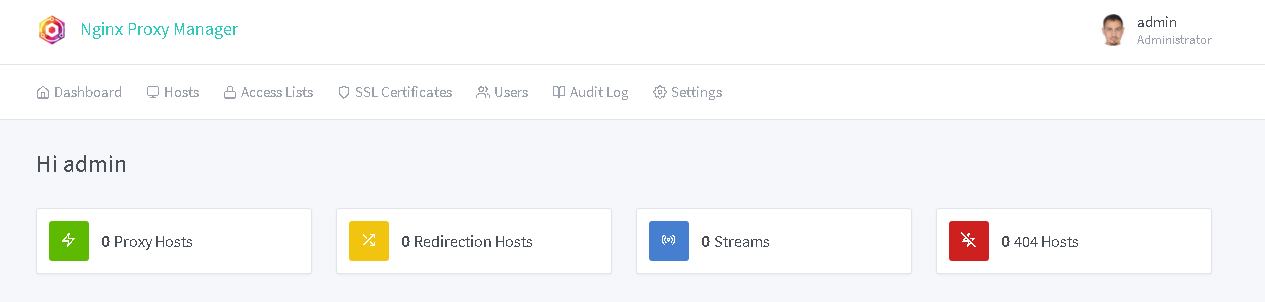
To show at least the hosts populated in the UI after restart

Screenshots
The new instance
image

The old instance

image

Operating System
Synology NAS DSM 64bit Intel CPU
Portainer
Docker Compose

Docker Stacks used:
For the official one

version: "3"
services:
  app:
    image: 'jc21/nginx-proxy-manager:latest'
    restart: always
    ports:
      # Public HTTP Port:
      - '8097:80'
      # Public HTTPS Port:
      - '8098:443'
      # Admin Web Port:
      - '8099:81'
    environment:
      # These are the settings to access your db
      #DB_MYSQL_HOST: "db"
      #DB_MYSQL_PORT: 3306
      #DB_MYSQL_USER: "npm"
      #DB_MYSQL_PASSWORD: "npm"
      #DB_MYSQL_NAME: "npm"
      # If you would rather use Sqlite uncomment this
      # and remove all DB_MYSQL_* lines above
        DB_SQLITE_FILE: "/data/database.sqlite"
      # Uncomment this if IPv6 is not enabled on your host
        DISABLE_IPV6: 'true'
    volumes:
      - /volume1/docker/nginx-proxy-manager/Test-Org-Image/config/data:/data
      - /volume1/docker/nginx-proxy-manager/Test-Org-Image/config/letsencrypt:/etc/letsencrypt
    depends_on:
      - db
  db:
    image: 'jc21/mariadb-aria:latest'
    restart: always
    environment:
      MYSQL_ROOT_PASSWORD: 'npm'
      MYSQL_DATABASE: 'npm'
      MYSQL_USER: 'npm'
      MYSQL_PASSWORD: 'npm'
    volumes:
      - /volume1/docker/nginx-proxy-manager/Test-Org-Image/config/sql:/var/lib/mysql

The old one:

version: '3'
services:
  nginx-proxy-manager:
    image: jlesage/nginx-proxy-manager
    ports:
      - "8181:8181"
      - "80:8080"
      - "443:4443"
    volumes:
      - "/volume1/docker/nginx-proxy-manager/config:/config:rw"

The ask is, what is the best steps to migrate in my case.

Thanks

Originally created by @redtripleAAA on GitHub (Apr 10, 2021). Original GitHub issue: https://github.com/NginxProxyManager/nginx-proxy-manager/issues/1007 **Checklist** - Have you pulled and found the error with `jc21/nginx-proxy-manager:latest` docker image? Yes - Are you sure you're not using someone else's docker image? Yes, I am using this image jc21/nginx-proxy-manager - If having problems with Lets Encrypt, have you made absolutely sure your site is accessible from outside of your network? No **Describe the bug** - A clear and concise description of what the bug is. I am trying to migrate my proxy hosts and certificates from copy image to the use the official image - What version of Nginx Proxy Manager is reported on the login page? Latest: v2.8.1 © 2019 jc21.com. **To Reproduce** Simply copy the content from data and let's encrypt files from the old proxy manager directories to the new one **Expected behavior** To show at least the hosts populated in the UI after restart **Screenshots** The new instance ![image](https://user-images.githubusercontent.com/5244872/114281249-57020500-9a0b-11eb-9135-ccef5191f0e3.png) The old instance ![image](https://user-images.githubusercontent.com/5244872/114281264-6da85c00-9a0b-11eb-85a2-0b4596440004.png) **Operating System** Synology NAS DSM 64bit Intel CPU Portainer Docker Compose Docker Stacks used: For the official one ``` version: "3" services: app: image: 'jc21/nginx-proxy-manager:latest' restart: always ports: # Public HTTP Port: - '8097:80' # Public HTTPS Port: - '8098:443' # Admin Web Port: - '8099:81' environment: # These are the settings to access your db #DB_MYSQL_HOST: "db" #DB_MYSQL_PORT: 3306 #DB_MYSQL_USER: "npm" #DB_MYSQL_PASSWORD: "npm" #DB_MYSQL_NAME: "npm" # If you would rather use Sqlite uncomment this # and remove all DB_MYSQL_* lines above DB_SQLITE_FILE: "/data/database.sqlite" # Uncomment this if IPv6 is not enabled on your host DISABLE_IPV6: 'true' volumes: - /volume1/docker/nginx-proxy-manager/Test-Org-Image/config/data:/data - /volume1/docker/nginx-proxy-manager/Test-Org-Image/config/letsencrypt:/etc/letsencrypt depends_on: - db db: image: 'jc21/mariadb-aria:latest' restart: always environment: MYSQL_ROOT_PASSWORD: 'npm' MYSQL_DATABASE: 'npm' MYSQL_USER: 'npm' MYSQL_PASSWORD: 'npm' volumes: - /volume1/docker/nginx-proxy-manager/Test-Org-Image/config/sql:/var/lib/mysql ``` The old one: ``` version: '3' services: nginx-proxy-manager: image: jlesage/nginx-proxy-manager ports: - "8181:8181" - "80:8080" - "443:4443" volumes: - "/volume1/docker/nginx-proxy-manager/config:/config:rw" ``` The ask is, what is the best steps to migrate in my case. Thanks
kerem 2026-02-26 06:34:39 +03:00
Author
Owner

@redtripleAAA commented on GitHub (Apr 13, 2021):

This is ask for support as there is RFE already for export/import # https://github.com/jc21/nginx-proxy-manager/issues/168

<!-- gh-comment-id:818480032 --> @redtripleAAA commented on GitHub (Apr 13, 2021): This is ask for support as there is RFE already for export/import # https://github.com/jc21/nginx-proxy-manager/issues/168
Author
Owner

@chaptergy commented on GitHub (May 10, 2021):

Unfortunately it is not possible to do this via the web interface, so you will need to dump the database and restore it yourself. https://github.com/jc21/nginx-proxy-manager/issues/90, especially https://github.com/jc21/nginx-proxy-manager/issues/90#issuecomment-822212289 should help you with this process.

<!-- gh-comment-id:837428391 --> @chaptergy commented on GitHub (May 10, 2021): Unfortunately it is not possible to do this via the web interface, so you will need to dump the database and restore it yourself. https://github.com/jc21/nginx-proxy-manager/issues/90, especially https://github.com/jc21/nginx-proxy-manager/issues/90#issuecomment-822212289 should help you with this process.
Sign in to join this conversation.
No milestone
No project
No assignees
1 participant
Notifications
Due date
The due date is invalid or out of range. Please use the format "yyyy-mm-dd".

No due date set.

Dependencies

No dependencies set.

Reference
starred/nginx-proxy-manager-NginxProxyManager#845
No description provided.