[GH-ISSUE #919] AccessList Has Stopped Working After Switching From Flexible SSL to Full (Strict) SSL on CloudFlare #778

Closed
opened 2026-02-26 06:34:23 +03:00 by kerem · 13 comments
Owner

Originally created by @jfl1616 on GitHub (Mar 1, 2021).
Original GitHub issue: https://github.com/NginxProxyManager/nginx-proxy-manager/issues/919

I'm unable to post on Ngninx Proxy Manager reddit due to the restricted user.

Describe the bug
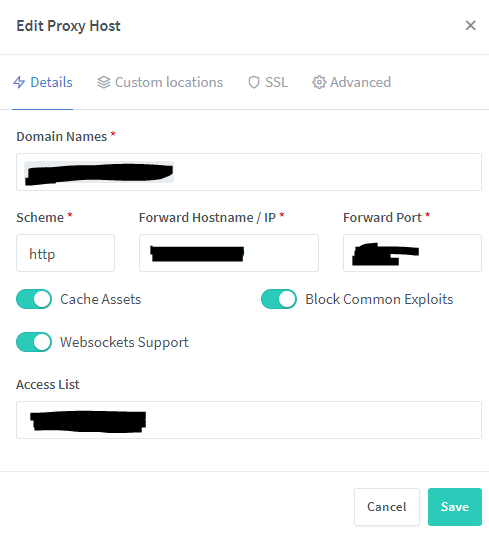
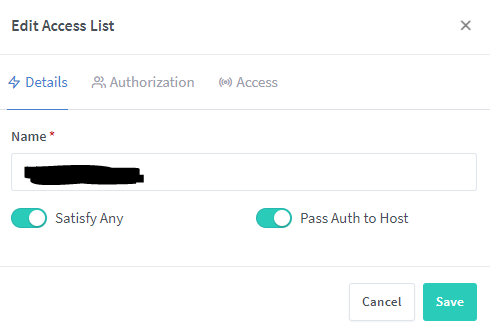
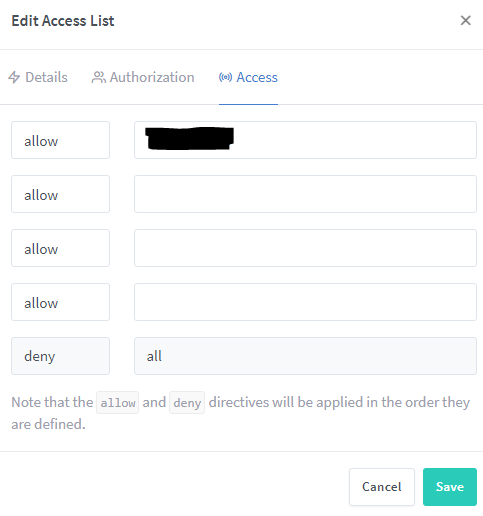
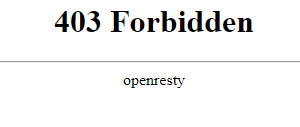
I'm currently experiencing the issue on Nginx Proxy Manager with Access Lists function right after I changed the Cloudflare SSL options. I realized that I've received the warning about exposing my origin IP address via DNS records on the multiple sub-domains on Cloudflare. I changed these sub-domains to be proxied in order to protect my origin IP address. However, it creates a different issue when I tried to visit my domain that shows the error message (ERR_TOO_MANY_REDIRECTS). I resolved this issue by switching from Flexible SSL to Full(Strict) SSL on CloudFlare. I'm currently seeing the page "Forbidden 403 error" when I enable the access list with my own public IP address. I just checked the proxy_host log to see the specific visitor IP, myself, and noticed that it shows different IP address, instead of my Public IP (Cloudflare's IP address's effect on it). I've been researching on this one, it seems that I will need to restore original visitor IPs in this case.

Version of Nginx Proxy Manager

  • (2.8.0)

Expected behavior
NGNIX Proxy Manager should be able to detect the original visitor IPs in order to match the specific IP address on Access List configuration.

Operating System

  • Ubuntu 20.04.2 LTS (Focal Fossa)

Screenshots
image
image
image
image
image

Originally created by @jfl1616 on GitHub (Mar 1, 2021). Original GitHub issue: https://github.com/NginxProxyManager/nginx-proxy-manager/issues/919 I'm unable to post on Ngninx Proxy Manager reddit due to the restricted user. **Describe the bug** I'm currently experiencing the issue on Nginx Proxy Manager with Access Lists function right after I changed the Cloudflare SSL options. I realized that I've received the warning about exposing my origin IP address via DNS records on the multiple sub-domains on Cloudflare. I changed these sub-domains to be proxied in order to protect my origin IP address. However, it creates a different issue when I tried to visit my domain that shows the error message (ERR_TOO_MANY_REDIRECTS). I resolved this issue by switching from Flexible SSL to Full(Strict) SSL on CloudFlare. I'm currently seeing the page "Forbidden 403 error" when I enable the access list with my own public IP address. I just checked the _proxy_host_ log to see the specific visitor IP, myself, and noticed that it shows different IP address, instead of my Public IP (Cloudflare's IP address's effect on it). I've been researching on this one, it seems that I will need to restore original visitor IPs in this case. **Version of Nginx Proxy Manager** - (2.8.0) **Expected behavior** NGNIX Proxy Manager should be able to detect the original visitor IPs in order to match the specific IP address on Access List configuration. **Operating System** - Ubuntu 20.04.2 LTS (Focal Fossa) **Screenshots** ![image](https://user-images.githubusercontent.com/33557269/109557380-e4f1e400-7a8c-11eb-8075-67640a3b602c.png) ![image](https://user-images.githubusercontent.com/33557269/109557588-271b2580-7a8d-11eb-8b39-d67c5c1de047.png) ![image](https://user-images.githubusercontent.com/33557269/109557644-37cb9b80-7a8d-11eb-9474-01a1d4e9724e.png) ![image](https://user-images.githubusercontent.com/33557269/109556893-3d74b180-7a8c-11eb-8df7-d910e28e5960.png) ![image](https://user-images.githubusercontent.com/33557269/109557242-abb97400-7a8c-11eb-8c81-49c10cfdcbeb.png)
kerem 2026-02-26 06:34:23 +03:00
  • closed this issue
  • added the
    stale
    bug
    labels
Author
Owner

@apainter2 commented on GitHub (Jun 1, 2021):

This is how Cloudflare is supposed to work, if you have Proxied-DNS enabled.

Just had the same issue myself, and here is my solution.

As NPM can not see your actual IP address, it sees the Cloudflare proxied IP address. You need to use the Advanced option for the proxy host and enter the following:

set_real_ip_from 173.245.48.0/20;
set_real_ip_from 103.21.244.0/22;
set_real_ip_from 103.22.200.0/22;
set_real_ip_from 103.31.4.0/22;
set_real_ip_from 141.101.64.0/18;
set_real_ip_from 108.162.192.0/18;
set_real_ip_from 190.93.240.0/20;
set_real_ip_from 188.114.96.0/20;
set_real_ip_from 197.234.240.0/22;
set_real_ip_from 198.41.128.0/17;
set_real_ip_from 162.158.0.0/15;
set_real_ip_from 172.64.0.0/13;
set_real_ip_from 131.0.72.0/22;
set_real_ip_from 104.16.0.0/13;
set_real_ip_from 104.24.0.0/14;
set_real_ip_from 2400:cb00::/32;
set_real_ip_from 2606:4700::/32;
set_real_ip_from 2803:f800::/32;
set_real_ip_from 2405:b500::/32;
set_real_ip_from 2405:8100::/32;
set_real_ip_from 2a06:98c0::/29;
set_real_ip_from 2c0f:f248::/32;

real_ip_header CF-Connecting-IP;

You can find the latest Cloudflare IP addresses via: https://www.cloudflare.com/en-gb/ips/

You can then use the Access ACL option to only permit your home router IP for example and then it works:

Only potential problem for the future is when Cloudflare updates their IP addresses, your list will be out of date. Maybe incorporate this into NPM?

Source: https://support.cloudflare.com/hc/en-us/articles/200170786-Restoring-original-visitor-IPs
Additional Info: https://danielmiessler.com/blog/getting-real-ip-addresses-using-cloudflare-nginx-and-varnish/

<!-- gh-comment-id:852432247 --> @apainter2 commented on GitHub (Jun 1, 2021): This is how Cloudflare is supposed to work, if you have Proxied-DNS enabled. Just had the same issue myself, and here is my solution. As NPM can not see your actual IP address, it sees the Cloudflare proxied IP address. You need to use the Advanced option for the proxy host and enter the following: ``` set_real_ip_from 173.245.48.0/20; set_real_ip_from 103.21.244.0/22; set_real_ip_from 103.22.200.0/22; set_real_ip_from 103.31.4.0/22; set_real_ip_from 141.101.64.0/18; set_real_ip_from 108.162.192.0/18; set_real_ip_from 190.93.240.0/20; set_real_ip_from 188.114.96.0/20; set_real_ip_from 197.234.240.0/22; set_real_ip_from 198.41.128.0/17; set_real_ip_from 162.158.0.0/15; set_real_ip_from 172.64.0.0/13; set_real_ip_from 131.0.72.0/22; set_real_ip_from 104.16.0.0/13; set_real_ip_from 104.24.0.0/14; set_real_ip_from 2400:cb00::/32; set_real_ip_from 2606:4700::/32; set_real_ip_from 2803:f800::/32; set_real_ip_from 2405:b500::/32; set_real_ip_from 2405:8100::/32; set_real_ip_from 2a06:98c0::/29; set_real_ip_from 2c0f:f248::/32; real_ip_header CF-Connecting-IP; ``` You can find the latest Cloudflare IP addresses via: https://www.cloudflare.com/en-gb/ips/ You can then use the Access ACL option to only permit your home router IP for example and then it works: Only potential problem for the future is when Cloudflare updates their IP addresses, your list will be out of date. Maybe incorporate this into NPM? Source: https://support.cloudflare.com/hc/en-us/articles/200170786-Restoring-original-visitor-IPs Additional Info: https://danielmiessler.com/blog/getting-real-ip-addresses-using-cloudflare-nginx-and-varnish/
Author
Owner

@NajibNour commented on GitHub (Jun 3, 2021):

@apainter2 I've given this a shot multiple times and it still does not work. also, you do not need to pull the ips yourself as NPM does it for you It fou look in the logs on boot up it does log it pulling Cloudflare ip's. The ips can be found in this file of the NPM container : /etc/nginx/conf.d/include/ip_ranges.conf

<!-- gh-comment-id:853469825 --> @NajibNour commented on GitHub (Jun 3, 2021): @apainter2 I've given this a shot multiple times and it still does not work. also, you do not need to pull the ips yourself as NPM does it for you It fou look in the logs on boot up it does log it pulling Cloudflare ip's. The ips can be found in this file of the NPM container : **/etc/nginx/conf.d/include/ip_ranges.conf**
Author
Owner

@NajibNour commented on GitHub (Jun 3, 2021):

@apainter2 did you have to put anything in the advanced section of your host? Also what version of NPM are you using?

<!-- gh-comment-id:853470324 --> @NajibNour commented on GitHub (Jun 3, 2021): @apainter2 did you have to put anything in the advanced section of your host? Also what version of NPM are you using?
Author
Owner

@apainter2 commented on GitHub (Jun 3, 2021):

@NajibNour your right those IP ranges are in the file you linked.

So, yes I have placed the following into the advanced section of my proxy-host for it to pass on the proper visitor IP address to allow the ACL to work when using cloudflare:

real_ip_header CF-Connecting-IP;

npm-cf1

Oh, and I am using version 2.9.3 (latest at the time of this post).

<!-- gh-comment-id:854156060 --> @apainter2 commented on GitHub (Jun 3, 2021): @NajibNour your right those IP ranges are in the file you linked. So, yes I have placed the following into the advanced section of my proxy-host for it to pass on the proper visitor IP address to allow the ACL to work when using cloudflare: `real_ip_header CF-Connecting-IP;` ![npm-cf1](https://user-images.githubusercontent.com/66255771/120707688-8fc1d600-c4b2-11eb-9907-7266d2839e1f.PNG) Oh, and I am using version 2.9.3 (latest at the time of this post).
Author
Owner

@NajibNour commented on GitHub (Jun 3, 2021):

@apainter2 hmm I’ve given that a shot previously, but I have not had any luck. Where did you place the file for the ips and what where it’s contents?

<!-- gh-comment-id:854158990 --> @NajibNour commented on GitHub (Jun 3, 2021): @apainter2 hmm I’ve given that a shot previously, but I have not had any luck. Where did you place the file for the ips and what where it’s contents?
Author
Owner

@apainter2 commented on GitHub (Jun 3, 2021):

@NajibNour the list of Cloudflare IPs? I've left them where you referenced them, and only added the above-advanced option to the Advanced section.

The CF IPs are pre-populated within the /etc/nginx/conf.d/include/ip_ranges.conf file

You can verify by connecting to the container

docker exec -it name-of-npm-container /bin/bash

once connected to the container:

cat /etc/nginx/conf.d/include/ip_ranges.conf

<!-- gh-comment-id:854161350 --> @apainter2 commented on GitHub (Jun 3, 2021): @NajibNour the list of Cloudflare IPs? I've left them where you referenced them, and only added the above-advanced option to the Advanced section. The CF IPs are pre-populated within the /etc/nginx/conf.d/include/ip_ranges.conf file You can verify by connecting to the container `docker exec -it name-of-npm-container /bin/bash` once connected to the container: `cat /etc/nginx/conf.d/include/ip_ranges.conf`
Author
Owner

@NajibNour commented on GitHub (Jun 3, 2021):

@apainter2 yhea I figured just thought I would ask to be safe. The real ip header does not work for me. I will have to do some investigating. How to you view current established connection ip’s from within the NPM container? I’ve noticed there’s allot of tools that are not installed to view connected ips

<!-- gh-comment-id:854163154 --> @NajibNour commented on GitHub (Jun 3, 2021): @apainter2 yhea I figured just thought I would ask to be safe. The real ip header does not work for me. I will have to do some investigating. How to you view current established connection ip’s from within the NPM container? I’ve noticed there’s allot of tools that are not installed to view connected ips
Author
Owner

@apainter2 commented on GitHub (Jun 3, 2021):

@NajibNour I list out the contents of the proxy-hosts ngnix access log:

within the NPM data directory which you mapped, in my instance as an example:

tail -f /home/USER/docker_files/npm/data/logs/proxy_host-XX.log

XX is the number linked to your proxy-host entry in the GUI.

In my case a real-world example, with the real_ip_header CF-Connecting-IP; set

[03/Jun/2021:20:47:28 +0000] - 200 200 - GET https meh.example.domain.tld "/login" [Client 92.40.192.102] [Length 3533] [Gzip -] [Sent-to 192.168.1.9] "Mozilla/5.0 (iPhone; CPU iPhone OS 14_6 like Mac OS X) AppleWebKit/605.1.15 (KHTML, like Gecko) Version/14.1.1 Mobile/15E148 Safari/604.1" "-"

So, 92.40.192.102 is my mobile phone providers IP block range.

and without real_ip_header CF-Connecting-IP; set:

[03/Jun/2021:20:49:46 +0000] - 200 200 - GET https meh.example.domain.tld "/login" [Client 141.101.105.125] [Length 3541] [Gzip -] [Sent-to 192.168.1.9] "Mozilla/5.0 (iPhone; CPU iPhone OS 14_6 like Mac OS X) AppleWebKit/605.1.15 (KHTML, like Gecko) Version/14.1.1 Mobile/15E148 Safari/604.1" "-"

Where as 141.101.105.125 is: one of Cloudflares proxy IP addresses.

<!-- gh-comment-id:854171909 --> @apainter2 commented on GitHub (Jun 3, 2021): @NajibNour I list out the contents of the proxy-hosts ngnix access log: within the NPM data directory which you mapped, in my instance as an example: tail -f /home/USER/docker_files/npm/data/logs/proxy_host-XX.log XX is the number linked to your proxy-host entry in the GUI. In my case a real-world example, with the `real_ip_header CF-Connecting-IP;` set `[03/Jun/2021:20:47:28 +0000] - 200 200 - GET https meh.example.domain.tld "/login" [Client 92.40.192.102] [Length 3533] [Gzip -] [Sent-to 192.168.1.9] "Mozilla/5.0 (iPhone; CPU iPhone OS 14_6 like Mac OS X) AppleWebKit/605.1.15 (KHTML, like Gecko) Version/14.1.1 Mobile/15E148 Safari/604.1" "-"` So, 92.40.192.102 is my mobile phone providers IP block range. and without `real_ip_header CF-Connecting-IP;` set: `[03/Jun/2021:20:49:46 +0000] - 200 200 - GET https meh.example.domain.tld "/login" [Client 141.101.105.125] [Length 3541] [Gzip -] [Sent-to 192.168.1.9] "Mozilla/5.0 (iPhone; CPU iPhone OS 14_6 like Mac OS X) AppleWebKit/605.1.15 (KHTML, like Gecko) Version/14.1.1 Mobile/15E148 Safari/604.1" "-"` Where as 141.101.105.125 is: one of Cloudflares proxy IP addresses.
Author
Owner

@NajibNour commented on GitHub (Jun 3, 2021):

@apainter2 Thanks for this. I've just given it shot. It does show the proper Ip address in the logs. the following does work "real_ip_header CF-Connecting-IP;"
But access lists are still an issue. I have created an access list with my ip address as allow and everything else as deny and it is set to satisfy any. I still get returned a 403. Logs it shows up as 403 as well.

<!-- gh-comment-id:854217729 --> @NajibNour commented on GitHub (Jun 3, 2021): @apainter2 Thanks for this. I've just given it shot. It does show the proper Ip address in the logs. the following does work "real_ip_header CF-Connecting-IP;" But access lists are still an issue. I have created an access list with my ip address as allow and everything else as deny and it is set to satisfy any. I still get returned a 403. Logs it shows up as 403 as well.
Author
Owner

@NajibNour commented on GitHub (Jun 3, 2021):

Please Disregard, ACL's Do work it's just a little finicky. You must have the host enabled, Create the ACL, Then set the ACL then Unset then set The ACL. That was the only way I could get it to work.

<!-- gh-comment-id:854239883 --> @NajibNour commented on GitHub (Jun 3, 2021): Please Disregard, ACL's Do work it's just a little finicky. You must have the host enabled, Create the ACL, Then set the ACL then Unset then set The ACL. That was the only way I could get it to work.
Author
Owner

@phgoff commented on GitHub (Jan 30, 2022):

This is how Cloudflare is supposed to work, if you have Proxied-DNS enabled.

Just had the same issue myself, and here is my solution.

As NPM can not see your actual IP address, it sees the Cloudflare proxied IP address. You need to use the Advanced option for the proxy host and enter the following:

set_real_ip_from 173.245.48.0/20;
set_real_ip_from 103.21.244.0/22;
set_real_ip_from 103.22.200.0/22;
set_real_ip_from 103.31.4.0/22;
set_real_ip_from 141.101.64.0/18;
set_real_ip_from 108.162.192.0/18;
set_real_ip_from 190.93.240.0/20;
set_real_ip_from 188.114.96.0/20;
set_real_ip_from 197.234.240.0/22;
set_real_ip_from 198.41.128.0/17;
set_real_ip_from 162.158.0.0/15;
set_real_ip_from 172.64.0.0/13;
set_real_ip_from 131.0.72.0/22;
set_real_ip_from 104.16.0.0/13;
set_real_ip_from 104.24.0.0/14;
set_real_ip_from 2400:cb00::/32;
set_real_ip_from 2606:4700::/32;
set_real_ip_from 2803:f800::/32;
set_real_ip_from 2405:b500::/32;
set_real_ip_from 2405:8100::/32;
set_real_ip_from 2a06:98c0::/29;
set_real_ip_from 2c0f:f248::/32;

real_ip_header CF-Connecting-IP;

You can find the latest Cloudflare IP addresses via: https://www.cloudflare.com/en-gb/ips/

You can then use the Access ACL option to only permit your home router IP for example and then it works:

Only potential problem for the future is when Cloudflare updates their IP addresses, your list will be out of date. Maybe incorporate this into NPM?

Source: https://support.cloudflare.com/hc/en-us/articles/200170786-Restoring-original-visitor-IPs Additional Info: https://danielmiessler.com/blog/getting-real-ip-addresses-using-cloudflare-nginx-and-varnish/

This is solved my problem. Thank you.

<!-- gh-comment-id:1025171063 --> @phgoff commented on GitHub (Jan 30, 2022): > This is how Cloudflare is supposed to work, if you have Proxied-DNS enabled. > > Just had the same issue myself, and here is my solution. > > As NPM can not see your actual IP address, it sees the Cloudflare proxied IP address. You need to use the Advanced option for the proxy host and enter the following: > > ``` > set_real_ip_from 173.245.48.0/20; > set_real_ip_from 103.21.244.0/22; > set_real_ip_from 103.22.200.0/22; > set_real_ip_from 103.31.4.0/22; > set_real_ip_from 141.101.64.0/18; > set_real_ip_from 108.162.192.0/18; > set_real_ip_from 190.93.240.0/20; > set_real_ip_from 188.114.96.0/20; > set_real_ip_from 197.234.240.0/22; > set_real_ip_from 198.41.128.0/17; > set_real_ip_from 162.158.0.0/15; > set_real_ip_from 172.64.0.0/13; > set_real_ip_from 131.0.72.0/22; > set_real_ip_from 104.16.0.0/13; > set_real_ip_from 104.24.0.0/14; > set_real_ip_from 2400:cb00::/32; > set_real_ip_from 2606:4700::/32; > set_real_ip_from 2803:f800::/32; > set_real_ip_from 2405:b500::/32; > set_real_ip_from 2405:8100::/32; > set_real_ip_from 2a06:98c0::/29; > set_real_ip_from 2c0f:f248::/32; > > real_ip_header CF-Connecting-IP; > ``` > > You can find the latest Cloudflare IP addresses via: https://www.cloudflare.com/en-gb/ips/ > > You can then use the Access ACL option to only permit your home router IP for example and then it works: > > Only potential problem for the future is when Cloudflare updates their IP addresses, your list will be out of date. Maybe incorporate this into NPM? > > Source: https://support.cloudflare.com/hc/en-us/articles/200170786-Restoring-original-visitor-IPs Additional Info: https://danielmiessler.com/blog/getting-real-ip-addresses-using-cloudflare-nginx-and-varnish/ This is solved my problem. Thank you.
Author
Owner

@github-actions[bot] commented on GitHub (Mar 18, 2024):

Issue is now considered stale. If you want to keep it open, please comment 👍

<!-- gh-comment-id:2002735367 --> @github-actions[bot] commented on GitHub (Mar 18, 2024): Issue is now considered stale. If you want to keep it open, please comment :+1:
Author
Owner

@github-actions[bot] commented on GitHub (Apr 29, 2025):

Issue was closed due to inactivity.

<!-- gh-comment-id:2837246993 --> @github-actions[bot] commented on GitHub (Apr 29, 2025): Issue was closed due to inactivity.
Sign in to join this conversation.
No milestone
No project
No assignees
1 participant
Notifications
Due date
The due date is invalid or out of range. Please use the format "yyyy-mm-dd".

No due date set.

Dependencies

No dependencies set.

Reference
starred/nginx-proxy-manager-NginxProxyManager#778
No description provided.