mirror of
https://github.com/NginxProxyManager/nginx-proxy-manager.git
synced 2026-04-26 01:45:54 +03:00
[GH-ISSUE #852] Too Many Redirects #721
Labels
No labels
awaiting feedback
bug
cannot reproduce
dns provider request
duplicate
enhancement
enhancement
enhancement
good first issue
help wanted
invalid
need more info
no certbot plugin available
product-support
pull-request
question
stale
troll
upstream issue
v2
v2
v2
v3
wontfix
No milestone
No project
No assignees
1 participant

Notifications
Due date
No due date set.
Dependencies
No dependencies set.
Reference
starred/nginx-proxy-manager-NginxProxyManager#721
Loading…
Add table
Add a link
Reference in a new issue
No description provided.
Delete branch "%!s()"
Deleting a branch is permanent. Although the deleted branch may continue to exist for a short time before it actually gets removed, it CANNOT be undone in most cases. Continue?
Originally created by @sirastynax on GitHub (Jan 30, 2021).
Original GitHub issue: https://github.com/NginxProxyManager/nginx-proxy-manager/issues/852
Checklist
What is troubling you?
Most likely a configuration problem on my end, but I cannot seem to get Force SSL to work. I keep getting Too Many Redirects.
Currently using:
v 2.7.3
Chrome Browser and Edge
Both subdomain certificate and wildcard certificate
It is most likely a configuration I missed somewhere, but not sure where.
@Barbait commented on GitHub (Jan 31, 2021):
+1 i'm interested as well
@lieven121 commented on GitHub (Feb 11, 2021):
If you manually go to the https website (with force ssl off) does this work?
@sirastynax commented on GitHub (Feb 26, 2021):
Sorry I did not get an alert there were responses to this message.
The sites I was having an issue with were all http sites that I was proxying a connection to. I did however find part of the configuration issues that I had. Force SSL may not work with CloudFlare proxying. Since I was not able to get it to work at the server level, I enabled Strict SSL Enforcement on CloudFlare.
@mwgaillardetz commented on GitHub (Nov 6, 2021):
@sirastynax I have been working on this for days and your solution was the only one that fixed my error. Thank you sir!!
@chaptergy commented on GitHub (Nov 6, 2021):
Yeah, often Cloudflare is causing issues just like in this case. The cloudflare proxy does not actually follow the redirect nginx sends, which results in this error. You probably need to set the SSL/TLS encryption mode to
FullorFull (Strict)or remove the additional CloudFlare proxy.Source
@fahadshery commented on GitHub (Nov 19, 2021):
this solved my issue. had to change the settings in cloud flare
@wiqram commented on GitHub (Dec 17, 2021):
solved my issue. been at it for days on and off. damn such a simple change...
@Berg1042 commented on GitHub (Apr 3, 2022):
I met this issue too, @wiqram , could you please tell me what is your changed? thanks
@ghost commented on GitHub (Apr 9, 2022):
Is the location for this setting in: website (the domain i have listedn in cloudflare) > rules > page rules > create new rule > SSL: full or SSL: full strict.
This does not solve the issue entirely - i am now able to access the site however all formatting for the website is broken, its now basic HTML and any bitton press on the option on the menu shows the error "this page isnt redirecting properly)
@cye18 commented on GitHub (Jun 15, 2022):
@ultrask14 Thanks for the instruction. Same here. I can access the site but the format is messed up. Did you by chance find a fix?
@cye18 commented on GitHub (Jun 15, 2022):
@ultrask14 I got it. It's not in Page Rules. It's under SSL/TSL -> Overview.
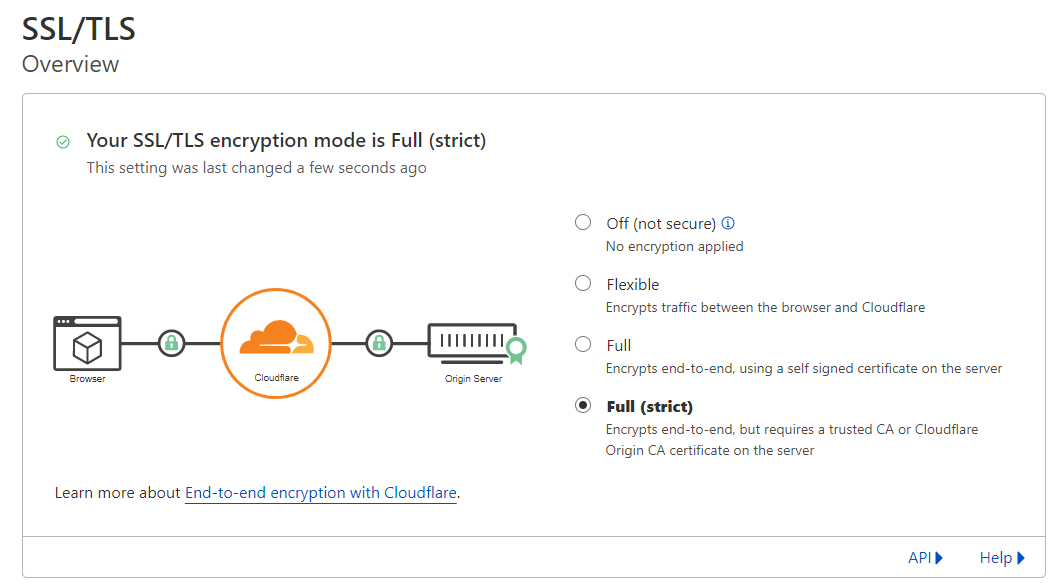
It works for me.
@baldunderwear commented on GitHub (Feb 20, 2024):
Worked for me as well!
@thraizz commented on GitHub (Nov 19, 2024):
The UI changed here, you need to go to "SSL/TLS Overview" in the sidebar, then click "configure".

Then you need to select "Custom SSL/TLS" there the option "Full (strict)" and then "save".

@antwal commented on GitHub (Jan 30, 2025):
i have the same problem it is not solved if i enable Force SSL and include this in the config
Force SSL
include conf.d/include/force-ssl.conf;