mirror of
https://github.com/NginxProxyManager/nginx-proxy-manager.git
synced 2026-04-25 09:25:55 +03:00
[GH-ISSUE #767] help needed with configuring #650
Labels
No labels
awaiting feedback
bug
cannot reproduce
dns provider request
duplicate
enhancement
enhancement
enhancement
good first issue
help wanted
invalid
need more info
no certbot plugin available
product-support
pull-request
question
stale
troll
upstream issue
v2
v2
v2
v3
wontfix
No milestone
No project
No assignees
1 participant

Notifications
Due date
No due date set.
Dependencies
No dependencies set.
Reference
starred/nginx-proxy-manager-NginxProxyManager#650
Loading…
Add table
Add a link
Reference in a new issue
No description provided.
Delete branch "%!s()"
Deleting a branch is permanent. Although the deleted branch may continue to exist for a short time before it actually gets removed, it CANNOT be undone in most cases. Continue?
Originally created by @NightFalcon650 on GitHub (Dec 9, 2020).
Original GitHub issue: https://github.com/NginxProxyManager/nginx-proxy-manager/issues/767
Good evening,
I've installed nginx proxy manager and i want to configure different services in the manner on the picture.
So connect through a url like xxx.duckdns.org
and connect to services with adding /service1 of /service2 etc.
Each service kan be on a different IP:port.
How can i get this to work and could someone show me how and where to configure this?
@spcqike commented on GitHub (Dec 10, 2020):
Hello
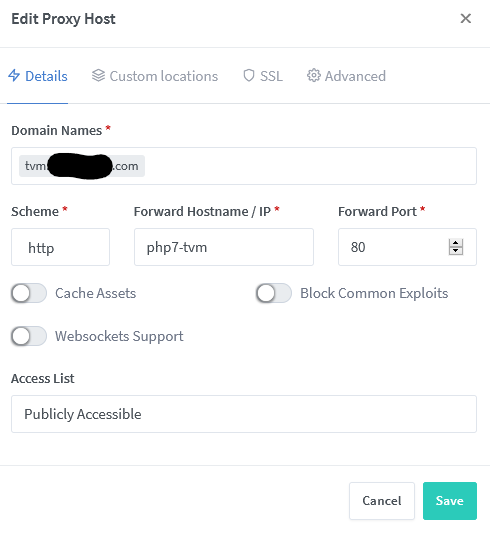
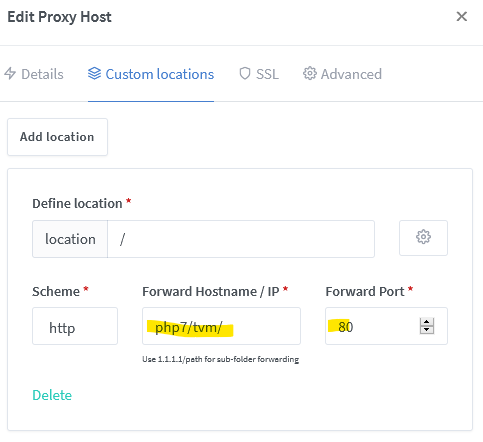
this should be possible. just create a proxy_host, give it your desired dns name, fill in some pseudo ip/name and port (this will be shown on the overview page!), create a location and give it all your needed infos.
in my case, i use "php7/tvm" and port 80, because its a docker network where nginx sees the other container via its name, but you should be able to use whatever you like. so a location with "/" and a DNS/IP/Path like "xxx.duckdns.org/service1" and Port "8081" should work. at least it did for me.
@NightFalcon650 commented on GitHub (Dec 12, 2020):
Thanks for the reply. I've tryed it and it works partly.
I've to put the / behind the adresses and the location parts, otherwise it's giving the 404 error.
But with the location part, the site gets loaded, but at the moment that the site has to load it's files it gives 502 bad gateway errors.
I've tried it with service1
xxx.duckdns.org points to IP:PORT
xxx.duckdns.org/service1 point to the same IP but a other port IP:PORT.
The service1 expects to load it's stuff from IP:PORT/.... etc.
But the proxy points to xxx.duckdns.org/index.html
So the location file points to the right place, but how can i change the haeder so on the screen it points to xxx.duckdns.org but under the hood it uses IP:PORT of service1.
Further why does it only work with the /service1/ and not with /service1
It's also hard to find clear explanations about advanced variables and proxy-manager specific.
I've updated the networkpicture with the docker networks.
Hoping to get it working without issues, so i can make the next step. Turning it in to HTTPS.
@spcqike commented on GitHub (Dec 13, 2020):
I guess you won’t find explanation for proxy related things, because NPM is just a web GUI for nginx. So you need to look up nginx.
Idrk but I think you need the ending / so that your path is interpreted as path to a folder and not path to a file without extension (like a Index without .html or .php or like a htaccess)
As I mentioned before you need a location of / that uses IP/path/ and Port. Right now you have a location named /service/ that uses IP and Port. Have a closer look on my second image in my previous post.
Is there a reason for having 3 docker networks? If not I would use one network. So that nginx can access the services directly within Docker (pointing to Docker Container Name).
I guess for a small website this wouldn’t hardly matter at all, but you would save routings / forwards and you have less problems if the IP address of your hosts change (like if you want to migrate the setup to a new location/ server)
@NightFalcon650 commented on GitHub (Dec 15, 2020):
Mmm searching for nginx didn't bring something.. i'll keep on searching.
Looked in the js files and it's done with regular expression. but it works with the slashes except for the first part of the url (the root).
Reason for the seperate networks, is that some containers (homeassistant for example have there own network. So al the parts are arranged in there own basic environments..
@mossaab commented on GitHub (Dec 29, 2020):
traefik is the best solution for your case
@chaptergy commented on GitHub (May 12, 2021):
As this is about nginx not NPM specifically, I will close this.